Community listing page, reviews here may not be monitored by the author.
VisualOres


VisualProspecting but for 1.12
Community voices
Reviews
No reviews yet. Be the first to review this project!
Get it on
Available Platforms
Compatibility
Supported Environments
Must be installed on both the client and the server.
About
Project Details
For authors
Embed Badge
If you're the author of this project, you can embed a live badge anywhere that supports HTML or Markdown. It updates automatically whenever ratings change.
Use HTML for any page that supports it, or Markdown for README files and Markdown-based descriptions.
Identifiers
Platform IDs
About
Description
VisualOres
"VisualProspecting but for 1.12"
A mod that adds various overlays to map mods.
Requires CodeChickenLib and MixinBooter
Supports Journeymap and Xaero's Minimap and World Map.
Overlays can be toggled by either a button on the world map or by pressing a keybind in-game (unbound by default - check the controls settings)
The location and order of the buttons can be customized in the config:
The order of the buttons can be changed either by a list or just reversing the order
Reversing the order does not require restarting minecraft, while modifying the list does not
Changes to the order list will also affect what order layers render in if multiple are enabled
Journeymap users can put the buttons either next to the main map types or in their own toolbar on the right of the screen
Xaero's World Map users can put the buttons anywhere!
- The default location was chosen to not interfere with any other map controls
Prospection data can be shared to other players with /vo share <player name>. This requires VisualOres to be installed on the server and both clients.
Your client-side cache folder can be opened with /vo openCacheFolder, and all client-side prospection data can be reset with /vo resetClientCache. Resetting the cache is not reversible!
Current overlays
GregTech CEu
Requires GTCEU version 2.7.3
Requires VisualOres to be installed on both the client and server
Ore vein overlay
Displays ore veins you have discovered. Pick up surface rocks, right-click ore blocks, or use an electric prospector on ore mode to discover veins.
Press the "action key" (default: delete) while hovering over a vein to mark it as depleted (or not depleted).
Double-click a vein to mark it as a waypoint, and again to unmark it.
VisualOres will attempt to generate ore vein locations for worlds that were generated before it was added, but it will generate some inaccurate vein positions!
Veins may be missing, and veins that do not exist may be marked.
(Still better than nothing, though. Most veins should be accurate.)
Underground fluid overlay
Displays underground fluid fields you have discovered. Use an electric prospector on fluid mode to discover fields.
(Yes, fields being shown as larger around x=0 and z=0 is correct. Underground fluid veins generated with GTCEu 2.7.2 and earlier have a bug with generation that causes this.)
Immersive Engineering
Also contains integration with Immersive Petroleum
Excavator vein overlay
Displays excavator veins you have discovered. Pick up a core sample to add its data to your map.
Double click on a vein to toggle it as a waypoint.
Thaumcraft
Aura/flux level overlay
Displays aura/flux levels you have seen in chunks. Hold a thaumometer to add the levels shown in the hud to your map.
Astral Sorcery
Starlight level overlay
Displays starlight concentration levels. Hold a fosic resonator to add nearby starlight levels to your map.
Lighter blue means higher concentration (the areas shown in-world with white sparkles).
Neromantic Prime fluid vein overlay
Displays fluid veins you have discovered. Hold an ichosic resonator to add veins to your map as the particle effects spawn.
(This means veins are only discovered when a particle effect spawns in their chunk, so it can take some time before the fluid in a specific chunk is discovered! Be patient.)
VisualOres
"VisualProspecting but for 1.12"
A mod that adds various overlays to map mods.
Requires CodeChickenLib and MixinBooter
Supports Journeymap and Xaero's Minimap and World Map.
Overlays can be toggled by either a button on the world map or by pressing a keybind in-game (unbound by default - check the controls settings)
The location and order of the buttons can be customized in the config:
- The order of the buttons can be changed either by a list or just reversing the order
- Reversing the order does not require restarting minecraft, while modifying the list does
- Changes to the order list will also affect what order layers render in if multiple are enabled
- Journeymap users can put the buttons either next to the main map types or in their own toolbar on the right of the screen
- Xaero's World Map users can put the buttons anywhere!
- The default location was chosen to not interfere with any other map controls
Prospection data can be shared to other players with /vo share <player name>. This requires VisualOres to be installed on the server and both clients.
Your client-side cache folder can be opened with /vo openCacheFolder, and all client-side prospection data can be reset with /vo resetClientCache. Resetting the cache is not reversible!
Current overlays
GregTech CEu
Requires GTCEu version 2.7.3
Requires VisualOres to be installed on both the client and server
Ore vein overlay
Displays ore veins you have discovered. Pick up surface rocks, right-click ore blocks, or use an electric prospector on ore mode to discover veins.
Press the "action key" (default: delete) while hovering over a vein to mark it as depleted (or not depleted).
Double-click a vein to mark it as a waypoint, and again to unmark it.
VisualOres will attempt to generate ore vein locations for worlds that were generated before it was added, but it will generate some inaccurate vein positions!
Veins may be missing, and veins that do not exist may be marked.
(Still better than nothing, though. Most veins should be accurate.)
Underground fluid overlay
Displays underground fluid fields you have discovered. Use an electric prospector on fluid mode to discover fields.
(Yes, fields being shown as larger around x=0 and z=0 is correct. Underground fluid veins generated with GTCEu 2.7.2 and earlier have a bug with generation that causes this.)
Immersive Engineering
Also contains integration with Immersive Petroleum
Excavator vein overlay
Displays excavator veins you have discovered. Pick up a core sample to add its data to your map.
Double click on a vein to toggle it as a waypoint.
Thaumcraft
Aura/flux level overlay
Displays aura/flux levels you have seen in chunks. Hold a thaumometer to add the levels shown in the hud to your map.
Astral Sorcery
Starlight level overlay
Displays starlight concentration levels. Hold a fosic resonator to add nearby starlight levels to your map.
Lighter blue means higher concentration (the areas shown in-world with white sparkles).
Neromantic Prime fluid vein overlay
Displays fluid veins you have discovered. Hold an ichosic resonator to add veins to your map as the particle effects spawn.
(This means veins are only discovered when a particle effect spawns in their chunk, so it can take some time before the fluid in a specific chunk is discovered! Be patient.)
Screenshots
Gallery
-
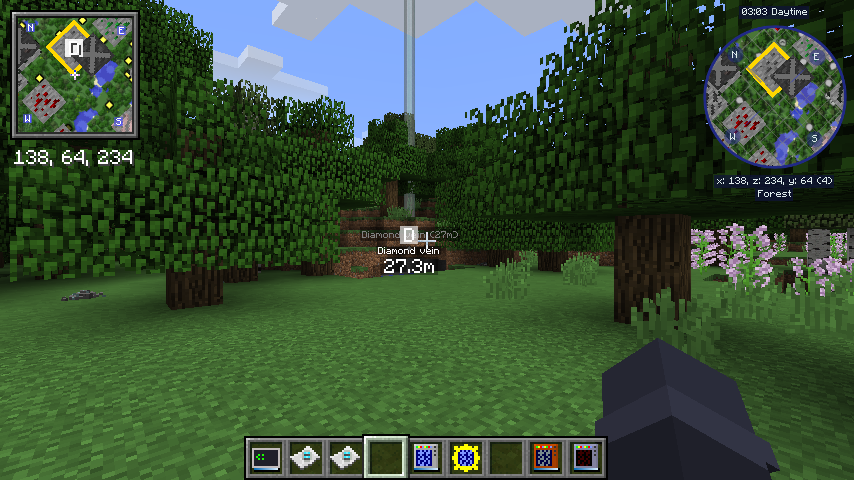 Minimap and waypoints GTCEu ore veins being rendered on both Xaero's and Journeymap minimaps, plus a waypoint from both, generated by double-clicking the ore vein overlay
 -
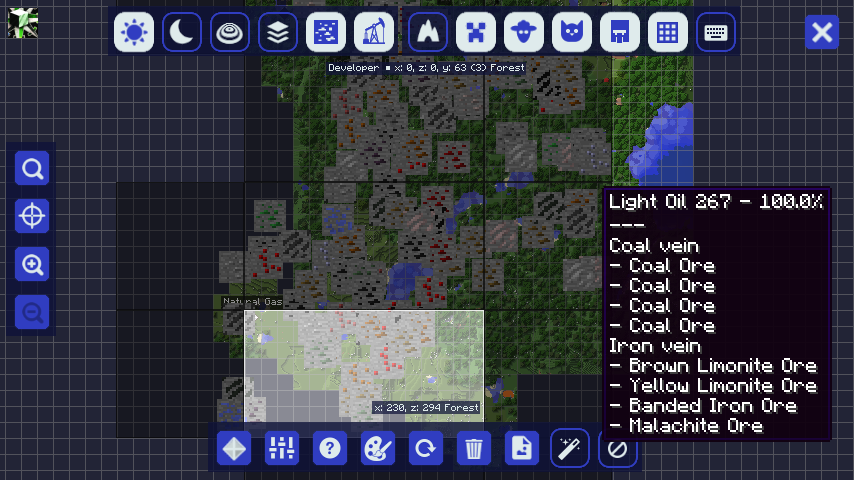 Both GTCEu overlays Both GTCEu overlays, displayed at the same time in Journeymap, with stacked tooltips
-
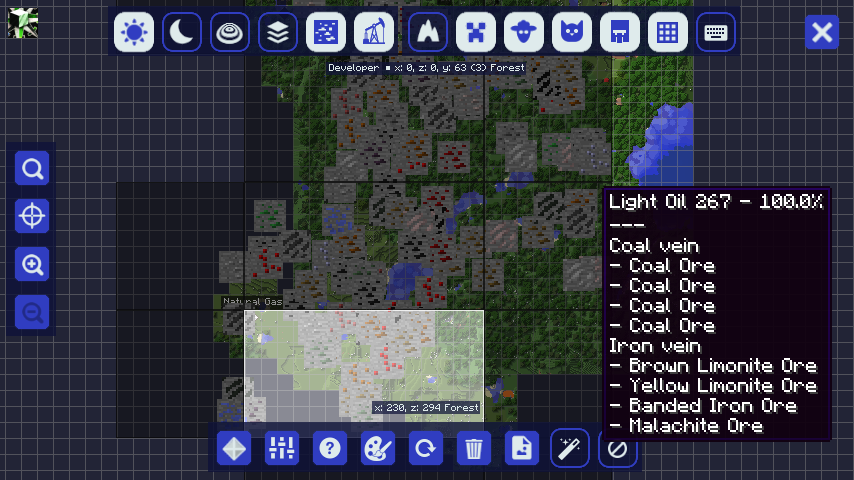 Both GTCEu overlays Both GTCEu overlays, displayed at the same time in Journeymap, with stacked tooltips
 -
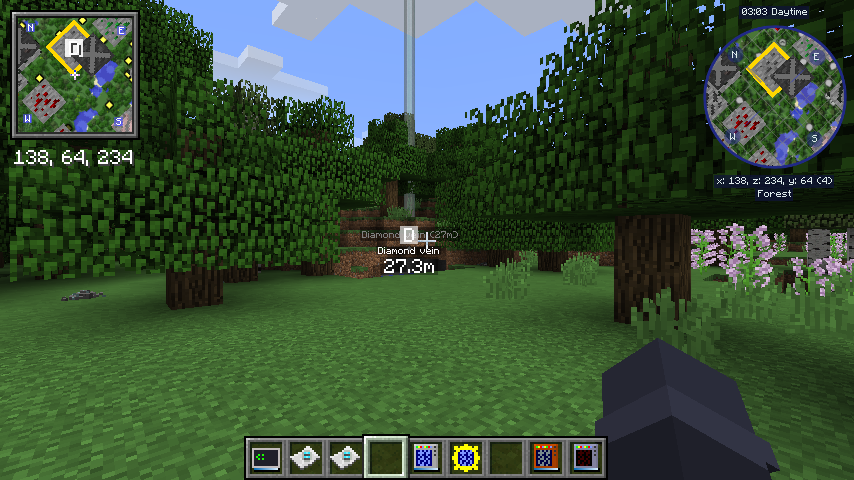 Minimap and waypoints GTCEu ore veins being rendered on both Xaero's and Journeymap minimaps, plus a waypoint from both, generated by double-clicking the ore vein overlay
Versions
Files
Relations
Project Relations
More like this
Similar Mods
Suggestions use data such as tags, dependencies, dependents, descriptions, titles, and more to rank how much they overlap with this mod.
On ModDex
Community snapshot
By the numbers
Statistics
Want to reach Minecraft players?
We're looking for a server hosting partner to feature here and other parts of the site. Interested? Send us a message!
Get in touchGet it on
Available Platforms
On ModDex
Community snapshot
By the numbers