
Community listing page, reviews may not be monitored by the author.
Voice Chat Group Player Names


No reviews yet
A mod that displays player names next to their heads in voice chat groups

Community voices
Reviews
No reviews yet. Be the first to review this project!
Get it on
Available Platforms
Compatibility
Supported Environments
Runs entirely on the client. Works on vanilla servers.
About
Project Details
For authors
Embed Badge
If you're the author of this project, you can embed a live badge anywhere that supports HTML or Markdown. It updates automatically whenever ratings change.
Use HTML for any page that supports it, or Markdown for README files and Markdown-based descriptions.
Identifiers
Platform IDs
Resources
External Links
About
Description

VoiceChat Player Names
VoiceChat Player Names displays the names of players next to their heads while they are in your Simple Voice Chat group. It is highly customizable and integrates with ModMenu to make all settings easy to view and adjust.
Example

Features
- Shows player names above their heads when in a voice chat group
- Clean integration with ModMenu for visual settings
- Lightweight and compatible with most other mods
Dependencies
Make sure you have the following installed:
- ModMenu
- Cloth Config API
- Simple Voice Chat
VoiceChat Player Names
Shows the names of players next to their heads while they are in your Simple Voice Chat group.
Features
- Names next to heads: see who is talking at a glance while you are in a voice chat group.
- Highly customizable: every setting can be adjusted to your liking.
- ModMenu integration: view and change all settings visually, no config files needed.
- Lightweight: compatible with most other mods.
Dependencies
| Mod | Status |
|---|---|
| Simple Voice Chat | Required |
| ModMenu | Required |
| Cloth Config API or YACL | Required |
Installation
- Install the dependencies listed above.
- Download the latest version from the Versions tab.
- Drop the
.jarinto yourmodsfolder. - Open ModMenu in game to adjust the settings.
Screenshots
Gallery
-
 a169005f558cfa4f2da202e075347d1ef1567f64.png a169005f558cfa4f2da202e075347d1ef1567f64.png
-
 91d3f90fb178035ad83ee220c709f3862337a656.png 91d3f90fb178035ad83ee220c709f3862337a656.png
-
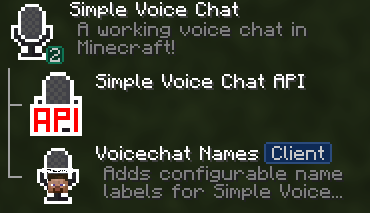 Settings in Modmenu (Fabric) before 26.3
-
 Always mode
-
 Text Settings (V. 0.1.2)
-
 Name
Versions
Files
Relations
Project Relations
More like this
Similar Mods
Suggestions use data such as tags, dependencies, dependents, descriptions, titles, and more to rank how much they overlap with this mod.
On ModDex
Community snapshot
By the numbers
Statistics

Get it on
Available Platforms
On ModDex
Community snapshot
By the numbers
Statistics
Resources