
VoiceAttackAPI
No reviews yet
A Minecraft mod to integrate VoiceAttack with specific aspects of the game.
Fabric is a mod loader for versions 1.14+ of Minecraft, particularly popular for client side and optimization mods.
Community voices
Reviews
Click once to include, again to exclude, again to clear
No reviews yet. Be the first to review this project!
Get it on
Available Platforms
 Modrinth
Compatibility
Supported Environments
About
Project Details
For authors
Embed Badge
If you're the author of this project, you can embed a live badge anywhere that supports HTML or Markdown. It updates automatically whenever ratings change.
Use HTML for any page that supports it, or Markdown for README files and Markdown-based descriptions.
Identifiers
Platform IDs
About
Description
Minecraft VoiceAttack Integration Mod
Important! This mod will not work without the companion plugin for VoiceAttack, which can be found here.
Overview
The Minecraft VoiceAttack Integration Mod is a client-side utility designed to enhance accessibility and gameplay experience by allowing VoiceAttack to communicate directly with Minecraft. This mod enables players to execute keybind actions using voice commands, making it easier to navigate the game without relying solely on traditional input methods. It is particularly beneficial for players using controller mods, as it eliminates the need to remember complex button combinations to access various mods and UIs.
Features
- Seamless Integration: Works out of the box with controller mods, allowing for easy access to game functions without the need for complicated button combinations.
- Voice Command Execution: Use VoiceAttack to trigger keybind actions in Minecraft, enhancing accessibility for players with different needs.
- Automatic Port Configuration: The mod automatically establishes a connection to VoiceAttack on a specific static port, generating a unique port for communication during the handshake process.
How It Works
-
Connection Establishment: Upon launching Minecraft with the mod, it attempts to connect to VoiceAttack on a predefined static port.
-
Handshake Process: The mod sends a handshake request to VoiceAttack, along with a randomly generated port number for future communication.
-
Key Command Execution: Once the handshake is successful, VoiceAttack will use the provided port to send key commands to the mod, allowing for real-time execution of keybind actions.
-
Keybinds for Socket Management:
- Restart Socket Server: A keybind to restart the socket server, ensuring a stable connection with VoiceAttack. Default key is
R. - Update Mappings: A keybind to export a
voiceattack_translation_keys.jsonfile to the configs folder, which contains the translation keys for any bound key at the time of export. Default key isU.
Setup Instructions
Minecraft Mod
- No Setup Required: Simply install the mod in your Minecraft client, and it will automatically handle the connection to VoiceAttack.
VoiceAttack Configuration
To set up VoiceAttack for use with this mod, you need to configure each command with the following parameters:
-
Translation Key: Create a text variable named
keybindthat corresponds to the action you want to trigger in Minecraft. This variable should hold the translation key for the desired keybind. -
Execute Command: Use the Minecraft plugin for VoiceAttack to execute the command. Pass the context
execute_keybindalong with thekeybindvariable you created earlier.
Example Command Setup
- Create a new command in VoiceAttack.
- Add a text variable named
keybindwith the value of the desired Minecraft action (e.g.,key.inventory). - Add an action to execute the Minecraft plugin with the context
execute_keybindand reference thekeybindvariable.
Exporting Translation Keys
To export the translation keys for any bound key:
- Use the designated keybind to export the
voiceattack_translation_keys.jsonfile. - Locate the exported file in the configs folder.
- Reference this file to accurately send data to Minecraft via VoiceAttack.
Use Cases
- Accessibility: Ideal for players with mobility challenges who may find traditional controls difficult to use.
- Hands-Free Gameplay: Allows players to execute commands without needing to use their hands, making it easier to multitask or play in a more relaxed position.
- Enhanced Gameplay: Streamlines the process of accessing various mods and UIs, improving overall gameplay efficiency.
Limitations
- The mod does not support all keybind methods, including:
- Player movement controls (e.g., walking, running).
- Mouse look functionality.
- Keybinds that require holding down a key (e.g., zooming into a world map).
VoiceAttack logo used with permission from owner.
Screenshots
Gallery
-
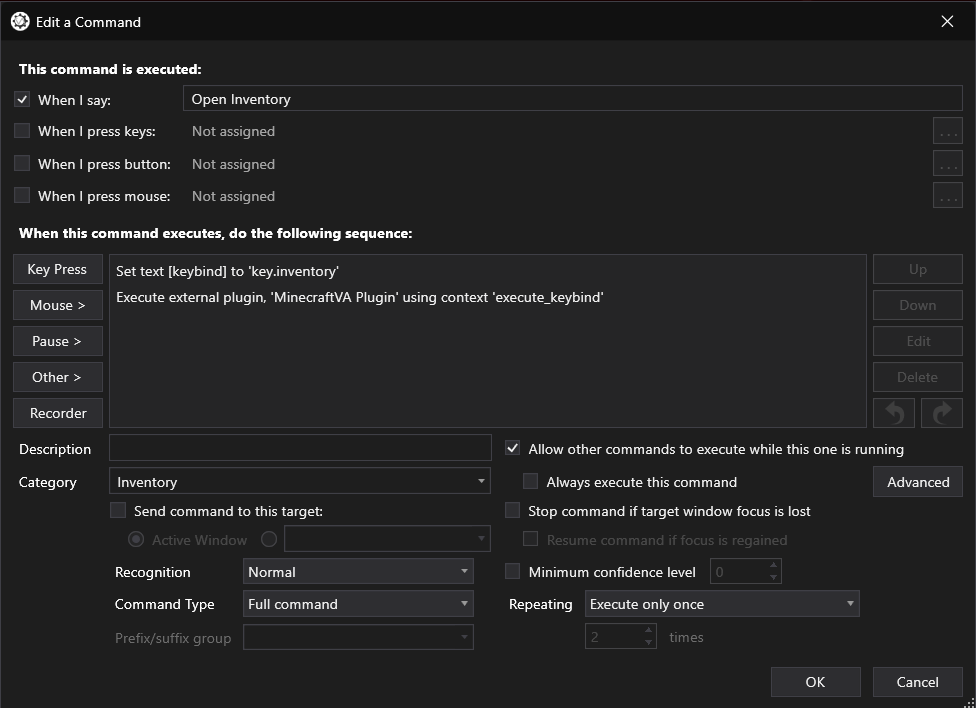 VoiceAttack Configuration Example of how to configure a VoiceAttack command to open the inventory
Versions
Files
Relations
Project Relations
More like this
Similar Mods
Suggestions use data such as tags, dependencies, dependents, descriptions, titles, and more to rank how much they overlap with this mod.
On ModDex
Community snapshot
By the numbers
Statistics

Want to reach Minecraft players?
We're looking for a server hosting partner to feature here and other parts of the site. Interested? Send us a message!
Get in touchGet it on
Available Platforms
On ModDex
Community snapshot
By the numbers