
VoiceChatModerator
No reviews yet
A Mod to moderate a Server with SimpleVoiceChat. Includes Speaking Overlay, VoiceChatRecordings, live transcripts and more
Fabric is a mod loader for versions 1.14+ of Minecraft, particularly popular for client side and optimization mods.
Community voices
Reviews
Click once to include, again to exclude, again to clear
No reviews yet. Be the first to review this project!
Get it on
Available Platforms
 Modrinth
Compatibility
Supported Environments
About
Project Details
For authors
Embed Badge
If you're the author of this project, you can embed a live badge anywhere that supports HTML or Markdown. It updates automatically whenever ratings change.
Use HTML for any page that supports it, or Markdown for README files and Markdown-based descriptions.
Identifiers
Platform IDs
Resources
External Links
About
Description
VoiceChatModerator
VoiceChatModerator is a client-side Fabric mod for Simple Voice Chat that shows you who is currently speaking, can optionally display spoken text, and archives conversations locally as audio and text.
The mod is designed for server moderation, event support, documentation, and anyone who wants to review or search voice chat sessions later.
Highlights
- Live speaker overlay in the HUD
- Transcript above player name tags
- Local recordings as audio and text
- In-game browser for saved sessions
- Export feature for individual recordings
- Optional speech-to-text
- Client-side – no server-side mod required
What the mod does
While you are using Simple Voice Chat, the mod detects incoming voice activity and can make it visible in several ways:
Speaker Overlay
A clean HUD overlay shows which players are currently speaking. Depending on your configuration, it can display things like:
- player names
- distance
- volume
- short transcript snippets
Name Tag Transcript
If speech-to-text is enabled, spoken text can be displayed above the player's head.
Recording & Archive
Conversations are saved locally, split by hour and organized by:
- server
- player
- date
- hour
Depending on your settings, this creates:
.wavor.mp3files- matching
.txtfiles with transcript content
Browser & Export
The built-in browser lets you search through your recordings directly in-game and export them when needed.
Who is this mod for?
VoiceChatModerator is especially useful for:
- moderation teams on community servers
- event or roleplay organization
- documenting conversations
- reviewing incidents
- players who want a better overview of voice chat activity
Speech-to-Text
Speech-to-text is optional and can be turned off completely.
At the moment, the mod mainly supports these approaches:
- DIRECT – directly local inside the mod
- API – through an external compatible service
If you only want the overlay and recordings, you can simply leave speech-to-text disabled.
Hotkeys
- F6 – toggle overlay
- F7 – open recording browser
- F8 – toggle recording
Requirements
- Minecraft 1.21.11
- Fabric Loader
- Fabric API
- Simple Voice Chat
- Java 21+
- ModMenu optional, but recommended
Installation
- Install Fabric Loader
- Put Fabric API into your
modsfolder - Put Simple Voice Chat into your
modsfolder - Put VoiceChatModerator into your
modsfolder - Optionally install ModMenu for easier configuration
Quick Start
Without Speech-to-Text
If you only want the moderation and recording features at first:
- Start the game
- Disable STT in the settings
- Enable recording
- Use F7 later to browse saved recordings
With Speech-to-Text
Enable STT in the configuration and choose a supported method. Spoken content can then appear in the overlay, as name tag text, and in saved transcript files depending on your settings.
Recording Location
Recordings are stored locally in your Minecraft directory:
.minecraft/VoiceChatRecord/
Important Notes
- This mod is client-side.
- It does not replace Simple Voice Chat; it extends it.
- Audio and transcripts are stored locally on your computer.
- Speech-to-text quality may vary depending on language, audio quality, and background noise.
In Short
If you want to see who is speaking, what was said, and keep a local record of voice conversations in Minecraft, VoiceChatModerator is made for exactly that.
Screenshots
Gallery
-
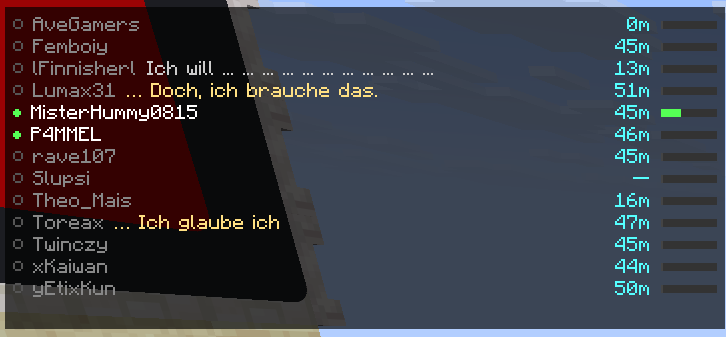 The Voice Overlay Here you can see who is currently speaking. When a fast whisper server is attached, it auotmaticly transcribes the spoken words.
 -
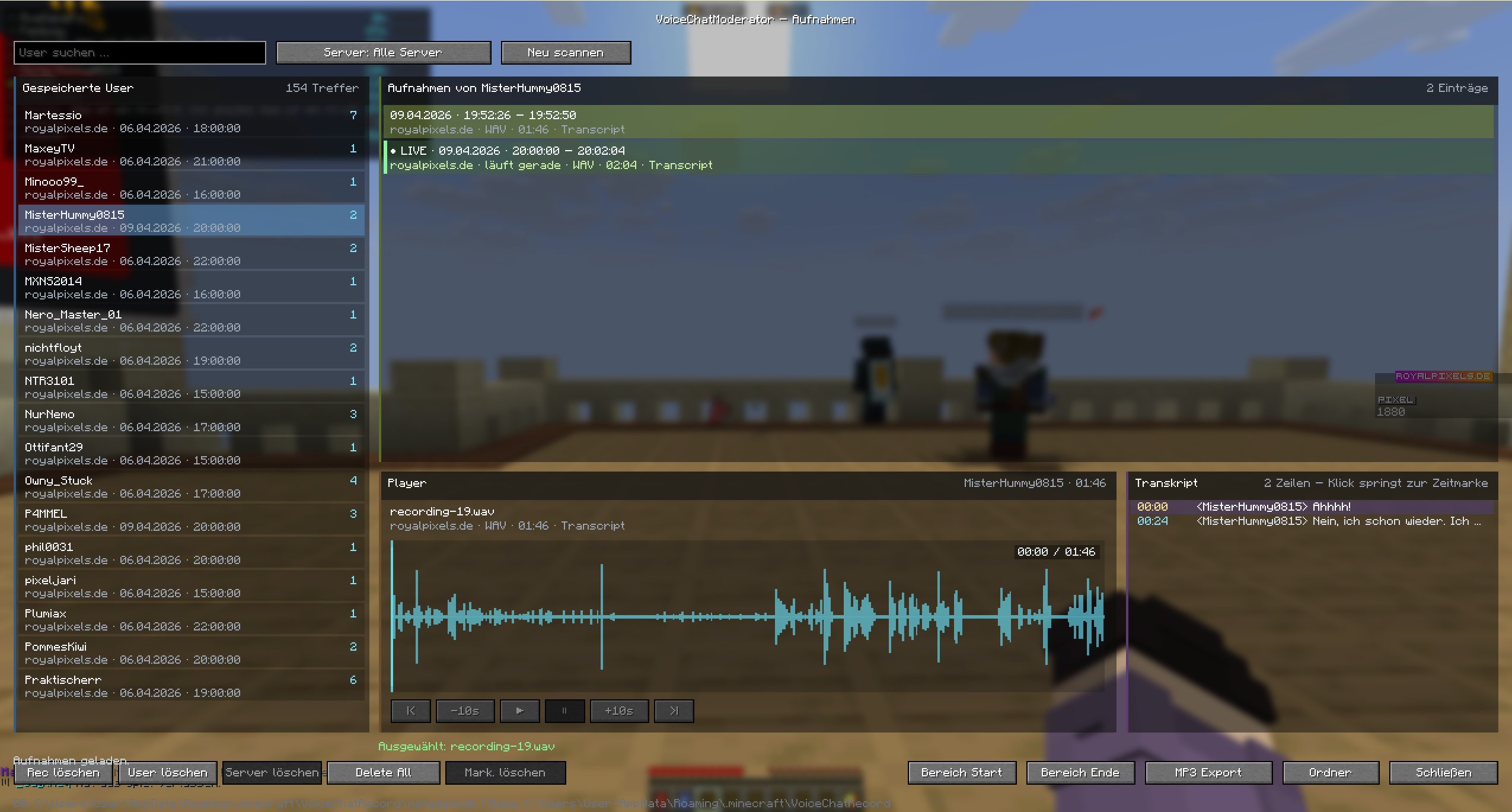 The Voice Browser Everything is recorded. The recordings can be accessed directly Ingame with a nice UI.
Versions
Files
Relations
Project Relations
More like this
Similar Mods
Suggestions use data such as tags, dependencies, dependents, descriptions, titles, and more to rank how much they overlap with this mod.
On ModDex
Community snapshot
By the numbers
Statistics

Want to reach Minecraft players?
We're looking for a server hosting partner to feature here and other parts of the site. Interested? Send us a message!
Get in touchGet it on
Available Platforms
On ModDex
Community snapshot
By the numbers
Statistics
Resources