
Community listing page, reviews here may not be monitored by the author.
VoxelPort

No reviews yet
Host a Fabric server without port forwarding. Players join with vanilla Minecraft
Community voices
Reviews
No reviews yet. Be the first to review this project!
Get it on
Available Platforms
About
Project Details
For authors
Embed Badge
If you're the author of this project, you can embed a live badge anywhere that supports HTML or Markdown. It updates automatically whenever ratings change.
Use HTML for any page that supports it, or Markdown for README files and Markdown-based descriptions.
Identifiers
Platform IDs
About
Description

VoxelPort Fabric Mod
Host your Fabric server without port forwarding. Install the mod and share a normal join address with vanilla players. No signup, no Discord, no token to copy — it just works.



Overview
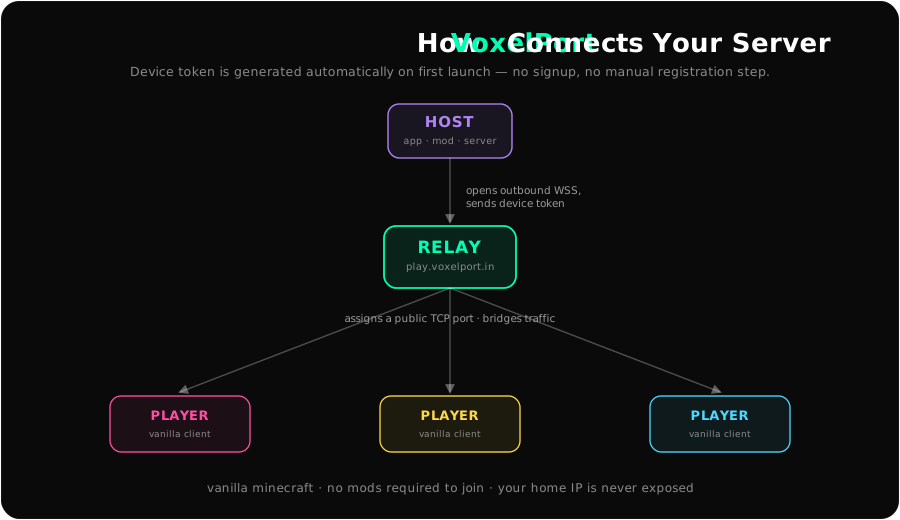
VoxelPort connects a Fabric server or an Open to LAN singleplayer world to VoxelPort-operated relay infrastructure. Your game opens an outbound encrypted WebSocket connection, the relay assigns a public TCP port, and players join that address from vanilla Minecraft.
Players do not need to install the mod.
Requirements
| Requirement | Version |
|---|---|
| Minecraft | 26.x |
| Fabric Loader | 0.18.6+ |
| Java | 25+ |
A device token is generated automatically on first launch — nothing to request or paste.
Quick Start
Singleplayer world
- Install the VoxelPort mod in your Fabric client.
- Open Minecraft and load your singleplayer world.
- Use Minecraft's Open to LAN button.
- Press Open to VoxelPort from the pause menu.
- Share the copied
play.voxelport.in:<assigned-port>address.
Players joining your address do not need the mod.
Dedicated server
- Install Fabric Loader on your Minecraft server.
- Put the VoxelPort mod JAR in your server's
mods/folder. - Restart the server.
- Run
/voxelport start. - Share the address shown by
/voxelport address.
Commands
/voxelport start
/voxelport start <port>
/voxelport status
/voxelport address
/voxelport stop
/voxelport start uses the server's configured Minecraft port automatically. Use /voxelport start <port> only when you need to expose a different local port.
The device token is managed for you; /voxelport token <token> still exists as an advanced override.
Configuration
The mod saves server settings at:
config/voxelport/settings.propertiesExample config:
server_token=vp_...        # auto-generated; do not share
public_host=play.voxelport.in
server_host=127.0.0.1
max_connections=200
relay_url=wss://relay.voxelport.in
Leave relay_url blank (or wss://relay.voxelport.in) unless you are testing with VoxelPort support.
How It Works
- The mod opens an outbound WebSocket to the relay.
- It registers using its auto-generated device token.
- The relay assigns a public TCP port.
- Players join
play.voxelport.in:<assigned-port>from vanilla Minecraft. - Minecraft traffic is bridged through the relay to your Fabric server.
The relay is a bridge, not a game server. Your world, mods, and player data stay on your own server.
Troubleshooting
Status shows disconnected
Make sure your host allows outbound HTTPS/WSS traffic to relay.voxelport.in on port 443.
Players cannot join
Run /voxelport status or /voxelport address, then make sure players are joining the public address shown there.
Disconnects with compression or packet errors Update to the latest mod release. Server mode buffers fragmented WebSocket frames and serializes relay writes to prevent packet-stream corruption.
Links
- Website
- Desktop app — a separate download that tunnels any local Minecraft server without a mod
- Status Page
- VoxelPort GitHub
License
MIT. See the included license file.
VoxelPort is not affiliated with Mojang, Microsoft, Fabric, CurseForge, or Modrinth.
Screenshots
Gallery
Versions
Files
Relations
Project Relations
More like this
Similar Mods
Suggestions use data such as tags, dependencies, dependents, descriptions, titles, and more to rank how much they overlap with this mod.
On ModDex
Community snapshot
By the numbers
Statistics
Want to reach Minecraft players?
We're looking for a server hosting partner to feature here and other parts of the site. Interested? Send us a message!
Get in touchGet it on
Available Platforms
On ModDex
Community snapshot
By the numbers