Mod

Wawel Auth

Quick rating

Wawel Auth

No reviews yet

Authentication mod for Minecraft 1.7.10.

QoL & Tweaks
Mod Loaders
Forge
Minecraft

Community voices

Reviews

Versions
Loading versions…
Match includes

Click once to include, again to exclude, again to clear

Rating Any
Any 0.5 1.0 1.5 2.0 2.5 3.0 3.5 4.0 4.5 5.0
Min
Max
Play Status
Reviews
Time Played
hrs+
Verified developers only
Has developer response
List view
Grid view
Compact view
Sort by
Date
Rating
Helpful
Unhelpful
Edited
Sort ascending
Delete this review?

This removes your review from the project. You can write a new review after.

Review submitted for moderation

Your review has been sent to moderators, who will check that it meets our guidelines before it appears publicly.

No reviews yet. Be the first to review this project!

Get it on

Available Platforms

Compatibility

Supported Environments

Dev Environment
Client Optional
Server Optional

About

Project Details

Type
Mod
License
GNU Lesser General Public License v3.0 only
Latest Version
wawelauth-1.0.5-curseforge.jar
Authors
CurseForge

For authors

Embed Badge

If you're the author of this project, you can embed a live badge anywhere that supports HTML or Markdown. It updates automatically whenever ratings change.

Custom banner text
ModDex rating badge preview

Use HTML for any page that supports it, or Markdown for README files and Markdown-based descriptions.

Identifiers

Platform IDs

CurseForge ID
Modrinth ID

Resources

External Links

About

Description

Wawel Auth

logo

Authentication mod for Minecraft 1.7.10. Use Microsoft or any Yggdrasil-compatible provider, or run your own auth server alongside the game server. Includes modern and HD skins, animated capes, and optional 3D skin layers.

Some highlights of what Wawel Auth allows you to do:

  • Login into any Yggdrasil-compatible provider on the client (Microsoft, ely.by, drasl, ...)
  • Bind accounts to servers
  • Host an account and skin provider directly on the game server
  • Allow any Yggdrasil-compatible provider to join your server
  • Modern and HD skin support
  • Animated capes for Wawel Auth accounts
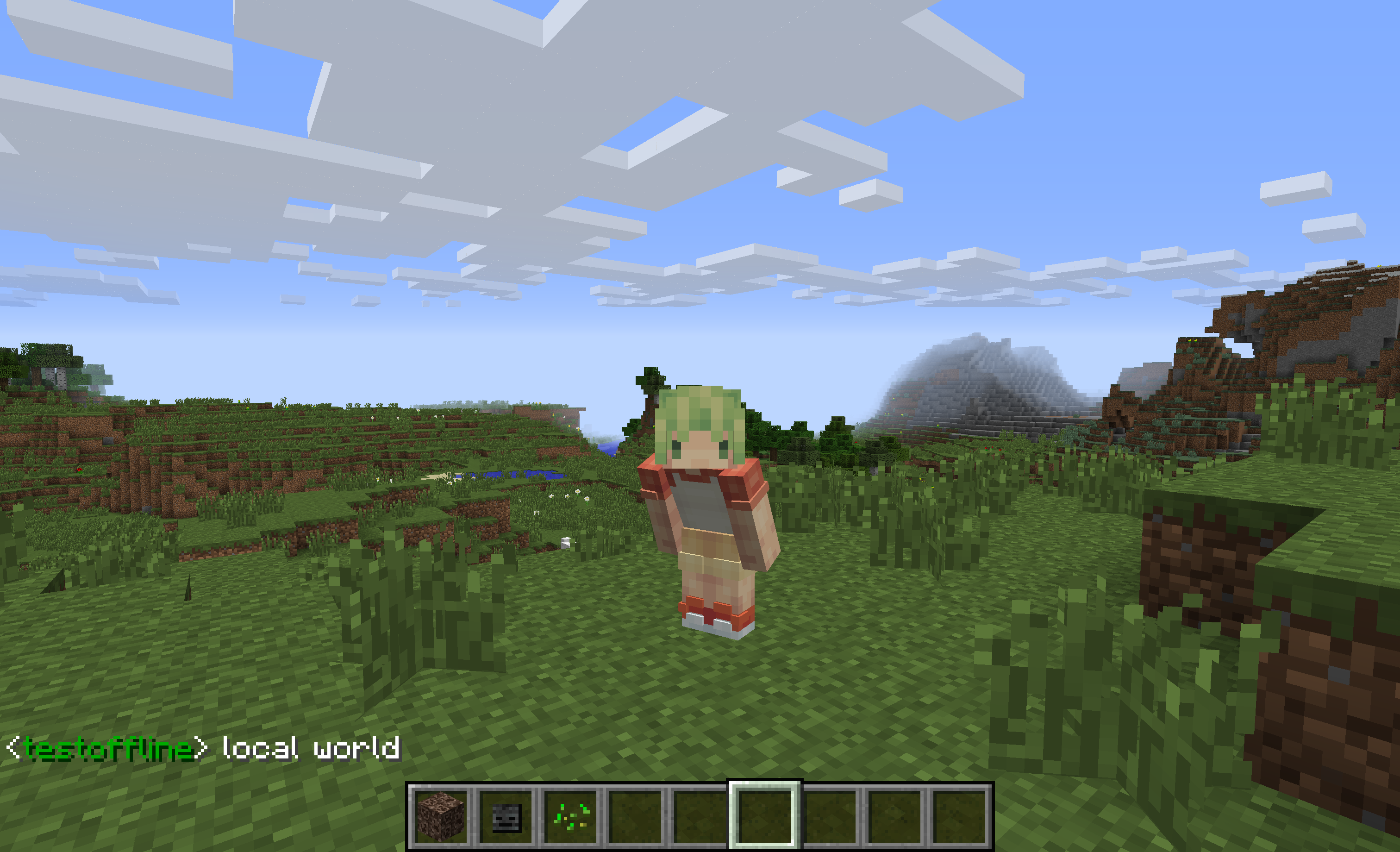
  • 3D skin layers implementation
  • Admin web UI for server-side management

Wawel Auth does not need to be installed on the client, nor on the server to benefit from a lot of features. You can setup a server that allows Microsoft and ely.by users, without clients having to do anything special. Clients can also benefit from account management, modern skins, and 3d skin layers, even if a server doesn't run Wawel Auth.

screen1

hub curse modrinth 67 maven forge cord

Dependencies

[!NOTE] Each release also includes a nodep jar. It does not ship sqlite-jdbc or Bouncy Castle, and relies on FalsePatternLib curse modrinth git to supply them.

Client Setup And Use

Wawel Auth stores a small Minecraft instance-bound config file under config/wawelauth/local.json. Most other settings, however, are shared across all Minecraft instances (can be disabled using useOsConfigDir). Those settings live in files stored under the following locations: * Windows: %APPDATA%/wawelauth/ * macOS: ~/Library/Application Support/wawelauth/ * Linux: $XDG_DATA_HOME/wawelauth/ or ~/.local/share/wawelauth/

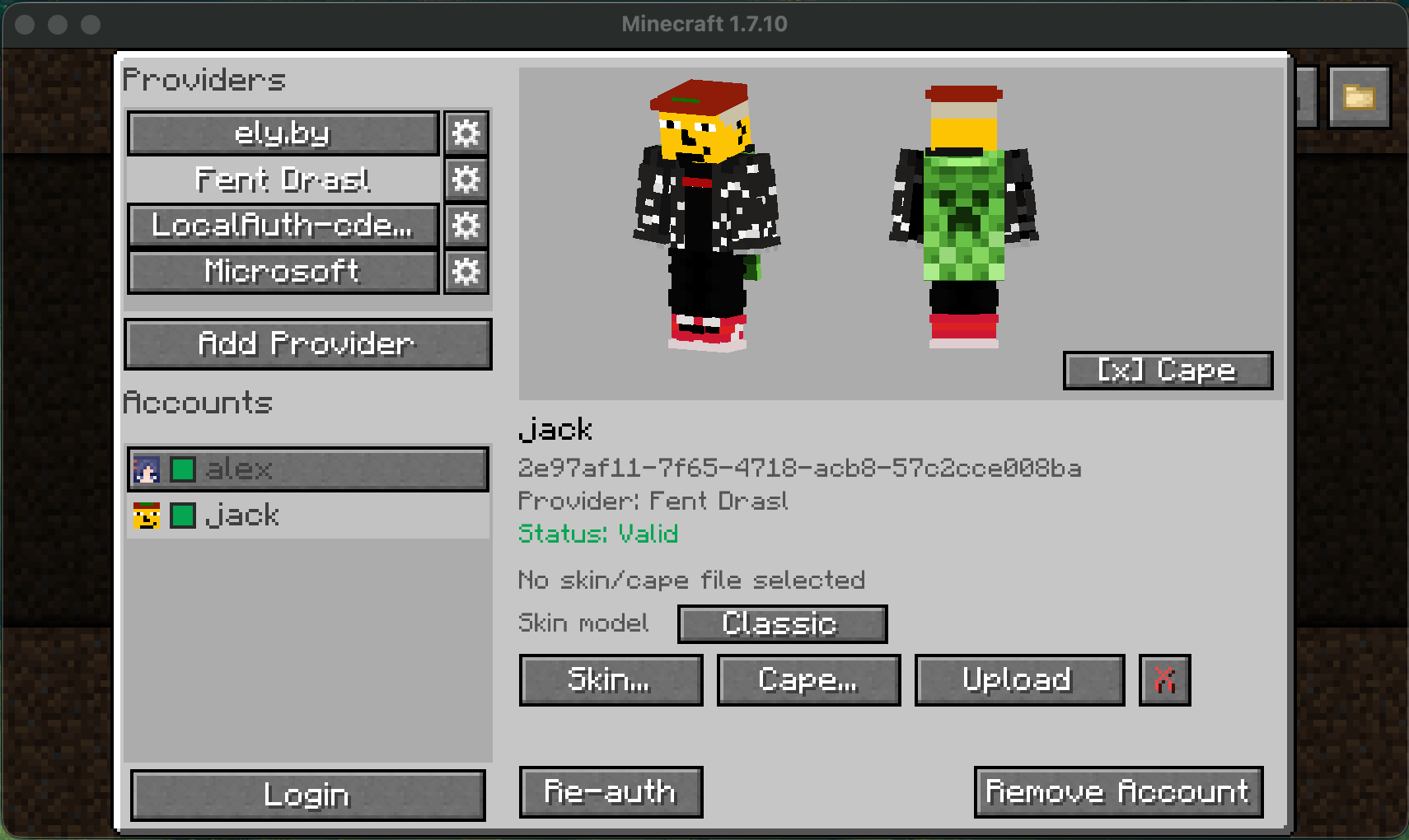
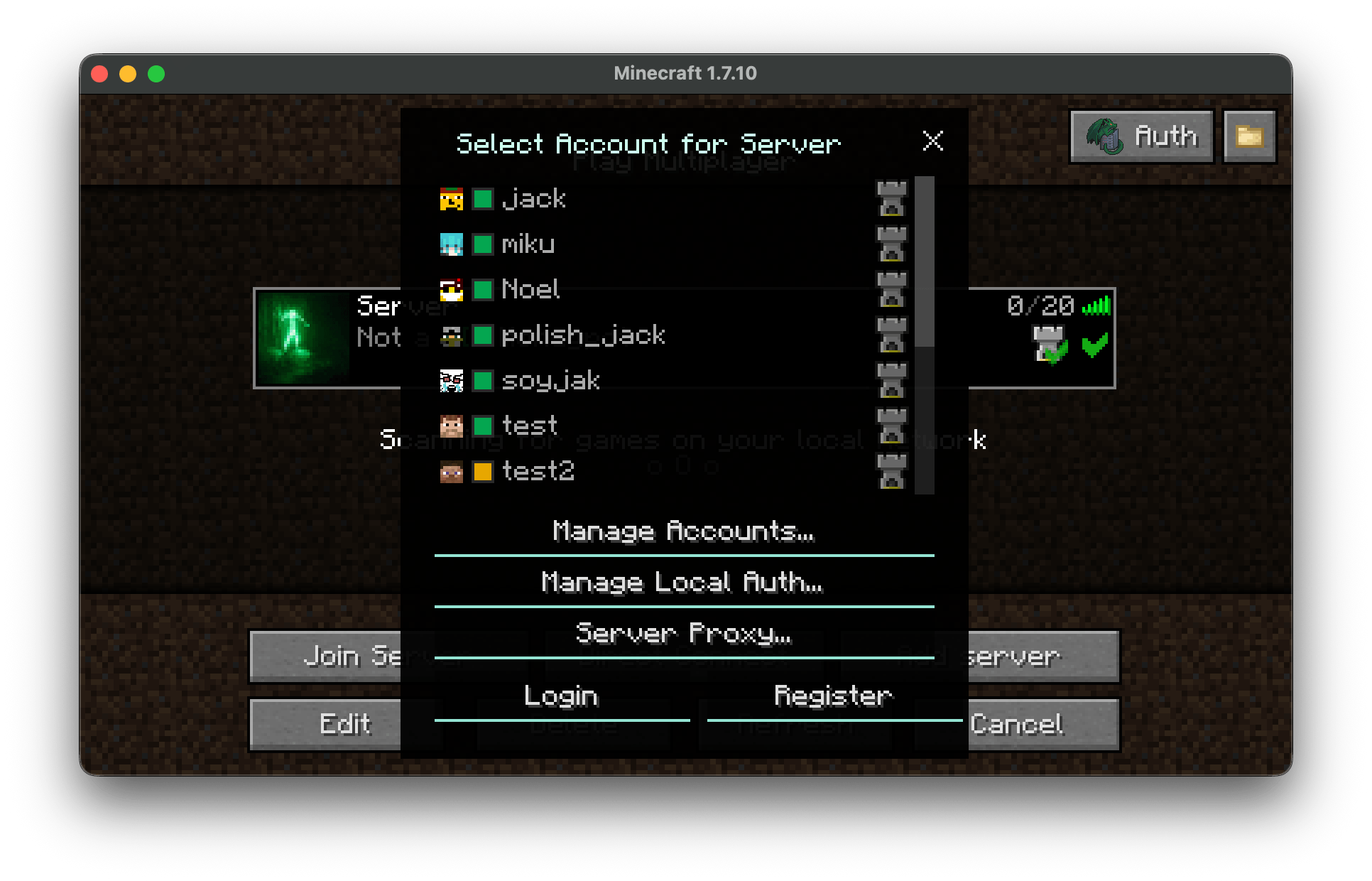
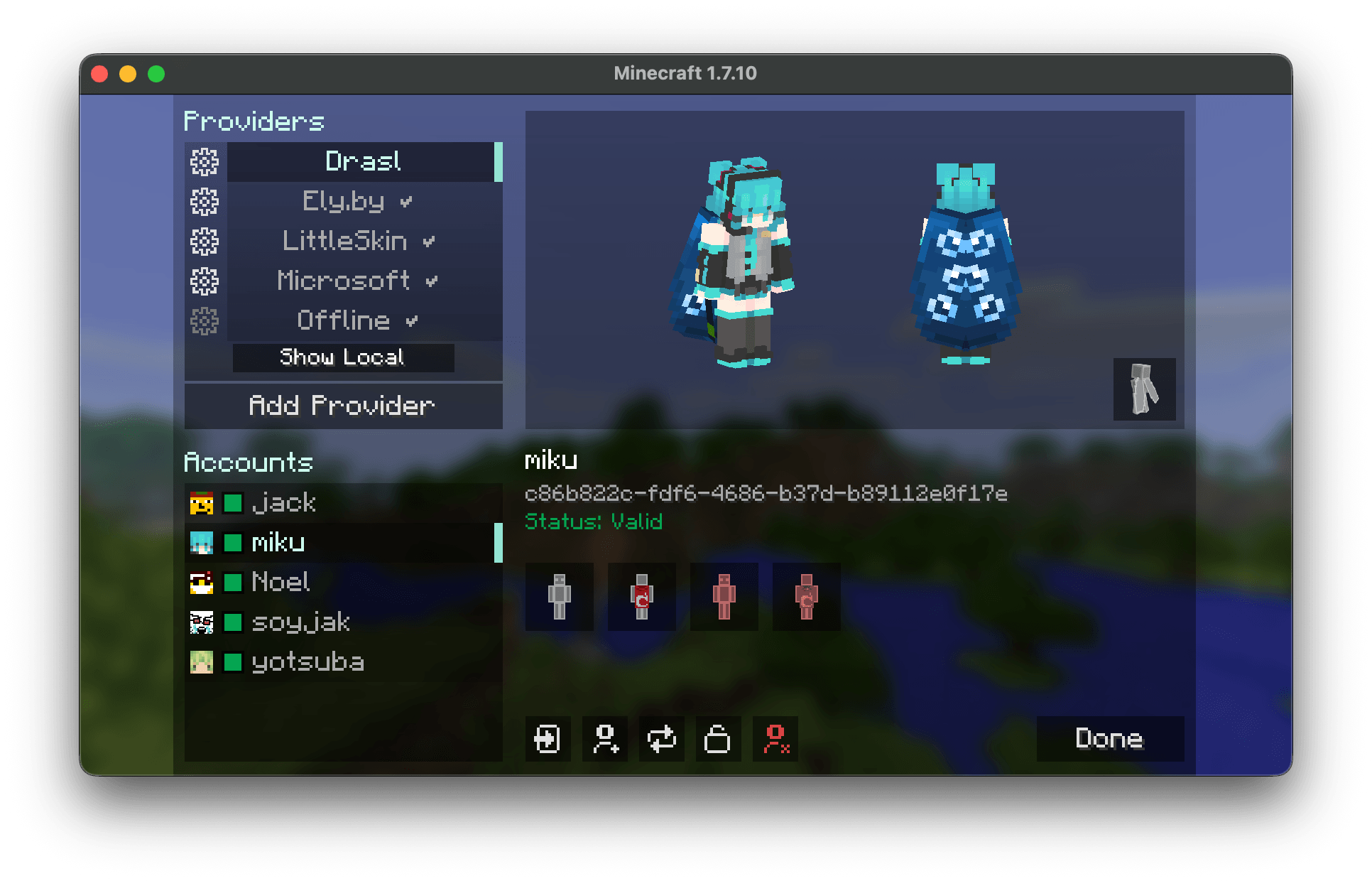
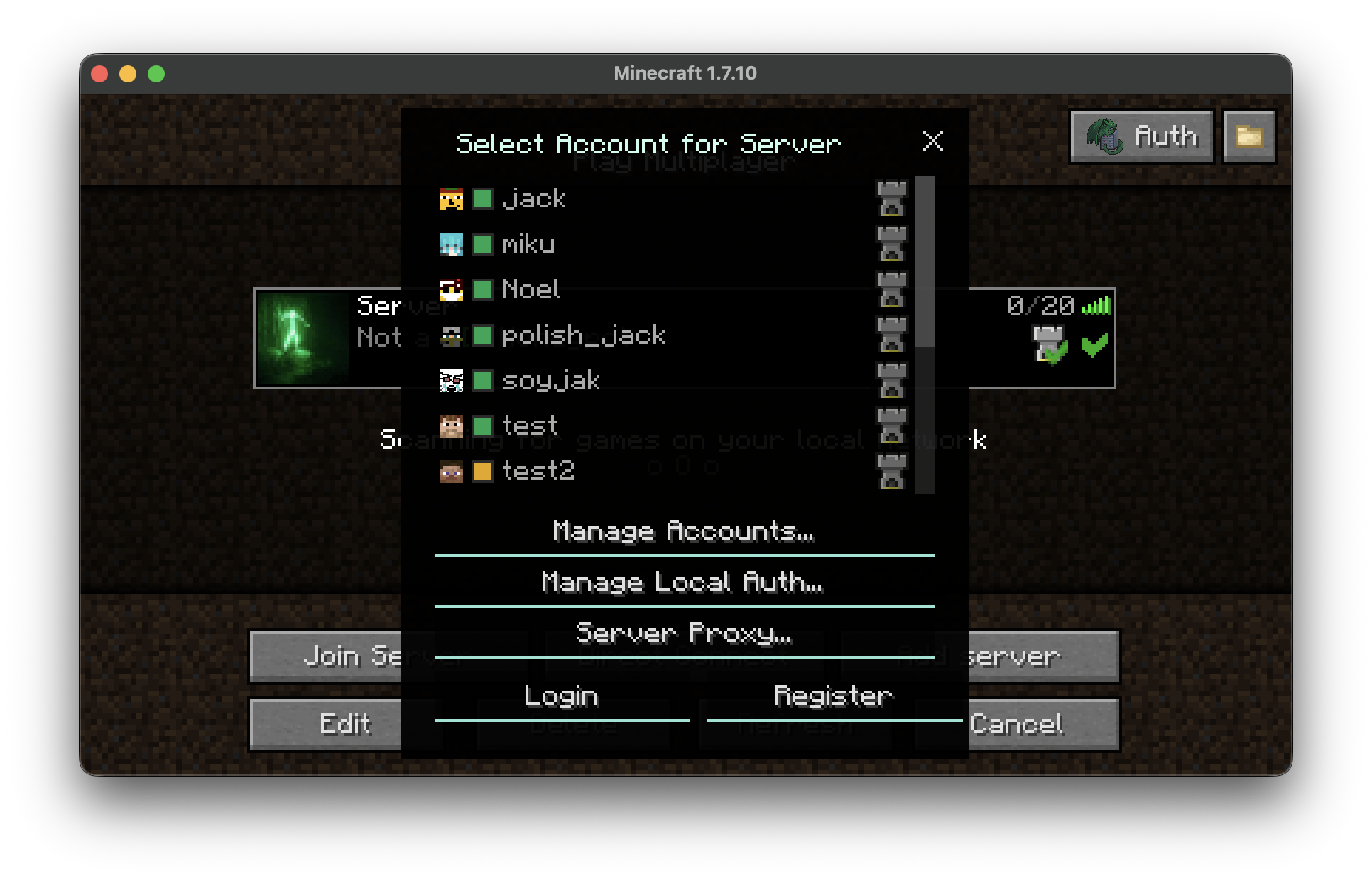
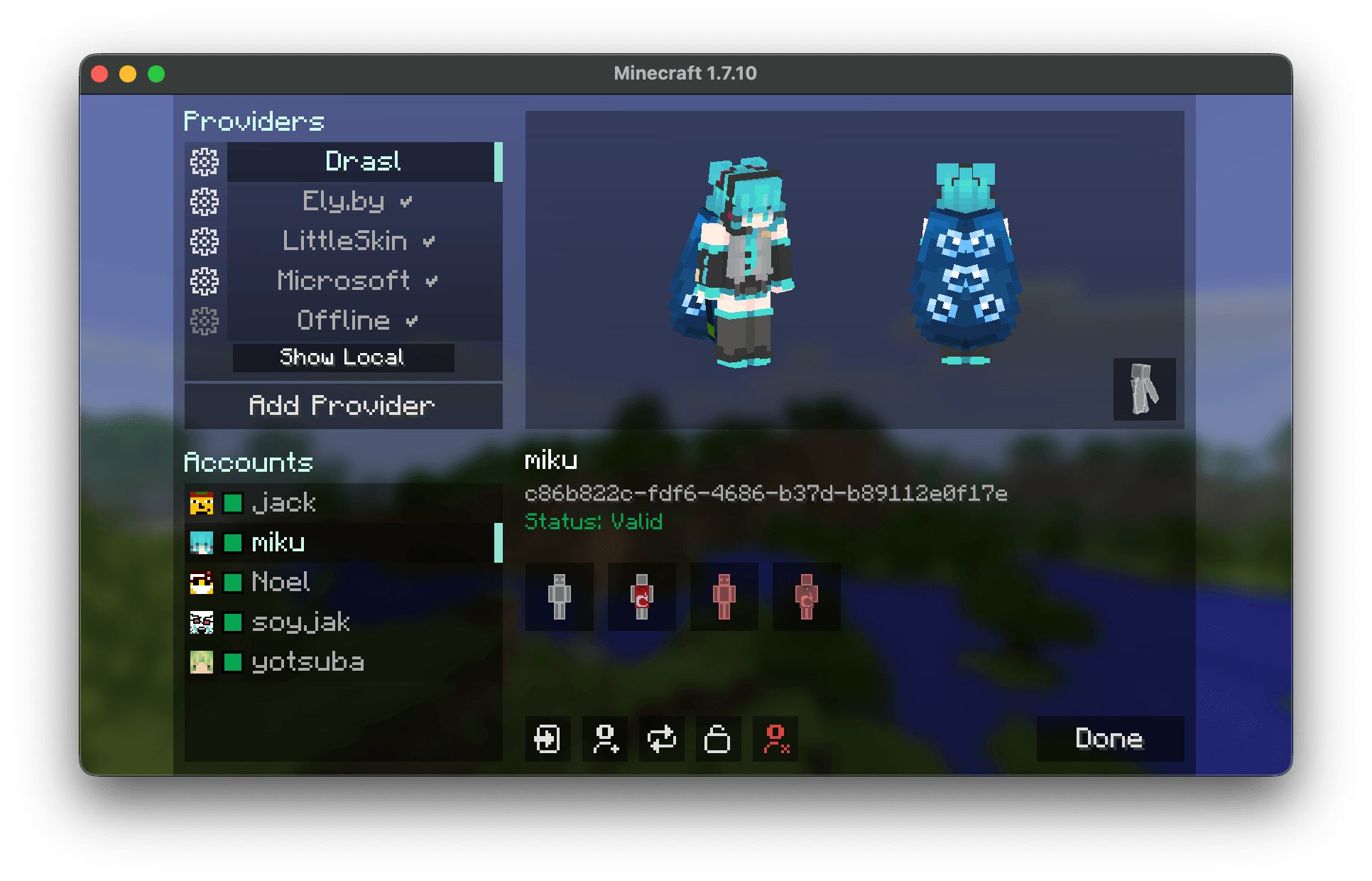
The main menu is opened with the Auth button in the multiplayer screen. From there, you can add auth providers, and accounts.

Some things of note: * Microsoft, Ely.by, and LittleSkin providers are built in. * Any Yggdrasil / authlib-injector provider can be added by URL. * The Manage Local Auth... button is the quickest way to use local accounts on a Wawel Auth server. * Adding the same local server manually as a normal provider is also supported. * Skin management buttons can be suppressed per provider through client.json, in the case a provider does not provide these functions. This is purely cosmetic. The following options let you configure this: * disableSkinUpload * disableCapeUpload * disableTextureReset

The disable* lists are regexes matched against provider name or API root.

  • Animated capes are only supported by Wawel Auth servers, and are in the minecraftcapes.net format.

[!NOTE] You can also drag and drop skins and capes, if using Java 17+.

Server Setup And Use

Files and locations

  • Dedicated servers always use config/wawelauth/ to store their config, and state data
  • That state directory contains the SQLite database, generated keys, and stored textures

[!WARNING] * Your private server key is sensitive information, never share it. * It is important to not change your server keys, if not absolutely necessary. Wawel Auth client users will need to trust the key again, and authlib-injector users will refuse to connect to a server whose public key has changed.

Example local-only setup

server.json

{
  "wawelAuthEnabled": true,
  "serverName": "My WawelAuth Server",
  "publicBaseUrl": "auth.example.com:25565",
  "apiRoot": "auth",
  "admin": {
    "enabled": true,
    "token": "strong_password_best_if_randomly_generated"
  }
}
  1. set online-mode=true in server.properties
  2. set publicBaseUrl to the real public base URL clients use
  3. leave apiRoot as a relative path such as auth
  4. set an admin token through server.admin.token or WAWELAUTH_ADMIN_TOKEN
  5. restart the server

Notes:

  • if publicBaseUrl has no scheme, Wawel Auth assumes http://
  • with the example above, the auth API is published at http://auth.example.com:25565/auth
  • on dedicated servers, Wawel Auth now hard-stops before world load if online-mode=false, publicBaseUrl is missing, or apiRoot is configured as a full URL
  • for CI smoke tests only, WAWELAUTH_CI=true or GITHUB_ACTIONS=true bypasses the missing-publicBaseUrl hard stop

Important server settings

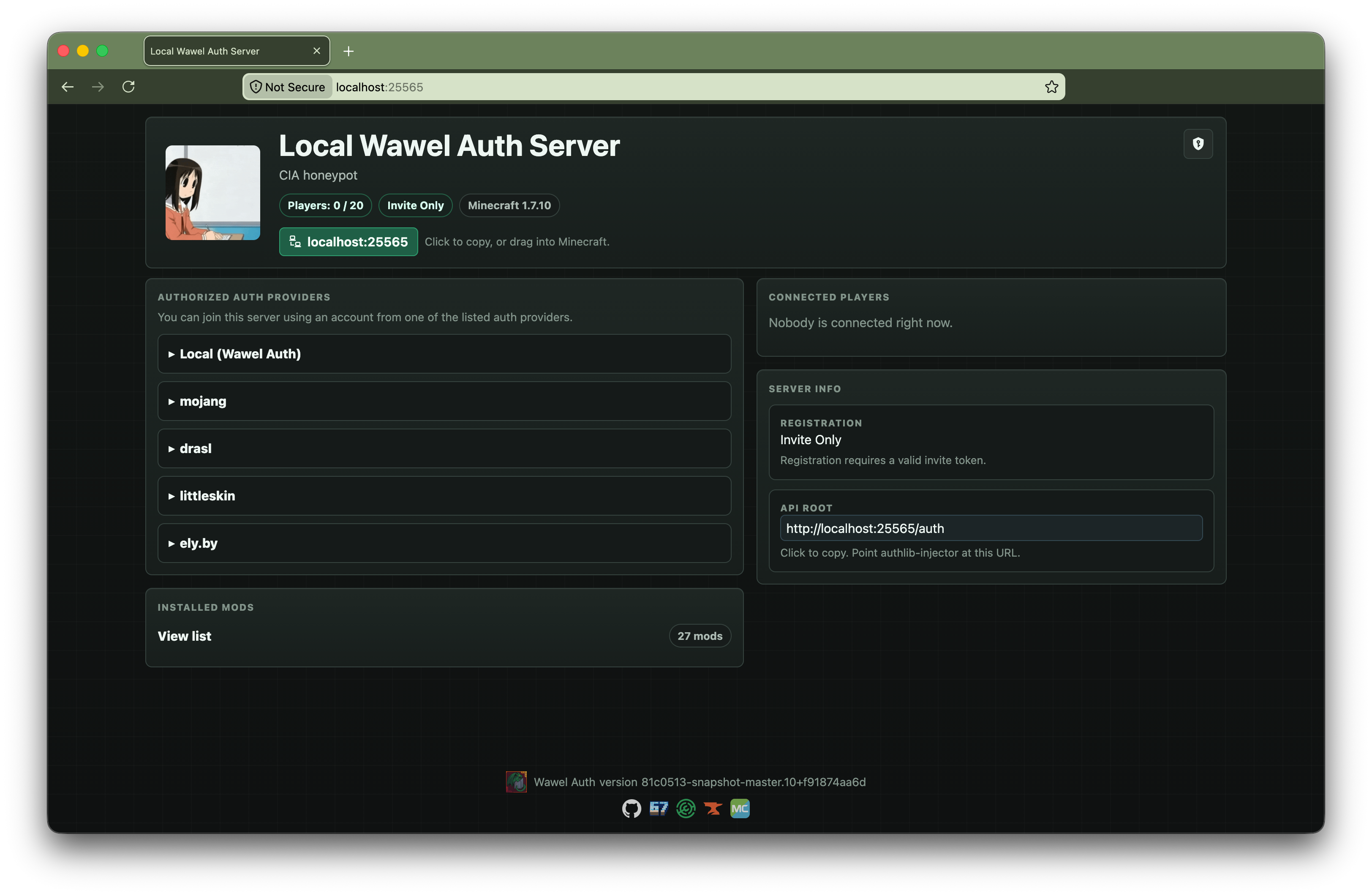
  • registration.policy: OPEN, INVITE_ONLY, CLOSED
  • textures: max skin / cape dimensions, file limits, animated cape limits
  • http: same-port HTTPS enable flag, HTTP read timeout, TLS handshake timeout, and max request body size
  • admin: web UI enable flag, login token, session TTL

Admin web UI

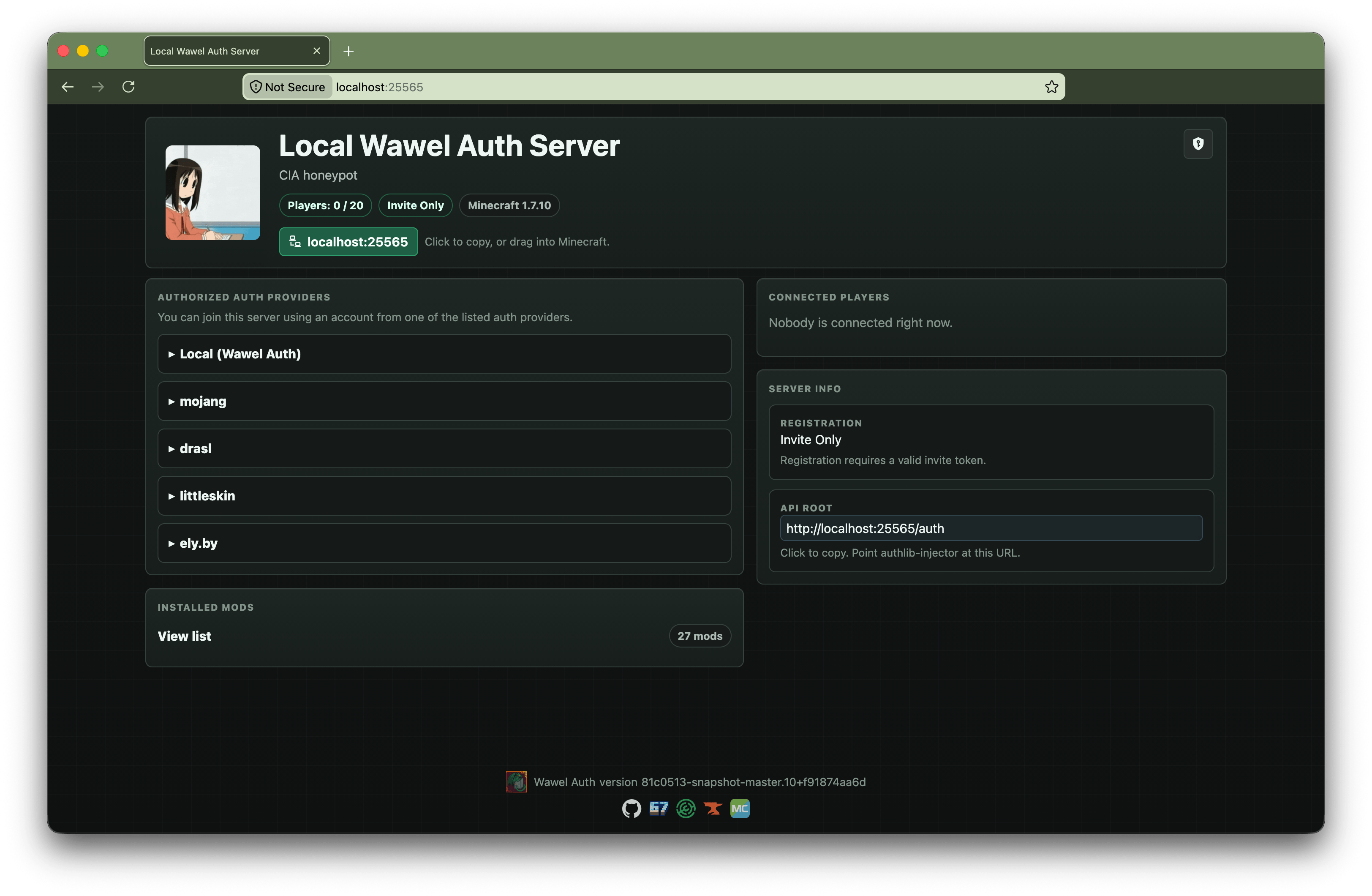
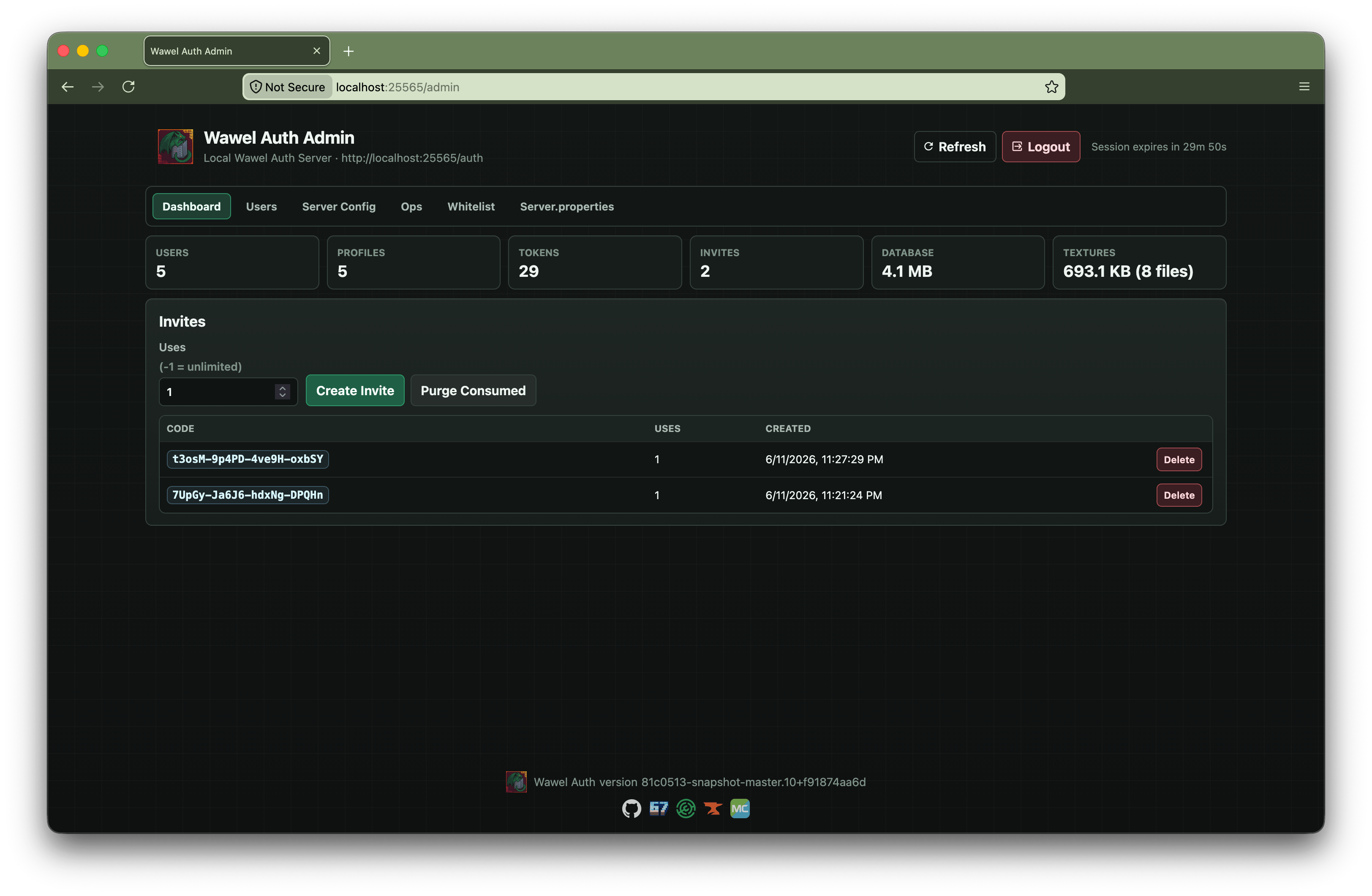
If server.admin.enabled=true, the admin UI is available at:

  • https://your-host:your-port/admin when server.http.httpsEnabled=true (default)
  • http://your-host:your-port/admin for bootstrap/status only; login requires HTTPS

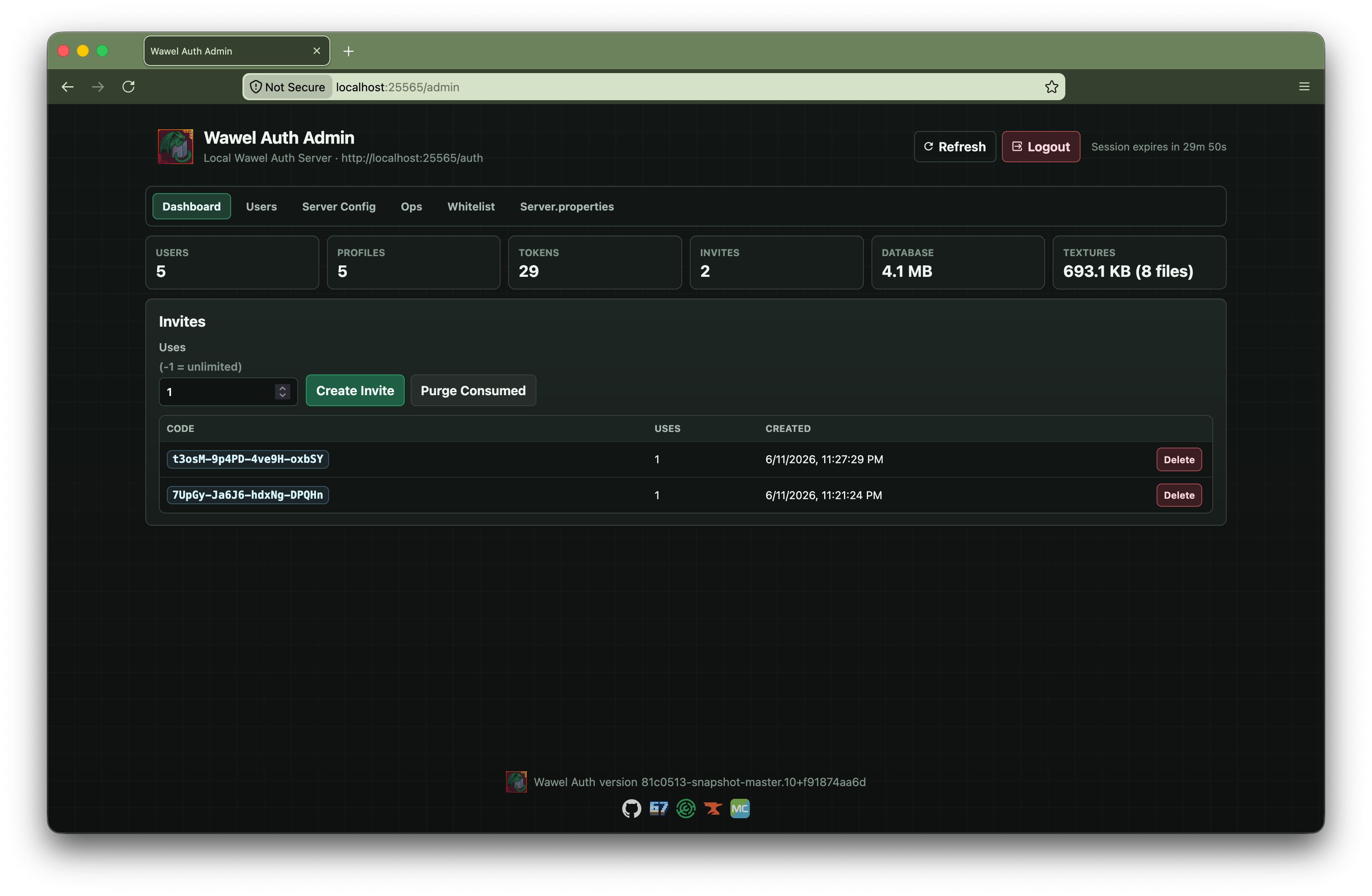
It manages users, textures, invites, whitelist, ops, server.json, and server.properties. Same-port HTTPS uses a self-signed certificate generated in WawelAuth's data directory; verify the SHA-256 fingerprint printed in the server log when accepting the browser warning.

Fallback providers

Fallback providers are defined in fallback-servers.json and checked in order.

{
  "fallbackServers": [
    ...
  ]
}

[!WARNING] name must not contain whitespaces.

[!TIP] name is used in provider-scoped commands such as /op player@provider.

Microsoft fallback example

{
  "name": "mojang",
  "sessionServerUrl": "https://sessionserver.mojang.com",
  "accountUrl": "https://authserver.mojang.com",
  "servicesUrl": "https://api.minecraftservices.com",
  "skinDomains": [
    ".minecraft.net",
    ".mojang.com"
  ],
  "cacheTtlSeconds": 300
}

Ely.by fallback example

{
  "name": "ely.by",
  "sessionServerUrl": "" rel="noopener nofollow" target="_blank">https://authserver.ely.by/api/authlib-injector/sessionserver",
  "accountUrl": "" rel="noopener nofollow" target="_blank">https://authserver.ely.by/api",
  "servicesUrl": "" rel="noopener nofollow" target="_blank">https://authserver.ely.by/api/authlib-injector/minecraftservices",
  "skinDomains": [
    "ely.by",
    ".ely.by"
  ],
  "cacheTtlSeconds": 300
}

LittleSkin fallback example

{
  "enabled": true,
  "name": "littleskin",
  "apiRoot": "" rel="noopener nofollow" target="_blank">https://littleskin.cn/api/yggdrasil",
  "sessionServerUrl": "" rel="noopener nofollow" target="_blank">https://littleskin.cn/api/yggdrasil/sessionserver",
  "accountUrl": "" rel="noopener nofollow" target="_blank">https://littleskin.cn/api/yggdrasil/authserver",
  "servicesUrl": "" rel="noopener nofollow" target="_blank">https://littleskin.cn/api/yggdrasil",
  "signaturePublicKeyBase64": "",
  "skinDomains": [
    "littleskin.cn"
  ],
  "cacheTtlSeconds": 300
}

Commands

/wawelauth

  • /wawelauth register <username> <password>
  • /wawelauth invite create [uses|unlimited]
  • /wawelauth invite list
  • /wawelauth invite delete <code>
  • /wawelauth invite purge
  • /wawelauth test

Provider-qualified whitelist and op commands

  • /whitelist add <username>@<provider>
  • /whitelist remove <username>@<provider>
  • /op <username>@<provider>
  • /deop <username>@<provider>

<provider> is either a fallbackServers[].name or one of the local aliases: local, localauth, wawelauth, self.

Regular whitelist and op commands are disabled.

[!WARNING] Plain authlib-injector clients (or vanilla) can authenticate against a Wawel Auth server, but mixed-provider skin handling only works if the client and server run Wawel Auth.

Interoperability Notes

Building

./gradlew build

Credits

License

LGPLv3

Buy me some creatine

  • ko-fi.com
  • Monero: 893tQ56jWt7czBsqAGPq8J5BDnYVCg2tvKpvwTcMY1LS79iDabopdxoUzNLEZtRTH4ewAcKLJ4DM4V41fvrJGHgeKArxwmJ


license

Wawel Auth

logo

Authentication mod for Minecraft 1.7.10. Use Microsoft or any Yggdrasil-compatible provider, or run your own auth server alongside the game server. Includes modern and HD skins, animated capes, and optional 3D skin layers.

Some highlights of what Wawel Auth allows you to do:

  • Login into any Yggdrasil-compatible provider on the client (Microsoft, ely.by, drasl, ...)
  • Bind accounts to servers
  • Host an account and skin provider directly on the game server
  • Allow any Yggdrasil-compatible provider to join your server
  • Modern and HD skin support
  • Animated capes for Wawel Auth accounts
  • 3D skin layers implementation
  • Admin web UI for server-side management

Wawel Auth does not need to be installed on the client, nor on the server to benefit from a lot of features. You can setup a server that allows Microsoft and ely.by users, without clients having to do anything special. Clients can also benefit from account management, modern skins, and 3d skin layers, even if a server doesn't run Wawel Auth.

screen1

hub curse modrinth 67 maven forge cord

Dependencies

[!NOTE] Each release also includes a nodep jar. It does not ship sqlite-jdbc or Bouncy Castle, and relies on FalsePatternLib curse modrinth git to supply them.

Client Setup And Use

Wawel Auth stores a small Minecraft instance-bound config file under config/wawelauth/local.json. Most other settings, however, are shared across all Minecraft instances (can be disabled using useOsConfigDir). Those settings live in files stored under the following locations:

  • Windows: %APPDATA%/wawelauth/
  • macOS: ~/Library/Application Support/wawelauth/
  • Linux: $XDG_DATA_HOME/wawelauth/ or ~/.local/share/wawelauth/

The main menu is opened with the Auth button in the multiplayer screen. From there, you can add auth providers, and accounts.

Some things of note:

  • Microsoft, Ely.by, and LittleSkin providers are built in.
  • Any Yggdrasil / authlib-injector provider can be added by URL.
  • The Manage Local Auth... button is the quickest way to use local accounts on a Wawel Auth server.
  • Adding the same local server manually as a normal provider is also supported.
  • Skin management buttons can be suppressed per provider through client.json, in the case a provider does not provide these functions. This is purely cosmetic. The following options let you configure this:
    • disableSkinUpload
    • disableCapeUpload
    • disableTextureReset

The disable* lists are regexes matched against provider name or API root.

  • Animated capes are only supported by Wawel Auth servers, and are in the minecraftcapes.net format.

[!NOTE] You can also drag and drop skins and capes, if using Java 17+.

Server Setup And Use

Files and locations

  • Dedicated servers always use config/wawelauth/ to store their config, and state data
  • That state directory contains the SQLite database, generated keys, and stored textures

[!WARNING]

  • Your private server key is sensitive information, never share it.
  • It is important to not change your server keys, if not absolutely necessary. Wawel Auth client users will need to trust the key again, and authlib-injector users will refuse to connect to a server whose public key has changed.

Example local-only setup

server.json

{
  "wawelAuthEnabled": true,
  "serverName": "My WawelAuth Server",
  "publicBaseUrl": "auth.example.com:25565",
  "apiRoot": "auth",
  "admin": {
    "enabled": true,
    "token": "strong_password_best_if_randomly_generated"
  }
}
  1. set online-mode=true in server.properties
  2. set publicBaseUrl to the real public base URL clients use
  3. leave apiRoot as a relative path such as auth
  4. set an admin token through server.admin.token or WAWELAUTH_ADMIN_TOKEN
  5. restart the server

Notes:

  • if publicBaseUrl has no scheme, Wawel Auth assumes http://
  • with the example above, the auth API is published at http://auth.example.com:25565/auth
  • on dedicated servers, Wawel Auth now hard-stops before world load if online-mode=false, publicBaseUrl is missing, or apiRoot is configured as a full URL
  • for CI smoke tests only, WAWELAUTH_CI=true or GITHUB_ACTIONS=true bypasses the missing-publicBaseUrl hard stop

Important server settings

  • registration.policy: OPEN, INVITE_ONLY, CLOSED
  • textures: max skin / cape dimensions, file limits, animated cape limits
  • http: same-port HTTPS enable flag, HTTP read timeout, TLS handshake timeout, and max request body size
  • admin: web UI enable flag, login token, session TTL

Admin web UI

If server.admin.enabled=true, the admin UI is available at:

  • https://your-host:your-port/admin when server.http.httpsEnabled=true (default)
  • http://your-host:your-port/admin for bootstrap/status only; login requires HTTPS

It manages users, textures, invites, whitelist, ops, server.json, and server.properties. Same-port HTTPS uses a self-signed certificate generated in WawelAuth's data directory; verify the SHA-256 fingerprint printed in the server log when accepting the browser warning.

Fallback providers

Fallback providers are defined in fallback-servers.json and checked in order.

{
  "fallbackServers": [
    ...
  ]
}

[!WARNING] name must not contain whitespaces.

[!TIP] name is used in provider-scoped commands such as /op player@provider.

Microsoft fallback example

{
  "name": "mojang",
  "sessionServerUrl": "https://sessionserver.mojang.com",
  "accountUrl": "https://authserver.mojang.com",
  "servicesUrl": "https://api.minecraftservices.com",
  "skinDomains": [
    ".minecraft.net",
    ".mojang.com"
  ],
  "cacheTtlSeconds": 300
}

Ely.by fallback example

{
  "name": "ely.by",
  "sessionServerUrl": "https://authserver.ely.by/api/authlib-injector/sessionserver",
  "accountUrl": "https://authserver.ely.by/api",
  "servicesUrl": "https://authserver.ely.by/api/authlib-injector/minecraftservices",
  "skinDomains": [
    "ely.by",
    ".ely.by"
  ],
  "cacheTtlSeconds": 300
}

LittleSkin fallback example

{
  "enabled": true,
  "name": "littleskin",
  "apiRoot": "https://littleskin.cn/api/yggdrasil",
  "sessionServerUrl": "https://littleskin.cn/api/yggdrasil/sessionserver",
  "accountUrl": "https://littleskin.cn/api/yggdrasil/authserver",
  "servicesUrl": "https://littleskin.cn/api/yggdrasil",
  "signaturePublicKeyBase64": "",
  "skinDomains": [
    "littleskin.cn"
  ],
  "cacheTtlSeconds": 300
}

Commands

/wawelauth

  • /wawelauth register <username> <password>
  • /wawelauth invite create [uses|unlimited]
  • /wawelauth invite list
  • /wawelauth invite delete <code>
  • /wawelauth invite purge
  • /wawelauth test

Provider-qualified whitelist and op commands

  • /whitelist add <username>@<provider>
  • /whitelist remove <username>@<provider>
  • /op <username>@<provider>
  • /deop <username>@<provider>

<provider> is either a fallbackServers[].name or one of the local aliases: local, localauth, wawelauth, self.

Regular whitelist and op commands are disabled.

[!WARNING] Plain authlib-injector clients (or vanilla) can authenticate against a Wawel Auth server, but mixed-provider skin handling only works if the client and server run Wawel Auth.

Interoperability Notes

Building

./gradlew build

Credits

License

LGPLv3

Buy me some creatine

  • ko-fi.com
  • Monero: 893tQ56jWt7czBsqAGPq8J5BDnYVCg2tvKpvwTcMY1LS79iDabopdxoUzNLEZtRTH4ewAcKLJ4DM4V41fvrJGHgeKArxwmJ

license

Screenshots

Gallery

  • 2026-03-14_14.43.33.png
    2026-03-14_14.43.33.png 2026-03-14_14.43.33.png
  • wawel_admin.png
    wawel_admin.png wawel_admin.png
  • 587356256-ffbe5c6a-9bff-4040-9d5a-43d64366dedd.png
    587356256-ffbe5c6a-9bff-4040-9d5a-43d64366dedd.png 587356256-ffbe5c6a-9bff-4040-9d5a-43d64366dedd.png
  • Main Auth GUI
    Main Auth GUI
  • Admin Panel
    Admin Panel
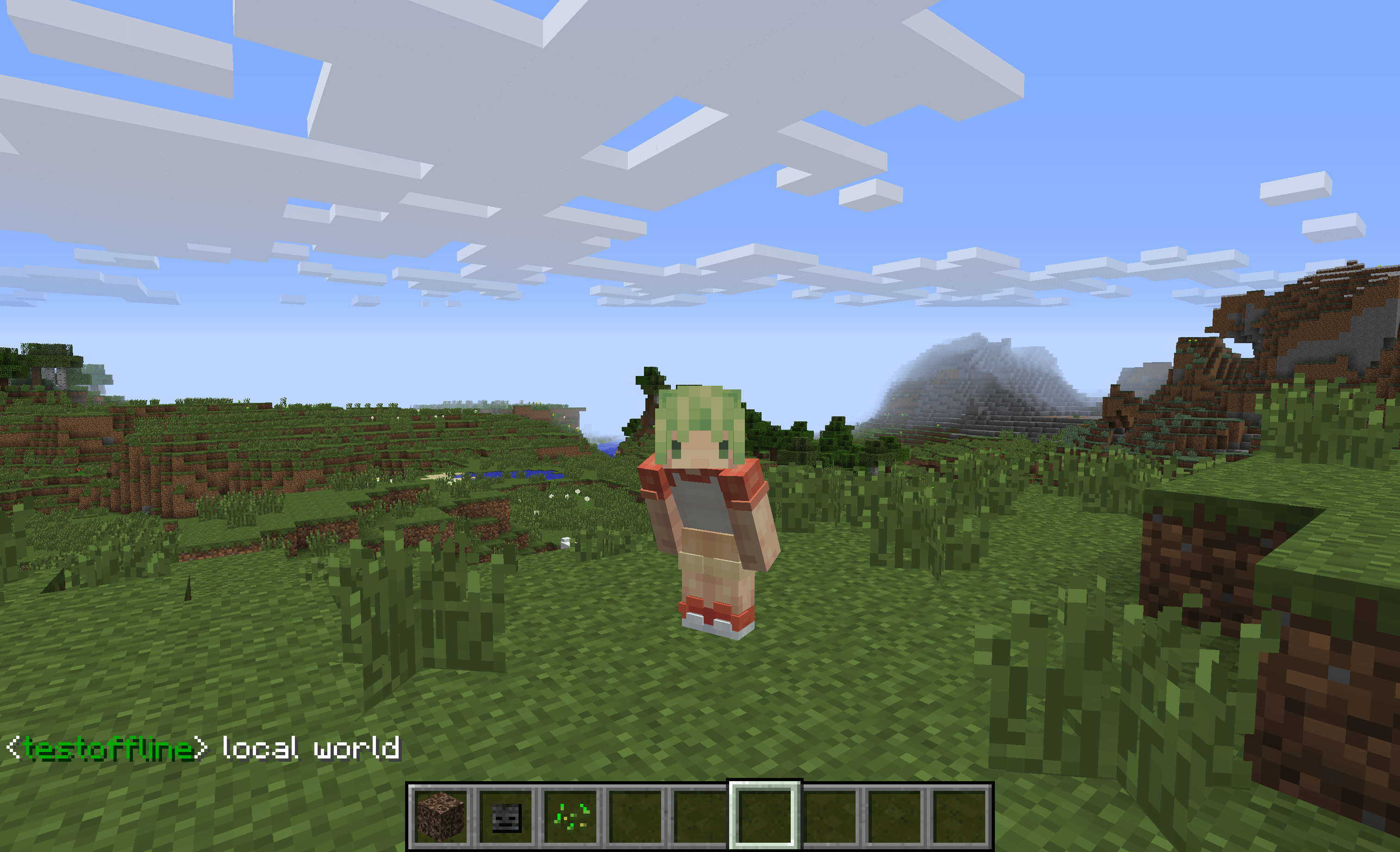
  • 3D skin layers
    3D skin layers

Versions

Files

Relations

Project Relations

More like this

Similar Mods

Suggestions use data such as tags, dependencies, dependents, descriptions, titles, and more to rank how much they overlap with this mod.

On ModDex

Community snapshot

0
Ratings
0
Followers
0
In stacks

By the numbers

Statistics

<1,000
Total Downloads
CurseForge
<1,000
Modrinth
<1,000
Last Updated
CurseForge
Created
CurseForge
Modrinth
Last synced
When ModDex last fetched and imported data for this project from CurseForge or Modrinth. High-traffic and active projects are checked more often.
Next pipeline sync