
Community listing page, reviews here may not be monitored by the author.
wCombatPatternAnalyzer

No reviews yet
Analyze your enemy's combat patterns and predict their actions in PvP!
Community voices
Reviews
No reviews yet. Be the first to review this project!
Get it on
Available Platforms
Compatibility
Supported Environments
Runs entirely on the client. Works on vanilla servers.
About
Project Details
For authors
Embed Badge
If you're the author of this project, you can embed a live badge anywhere that supports HTML or Markdown. It updates automatically whenever ratings change.
Use HTML for any page that supports it, or Markdown for README files and Markdown-based descriptions.
Identifiers
Platform IDs
Resources
External Links
About
Description
🎯 What does this mod do?
wCombat Pattern Analyzer is a client-side Fabric mod that tracks and analyzes your opponents' combat behavior in real-time, helping you predict their next actions.
⚔️ Key Features
- Attack Prediction - calculates average intervals between opponent's attacks and shows when they'll strike again
- Movement Analysis - detects movement patterns (W-Tap, S-Tap, Strafe)
- Shield Tracking - shows when opponent is blocking with shield
- Smart Indicators - color-coded danger levels:
- 🔴 Red - opponent attacking soon (danger!)
- 🟢 Green - safe to counter-attack
- 🟡 Yellow - neutral phase
📊 How it works
- Mod collects data about opponent's last 20 actions
- Analyzes intervals between attacks and movement patterns
- Predicts next action based on collected data
- Displays information in convenient HUD to the left of crosshair
🎮 Usage
- Install the mod in your
modsfolder - Join a game and get within 16 blocks of an opponent
- Mod automatically starts tracking the closest player
- After 3+ actions, predictions will start showing
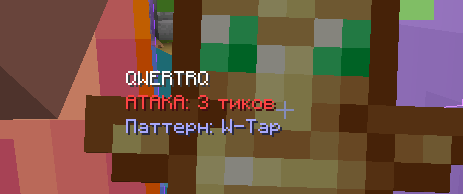
What's displayed on screen:
Player Name
ATTACK: 5 ticks         (red - danger)
COUNTER READY           (green - attack now)
Waiting: 10             (yellow - neutral)
Pattern: W-Tap          (pattern detected)
BLOCKING SHIELD         (blue - holding shield)
⚙️ Configuration
Settings are located in config/wcombatpatternanalyzer.json:
{
  "enabled": true,
  "maxTrackedActions": 20,
  "predictionSensitivity": 0.75,
  "showAttackIndicator": true,
  "showMovementPattern": true,
  "showShieldUsage": true,
  "showCriticalJumps": true,
  "maxTrackingDistance": 16,
  "debugMode": false
}
Parameters:
enabled- enable/disable the modmaxTrackedActions- number of tracked actions (10-50)predictionSensitivity- prediction sensitivity (0.5-1.0)showAttackIndicator- show attack indicatorshowMovementPattern- show movement patternsshowShieldUsage- show shield usagemaxTrackingDistance- tracking distance in blocks (8-32)debugMode- debug mode (logs tologs/latest.log)
📋 Requirements
- Minecraft: 1.21.4
- Fabric Loader: 0.17.0+
- Fabric API: 0.119.4+1.21.4
- Java: 21+
🔧 Technical Details
What's tracked:
- ✅ Attack intervals (timing)
- ✅ Movement patterns (w-tap, s-tap, strafe)
- ✅ Shield usage
- ✅ Critical hit jumps
- ✅ Action sequences
How it analyzes:
- Collects data about last 10-20 actions
- Calculates average interval between attacks
- Identifies repeating patterns
- Predicts next action based on current pattern
🎨 Features
- Minimal UI - doesn't clutter your screen
- Closest player only - tracks one opponent at a time
- Automatic tracking - no configuration needed
- Client-side - works on any server
- Lightweight - no performance impact
📝 Notes
- Mod is client-side only
- Needs 3+ actions from opponent for accurate predictions
- More data = more accurate predictions
- Doesn't provide unfair advantages, only analyzes visible behavior
Screenshots
Gallery
Versions
Files
Relations
Project Relations
More like this
Similar Mods
Suggestions use data such as tags, dependencies, dependents, descriptions, titles, and more to rank how much they overlap with this mod.
On ModDex
Community snapshot
By the numbers
Statistics

Want to reach Minecraft players?
We're looking for a server hosting partner to feature here and other parts of the site. Interested? Send us a message!
Get in touchGet it on
Available Platforms
On ModDex
Community snapshot
By the numbers
Statistics
Resources