
Community listing page, reviews here may not be monitored by the author.
wCopy

No reviews yet
Copy Chat is a lightweight quality-of-life mod that lets you easily copy Minecraft chat messages to your clipboard. Simply hover your cursor over a chat message and press Alt + Left Click to instantly copy it.
Community voices
Reviews
No reviews yet. Be the first to review this project!
Get it on
Available Platforms
Compatibility
Supported Environments
Runs entirely on the client. Works on vanilla servers.
About
Project Details
For authors
Embed Badge
If you're the author of this project, you can embed a live badge anywhere that supports HTML or Markdown. It updates automatically whenever ratings change.
Use HTML for any page that supports it, or Markdown for README files and Markdown-based descriptions.
Identifiers
Platform IDs
Resources
External Links
About
Description
Copy Chat
Copy Chat is a lightweight quality-of-life Minecraft mod designed to make interacting with chat messages faster, easier, and more convenient. It adds a simple but useful feature that allows players to copy any message from the in-game chat directly to their clipboard without needing to manually select text or use external tools.
Whether you want to save coordinates, copy a command, share a player message, record important information, or quickly move text into another application, Copy Chat provides a seamless way to do it directly from the Minecraft chat interface.
Features
📋 Instant Chat Copying
Copy any Minecraft chat message with just a simple action. Hover your cursor over the message you want to copy and press:
Alt + Left Click
The selected chat message will immediately be copied to your clipboard, ready to paste anywhere.
✨ Clear Confirmation Feedback
To make sure you know the action was successful, Copy Chat displays a large confirmation message in the center of your screen:
Text Copied!
This provides instant feedback so you never have to wonder whether the message was copied correctly.
⚡ Lightweight and Simple
Copy Chat focuses on doing one thing well: copying chat messages. It avoids unnecessary features and keeps the experience clean, making it a small and efficient addition to your Minecraft setup.
🎮 Improved Chat Interaction
Minecraft chat often contains useful information that players may want to save or reuse, such as:
- Coordinates
- Commands
- Server announcements
- Player messages
- Links
- Game information
- Custom text
With Copy Chat, transferring this information becomes quick and effortless.
How to Use
- Open the Minecraft chat.
- Move your cursor over the message you want to copy.
- Press Alt + Left Click.
- A "Text Copied!" notification will appear in the center of your screen.
- Paste the copied message wherever you need it.
Copy Chat makes Minecraft chat more practical by adding a simple interaction that fits naturally into the game, improving everyday gameplay without changing the vanilla experience.
Client-side only. No server installation required.
Screenshots
Gallery
-
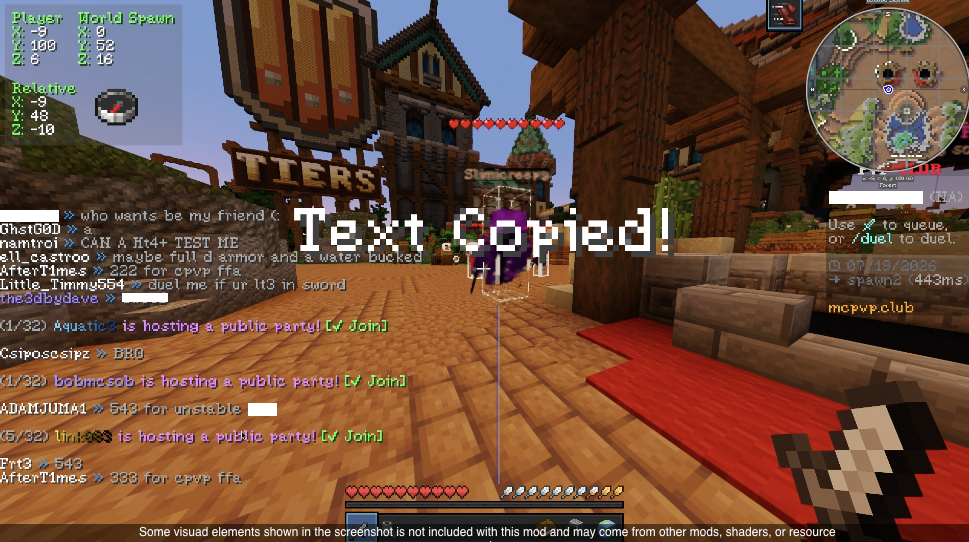 Text Copied! A Short visual interpretation about how the mod looks
Versions
Files
Relations
Project Relations
More like this
Similar Mods
Suggestions use data such as tags, dependencies, dependents, descriptions, titles, and more to rank how much they overlap with this mod.
On ModDex
Community snapshot
By the numbers
Statistics

Want to reach Minecraft players?
We're looking for a server hosting partner to feature here and other parts of the site. Interested? Send us a message!
Get in touchGet it on
Available Platforms
On ModDex
Community snapshot
By the numbers
Statistics
Resources