
Community listing page, reviews here may not be monitored by the author.
Wearables

No reviews yet
Fancy, customizable, functional armor

Community voices
Reviews
No reviews yet. Be the first to review this project!
Get it on
Available Platforms
About
Project Details
For authors
Embed Badge
If you're the author of this project, you can embed a live badge anywhere that supports HTML or Markdown. It updates automatically whenever ratings change.
Use HTML for any page that supports it, or Markdown for README files and Markdown-based descriptions.
Identifiers
Platform IDs
About
Description
Wearables
Wearables is an entry to the first ModOff modding competition. This mod adds many new wearable items, some of which have special functionalities and some which don't. They can all be colored and combined to your own liking.
Creation
Your first step in the wearable creation process will be to create Wearable Fabricator. This block is involved in creating individual wearable components, which can later be combined into wearable items.
The Wearable Fabricator can be crafted like this, with any type carpet and planks:
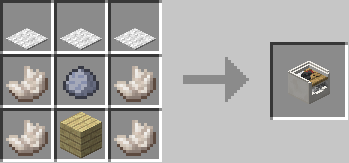
Once you have your Wearable Fabricator, interacting with the block will bring a GUI. From here, you can select components to create by clicking the desired component slot, and scroll through them by dragging the scrollbar.
Once selected, a preview will show up and an ingredient list will be provided. Input those ingredients to the bottom 4 slots, and the uncolored component item will be outputted.

Next, you can move to the Wearable Colorizer. This block allows wearables to be colored however you choose. This can be crafted like so:

From the Colorizer GUI, you can input your Wearable Component into the middle slot. Once placed, a larger preview will show.
The three sliders on the right can be dragged to change the RGB values for the currently selected layer. The tabs on the side can be used to select different layers of the component.

Now, take your component out and move to the Wearable Assembler.
The Wearable Assembler is crafted like this, with any wood or stone slab.

From the Assembler GUI, you can input multiple Wearable Components from the same armor type. (chest, head, legs, feet)
You cannot add two components of the same type, such as two glasses.
Once you've inputted your components, you will see a preview of your wearable.

You can either take the end result out, or customize it some more.
Firstly, you can apply armor to your wearable. Regularly, wearables do not protect you from any damage and do not have durability. When you apply an armor piece, the wearable will gain that damage protection and durability.
You can do this by adding an armor piece to the armor slot:

Secondly, on some components you can customize the Height property. This specifies and offset on the Y axis for an individual component.
Press the "..." button and it will take you to a new GUI. From here you can select individual components and adjust their properties.
For example, you may want to align glasses with your skin eyes.

To exit from this GUI, simply press 'Escape'.
Now, you can finally take the wearable out of the assembler and wear it for yourself. Once you take it out, it behaves just like regular armor. You can take it on and off like you normally would for armor.

Fancy, right?
But wait, there's more!
Functional Wearables
There are a few functional wearables currently in this mod.
Jetpack
The jetpack works as would be expected, holding Jump allows you to fly. Pressing Forward allows you to move forward at quick speeds. In survival, however, you will require Jetpack Fuel.

This can be crafted like this (shapeless):

Once you have fuel in your inventory, you can fly with your jetpack. It will slowly be drained, so keep an eye on the fuel level!
Wings
Wings also allow flight, although in a slightly different manner. Pitch is defined by your player head pitch, and holding space makes you go faster. If you are already flying but not holding space, you will move at a slower speed.

Flippers
Flippers make getting around in water much faster. On land, however, they slow you down.
As soon as you get into two block deep water, you will move into swimming position. Here you can swim fast, with the help of your flippers.

Night Vision Goggles
Night Vision Goggles work as you might expect. Putting them on at night will improve your visibility, but putting them on in the day will decrease your visibility.
Display
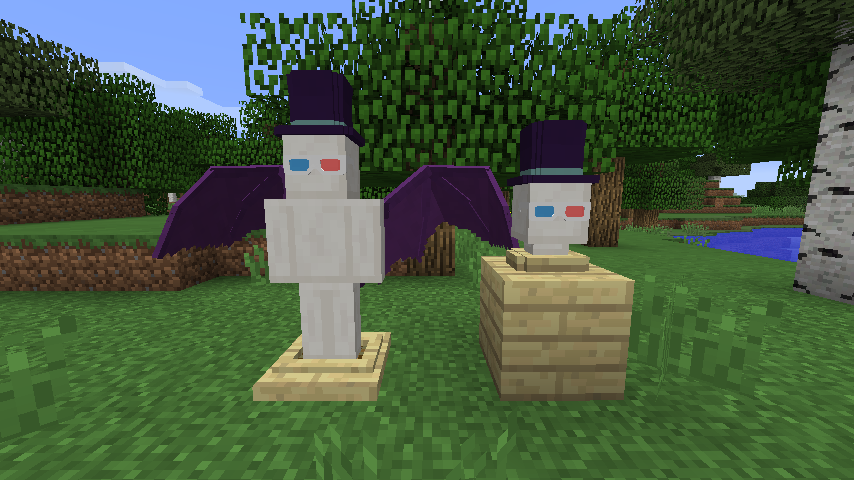
Now, you may want to display your beautiful wearable creations. This is possible with the Display Mannequin and Mannequin Head Stand.
The regular Display Mannequin allows displaying of the all wearables, but the Mannequin Head Stand only displays head wearables.
Display Mannequin crafting:

Head Stand crafting:

The Display Mannequin can have wearables added through a GUI (opened by interaction), and the head stand swaps wearables in your hand with a single interaction.
This mod requires LLibrary. Make sure to install it before this mod!
Screenshots
Gallery
Versions
Files
Relations
Project Relations
More like this
Similar Mods
Suggestions use data such as tags, dependencies, dependents, descriptions, titles, and more to rank how much they overlap with this mod.
On ModDex
Community snapshot
By the numbers
Statistics
 (opens in a new tab)
Get it on
Available Platforms
On ModDex
Community snapshot
By the numbers