
WearMe2
No reviews yet
A datapack that allows you to wear anything! Includes custom model changing support!
Data Packs were introduced to vanilla Minecraft in version 1.13 and allow the server to modify data about the game, or run commands. Data Packs are compatible with all mod loaders.
Community voices
Reviews
Click once to include, again to exclude, again to clear
No reviews yet. Be the first to review this project!
Get it on
Available Platforms
 Modrinth
Compatibility
Supported Environments
About
Project Details
For authors
Embed Badge
If you're the author of this project, you can embed a live badge anywhere that supports HTML or Markdown. It updates automatically whenever ratings change.
Use HTML for any page that supports it, or Markdown for README files and Markdown-based descriptions.
Identifiers
Platform IDs
About
Description
Wear any item in your head with custom models!
With WearMe2 now you can wear your own custom models in your head easier than ever! Goodbye pumpkins!
You just need to have a renamed item in your offhand (the example comes with one), and your main item in your mainhand, then press [ Change Model ]. Then press [ Make wereable ] and you can use your new custom item!
How to get started
First of all download the datapack and the example RP. (the example RP is in the versions tab)
Once everything is isntalled, in-game run the command /trigger wearmetoo and then press any of the buttons you wanna use!
[ Change Model ]
- This button allows you to change the item's model in you main hand with the name of the item in your offhand! In the example we have a model in
chimeradev:models/item/crownand the texture inchimeradev:textures/item/crown.pngso we need to rename our item tochimeradev:crown. Once we have the item ready, we put it on our offhand, and then get the item we want as a helmet in our main hand. Once that's done, press[ Change Model ]in the menu (accesible with/trigger wearmetoo)
[ Make weareable ]
- This button makes the item that you're holding be able to be equipped in your head! It can also be triggered with
/trigger helmet
[ Make unweareable ]
- This button makes the item that you're holding not able to be equipped. It can also be triggered with
/trigger unhelmet
How do I add my own models? My old CustomModelData aren't working!
In this new version, we have "Item Models", this wont work with old minecraft custom models, as they use a different format!
now custom items are in <namespace>/models/item/<id>, and their texture are in <namespace>/textures/item/<id> so the custom models are basically :``
This means that your custom models don't need to be tied to any specific item!
Can i do this to armor?
Sadly as of the 24w26a we can only modify texture on armors, so not for now! If this changes, it will be added to the datapack ASAP :)
Screenshots
Gallery
-
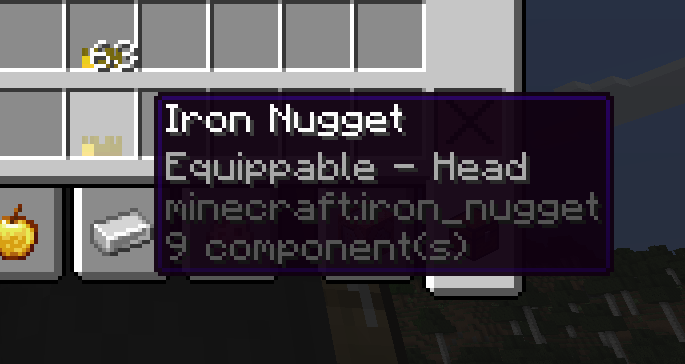 Item description Example of the item description
 -
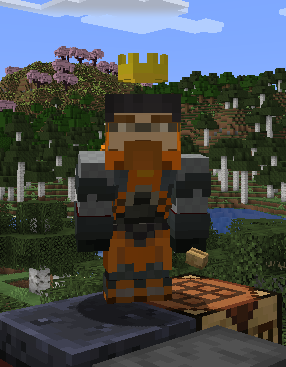 Custom Item head This is a custom item in the head.
Versions
Files
Relations
Project Relations
More like this
Similar Mods
Suggestions use data such as tags, dependencies, dependents, descriptions, titles, and more to rank how much they overlap with this mod.
On ModDex
Community snapshot
By the numbers
Statistics

Want to reach Minecraft players?
We're looking for a server hosting partner to feature here and other parts of the site. Interested? Send us a message!
Get in touchGet it on
Available Platforms
On ModDex
Community snapshot
By the numbers