
Window Title Bar Information
No reviews yet
Customizable client-side window title info for NeoForge 1.21.1 with dark Windows title bar support, player name, FPS, memory, and multiplayer-only ping.
Neoforge is a fork of the Minecraft Forge available for versions 1.20.1+ of Minecraft. Many Forge mods are compatible with Neoforge and vice versa.
Community voices
Reviews
Click once to include, again to exclude, again to clear
No reviews yet. Be the first to review this project!
Get it on
Available Platforms
 Modrinth
Compatibility
Supported Environments
About
Project Details
For authors
Embed Badge
If you're the author of this project, you can embed a live badge anywhere that supports HTML or Markdown. It updates automatically whenever ratings change.
Use HTML for any page that supports it, or Markdown for README files and Markdown-based descriptions.
Identifiers
Platform IDs
Resources
External Links
About
Description
Window Title Bar Information
Window Title Bar Information is a lightweight client-side NeoForge 1.21.1 mod that replaces Minecraft's default window title with useful live client information.
Instead of the standard Minecraft title, the window can show:
Name: <player_name> | FPS: <client_fps> | Ping: <client_ping> | Memory: <current_memory_usage>/<allocated_memory>
Features
- Fully configurable client-side title format
- Dark Windows title bar support
- Player name shown even from the main menu
- FPS display
- Memory usage display
- Ping display only when connected to an external multiplayer server
- Configurable update interval, defaulting to 3 seconds
- Persistent title handling to prevent Minecraft from briefly restoring the default title when changing screens or closing chat
- Client-side only, with no server installation required
Configuration
The generated config file is:
config/window_title_bar_information-client.toml
You can configure:
- Enable or disable the custom title
- Enable or disable persistent title re-application
- Enable or disable the dark Windows title bar
- Show or hide player name
- Show or hide FPS
- Show or hide ping
- Show or hide memory usage
- Change labels such as
Name:,FPS:,Ping:, andMemory: - Change the separator between title sections
- Change the fallback title
- Change the update interval
Performance
The mod is designed with performance in mind.
Stats are recalculated only on the configured interval, which is 3 seconds by default. Persistent title handling re-applies the already-cached title instead of recalculating every value each tick.
Screenshots
Gallery
-
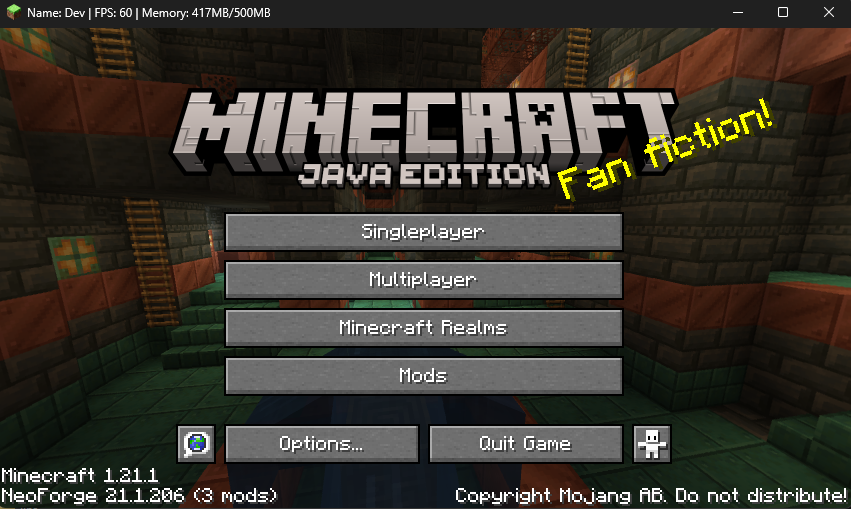 Client Title Changed Automatically
Versions
Files
Relations
Project Relations
More like this
Similar Mods
Suggestions use data such as tags, dependencies, dependents, descriptions, titles, and more to rank how much they overlap with this mod.
On ModDex
Community snapshot
By the numbers
Statistics

Want to reach Minecraft players?
We're looking for a server hosting partner to feature here and other parts of the site. Interested? Send us a message!
Get in touchGet it on
Available Platforms
On ModDex
Community snapshot
By the numbers
Statistics
Resources