Community listing page, reviews may not be monitored by the author.
Workers & Warriors

No reviews yet
Hire villagers as warriors, miners, builders and farmers — with names, levels, wages, food and beds.

Community voices
Reviews
No reviews yet. Be the first to review this project!
Get it on
Available Platforms
About
Project Details
For authors
Embed Badge
If you're the author of this project, you can embed a live badge anywhere that supports HTML or Markdown. It updates automatically whenever ratings change.
Use HTML for any page that supports it, or Markdown for README files and Markdown-based descriptions.
Identifiers
Platform IDs
Resources
External Links
About
Description
## Hire a Villager
## Extra Information ##
## 🏘 Getting Started
### 1. Find a worker
Workers live in **villages** — every village has a few of them waiting to be hired.
### 2. Hire him
**Right-click** a worker to see his **hiring fee** and his **daily wage** (every worker has his own price).
### 3. Choose his profession and name
After hiring, choose his **profession** — each profession costs a different amount of emeralds.
Then give him a **unique name**.
### 4. Open his menu
**Right-click** your worker at any time to open his menu. Everything you need to know about him is there: health, hunger, thirst, wage, level, his job and more.
---
## 🏠 Taking Care of Your Worker
Give your worker a **bed** and a **chest** (use *Select bed* and *Select chest* in his menu), and keep him somewhere safe — like a house.
Put these in his chest:
- 🍖 **Food**
- 💧 **Pure Water**
- 💎 **Emeralds** (his daily wage)
**Without these he can't work.** He takes what he needs from the chest by himself.
> ⚠ **Be careful:**
> - If you don't pay him for a day, he **quits** the next day.
> - If he starves or dies of thirst, he **quits**.
>
> He always warns you in chat before it happens.
### 💧 How to make Pure Water
Take a normal **water bottle** and cook it in a **furnace** or on a **campfire**.
### 🎒 Tools & Food
Every worker has a **Tools & Food** menu: the tools he needs for his job, his food and water, and a small **inventory** for everything he collects (he unloads it into his chest).
---
## 🛠 Professions
All jobs are given from the worker's **Control Panel**.
### 🧱 Builder
| Button | What it does |
|---|---|
| **Mark area** | Gives you a **Marker** — click two corners to mark what to build. |
| **Use held block** | The block in your hand becomes the block he builds with. |
| **Add to queue** | Adds the job to his **queue**. You can give him several jobs and he does them in order. |
| **Add helper** | Gives you a Marker — click another **Builder** to make him help with this job. They work together and finish faster. |
| **Release helpers** | Frees the helpers from the job. |
| **Start building** | Starts the work. |
| **Clear queue** | Deletes all the jobs in the queue. |
Signs next to worker names:
- **@** — this worker is a **helper**.
- **^** — this worker **leads** the job.
### ⛏ Miner
The miner can dig out an area you mark, **or go find ores for you** — diamonds, iron, gold and more.
| Button | What it does |
|---|---|
| **Select mine** | Choose where he digs his mine when he searches for ore. Best in an open area — **not inside your house!** |
| **MINE – find ore** | Choose the ore you want. When he finds it he tells you in chat, and you choose: **keep searching** or **come back**. |
| **Mark area** | Mark an area to dig out, add it to the **queue**, and press **Start** — he does the rest. |
### 🌾 Farmer
| Button | What it does |
|---|---|
| **Select land** | Choose his land — he turns it into **farmland**. |
| **Select well** | Mark an **infinite water source** — he fills his bucket there. |
| **SEEDS** | Choose a seed, get a Marker, and mark **where on the farmland** to plant it. |
### ⚔ Warrior
There are **4 warrior types**: **Sword**, **Bow**, **Mounted Sword** and **Mounted Bow**.
| Button | What it does |
|---|---|
| **Equipment** | Give him **armor** and the **weapon** that fits his type. |
> 🏹 **Bow warriors** have **3 arrow slots** in their Equipment. Give them arrows, or put arrows in their chest and they'll take them by themselves.
**Mounted warriors** get two extra buttons:
| Button | What it does |
|---|---|
| **Select horse** | **Tame** a horse and put a **saddle** on it, then click it with the Marker. The horse now belongs to this warrior: it follows him everywhere and fights by his side when he is **dismounted** (*Dismount* command). |
| **Select park** | Mark where the warrior should **park** his horse. |
## ⌨ The Command Menu (R)
Press **R** anywhere to open the **Command Menu** — command your whole army with one click.
*(You can change the key in Options → Controls → Workers Mod.)*
### 🎯 Who gets the command?
Choose who your command is sent to:
| Option | Who |
|---|---|
| **[Name]** | Only the worker you're looking at |
| **ALL** | All your workers and warriors nearby |
| **WORKERS** | Only your workers |
| **WARRIORS** | Only your warriors |
| **GROUP ▾** | A group of warriors you created |
### 🧭 Move
| Command | What it does |
|---|---|
| **Follow** | They follow you everywhere. |
| **Come to me** | They walk to you. |
| **Stand at...** | You get a ball — **throw it**, and they go stand where it lands. |
| **Stop** | They stop and stay where they are. |
| **Free** | They go back to their normal life (work, eat, sleep). |
### 🛠 Work
| Command | What it does |
|---|---|
| **Go to chest** | They go to their chest (to eat, drink, get paid and unload). |
| **Get back to work** | Everyone returns to his job — warriors go back to guarding or patrolling. |
### ⚔ Warriors only
| Command | What it does |
|---|---|
| **Attack** | Attacks every hostile mob he sees. |
| **Defense** | Forms a **defense ring** around you and protects you. |
| **Passive** | Doesn't start fights. |
| **Mount / Demount** | Mounted warriors get on or off their horse. |
| **Park horse** | Parks the horse at its parking spot. |
| **Attack target** | Look at a mob — all chosen warriors attack it. |
| **Clear target** | Cancels the target. |
### 📋 More menus (top of the screen)
- **Warriors / Workers** — a list of all your warriors or workers. For each one:
- **Details** — see his inventory, food, water and wage.
- **Orders** — give him a command.
- **Skills** — see his level and upgrade him.
- **TP** — teleport to him.
- **Summon** — bring him to you.
- **Groups** — create **groups of warriors** and command each group separately.
- **+ New group**, then **Add** — click warriors with the Marker to add or remove them.
- **Name**, **Show** (mark them in the world), **Summon** (bring the whole group to you).
- **Patrols** — create **patrol routes** for your warriors.
- **+ Add route** — click the **two ends** of the route with the Marker.
- **Assign** — click a warrior with the Marker to put him on the route.
- **Start / Stop** — start or stop all patrols.
- **Show** the route in the world, or **TP** to its start.
Screenshots
Gallery
-
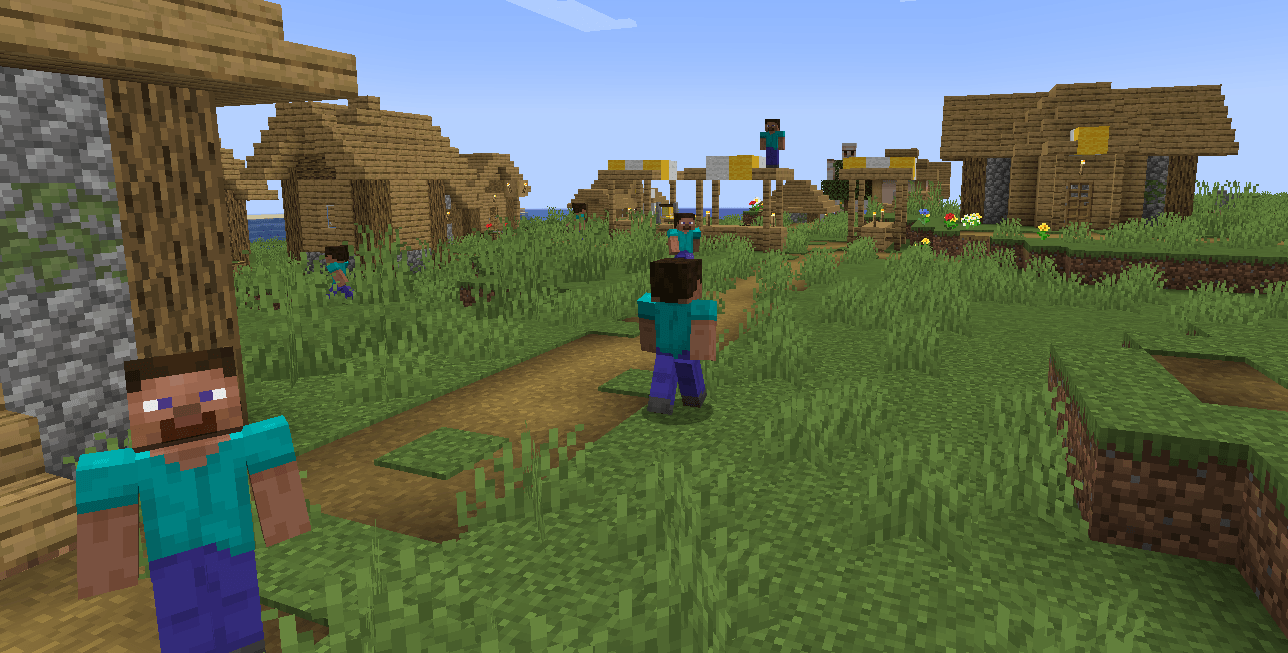 Workers in village you can find them in villages
 -
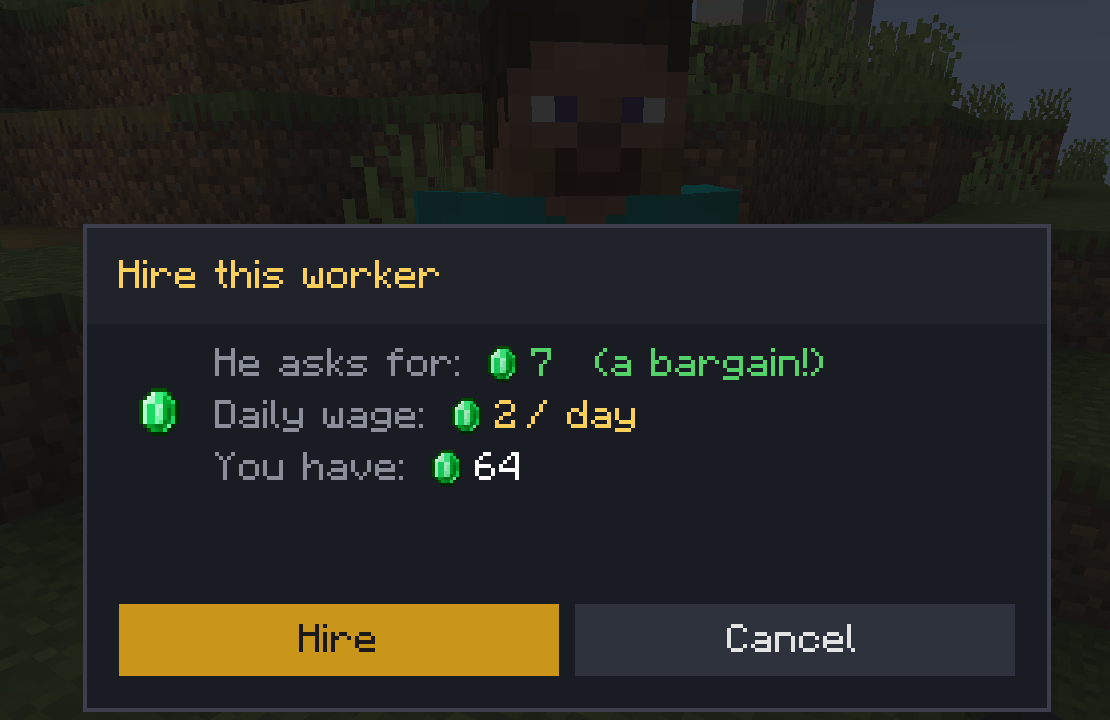 Hire screen
 -
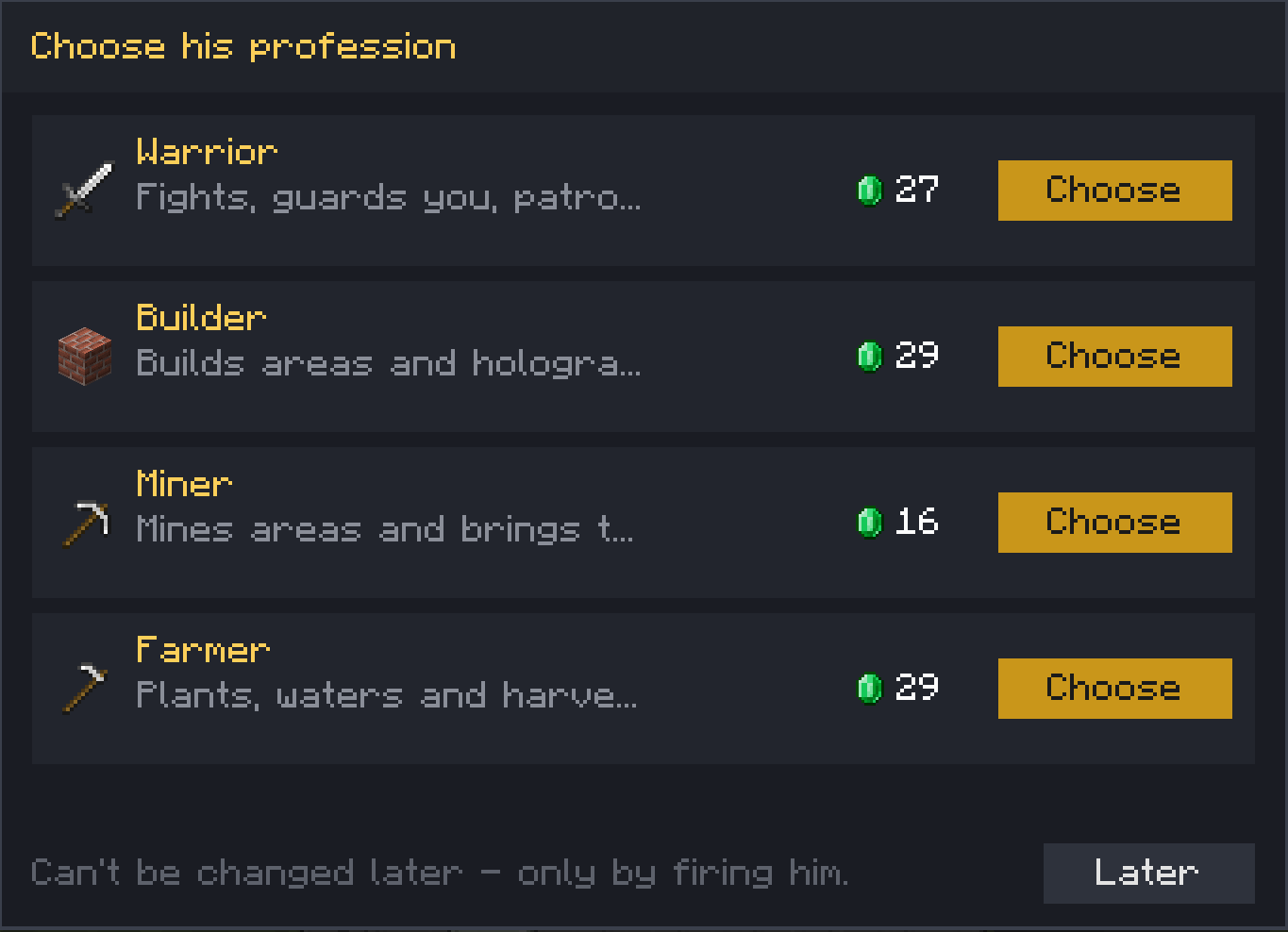 choose his profession the price for each profession changes for every other worker.
 -
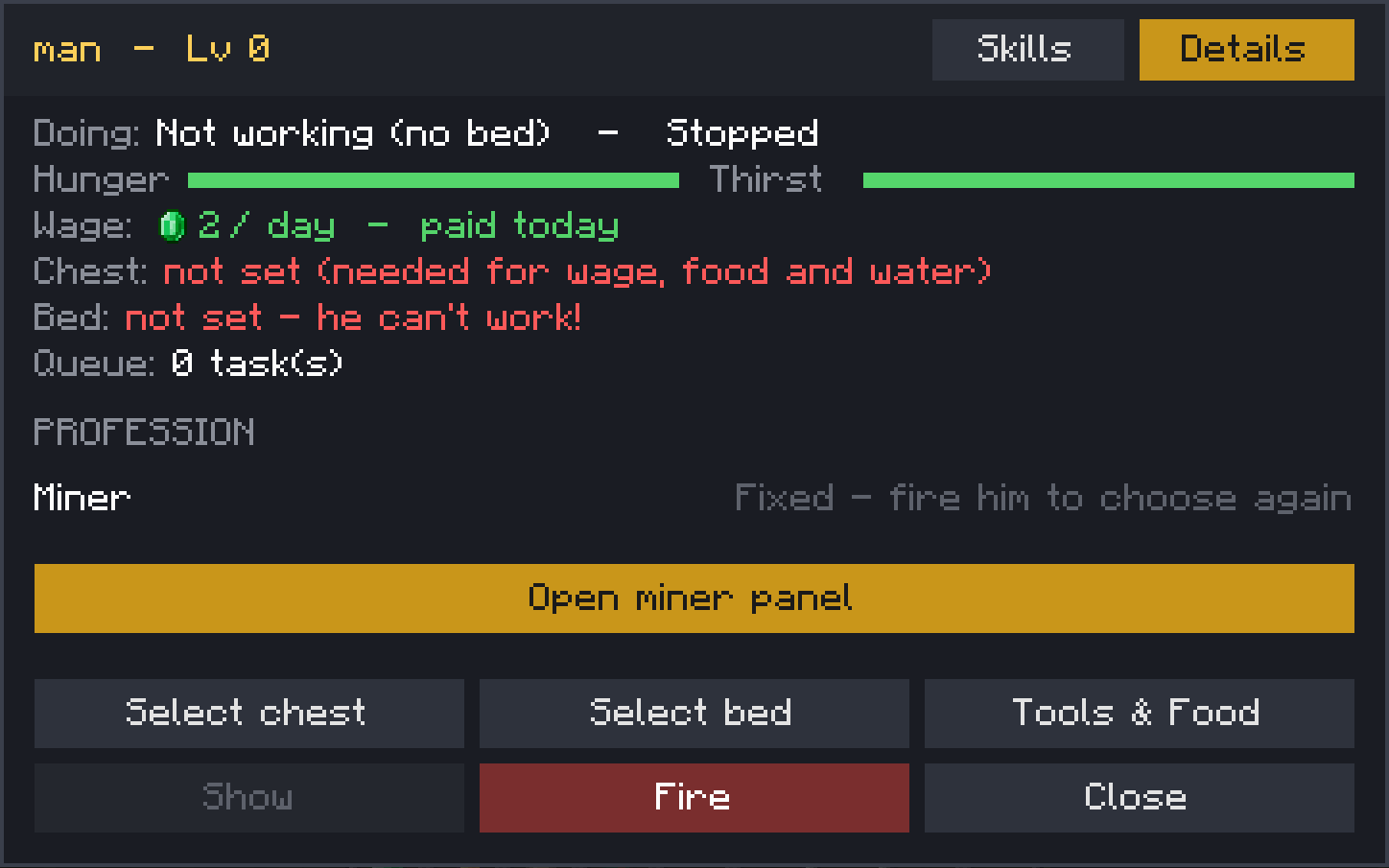 worker main menu
 -
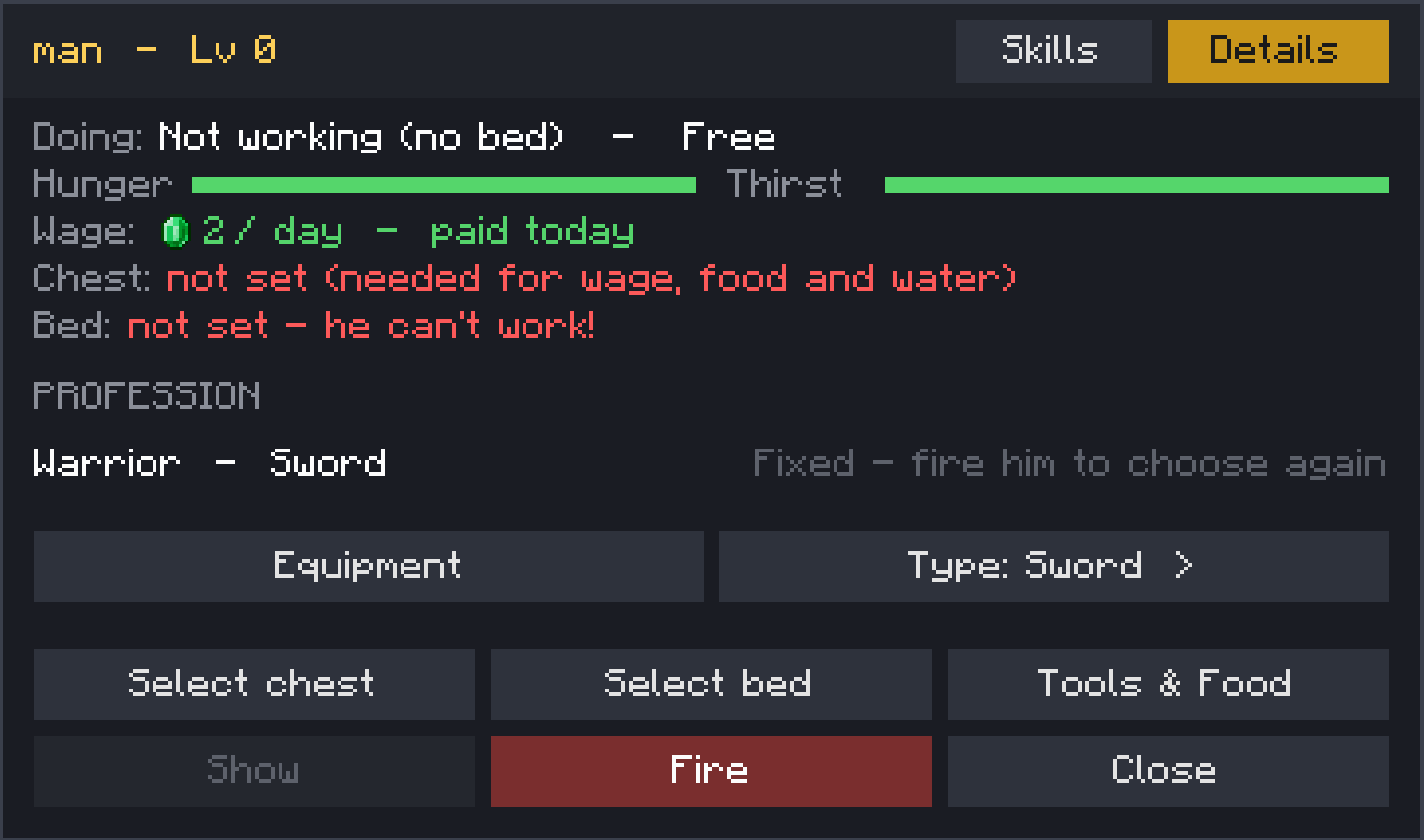 warrior main menu
 -
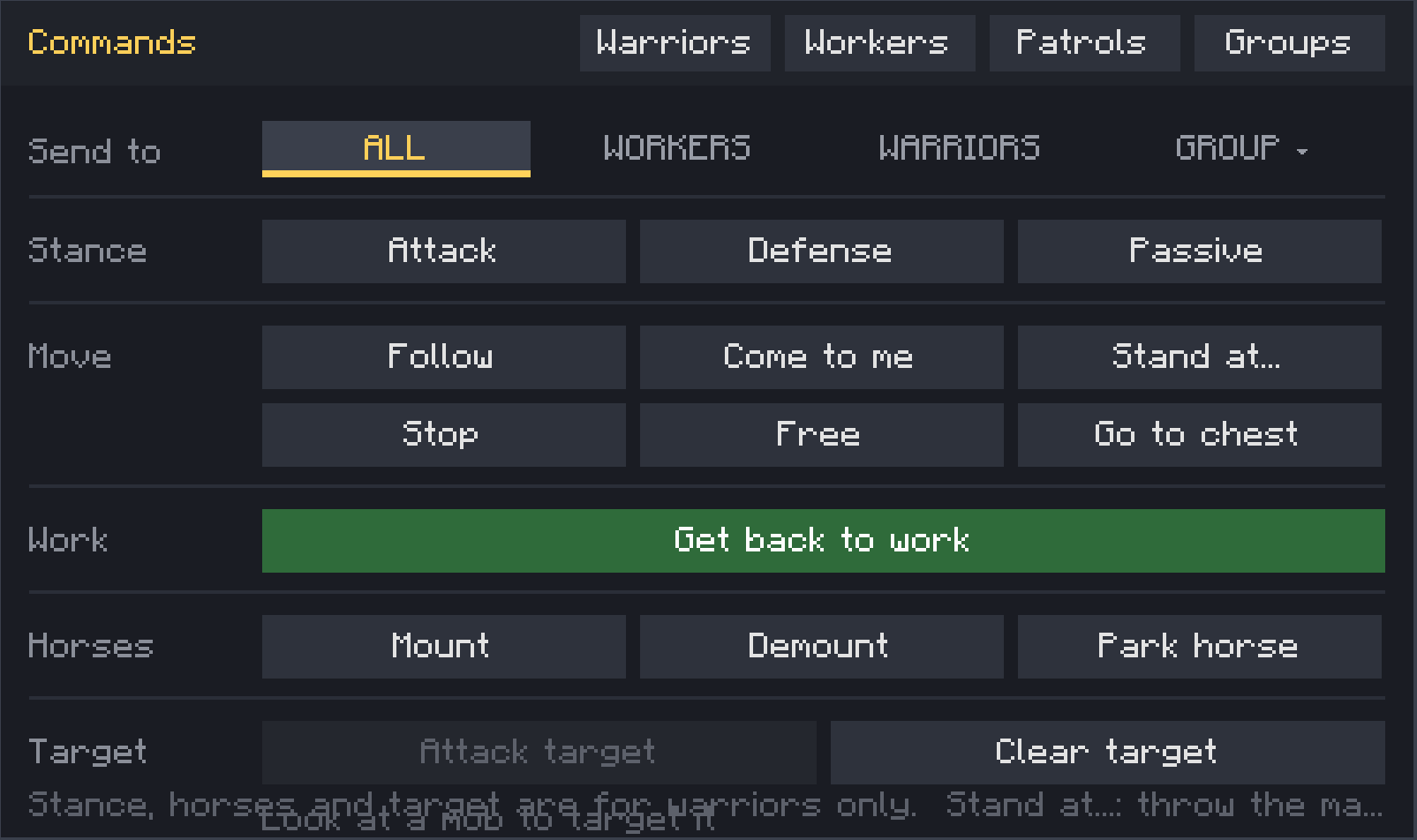 Command menu appears when you press "R"
Versions
Files
Relations
Project Relations
More like this
Similar Mods
Suggestions use data such as tags, dependencies, dependents, descriptions, titles, and more to rank how much they overlap with this mod.
On ModDex
Community snapshot
By the numbers
Statistics

Get it on
Available Platforms
On ModDex
Community snapshot
By the numbers
Statistics
Resources