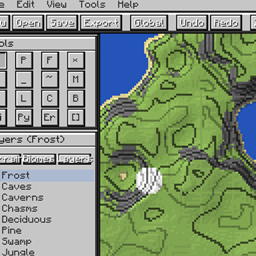
Community listing page, reviews here may not be monitored by the author.
World Painter

No reviews yet
In-game terrain editor for Minecraft inspired by WorldPainter. Features an interactive GUI, height sculpting, materials and biome painting, custom brushes, and undo history.
Community voices
Reviews
No reviews yet. Be the first to review this project!
Get it on
Available Platforms
About
Project Details
For authors
Embed Badge
If you're the author of this project, you can embed a live badge anywhere that supports HTML or Markdown. It updates automatically whenever ratings change.
Use HTML for any page that supports it, or Markdown for README files and Markdown-based descriptions.
Identifiers
Platform IDs
Resources
External Links
About
Description
WorldPainter (In-Game Terrain Editor)
An in-game world editing and terrain sculpting suite for Minecraft. It replicates the layout, tools, and workflows of the standalone WorldPainter application directly inside Minecraft through a dedicated interface.
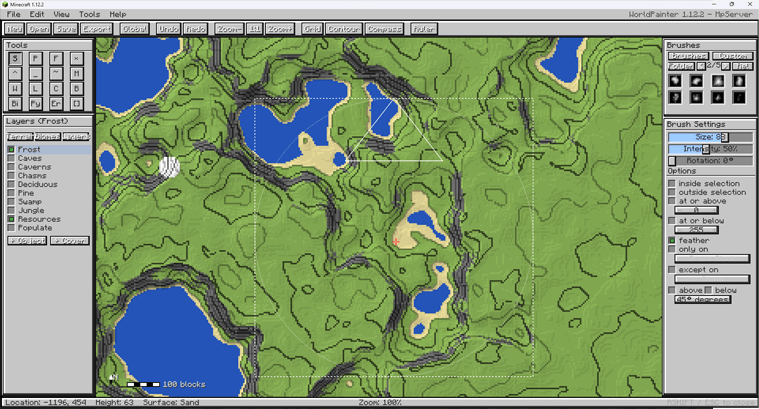
Getting Started & Controls
- Open / Close GUI:
Right Shift(configurable in Controls) - Pan Map: Click and drag with
Middle Mouse ButtonorRight Mouse Button - Zoom Map:
Ctrl+Mouse Wheel - Adjust Brush Size:
Mouse Wheel - Paint / Sculpt:
Left Mouse Button(apply / raise),Right Mouse Button(erase / lower)
Tools & Sculpting Suite
- Height (Raise / Lower): Raise terrain with left-click, lower with right-click.
- Flatten: Level terrain toward a target elevation (Modes: Normal, Raise Only, Lower Only).
- Smooth: Smooth elevation differences across terrain.
- Mountain: Sculpt steep peaks and ridges.
- Pyramid: Form sharp, geometric elevations.
- Erode: Apply erosion-style terrain smoothing.
- Spray Paint: Scatter materials, biomes, or layers using brush intensity.
- Pencil: Solid placement of materials and biomes.
- Fill (Bucket): Contiguous surface flood fill for blocks and biomes.
- Biome Painter: Paint biome IDs directly onto terrain columns.
- Water / Lava: Place surface water or lava bodies.
- Sponge: Remove water and lava within the brush radius.
- Flood Basin: Fill enclosed basins with water or lava up to a target level.
- Select: Create rectangular selections for filtering and global operations.
- Spawn Point: Set the world spawn coordinates.
Brushes & Filtering
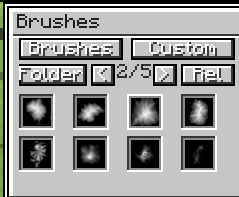
Brush Engine
- Built-in Brush Shapes: Circle, Dome, Cone, Plateau, Mountain, Noise, Square, Ring.
- Custom Bitmap Brushes: Load grayscale
.pngbrushes placed in.minecraft/worldpainter/brushes/. - Adjustable Parameters: Radius (Size), Intensity (0–100%), and Rotation angle.
Constraints & Mask Filters
- Height Constraints: Restrict application to
At or Above/At or Belowspecific Y-levels with optional edge feathering. - Slope Constraints: Limit application based on surface angle (
Slope Above/Slope Belowdegrees). - Block Masking: Restrict painting to
Only OnorExcept Onselected block types. - Selection Mask: Apply operations only
InsideorOutsidethe active selection.
Layers & Palettes
- Terrain Palette: Surface blocks (Grass, Dirt, Sand, Stone variants, Clay, Snow, Ice, etc.) with custom block picker support.
- Biome Palette: Standard Minecraft biomes.
- Built-in Layers:
- Frost: Places snow layers and freezes water.
- Caves / Caverns / Chasms: Subterranean cave carving.
- Resources: Places underground ore clusters.
- Tree Layers: Deciduous, Pine, Swamp, and Jungle tree placement.
- Custom Layers:
- Custom Objects: Spawns
.schematicstructures placed in.minecraft/worldpainter/schematics/. - Custom Ground Cover: Configurable block state and surface thickness.
- Custom Objects: Spawns
Generator, Heightmaps & History
- Procedural World Generation: Generate terrain using presets (Island, Hills, Alpine) with custom seed and size settings.
- Heightmap Import / Export: Import grayscale PNG images directly into world height, or export terrain to PNG heightmaps.
- Global Operations: Apply fill, raise/lower, biome changes, or layer applications across entire selections.
- Undo / Redo: Multi-step history system for terrain modifications.

Screenshots
Gallery
Versions
Files
Relations
Project Relations
More like this
Similar Mods
Suggestions use data such as tags, dependencies, dependents, descriptions, titles, and more to rank how much they overlap with this mod.
On ModDex
Community snapshot
By the numbers
Statistics
Want to reach Minecraft players?
We're looking for a server hosting partner to feature here and other parts of the site. Interested? Send us a message!
Get in touchGet it on
Available Platforms
On ModDex
Community snapshot
By the numbers
Statistics
Resources