
Community listing page, reviews may not be monitored by the author.
WorldManager


No reviews yet
Create and manage worlds in-game, through commands.

Community voices
Reviews
No reviews yet. Be the first to review this project!
Get it on
Available Platforms
Compatibility
Supported Environments
Runs entirely on the server. Also works in singleplayer.
About
Project Details
For authors
Embed Badge
If you're the author of this project, you can embed a live badge anywhere that supports HTML or Markdown. It updates automatically whenever ratings change.
Use HTML for any page that supports it, or Markdown for README files and Markdown-based descriptions.
Identifiers
Platform IDs
About
Description
[# WorldManager Create and manage worlds in-game, through commands.
Commands
The main command is /worldmanager. It has a shorter alias /wm.
/wmopens an overview gui of all custom worlds that have been created through this mod/wm delete <id>deletes the specified world, kicking all players that are currently in it/wm tp <id> [<targets>]teleports to the specified world to the players last location.
Create
/wm create <id> opens a gui where you can configure your world (dimension type, chunk generator and seed)
/wm create <id> <nbt> allows you to create a world without using the gui (advanced). {seed: 0L, generator: {biome: "minecraft:the_void", type: "fantasy:void"}, type: "minecraft:overworld"} could be used to create a void world.
Import
/wm create <id> <file> allows you to import a world from a zip or rar archive, or from a folder.
Spawn
/wm setspawn sets the world spawn of the current world to your position.
/wm spawn <id> [<targets>] teleports to the specified world spawn. If the spawn point is not set, it uses the vanilla spawn point logic.
The file / folder needs to contain a valid level.dat file.
This will import the overworld dimension of the given world.

Powered by fantasy <3]
WorldManager
Create and manage worlds in-game, through commands.
Commands
The main command is /worldmanager. It has a shorter alias /wm.
/wm listopens an overview gui of all custom worlds that have been created through this mod/wm delete <id>deletes the specified world, kicking all players that are currently in it/wm tp <id> [<targets>]teleports to the specified world to the players last location./wm seticon <id> [<icon>]sets the world icon to the specified item, or the item in your hand./wm manage [<id>]opens world management gui for the specified world, or the current world/wm setportal <portal_id> [<destination>]changes the portal destination of the specified portal in the current world
Create
/wm create <id> opens a gui where you can configure your world (dimension type, chunk generator and seed)
/wm create <id> <nbt> allows you to create a world without using the gui (advanced). {seed: 0L, generator: {biome: "minecraft:the_void", type: "fantasy:void"}, type: "minecraft:overworld"} could be used to create a void world.
Import
/wm create <id> <path> [--custom-config] allows you to import a world from a zip, rar or tar archive, or from a folder.
Export
/wm export [<id>] allows you to export the current world to an export.zip archive.
This zip file will contain the specified world (or all selected worlds if the id is not specified), along with an
appropriate level.dat file and a datapack to correctly load the worlds (e.g., in singleplayer).
The file / folder needs to contain a valid level.dat file.
This will import the overworld dimension of the given world.
Multiverse
Multiverse doesn't correctly specify the world configuration. WorldManager won't be able to infer configurations like
world height or chunk generation. You should append --custom-config when importing to manually configure your world
to match the original configuration as close as possible.
Spawn
/wm setspawn sets the world spawn of the current world to your position.
/wm spawn <id> [<targets>] teleports to the specified world spawn. If the spawn point is not set, it uses the vanilla spawn point logic.
Powered by fantasy <3
Screenshots
Gallery
-
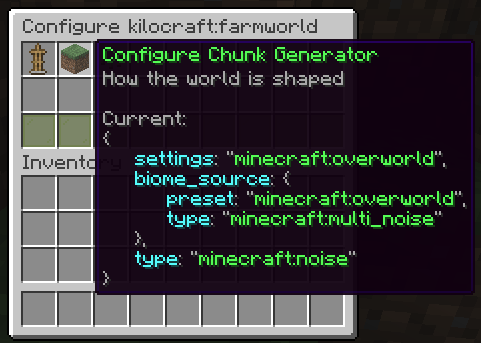 Configuration gui
 -
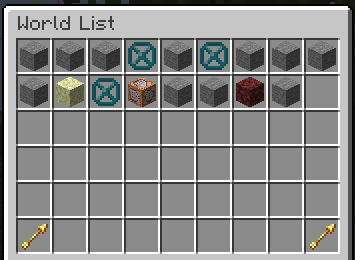 World overview
Versions
Files
Relations
Project Relations
More like this
Similar Mods
Suggestions use data such as tags, dependencies, dependents, descriptions, titles, and more to rank how much they overlap with this mod.
On ModDex
Community snapshot
By the numbers
Statistics

Get it on
Available Platforms
On ModDex
Community snapshot
By the numbers