
wynnmenu
No reviews yet
A radial menu mod for wynncraft server inspired by minemenu
Includes a large focus on traversing worlds with enhanced world generation, structures, dungeons, and more for players to find unique loot.
Fabric is a mod loader for versions 1.14+ of Minecraft, particularly popular for client side and optimization mods.
Community voices
Reviews
Click once to include, again to exclude, again to clear
No reviews yet. Be the first to review this project!
Get it on
Available Platforms
 Modrinth
Compatibility
Supported Environments
About
Project Details
For authors
Embed Badge
If you're the author of this project, you can embed a live badge anywhere that supports HTML or Markdown. It updates automatically whenever ratings change.
Use HTML for any page that supports it, or Markdown for README files and Markdown-based descriptions.
Identifiers
Platform IDs
Resources
External Links
About
Description
⚙️ WynnMenu
A highly customizable, fast, and interactive radial menu mod designed for Wynncraft (but works anywhere)!
WynnMenu is a client-side Fabric mod that adds a fully customizable radial menu to your game. Originally designed to make navigating Wynncraft's features smoother, it allows you to bind commands, simulate key presses, and navigate nested sub-menus—all through an intuitive, gorgeous radial interface.
✨ Features
- 🎯 Fully Customizable Slots: Bind any command, macro, or keybind to the menu slots.
- 📂 Infinite Sub-menus: Create menus inside menus! Perfect for organizing emotes, classes, or quick-chats.
- 🎨 Beautiful Default Assets: Comes pre-packaged with a custom wheel design and 21 built-in icons tailored for Wynncraft (Classes, Daily, Guild, Party, Shop, etc.).
- 🖼️ Custom Textures:
- Want your own icons? Just drop
.pngfiles intoconfig/wynnmenu/assets/icons/. - Want a different wheel? Place your custom
wheel.pnginconfig/wynnmenu/assets/.
- ⌨️ Advanced Keybinds: Supports both "Press" (one-shot click) and "Hold" (toggles a key being held down continuously) modes.
- ⚡ Dynamic Variables: Make your commands smart! Use these variables in your slot commands, and they will automatically update when clicked:
[player]- Targets the name of the nearest player to you.[position]- Grabs the X Y Z coordinates of the block you are currently looking at.[clipboard]- Pastes the current text copied to your computer's clipboard.[random]- Generates a random number between 0 and 9999.
- 🛠️ In-Game Editor: No need to mess with JSON files (unless you want to). Simply press
Alt + Clickon any slot while the menu is open to open the visual editor! - 🌈 Customizable Highlight Color: Easily change the hover highlight color via the config file.
- Want your own icons? Just drop
🚀 How to Use
- Press
V(default keybind, can be changed in Minecraft controls) to open the Radial Menu. - Hold
Altand Click on any slot to open the Editor. - Choose an Action:
- Command: Type any command (e.g.,
/class,/party invite [player]). - Keybind: Select a keybind ID to trigger or hold.
- Submenu: Enter the ID of the menu you want to link to.
- Command: Type any command (e.g.,
- Select an icon from the scrolling list, set a display name, and you're good to go!
📁 File Structure & Config
The mod automatically generates its configuration files upon first launch:
config/wynnmenu/menus.json- Where all your menu data is saved. You can also edit the"highlightColor": "#B8860B"value at the bottom of this file to change the slot hover color!config/wynnmenu/assets/wheel.png- Replace this to change the background wheel.config/wynnmenu/assets/icons/- Add your own.pngimages here to use them in the in-game editor. (The mod automatically extracts the 21 default icons here so you can use them immediately).
⚡ Performance Optimized
WynnMenu is built with performance in mind. Animations are smooth, and the rendering logic is heavily optimized to prevent micro-stutters, ensuring zero impact on your FPS even during intense gameplay.
🤝 Credits
Artist: randomcat7outof32 (discord)
Screenshots
Gallery
-
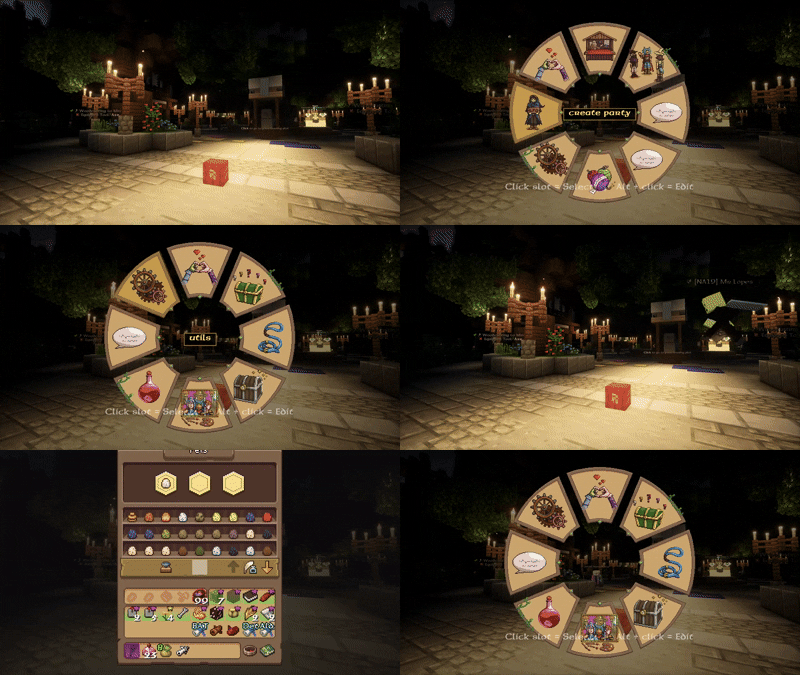 How the mod works
Versions
Files
Relations
Project Relations
More like this
Similar Mods
Suggestions use data such as tags, dependencies, dependents, descriptions, titles, and more to rank how much they overlap with this mod.
On ModDex
Community snapshot
By the numbers
Statistics

Want to reach Minecraft players?
We're looking for a server hosting partner to feature here and other parts of the site. Interested? Send us a message!
Get in touchGet it on
Available Platforms
On ModDex
Community snapshot
By the numbers
Statistics
Resources