
XpOrbs HUD
No reviews yet
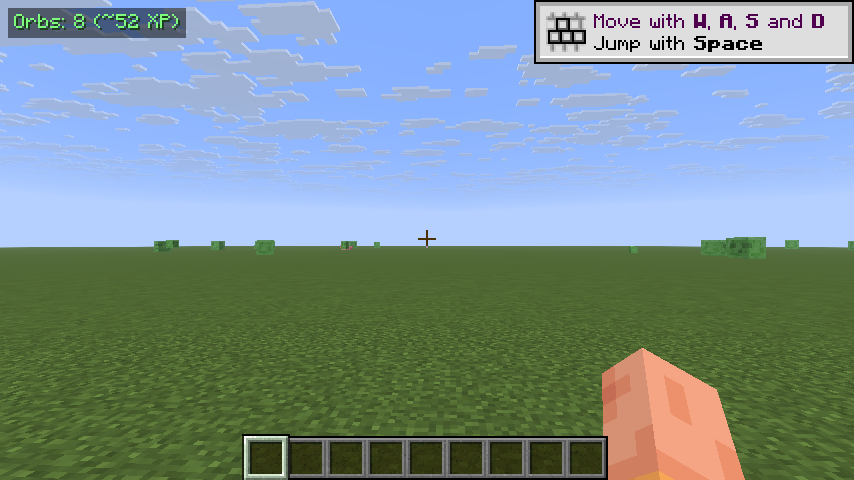
Tiny top-left HUD that counts experience orbs within 16 blocks and their total XP value, so you never miss orbs that scattered out of view after a fight. Toggle with X.
Fabric is a mod loader for versions 1.14+ of Minecraft, particularly popular for client side and optimization mods.
Community voices
Reviews
Click once to include, again to exclude, again to clear
No reviews yet. Be the first to review this project!
Get it on
Available Platforms
 Modrinth
Compatibility
Supported Environments
About
Project Details
For authors
Embed Badge
If you're the author of this project, you can embed a live badge anywhere that supports HTML or Markdown. It updates automatically whenever ratings change.
Use HTML for any page that supports it, or Markdown for README files and Markdown-based descriptions.
Identifiers
Platform IDs
Resources
External Links
About
Description
XpOrbs HUD is a one-line indicator that tells you whether there are still experience orbs in the area worth picking up. Vanilla Minecraft only shows orbs visually — and they often fly off behind blocks, drop down a cliff, or scatter into tall grass after a mob fight. By the time the XP-bar flash settles down you have no idea whether there's still anything left to grab. XpOrbs answers that at a glance.
What it shows
A small badge in the top-left corner:
Orbs: 8 (~52 XP)
- Orbs — how many
ExperienceOrbEntityentities are alive within 16 blocks of you. - ~XP — the sum of their values (what you would gain if you collected them all).
When there are no orbs nearby, the badge dims to a muted Orbs: 0 so you can tell the mod is still active without it shouting.
How it works
Every 5 client ticks (≈4 times per second) the mod queries the client world for nearby ExperienceOrbEntity instances inside a 16-block cube around the player, then filters by squared-distance so the radius is a true sphere. Each orb's value is read from getValue() and summed. The count and total are cached between scans so the HUD render itself is essentially free.
Controls
- X — toggle the HUD on / off. A chat message confirms the new state.
The key uses raw GLFW polling so it behaves identically on every supported Minecraft version, no rebind UI required.
Compatibility
Works on Minecraft 1.21.8, 1.21.9, 1.21.10, and 1.21.11 (Fabric Loader 0.16+). One JAR covers all four versions — install via Fabric and drop into your mods/ folder.
- Pure client-side: install on the client only, works on any server, no game-state changes.
- Hides automatically when you press F1 to hide the rest of the HUD, and while any GUI screen is open.
- Counts only orbs you can already reach in the loaded world chunks; orbs in unloaded chunks aren't included.
Why
XP orbs are easy to miss. After clearing a mob spawner room, killing a few zombies near a ravine, or breaking a vein of ore, orbs scatter and float around for a couple of minutes. XpOrbs HUD lets you know whether there's still a meaningful XP haul waiting nearby — without doing a slow lap of the room or hunting through tall grass.
Screenshots
Gallery
Versions
Files
Relations
Project Relations
More like this
Similar Mods
Suggestions use data such as tags, dependencies, dependents, descriptions, titles, and more to rank how much they overlap with this mod.
On ModDex
Community snapshot
By the numbers
Statistics

Want to reach Minecraft players?
We're looking for a server hosting partner to feature here and other parts of the site. Interested? Send us a message!
Get in touchGet it on
Available Platforms
On ModDex
Community snapshot
By the numbers
Statistics
Resources