
Community listing page, reviews here may not be monitored by the author.
Your PC Mine

No reviews yet
A toolkit for ARG creators and immersive multiplayer experiences — enabling scripted effects like fake errors, window shaking, visual overlays, browser actions, and more. All triggered through simple commands for use in private, trusted
Community voices
Reviews
No reviews yet. Be the first to review this project!
Get it on
Available Platforms
Compatibility
Supported Environments
Must be installed on both the client and the server.
About
Project Details
For authors
Embed Badge
If you're the author of this project, you can embed a live badge anywhere that supports HTML or Markdown. It updates automatically whenever ratings change.
Use HTML for any page that supports it, or Markdown for README files and Markdown-based descriptions.
Identifiers
Platform IDs
About
Description
YPM — Your PC Mine
A Fabric mod that lets you mess with your friends directly from a Minecraft server. Built for ARGs, horror maps, or just chaotic fun — you type a command, and something happens on their screen. Or their game. Or their PC.
⚠️ Must be installed on both server and client. Players without the mod will be kicked on join.
✨ What you can do
/ypm error <player> "Title" "Text" [freeze]
Pops a fake Windows error dialog on their screen. Add a freeze time to lock up their game first, then show it. Use | for line breaks.
/ypm errorspam <player> <count> "Title" "Text" [--random] [--minimize]
Floods their screen with fake error dialogs — up to 100 at once. Flags:
--random— randomizes dialog positions across the screen--minimize— minimizes Minecraft before spawning the dialogs
/ypm toast <player> "Title" "Text" [icon] [durationMs]
Shows a real Windows system notification (toast) in the bottom-right corner. Icon options: Info (default), Warning, Error, None. Duration in milliseconds (1000–30000, default 5000).
/ypm msgbox <player> "Title" "Text" [buttons] [icon]
Opens a real Windows message box dialog. Button sets: OK (default), OKCancel, YesNo, YesNoCancel, RetryCancel, AbortRetryIgnore. Icons: Info (default), Warning, Error, Question, None.
/ypm freeze <player> <time>
Freezes their game completely for a set time (e.g. 10s, 2m). Nothing works — no clicking, no moving, nothing.
/ypm windowshake <player> <time> <strength 1-10> [--noise] [--fullwindowed] [--restore]
Shakes their Minecraft window. Strength from 1 to 10. Optional flags:
--noise— random jerky movement instead of smooth waves--fullwindowed— stretches to fullscreen before shaking--restore— puts the window back where it was after
/ypm colorbars <player> <time> [type] [--tone] [--label <corner> "text"]
Covers their screen with broadcast-style color bars. Types: smpte (default), hd, ebu, pluge, mono, rgb. Flags:
--tone— plays a 1kHz test tone for the duration--label <corner> "text"— shows text in a corner (tl,tr,bl,br); supports&color codes
/ypm invert <player> <time>
Inverts all colors on their screen for the given time (e.g. 5s, 1m).
/ypm syssound <player> <sound>
Plays a Windows system sound on their PC with no visual. Options: Hand, Asterisk, Beep, Exclamation, Question.
/ypm overlaytext <player> <time> <size 1-5|rdm> <scaleX|rdm> <scaleY|rdm> <color> "text" [--random] [--sound] [--mctext]
Renders text directly on their screen, over the game. Size from 1 (tiny) to 5 (huge), or rdm for random. Scale X/Y control stretch — rdm randomly squeezes one axis and stretches the other. Flags:
--random— places the text at a random position on screen--sound— plays a low tone when the text appears--mctext— uses the vanilla Minecraft font instead of the mod's font Supports&color codes (&4,&c, etc.) and formatting codes (&lbold,&oitalic,&nunderline,&mstrikethrough,&kobfuscated,&rreset) anywhere in the text. Use|for line breaks.
/ypm overlayspam <player> <count> <time> <size> <scaleX> <scaleY> <color> "text" [--random] [--sound]
Sends the overlay text repeatedly — <count> times with 100ms between each flash.
/ypm console <player> <time> <color> "text" [--screamer [<vol> [<seconds>]]] [--mctext]
Blacks out their entire screen and types the text line-by-line like a terminal. Lines appear one at a time, looping until time runs out. Use | to separate lines. Flags:
--screamer— plays a scream sound when it appears. Optional:<vol>(0.0–1.0) and<seconds>for how long the sound lasts--mctext— uses vanilla Minecraft font Supports&color and formatting codes.
/ypm screamer <player> [<volume>] [<duration>]
Plays a raw scream sound directly on their client with no visual. Volume 0.0–1.0, duration in s/m format.
/ypm web <player> <url>
Opens a URL in their browser. While they're playing.
/ypm txt <player> "filename" "text"
Creates and opens a .txt file in Notepad with whatever you want it to say. Use | for line breaks.
/ypm minimize <player>
Minimizes their Minecraft window. Poof.
/ypm shutdown <player>
Shuts down their PC.
/ypm reboot <player>
Reboots their PC.
/ypm chat <player> "text" [--send] [--perspective]
Opens their chat and types text as if it's them. Flags:
--send— sends the message automatically--perspective— switches their camera view while typing
/ypm perspective <player>
Switches their camera between first and third person.
/ypm disclaimer <player>
Shows the YPM disclaimer screen to the player.
🔁 Interactive overlay — /ypmutil
/ypmutil overlaytext <overlay_to> <time> <size> <scaleX> <scaleY> <color> [chat_from] [--random] [--sound] [--mctext]
Starts an interactive overlay session. Whatever the designated player (chat_from, or the command executor by default) types in chat gets sent live as overlay text to overlay_to — instead of being posted in chat. Supports player names, comma-separated lists, or r<N> for radius (e.g. r20 = all players within 20 blocks).
Useful for ARGs where a "system" character types messages that appear directly on someone's screen in real time.
/ypmutil stop [<player>]
Ends the active overlay session. Without an argument, stops your own session.
🛡️ Player protection — /ypmconfig
Players can restrict what the operator is allowed to do on their machine:
/ypmconfig canopenweb <true|false>
Block the operator from opening URLs in the browser. When blocked, a fake browser window appears inside the game instead.
/ypmconfig canshutdown <true|false>
Block shutdown and reboot commands. When blocked, a fake shutdown/reboot screen appears inside the game — the PC is not touched.
/ypmconfig enablesafemode <true|false>
Enable Safe Mode — the most complete protection. All out-of-game actions (browser, Notepad, shutdown) are fully simulated inside Minecraft. Nothing reaches the real OS.
Running /ypmconfig with no arguments shows your current settings.
📡 Operator feedback
When you run any /ypm command, the server tells you the mode each player is in:
[YPM] Error sent to 3 player(s) | Normal: 2, SafeMode: 1
So if you're running an ARG with a group, you always know who gets the real effect and who is in safe mode.
🎭 Made for ARGs, horror maps, and pranks between friends on private servers. Please don't be evil.
Screenshots
Gallery
-
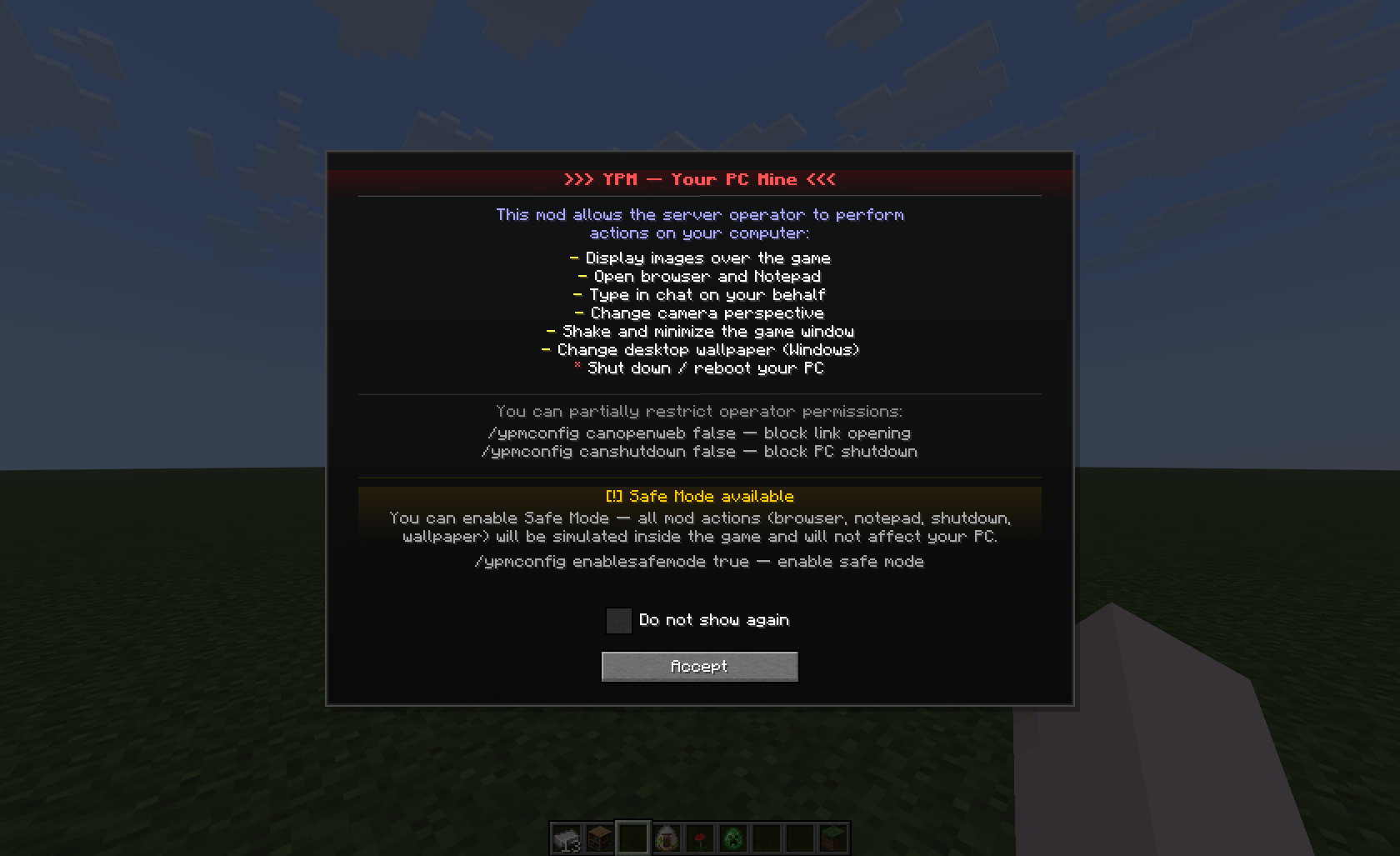 Disclamer
Versions
Files
Relations
Project Relations
More like this
Similar Mods
Suggestions use data such as tags, dependencies, dependents, descriptions, titles, and more to rank how much they overlap with this mod.
On ModDex
Community snapshot
By the numbers
Statistics

Want to reach Minecraft players?
We're looking for a server hosting partner to feature here and other parts of the site. Interested? Send us a message!
Get in touchGet it on
Available Platforms
On ModDex
Community snapshot
By the numbers