
Yurushi
No reviews yet
Discord Integration Whitelist Mod for Fabric. Simplify your server access management.
Fabric is a mod loader for versions 1.14+ of Minecraft, particularly popular for client side and optimization mods.
Community voices
Reviews
Click once to include, again to exclude, again to clear
No reviews yet. Be the first to review this project!
Get it on
Available Platforms
 Modrinth
Compatibility
Supported Environments
About
Project Details
For authors
Embed Badge
If you're the author of this project, you can embed a live badge anywhere that supports HTML or Markdown. It updates automatically whenever ratings change.
Use HTML for any page that supports it, or Markdown for README files and Markdown-based descriptions.
Identifiers
Platform IDs
Resources
External Links
About
Description
Yurushi
Discord Integration Whitelist Mod for Fabric. Simplify your server access management.
Features
- Discord Integration: Players request whitelist access via a Discord form (Modal).
- One-Click Approval: Admins can approve or deny requests directly from Discord with a single button click.
- Automated Communication:
- Sends a DM to the player upon approval or denial.
- Updates the original request message to reflect the decision.
- Customizable Messages: Fully configurable text and embed styles via
messages.toml. - Role-Based Access: Restrict whitelist management to specific Discord roles using
whitelistRole. - Debug Tools: Visualize your embed configurations with
/debug embeds.
Config
Configuration files are located in config/Yurushi/.
Yurushi.toml
Main plugin configuration.
| Config | Type | Description |
|---|---|---|
botToken |
String | Your Discord Bot Token |
adminChannelId |
String | ID of the Discord text channel where requests are sent |
whitelistRole |
List | List of Role IDs allowed to approve/deny requests |
Yurushi.toml
botToken = "YOUR_BOT_TOKEN_HERE"
adminChannelId = "123456789012345678"
whitelistRole = ["987654321098765432", "112233445566778899"]
messages.toml
Customize all bot messages, embeds, and button labels. Supports placeholders like {minecraft_username}, {reason}, etc. (Might not available in all messages).
messages.toml
[error]
no_permission = "❌ You don't have permission to perform this action."
server_unavailable = "❌ Server is not available. Please try again later."
unexpected = "❌ An unexpected error occurred."
admin_channel_not_found = "An error occurred. Please contact an administrator."

[button]
[button.approve]
label = "Approve"
success = "✅ Whitelist request for `{minecraft_username}` has been approved!\n**UUID:** `{uuid}`"
already_whitelisted = "⚠️ `{minecraft_username}` is already whitelisted on the server."
player_not_found = "❌ Player `{minecraft_username}` was not found on Mojang's servers.\nThis username might be incorrect or doesn't exist."
failed = "❌ Failed to whitelist `{minecraft_username}`.\nError: {error}"

[button.deny]
label = "Deny"
success = "Whitelist request for `{minecraft_username}` has been denied.\n**Reason:** {reason}"

[embed]
[embed.request]
title = "🕚 Whitelist Request"
footer = "User ID: {user_id}"
[embed.request.fields]
discord_user = "Discord User"
minecraft_username = "Minecraft Username"
description = "Description"
description_empty = "*No description provided*"

[embed.approved]
title = "✅ Whitelist Request - Approved"
footer = "You can now join the server!"
[embed.approved.fields]
approved_by = "Approved By"

[embed.already_whitelisted]
title = "⚠️ Whitelist Request - Already Whitelisted"
footer = "This player is already whitelisted."

[embed.denied]
title = "❌ Whitelist Request - Denied"
footer = "Please contact an administrator if you have questions."
[embed.denied.fields]
reason = "Reason"
denied_by = "Denied By"

[dm]
[dm.approved]
title = "✅ Whitelist Request Approved"
description = "Congratulations! Your whitelist request has been approved."

[dm.denied]
title = "❌ Whitelist Request Denied"
description = "Unfortunately, your whitelist request has been denied."

[modal]
[modal.register]
title = "Whitelist Registration"
success = "Your whitelist request has been submitted!"
[modal.register.inputs]
username_label = "Minecraft Username"
username_placeholder = "Enter your Minecraft username"
description_label = "Description (Optional)"
description_placeholder = "Tell us a bit about yourself or why you want to join..."

[modal.deny]
title = "Deny Whitelist Request"
[modal.deny.inputs]
reason_label = "Denial Reason"
reason_placeholder = "Provide a reason for denying the whitelist request..."
reason_empty = "*No reason provided*"
How to Use
Prerequisites
- A Minecraft server running Fabric with the Yurushi mod installed.
- A Discord Bot with the following:
- Bot Token (from Discord Developer Portal)
Server Members Intentenabled (Privileged Gateway Intents)- Invited to your Discord server with
applications.commandsandbotscopes
Installation
- Download the mod JAR from Releases.
- Place it in your server's
mods/folder. - Start the server once to generate default config files in
config/Yurushi/. - Stop the server and configure
Yurushi.tomlwith your bot token and channel settings. - Restart the server — the Discord bot will come online automatically.
Discord Bot Setup
- Go to Discord Developer Portal and create a new application.
- Navigate to Bot → Reset Token to get your bot token.
- Enable Server Members Intent under Privileged Gateway Intents.
- Go to OAuth2 → URL Generator, select
botandAdministratorscopes. - Copy the generated URL and invite the bot to your server.
- Paste the bot token in
Yurushi.toml(botToken).
Player Workflow
Players can request whitelist access directly from Discord:
- Use the
/registerslash command in any channel the bot can see. - A modal will appear asking for:
- Minecraft Username (required)
- Description (optional) – introduce yourself or explain why you want to join.
- After submitting, a confirmation message appears, and the request is sent to the admin channel.
Admin Workflow
Admins with the configured whitelistRole can manage requests:
- Whitelist requests appear in the configured
adminChannelIdwith Approve and Deny buttons. - Click Approve to:
- Add the player to the Minecraft server whitelist.
- Send a DM to the player notifying them of approval.
- Update the request embed to show "Approved" status.
- Click Deny to:
- Open a modal to enter a denial reason.
- Send a DM to the player with the reason.
- Update the request embed to show "Denied" status.
Commands
Discord Slash Commands
| Command | Description |
|---|---|
/register |
Opens the whitelist registration form for players |
/debug embeds |
Preview all configured embed styles (Admin only) |
/ping |
Check if the bot is online |
Minecraft Commands
| Command | Permission | Description |
|---|---|---|
/yurushi reload |
yurushi.command.reload (OP Level 3+) |
Reload configuration files without restarting the server |
Bug Reports & Suggestions
If you encounter any bugs or have suggestions for improvements, please open an issue on the GitHub Issues page.
Screenshots
Gallery
-
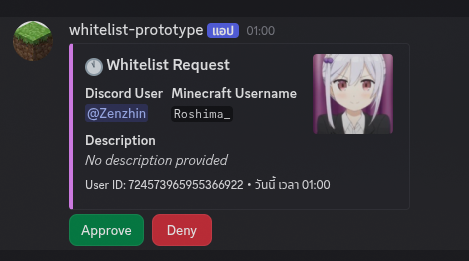 Whitelist request
Versions
Files
Relations
Project Relations
More like this
Similar Mods
Suggestions use data such as tags, dependencies, dependents, descriptions, titles, and more to rank how much they overlap with this mod.
On ModDex
Community snapshot
By the numbers
Statistics

Want to reach Minecraft players?
We're looking for a server hosting partner to feature here and other parts of the site. Interested? Send us a message!
Get in touchGet it on
Available Platforms
On ModDex
Community snapshot
By the numbers
Statistics
Resources