
Community listing page, reviews here may not be monitored by the author.
ZFD Utilities

No reviews yet
A client-side Minecraft control and diagnostics toolkit with a customizable HUD, zoom, pov freelook, entity hiding, ping deep-dives, fly speed, play-screen folders for organization, and video-production visual cleanup.
Community voices
Reviews
No reviews yet. Be the first to review this project!
Get it on
Available Platforms
Compatibility
Supported Environments
Runs entirely on the client. Works on vanilla servers.
About
Project Details
For authors
Embed Badge
If you're the author of this project, you can embed a live badge anywhere that supports HTML or Markdown. It updates automatically whenever ratings change.
Use HTML for any page that supports it, or Markdown for README files and Markdown-based descriptions.
Identifiers
Platform IDs
Resources
External Links
About
Description
ZFD's Utilities
ZFD's Utilities is a customizable client-side toolkit for players who want more control, cleaner visuals, and better diagnostics without stacking a bunch of separate small utility mods.
Use it for everyday gameplay, content creation, creative building, server testing, and troubleshooting ping, frame spikes, or mouse stutter. Most tools can be adjusted in the config screen, controlled with commands, or assigned to your own keybinds.
Highlights
Custom HUD Tools
- Compact Simple HUD overlay
- Coordinates, dimension, facing direction, FPS, ping, and health
- Equipment display for armor, held items, offhand, durability, and stack counts
- Custom text color, background, scale, alignment, and screen position
- Quick toggle support
Ping and Network Visibility
- Colored ping display in the HUD and player list
- Ping shown beside names, near the vanilla ping icon, or both
- Optional ping on in-world player nametags
- Ping category summaries for quickly seeing how a server is performing
/pingcountsfor a quick ping breakdown
Camera and Visual Control
- Smooth zoom with configurable strength and timing
- Optional scroll zoom while holding the zoom key
- Perspective freelook for third-person camera control without rotating your player
- Optional own-nametag display in perspective views
- Client-side visual time override
- Client-side clear weather override for hiding rain and thunder
- First-person shield height adjustment
Entity Hider
- Hide other players client-side for cleaner visuals
- Useful for recording, screenshots, crowded lobbies, and focused gameplay
- Allowlist players by target, name, or UUID
- Optional radius mode so nearby players can be hidden only within a chosen range
Performance and Diagnostics
- Frametime graph overlay
- Frametime spike logging
- Mouse stutter diagnostics
- PC specs logging helper
- Configurable frame spike threshold
- Logs are written to the normal Minecraft
logsfolder
Gameplay and Organization
- Keep crouch active through inventories and menus
- Creative-only fly speed multiplier
- Optional singleplayer and multiplayer play-screen folders
- Folder support is opt-in so every player can build their own layout
Built to Be Customized
ZFD's Utilities is not meant to force one setup on everyone. Fresh installs use clean defaults, advanced config sections start collapsed, and extra toggle-style keybinds are available but left unbound so you can assign the controls you actually want.
Default bound keys include:
H- Toggle Entity HiderGrave / Backtick- Toggle Simple HUDZ- ZoomLeft Alt- Hold Perspective Freelook
Other tools can be bound manually in Minecraft's Controls menu.
Useful For
- Video production and cleaner recordings
- Screenshots and cinematic shots
- Creative building and testing
- Server testing and ping checks
- Diagnosing frame pacing or mouse stutter
- Everyday quality-of-life gameplay
- Organizing worlds and servers without a large mod setup
Creator Note
ZFD's Utilities is also used in ZFDfilmsMC videos: https://youtube.com/@zfdfilmsmc
Notes
- This is a client-side Fabric mod.
- Server install is not required for the main utilities.
- Visual time, clear weather, and entity hiding only affect your local client.
- Creative fly speed only applies in creative mode/worlds.
- Fabric API is required.
- Mod Menu and Cloth Config are recommended for the best config experience.
License and Modpacks
ZFD's Utilities uses a custom permission license. You may use it for personal gameplay, content creation, recording, video production, screenshots, testing, and diagnostics.
Modpacks may include the official, unmodified mod file if they credit ZFDfilms and link back to this Modrinth project page. Standalone reuploads, selling the mod, publishing modified versions, or claiming ownership are not allowed without explicit permission.
Screenshots
Gallery
-
 Frame and Mouse Diagnostics Use frametime graphs, spike logging, mouse stutter diagnostics, and PC specs logging to help track down performance issues.
 -
 ZFD Utilities A clean overview banner for ZFD's Utilities, highlighting HUD tools, zoom, ping visibility, diagnostics, visual controls, freelook, performance tracking, and player customization.
 -
 Custom Simple HUD Show useful gameplay info like coordinates, FPS, ping, health, direction, dimension, and equipment with adjustable colors, scale, alignment, and position.
 -
 Zoom, Freelook, and Cleaner Visuals Smooth zoom, scroll zoom, perspective freelook, visual time, clear weather, and shield positioning give players more control over how the game looks and feels.
 -
 Folders Optional folders for oganizing and cleaning up your screen.
 -
 Quality-of-Life Gameplay Tools Includes entity hider, keep-crouch, creative fly speed, optional world/server folders, and other small controls designed to fit each player's setup.
 -
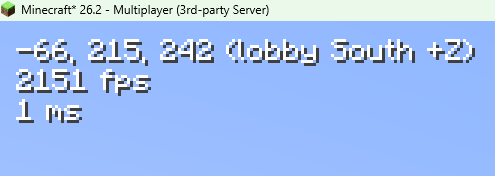 Hud Example Clean customizable HUD (minimal impact on performance)
 -
 Customizable Utility Toolkit ZFD's Utilities is built around player choice, with clean categories for HUD tools, camera controls, gameplay options, and diagnostics.
Versions
Files
Relations
Project Relations
More like this
Similar Mods
Suggestions use data such as tags, dependencies, dependents, descriptions, titles, and more to rank how much they overlap with this mod.
On ModDex
Community snapshot
By the numbers
Statistics

Want to reach Minecraft players?
We're looking for a server hosting partner to feature here and other parts of the site. Interested? Send us a message!
Get in touchGet it on
Available Platforms
On ModDex
Community snapshot
By the numbers
Statistics
Resources