ZoomMod
No reviews yet
ZoomMod
Forge is a popular mod loader for versions 1.1+ of Minecraft.
Community voices
Reviews
Click once to include, again to exclude, again to clear
No reviews yet. Be the first to review this project!
Get it on
Available Platforms
 CurseForge
About
Project Details
For authors
Embed Badge
If you're the author of this project, you can embed a live badge anywhere that supports HTML or Markdown. It updates automatically whenever ratings change.
Use HTML for any page that supports it, or Markdown for README files and Markdown-based descriptions.
Identifiers
Platform IDs
Resources
External Links
About
Description
ZoomMod
This small-mod adds a zoom(like binoculars) by pressing a button like optifine.
Spotlights:
by MCinSimple
http://www.youtube.com/watch?v=Qhv9wN9rnoQ
by Revolver0125
http://www.youtube.com/watch?v=6-6Gznl32aY
by TheGriefersBay
http://www.youtube.com/watch?v=pZ3yRBgIB1Q
by Cerorecord
http://www.youtube.com/watch?v=kgdgNAN5v40
Installation:
For 1.7.4
install like 1.7.2 or use Installer
For 1.7.2:
- Use the official launcher to download and start once Minecraft 1.7.2.
- Go to the minecraft base folder (the official launchers shows it when you click "Edit Profile" as "Game Directory")
- Go in subfolder "Versions"
- Rename the folder "1.7.2" to "1.7.2_zoom"
- Go in the subfolder "1.7.2_zoom"
- Rename "1.7.2.jar" to "1.7.2_zoom.jar"
- Rename "1.7.2.json" to "1.7.2_zoom.json"
- Open the file "1.7.2_zoom.json" with a text editor and replace "id":"1.7.2" with"id":"1.7.2_zoom" and save the file
- Copy the files from the ZoomMod ZIP file in "1.7.2_zoom.jar" as usual and remove the META-INF folder from "1.7.2_zoom".
- Start the official launcher
- Click "Edit Profile"
- Select "Use version:" -> "release 1.7.2_zoom"
- Click "Save Profile"
- Click "Play" or "Login" to start the game. If only "Play Offline" is available, then log out and log in again to fix it.
For 1.6.4 REQUIRED Forge:
- Use the official launcher to download and start once Minecraft 1.6.4.
place zip file to /mods
Changelog:
v1.2
Fixed framelimit bug
v1.1
- Config
- item "zoom" in options.txt, default - 4.0
v1.0
- Bugfix buttons (thanks Kochu)
v0.99
- Zoom
by ga2mer (bad english, I from russia)
Screenshots
Gallery
-
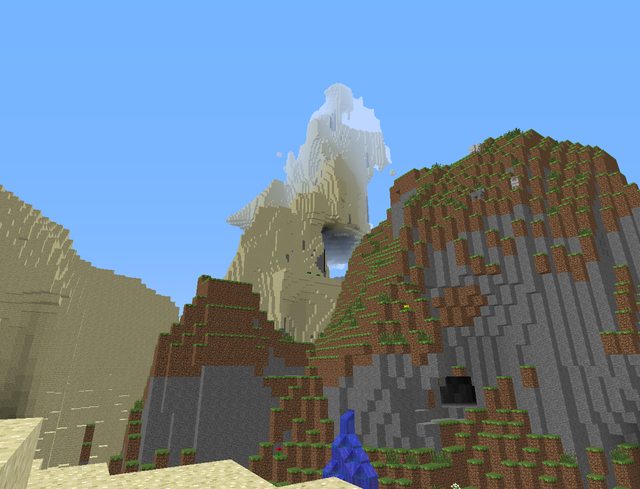 Not pressing zoom key Not pressing zoom key
 -
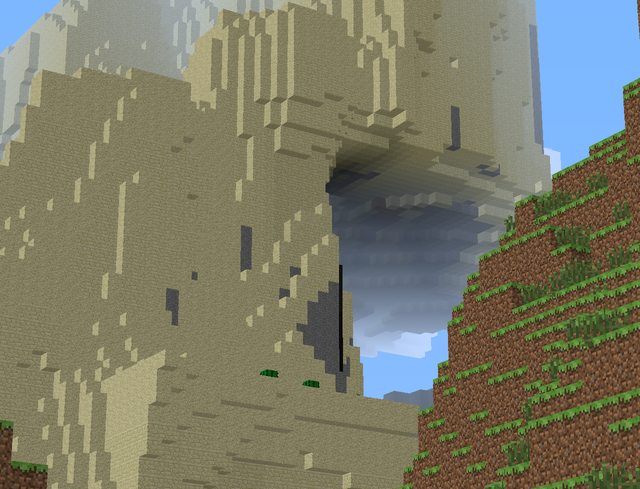 Pressing key zoom Pressing key zoom
Versions
Files
Relations
Project Relations
More like this
Similar Mods
Suggestions use data such as tags, dependencies, dependents, descriptions, titles, and more to rank how much they overlap with this mod.
On ModDex
Community snapshot
By the numbers
Statistics
Want to reach Minecraft players?
We're looking for a server hosting partner to feature here and other parts of the site. Interested? Send us a message!
Get in touchGet it on
Available Platforms
On ModDex
Community snapshot
By the numbers
Statistics
Resources