
Community listing page, reviews here may not be monitored by the author.
ArbuzOptimized

No reviews yet
565+ FPS FOR MINECRAFT | BEST OPTIMIZED MODPACK & SPEED PERFORMANCE

Community voices
Reviews
No reviews yet. Be the first to review this project!
Get it on
Available Platforms
Compatibility
Supported Environments
Runs entirely on the client. Works on vanilla servers.
About
Project Details
For authors
Embed Badge
If you're the author of this project, you can embed a live badge anywhere that supports HTML or Markdown. It updates automatically whenever ratings change.
Use HTML for any page that supports it, or Markdown for README files and Markdown-based descriptions.
Identifiers
Platform IDs
Resources
External Links
About
Description
🍉 ArbuzOptimized : 565+ FPS for Minecraft




The ultimate performance modpack for Minecraft. Turn your potato PC into a gaming rig. Smooth chunk loading, insane FPS, and zero stutter — all with a single download.
🚀 What is ArbuzOptimized?
ArbuzOptimized is a carefully crafted Fabric modpack focused purely on performance and speed. It strips away unnecessary bloat and combines the most powerful optimization mods available.
Whether you are playing on a high-end RTX machine or an old office laptop, this pack unlocks the true potential of Minecraft's engine.
🔥 Key Features
- ✅ Insane FPS Boost: Experience up to 565+ FPS (depending on hardware) with zero input lag.
- ✅ Low-End Friendly: Designed specifically to make Minecraft playable on integrated graphics and older CPUs.
- ✅ Vanilla Gameplay: 100% vanilla mechanics and visuals — we don't change the game, we just make it faster.
- ✅ Lightweight: Minimal impact on RAM and disk space.
- ✅ Active Support: Regularly updated for the latest Minecraft versions.
⚙️ Core Mods Included
| Mod | Description |
|---|---|
| Sodium | The king of rendering optimization. Rewrites the rendering engine for massive FPS gains. |
| Lithium | Optimizes the game's internal server and entity logic without breaking mechanics. |
| Entity Culling | Stops rendering entities you can't see (saves GPU power). |
| Krypton | Network compression and optimization (reduces server ping spikes). |
| FerriteCore | Memory usage reduction — lowers RAM consumption by 20-30%. |
| Immersive Portals (Optional) | (If included) Seamless portal transitions with optimized rendering. |
📥 Installation Guide
Prerequisites
- Java 17 or higher installed on your system.
- Fabric Launcher or a third-party launcher (CurseForge, Prism, MultiMC, ATLauncher).
Easy Setup (Recommended)
- Download the latest
.ziprelease of ArbuzOptimized from the Releases tab. - Open your preferred launcher (e.g., Prism Launcher / MultiMC).
- Select "Add Instance" -> "Import from ZIP" -> Select the downloaded file.
- Launch and enjoy!
Manual Setup (Advanced)
- Download the Fabric Installer from the official website.
- Install Fabric for your Minecraft version.
- Navigate to your
.minecraft/modsfolder. - Drag and drop all the
.jarfiles from themodsfolder of this pack. - Launch Minecraft with the Fabric profile.
🛠️ Performance Tips (For 565+ FPS)
To squeeze out the absolute maximum FPS:
- Allocate RAM: Do not allocate too much! For Vanilla + Optimization, 2GB - 4GB is the sweet spot. Allocating 8GB can actually cause lag due to Java Garbage Collection.
- Graphics Settings:
- Turn "Render Distance" down to 8-12 chunks.
- Set "Graphics" to Fast.
- Turn "Clouds" off or set to Fast.
- Disable "Vsync".
- JVM Arguments: Use these for better garbage collection:
-XX:+UseG1GC -Dsun.rmi.dgc.server.gcInterval=2147483646 -XX:+UnlockExperimentalVMOptions -XX:G1NewSizePercent=20 -XX:G1ReservePercent=20 -XX:MaxGCPauseMillis=50 -XX:G1HeapRegionSize=32M
Screenshots
Gallery
-
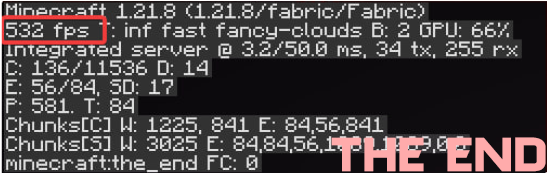 TheEnd_Fps
 -
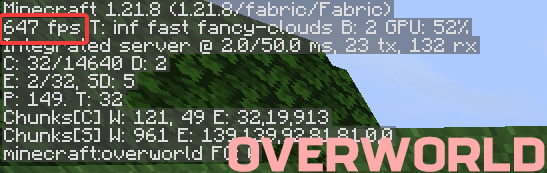 OverWorld_Fps
 -
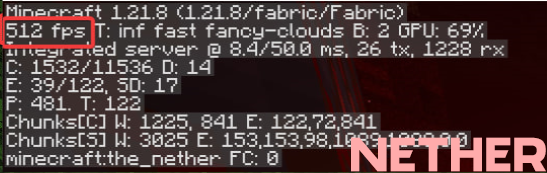 Nether_Fps
Versions
Files
Relations
Project Relations
More like this
Similar Modpacks
Suggestions use data such as tags, dependencies, dependents, descriptions, titles, and more to rank how much they overlap with this modpack.
On ModDex
Community snapshot
By the numbers
Statistics

 (opens in a new tab)
Get it on
Available Platforms
On ModDex
Community snapshot
By the numbers
Statistics
Resources