Community listing page, reviews may not be monitored by the author.
EmmiSkye's Mythical Pack

No reviews yet
Adds in a variety of mythical, fairy core, and magic/dimension mods to Minecraft!

Community voices
Reviews
No reviews yet. Be the first to review this project!
Get it on
Available Platforms
About
Project Details
For authors
Embed Badge
If you're the author of this project, you can embed a live badge anywhere that supports HTML or Markdown. It updates automatically whenever ratings change.
Use HTML for any page that supports it, or Markdown for README files and Markdown-based descriptions.
Identifiers
Platform IDs
Resources
External Links
About
Description
This modpack adds in a variety of mythical and fairy core themed mods. There is also some cat mods and useful mods too!
Have questions? Look on the official Wiki for help!
IMPORTANT!
-After you download this pack you need to download and install ffmpeg into the Mythical Pack folder! (This is a requirement and is essential to playing the modpack)
INSTRUCTIONS (Taken from the ReForgedPlay Mod):
Windows
1. Download the latest FFmpeg release from ffmpeg release essentials.
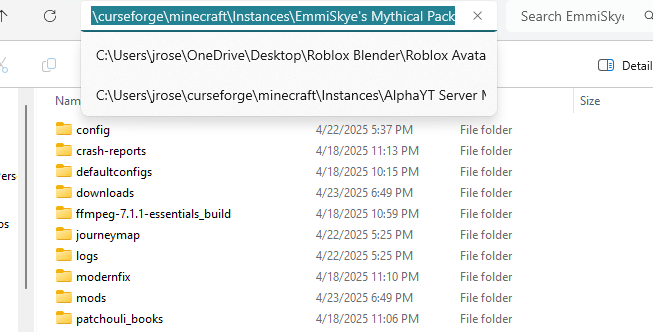
2. Extract the downloaded .zip file into the "EmmiSkye's Mythical Pack" folder. In order to find the folder's location open up the CurseForge app and go to "My Modpacks" under the Minecraft section. Next click on the "EmmiSkye's Mythical Pack" Modpack and then click on the 3 dots where the play button is. Once you click on the 3 dots find the "Open Folder" button and click on it. This should bring you to the location of the "EmmiSkye's Mythical Pack" folder where you're going to want to click on the first search bar and copy it (1). Finally go to the "ffmpeg release essentials" folders that you download, right click on the folder, click on "Extract all", and then paste the folder location for "EmmiSkye's Mythical Pack" into the browse bar (2). (You can put ffmpeg.exe anywhere inside the EmmiSkye's Mythical Pack folder)
(The "EmmiSkye's Mythical Pack" folder is located in "instances")
1.
Notes for alternative launchers
Twitch launcher by default installs Minecraft instances in C:\Users\username\Twitch\Minecraft\Instances\instancename
GD Launcher by default installs Minecraft instances in C:\Users\username\AppData\Roaming\gdlauncher_next\instances\instancename
MultiMC by default installs Minecraft instances in C:\Program Files (x86)\MultiMC\instances\Instancename.minecraft
For these launchers, make sure FFmpeg exists inside the corresponding folder.
Mac OSX
On OSX, you can install FFmpeg with Homebrew using brew install ffmpeg.
Alternatively, you can download the latest static build from ffmpeg website and copy the FFmpeg executable to /usr/local/bin.
1.3 Linux
On Linux, you can install FFmpeg using your system's package manager, for example using apt install ffmpeg. If in doubt, consult the documentation of your distribution.
Screenshots
Gallery
Versions
Files
Relations
Project Relations
More like this
Similar Modpacks
Suggestions use data such as tags, dependencies, dependents, descriptions, titles, and more to rank how much they overlap with this modpack.
On ModDex
Community snapshot
By the numbers
Statistics

Get it on
Available Platforms
On ModDex
Community snapshot
By the numbers
Statistics
Resources