Community listing page, reviews here may not be monitored by the author.
EyeMine Pack

No reviews yet
A simple pack with the requirements to use the EyeMine mod

Community voices
Reviews
No reviews yet. Be the first to review this project!
Get it on
Available Platforms
About
Project Details
For authors
Embed Badge
If you're the author of this project, you can embed a live badge anywhere that supports HTML or Markdown. It updates automatically whenever ratings change.
Use HTML for any page that supports it, or Markdown for README files and Markdown-based descriptions.
Identifiers
Platform IDs
Resources
External Links
About
Description
EyeMine - play Minecraft with your eyes!
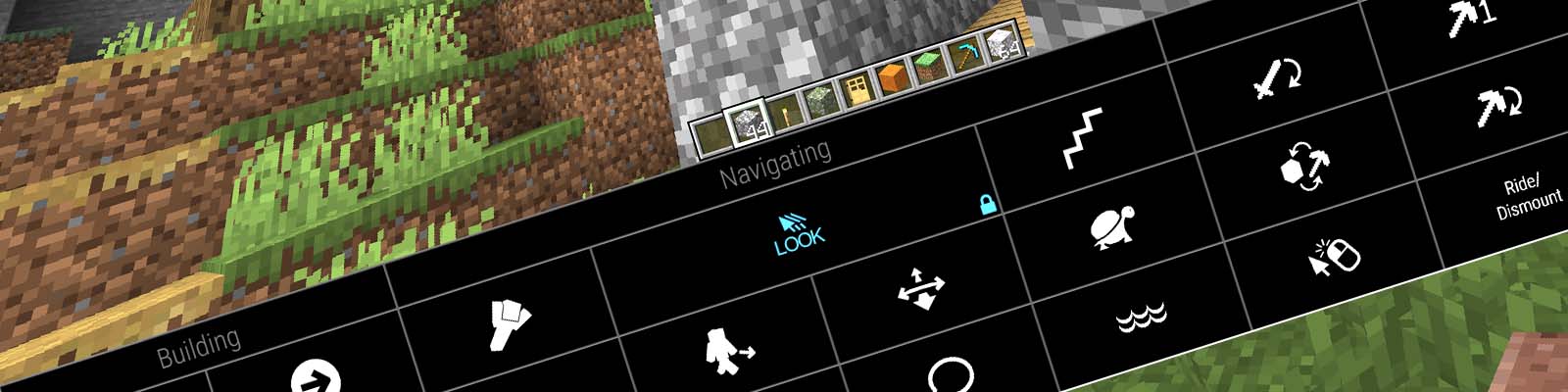
This modpack adds various functionality to support eye control for users unable to operate conventional controls.
To play with eye control, please install the EyeMineV2 interface from the EyeMine wiki which provides the necessary on-screen keyboard to access the controls. You will also require an eye tracker, head mouse or another method of controlling the cursor.
⚠️ Important config ⚠️
Before playing, go to Options -> Controls -> Mouse and turn sensitivity right down to "yawn" and set Raw Input: OFF. You can adjust your mouse sensitivity later using the keys in the EyeMine keyboard or with the left/right arrow keys on a physical keyboard.
If you are using an unsupported eye tracker via mouse emulation, you need to manually turn on "mouse emulation mode" in the mod options: Mods -> EyeMine -> Config -> Modify "eyemine-config.toml" -> Basic -> "Using mouse emulation"
For older versions see EyeMine Classic
Authors: EyeMine was originally developed by kmcnaught for SpecialEffect and upgraded by mrbysco for more versions of Minecraft
Code + issue tracker: https://github.com/SpecialEffect/EyeMineMods/issues
Documentation: https://github.com/SpecialEffect/EyeMine/wiki
Screenshots
Gallery
Versions
Files
Relations
Project Relations
More like this
Similar Modpacks
Suggestions use data such as tags, dependencies, dependents, descriptions, titles, and more to rank how much they overlap with this modpack.
On ModDex
Community snapshot
By the numbers
Statistics
 (opens in a new tab)
Get it on
Available Platforms
On ModDex
Community snapshot
By the numbers
Statistics
Resources