
Lekkerman Clientside
No reviews yet
Client-side modpack, with which you can join vanilla servers. Improves immersion and has many quality-of-life mods.
Does not follow a specific thematic focus apart from vanilla Minecraft.
Features content that solely expands on Vanilla mechanics and gameplay.
Includes a little of everything without sticking to any one particular type of gameplay or style.
Ideal for small groups of players or cooperative gameplay.
Includes quality of life improvements and small tweaks to enhance and customize gameplay.
Introduces lifelike mechanics and detailed enhancements to create a more believable and engaging experience.
Fabric is a mod loader for versions 1.14+ of Minecraft, particularly popular for client side and optimization mods.
Community voices
Reviews
Click once to include, again to exclude, again to clear
No reviews yet. Be the first to review this project!
Get it on
Available Platforms
 Modrinth
Compatibility
Supported Environments
About
Project Details
For authors
Embed Badge
If you're the author of this project, you can embed a live badge anywhere that supports HTML or Markdown. It updates automatically whenever ratings change.
Use HTML for any page that supports it, or Markdown for README files and Markdown-based descriptions.
Identifiers
Platform IDs
Resources
External Links
About
Description
A nice modpack for joining vanilla servers. Adds a map, graphical and sound upgrades, HUD improvements, performance increasing mods and quality-of-life mods.
Version 1.21.11:
Extra features worth mentioning:
(Some of these might be considered cheating on some servers, but they'll work fine on a private vanilla server.)
- Invite friends to your single-player world via Essential.
- Litematica: Build with schematics, if you want.
- Minimap (Press "m" to toggle and "j" for map interface).
- Custom notes per world (press "n").
- Middle click in a container to sort the items.
- Click through signs on chests.
- Zoom with "c".
- Non-cheat Freecam with "F4".
- View long distances with Distant Horizons.
- R-Click armor item in inventory to equip them, or sneak + r-click to swap armor with armor stand.
- Scroll inventory column with "Alt".
- Search full chest history (~/^)
- Emote each other (b) even without Emotecraft installed on the server.
- Smart Item Swapping with "r".
- Jump over fences and gates.
- Options to stack inventory to nearby chests that have matching items.
Mods:
- 3d-Skin-Layers
- AchievementStyle
- Anti Item Break
- AppleSkin
- Architectury
- Armor Quick Swap
- Armor Statues
- Atmosfera
- Bad Packets
- BadOptimizations
- Balm
- Beautified Chat Client
- Better Advancements
- Better Statistics Screen
- BetterShields
- Borderless Fullscreen
- Bridging Mod
- Chat Heads
- Cherished Worlds
- Chest Tracker (Unofficial port)
- ClickThrough Plus
- ClientSort
- Cloth Config v20
- Clumps
- Cold Breath
- Collective
- Completionist's Index
- Concurrent Chunk Management Engine
- Continuity
- Controlling
- CoolRain
- Cosy Critters & Creepy Crawlies
- Crafting Tweaks
- CreativeCore
- Cull Leaves
- Daily Dad
- Default Options
- Detail Armor Bar Reconstructed
- Distant Horizons
- Don't Hide My Items!
- DualBar
- Effect Insights
- EffectTimerPlus
- Emotecraft
- Enchantment Insights
- Entity Model Features
- Entity Texture Features
- EntityCulling
- Explosive Enhancement
- Fabric API
- Fabric Language Kotlin
- Falling Leaves
- FancyToasts
- FerriteCore
- Forge Config API Port
- Fzzy Config
- GUI Clock
- GUI Followers
- Held Item Tooltips
- Hide Experimental Warning
- HotbarAPI
- ImmediatelyFast
- Improved Sign Editing
- Inline Tooltips
- Inventory Essentials
- Iris
- Item Descriptions
- ItemSwapper
- Jade
- Journeymap
- Jump Over Fences
- Just Enough Book
- Just Enough Items
- LegacyFreecam
- LibJF
- Litematic Downloader
- Litematica
- Lithium
- M.R.U
- MaLiLib
- Mod Menu
- Monsters in the Closet
- More Culling
- Natural Waters
- No Resource Pack Warnings
- Noisium
- NotEnoughAnimations
- Notes
- Now Playing
- Omega Mute
- Online Emotes
- Pack/Rule Menus
- Paper Doll
- Particle Effects
- Particular Reforged
- Pick Up Notifier
- Ping Wheel
- Placeholder API
- Player Animation Library
- Pro Placer
- Punchy
- Puzzles Lib
- Random World Names
- Reese's Sodium Options
- Replanter Plus
- Resource Pack Options
- Resourcify
- ScalableLux
- Searchables
- Shulker Box Tooltip
- Simple Datapacks
- Simple Modpack Update Checker
- Slot Cycler
- Smooth Scroll
- Sodium
- Sodium Extra
- Sound Physics Remastered
- Sounds
- SplashFox
- Stack to Nearby Chests
- Stonecutter GUI Remastered
- Stylish Effects
- Subtle Effects
- Swinging Lanterns
- TCDCommons API
- TrialSpawnerTimer
- UltraLib
- Visual Keymap
- Visuality
- WI Zoom
- WaveyCapes
- WaxedIcons
- Where Did I Die?
- YDM's Weapon Master
- YetAnotherConfigLib
- essential-container
- uku's Armor HUD
- ukulib
Resource Packs:
These are all loaded (their latest versions) via Resclone during startup.
To change this, edit the config/resclone/config.json file.
- Actually 3D Blocks & Items!
- Armored Legacy
- Better Clearer Glass
- Better Lanterns
- Chat Reporting Helper
- Cubic Leaves
- Detailed Animations
- Sus Sand
- Better Boss Bars
- Extra Text Icons
- Fresh Animations
- Fresh Animations Details
- Fresh Animations Spiders
- Fresh Animations Quivers
- Fresh Animations Emissive
- Fresh Animations Creepers
- Fresh Buckets
- Fresh Food
- Unique Goat Horns
- Cookie Clicker Menu Sounds
Shaders:
- Complimentary Unbound
Data Packs:
They are inside the datapacks folder.
- Deadly Deadly Dungeon
- Fast Path
- Gamingbarn's Guns
- Haul
- Jake's Build Tools
- Sunken Spires
- Structory
- Structory Towers
- Very Simple Gravestones
- William Wythers' Overhauled Overworld (Datapack)
Version 1.21.10:
Extra features worth mentioning:
- Litematica: Build with schematics, if you want. (Press "u" to download schematics)
- R-Click armor item in inventory to equip them.
- Minimap (Press "m" to toggle and "j" for map interface).
- Middle click in a container to sort the items.
- Click through signs on chests.
- Zoom with "c".
- Non-cheat Freecam with "v".
- Scroll inventory column with "Alt".
- Invite friends to single player worlds.
- Nice datapacks to choose from, including structures, world-gen and Jake's Build Tools.
- Built-in Minesweeper game for more fun semi-afk sessions.
Mods:
- 3d-Skin-Layers
- AchievementStyle
- AmbientSounds
- Anti Item Break
- AppleSkin
- Armor Swapper
- Bad Packets
- BadOptimizations
- Balm
- Beautified Chat Client
- Better "Add Server"
- BetterShields
- Borderless Fullscreen
- Bridging Mod
- Camera Enhancements
- Chat Heads
- Cherished Worlds
- ClickThrough Plus
- ClientSort
- Cloth Config v20
- Clumps
- Cold Breath
- Collective
- Completionist's Index
- Controlling
- Crafting Tweaks
- CreativeCore
- CullLeaves
- Custom Player Animations
- Daily Dad
- Day Counter Enhanced
- Default Options
- Detail Armor Bar Reconstructed
- Distant Horizons
- Don't Hide My Items!
- DualBar
- Dynamic FPS
- Effect Insights
- EffectTimerPlus
- Emotecraft
- Enchantment Insights
- Entity Model Features
- Entity Texture Features
- EntityCulling
- Explosive Enhancement
- Fabric API
- Fabric Language Kotlin
- Falling Leaves
- Fancy Door Animations
- FancyToasts
- FerriteCore
- Forge Config API Port
- GUI Clock
- GUI Followers
- Held Item Tooltips
- Hide Experimental Warning
- HotbarAPI
- ImmediatelyFast
- Improved Sign Editing
- Inline Tooltips
- Inventory Essentials
- Iris
- Item Descriptions
- ItemPhysicLite
- Jade
- Journeymap
- Just Enough Book
- Just Enough Items
- Litematic Downloader
- Litematica
- Lithium
- M.R.U
- MaLiLib
- Minesweeper in game
- Mod Menu
- Monsters in the Closet
- More Culling
- Natural Waters
- No Resource Pack Warnings
- NotEnoughAnimations
- Notes
- Now Playing
- Pack/Rule Menus
- Paper Doll
- Particle Effects
- Particular Reforged
- Pick Up Notifier
- Ping Wheel
- Placeholder API
- Player Animation Library
- PrickleMC
- Pro Placer
- Puzzles Lib
- Random World Names
- Reese's Sodium Options
- Resourcify
- ScalableLux
- Searchables
- Shulker Box Tooltip
- Simple Datapacks
- Simple Modpack Update Checker
- Slot Cycler
- Smooth Scroll
- Sodium
- Sodium Extra
- Sound Physics Remastered
- Sounds
- Stack to Nearby Chests
- Stonecutter GUI Remastered
- Stylish Effects
- TrialSpawnerTimer
- UltraLib
- VisualKeys
- Visuality
- WCIFS
- WI Zoom
- WaxedIcons
- Where Did I Die?
- World Play Time
- YDM's Weapon Master
- YetAnotherConfigLib
- essential-container
- uku's Armor HUD
- ukulib
Resource Packs:
See datapacks section below as well - for their resource packs (if applicable) were also added.
- 3D crops Revamped
- Actually 3D Furnaces
- Actually 3D Workbenches
- Better Clearer Glass
- Better Fresher 3D Books
- Better Low Shield
- Better Boss Bars
- Canoe boats
- Chat Reporting Helper
- Cubic Leaves
- Extra Text Icons
- Fresh Animations
- Fresh Animations: Details
- Fresh Animations: Emissive
- Fresh Animations: Spiders
- Fresh Animations: Quivers
- Fresh Animations: Creepers
- Fresh Buckets
- Fresh Food
- Lively Turtle Helmet
- Low On Fire
- Minecraft Music Remastered
- Mickey Joe's Flowers
- Potions 3D Fusion
- Ray's Better Mace
- Sus Blocks
- Unique Goat Horns
- Sky's 3D Bars
- Cookie Clicker Menu Sounds
- Ray's 3D Ladders
- Ray's 3D Rails
Shaders:
- Complimentary Unbound
Data Packs:
They are inside the datapacks folder - copy them from there into your world's datapacks folder.
- Deadly Deadly Dungeon
- Fast Path
- Gamingbarn's Guns
- Haul
- Jake's Build Tools
- Sunken Spires
- Structory
- Structory Towers
- Very Simple Gravestones
- William Wythers' Overhauled Overworld (Datapack)
Version 1.21.9:
Features worth mentioning:
- Litematica: Build with schematics, if you want.
- R-Click armor item in inventory to equip them.
- Minimap (Press "j" for map interface).
- Middle click in a container to sort the items.
- Click through signs on chests.
- Zoom with "c".
- Non-cheat Freecam with "v".
- Scroll inventory column with "Alt".
- Invite friends to single player worlds.
Mods:
- AchievementStyle
- AmbientSounds
- Anti Item Break
- Armor Swapper
- Bad Packets
- BadOptimizations
- Balm
- Beautified Chat Client
- BetterShields
- Borderless Fullscreen
- Camera Enhancements
- Chat Heads
- ClickThrough Plus
- ClientSort
- Cloth Config v20
- Clumps
- Cold Breath
- Collective
- Completionist's Index
- Controlling
- Crafting Tweaks
- CreativeCore
- Default Options
- Detail Armor Bar Reconstructed
- Don't Hide My Items!
- DualBar
- Dynamic FPS
- EffectTimerPlus
- Enchantment Descriptions Java
- Enchantment Level Cap Indicator
- Fabric API
- Fabric Language Kotlin
- Falling Leaves
- FerriteCore
- Forge Config API Port
- GUI Clock
- GUI Followers
- Held Item Tooltips
- HotbarAPI
- ImmediatelyFast
- Improved Sign Editing
- Inventory Essentials
- Iris
- Item Descriptions
- ItemPhysicLite
- Jade
- Journeymap
- Just Enough Book
- Litematica
- Lithium
- M.R.U
- MaLiLib
- Mod Menu
- Now Playing
- One Click Join
- Paper Doll
- Particle Effects
- Particular Reforged
- Pick Up Notifier
- Ping Wheel
- Placeholder API
- Pro Placer
- Puzzles Lib
- Raise Sound Limit Simplified
- Random World Names
- Reese's Sodium Options
- Resourcify
- ScalableLux
- Searchables
- Shulker Box Tooltip
- Simple Modpack Update Checker
- Slot Cycler
- Sodium
- Sodium Extra
- Sound Physics Remastered
- Sounds
- Stonecutter GUI Remastered
- UltraLib
- VisualKeys
- Visuality
- WCIFS
- WI Zoom
- WaxedIcons
- Where Did I Die?
- YDM's Weapon Master
- YetAnotherConfigLib
- essential-container
- uku's Armor HUD
- ukulib
Resource Packs:
- Better Clearer Glass
- Better Fresher 3D Books
- Better Low Shield
- Better Boss Bars
- Chat Reporting Helper
- 3D crops Revamped
- Fresh Buckets
- Fresh Food
- Fresh Music Discs
- Low On Fire
- Minecraft Music Remastered
- Mickey Joe's Flowers
- Potions 3D Fusion
- Ray's Better Mace
- Sus Blocks
- Unique Goat Horns
- Sky's 3D Bars
- Cookie Clicker Menu Sounds
- Ray's 3D Ladders
- Ray's 3D Rails
- Actually 3D Workbenches
Shaders:
- Complimentary Unbound
Version 1.21.8:
Built on Fabulously OptimizedMods:
- AmbientSounds
- Amecs
- Animatica
- AppleSkin
- Architectury
- Auto Third Person
- Balm
- Better Mount HUD
- Better Third Person
- BetterF3
- BetterGrassify
- BetterShields
- Bridging Mod
- Capes
- Chat Heads
- Cherished Worlds
- ClickThrough Plus
- ClientSort
- Cloth Config v19
- Clumps
- Collective
- Continuity
- Controlify
- Controlling
- Crafting Tweaks
- CreativeCore
- Cubes Without Borders
- Debugify
- Distant Horizons
- Durability Tooltip
- Dynamic FPS
- EnchantmentDescriptions
- Entity Model Features
- Entity Texture Features
- EntityCulling
- Explosive Enhancement
- Fabric API
- Fabric Language Kotlin
- Fabrishot
- FastQuit
- FerriteCore
- Forge Config API Port
- Freecam
- Frostbyte's Improved Inventory
- Fzzy Config
- GUI Followers
- Hold My Items
- ImmediatelyFast
- Inventory Essentials
- Iris
- Item Descriptions
- Journeymap
- Just Enough Breeding
- LambDynamicLights
- Language Reload
- Lithium
- M.R.U
- Main Menu Credits
- MixinTrace
- Mod Menu
- Model Gap Fix
- More Chat History
- More Culling
- Mouse Tweaks
- No Chat Reports
- Notes
- OptiGUI
- Optiboxes
- Paginated Advancements
- Paper Doll
- Particle Rain
- Pick Up Notifier
- Presence Footsteps
- PrickleMC
- Puzzle
- Puzzles Lib
- Reese's Sodium Options
- Remove Reloading Screen
- Resourcify
- Roughly Enough Items
- Searchables
- Sheep Squeak
- Slot Cycler
- Sodium
- Sodium Extra
- Sound Physics Perfected
- Sounds
- Stack to Nearby Chests
- Stonecutter GUI Remastered
- Subtle Effects
- SuperMartijn642's Config Library
- Visuality
- World Play Time
- YOSBR
- YetAnotherConfigLib
- Zoomify
- e4mc
- ukulib
Resource Packs:
- Fresh Moves
- Armory Conglomery
- Better Fresher 3D Books
- Boss Refreshed
- Fresh Flowers and Plants
- Fresh Food
- Fresh Music Discs
- Fresh Ores and Ingots
- Fresh Paintings
- Fresh Skeleton Physics
- Fresh Animations
- Sus Blocks
- Cookie Clicker Menu Sounds
- Ray's 3D Ladders
- Ray's 3D Rails
- Beach Background
Shaders:
- Complimentary Unbound
Version 1.20.4:
Social:
- Essential (Invite friends into your single player world / emotes / cosmetics / etc.)
- Chat heads
- Daily dad
- More chat history
- No Chat Reports
Inventory/Storage/Crafting:
- Chest Tracker
- Searchables
- Click Through
- Crafting Tweaks
- EMI
- EMI Trades
- Equipment Compare
- Inventory Essentials
- Stack to nearby chests
- Mouse Wheelie
- Inventory Profiles Next
- Simple Shulker Preview
- Shulker Box Tooltip
Building:
- Bridging Mod
- Build Guide
HUD/GUI:
- Appleskin
- Autohud
- Better Mount HUD
- Idwtialsimmoedm
- Jade
- Simple HUD Enhanced
- Splashfox
- GUI Followers
- Main Menu Credits
- Paginated Advancements & Custom Frames
- Frostbyte's Improved Inventory
- BetterShields
- BactroMod
- Stonecutter GUI Remastered
- Blur
Navigation:
- Journeymap
- Zoomify
Movement:
- ThirdPersonBoating
Sound:
- Ambient Sounds
- Presence Footsteps
- Sheep Squeak
- Sound Physics Remastered
- Realistic Combat Soundpack
- Dynamic Surroundings: Fabric Edition
- Adventure Redefined
Graphics:
- Fresh Animations
- Capes
- Wavey Capes
- Better Zombies
- [EMF] Entity Model Features
- [ETF] Entity Texture Features
- Continuity
- Explosive Enhancement
- Falling Leaves
- Indium
- Interactic
- Iris Shaders
- Visuality
- FabricSkyboxes
- FabricSkyBoxes Interop
- Model Gap Fix
- OptiGUI
- Nautilus3D
- Limited Life Armor
- Wakes
- Better Clouds
- Better Beds
- Serious Player Animations
- Player Animator
- Make Bubbles Pop
- Not Enough Animations
Performance:
- Dynamic FPS
- Entity Culling
- Fast Quit
- Ferrite Core
- Immediately Fast
- Lithium
- ModernFix
- More Culling
- Reeses Sodium Options
- Sodium
- Sodium Extra
- Remove Reloading Screen
Management:
- Amecs
- Antighost
- Better F3
- Better Statistics Screen
- Cherished Worlds
- Continue Button
- Language Reload
- Mod Menu
- MixinTrace
- Notes
- Borderless Mining
- Controlify
- Debugify
- Fabrishot
- Your Options Shall Be Respected (YOSBR)
- Modpack Update Checker
- Death Log
Shaders:
- Complementary Shaders - Unbound + Euphoria Patches
Dependancies:
- Balm
- Cloth Config
- Collective
- CreativeCore
- Fabric API
- Fabric Language Kotlin
- Forge Config API Port
- Iceberg
- M.R.U
- Owo-Lib
- Yet another config lib
- Puzzle
- UkuLib
- libIPN
Version 1.19.3:
Social mods:
- Essential (Invite friends into your single player world, cosmetics, zoom, etc.)
- More chat history
- Daily dad
- Stendhal (fancy in-game text edits)
- Craft Presence
- Chat Heads
Inventory/Storage/Crafting Mods:
- EMI & EMI Trades
- Inventory Profiles Next
- Stack to nearby chests
- Click Through (click through signs on chests)
- Recipe Book is pain (recipe book re-arranged similar to creative mode)
- Idwtialsimmoedm & Enchanting Table Descriptions (Shows enchantment descriptions)
- Crafting Tweaks (r-click full stack, clearing, etc.)
- Item Swapper (Press "r" to switch to similar items, like tools/weapons)
- Adaptive tooltips
Building Mods:
- Bridging Mod (place blocks beneath/behind a block)
HUD Mods:
- Detail Armor Bar
- Simple HUD Utilities
- Jade (Shows what you're looking at)
Navigation Mods:
- Journeymap
Movement Mods:
- Camera Overhaul
Sound Mods:
- Jingle (hear when loading is done)
- Presence Footsteps
- Auditory
Graphics:
- Distant Horizons, for far viewing distances... or Shaders, if shaders are preferred.
- Classic 3D Resource Pack
- Visuality
- Interactic
- Super fancy coulds (when not using shaders)
- Explosive Enhancement
- Falling Leaves
- Biome Particle Weather
Management:
- Cherished Worlds (Favorite/pin/bookmark worlds)
- Advancement Info (More details about your advancements)
- Notebook (Accessible in your menu, for taking notes)
- Language Reload (Change Language in-game)
- Better Statistics Screen
- Better F3
Shaders (to choose from):
- BSL
- Contemporary
(Logo design by Freepik.)
Screenshots
Gallery
-
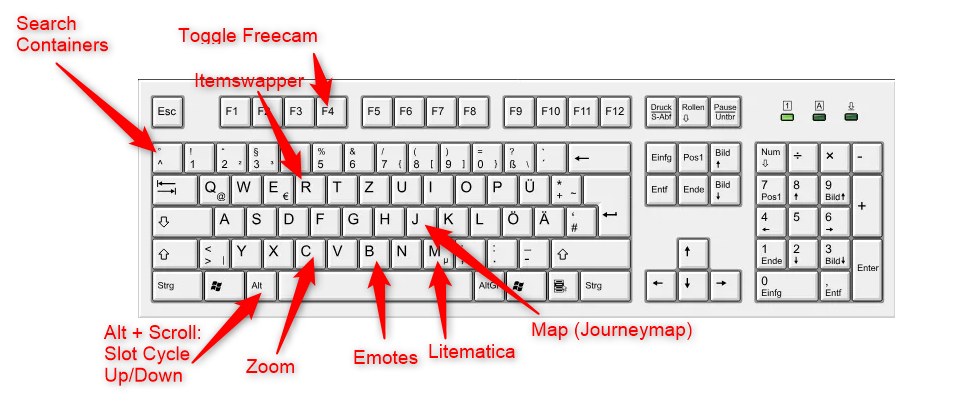 1.21.11 Keybindings Useful keybinds to know about with the default modpack settings.
 -
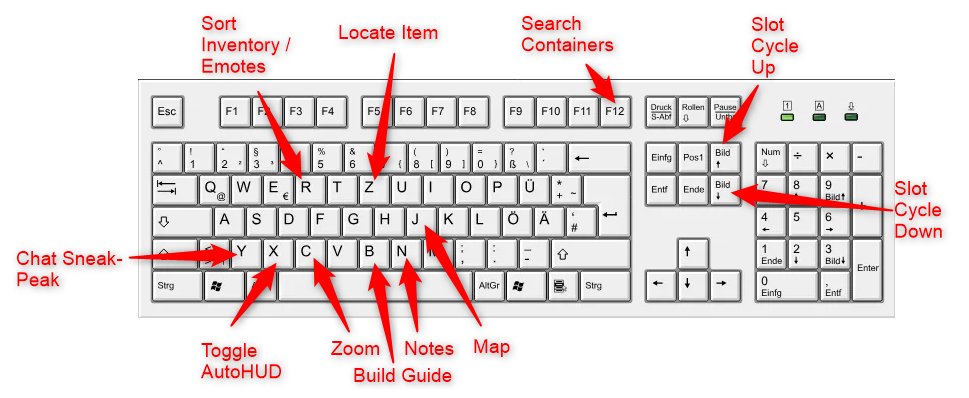 1.20.4: Keybindings
 -
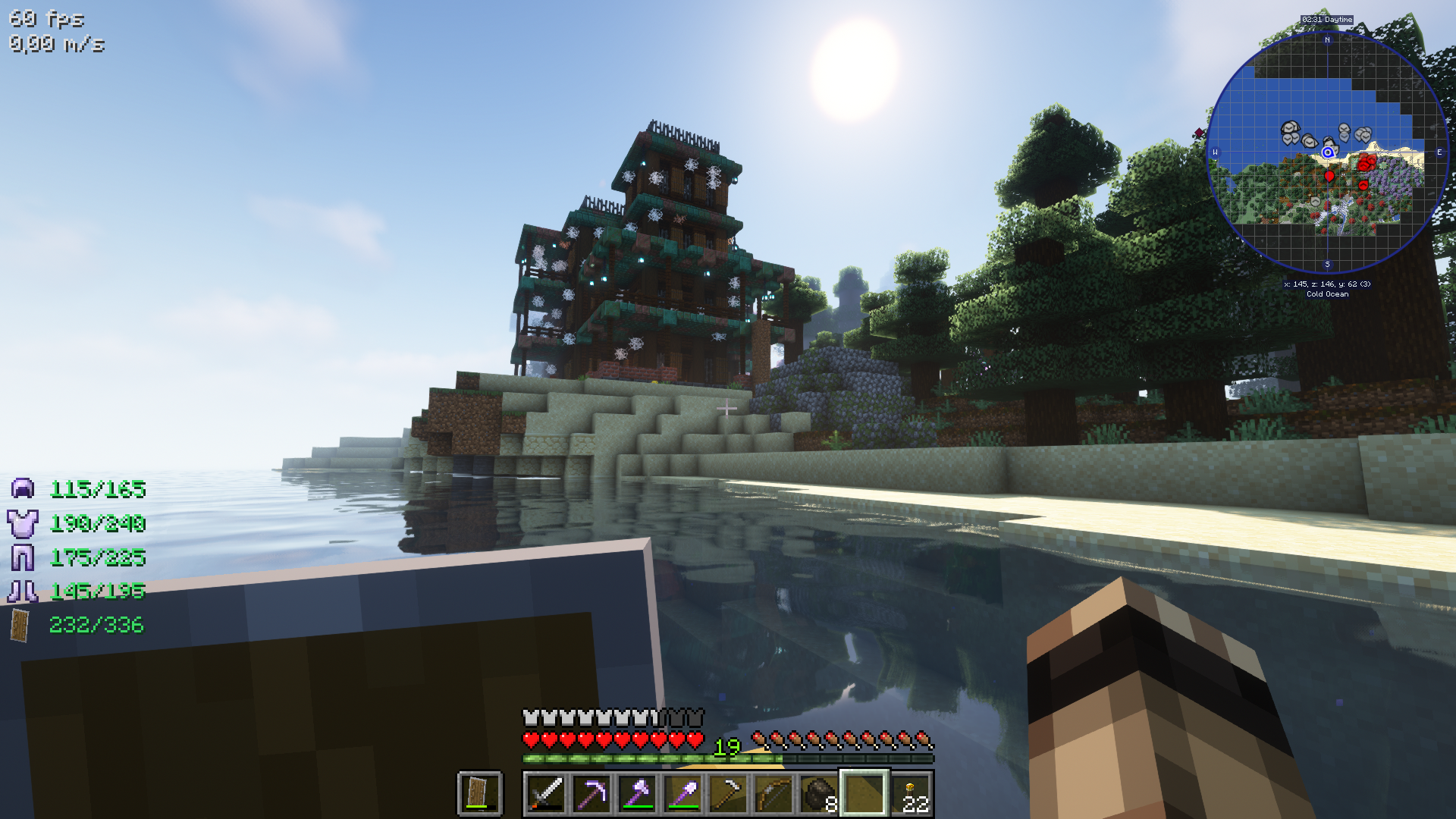 Shaders Complimentary shaders, or BSL shaders, available for selection. (At the cost of the huge viewing distance.)
 -
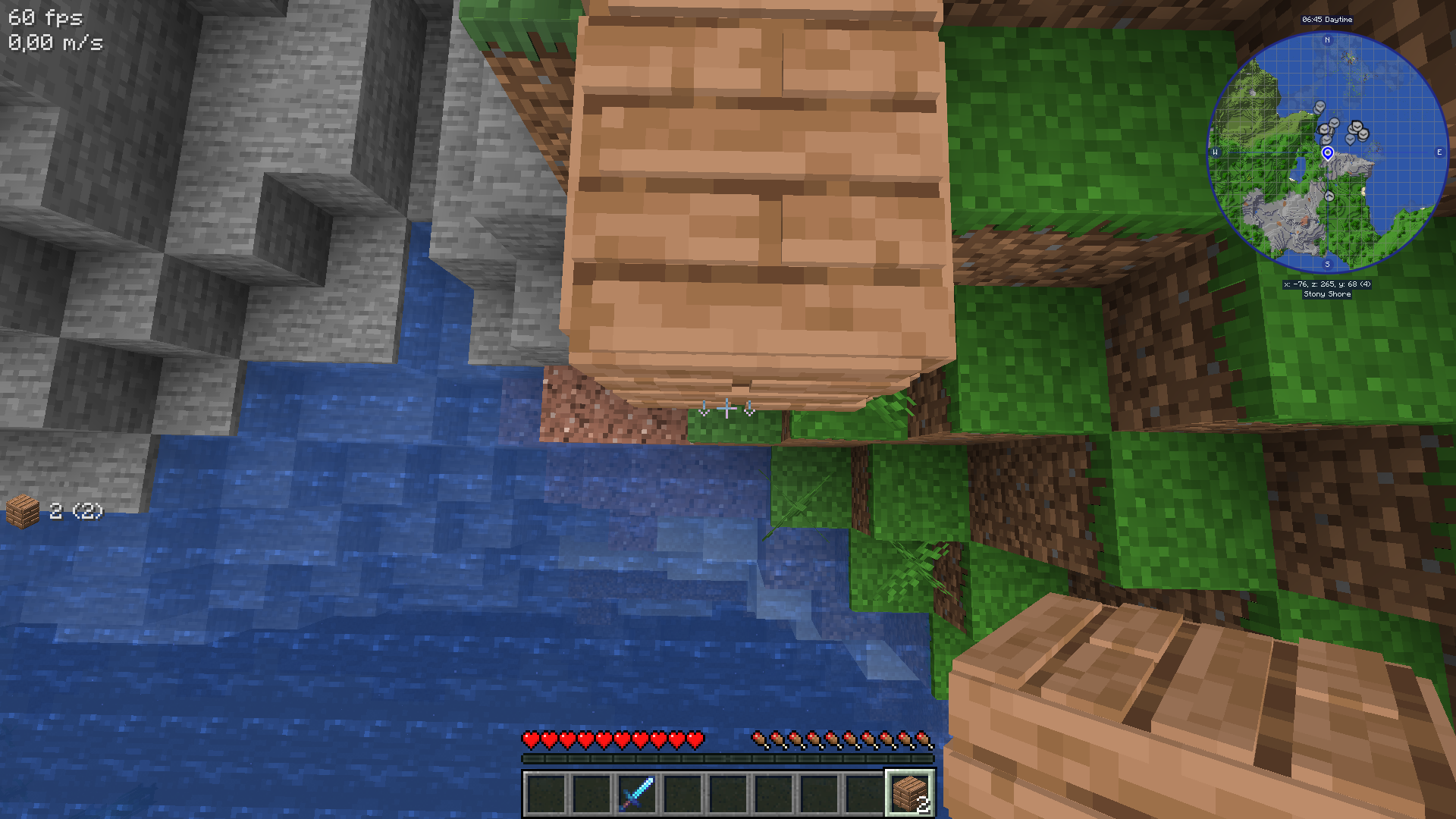 Bridging - below Place blocks beow the block, when this cursor shows.
 -
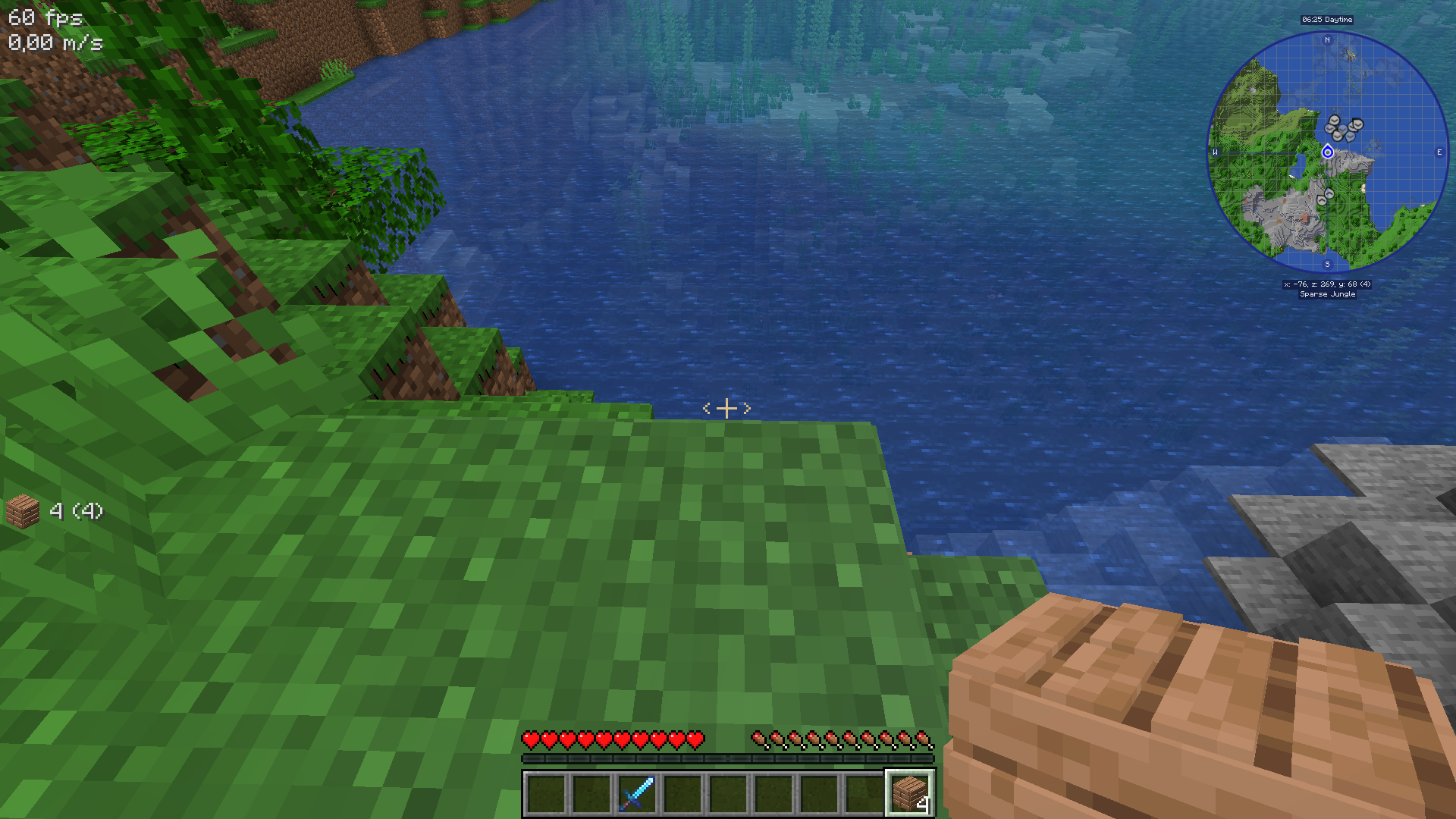 Bridging - behind Place blocks behind the block, when this cursor shows.
 -
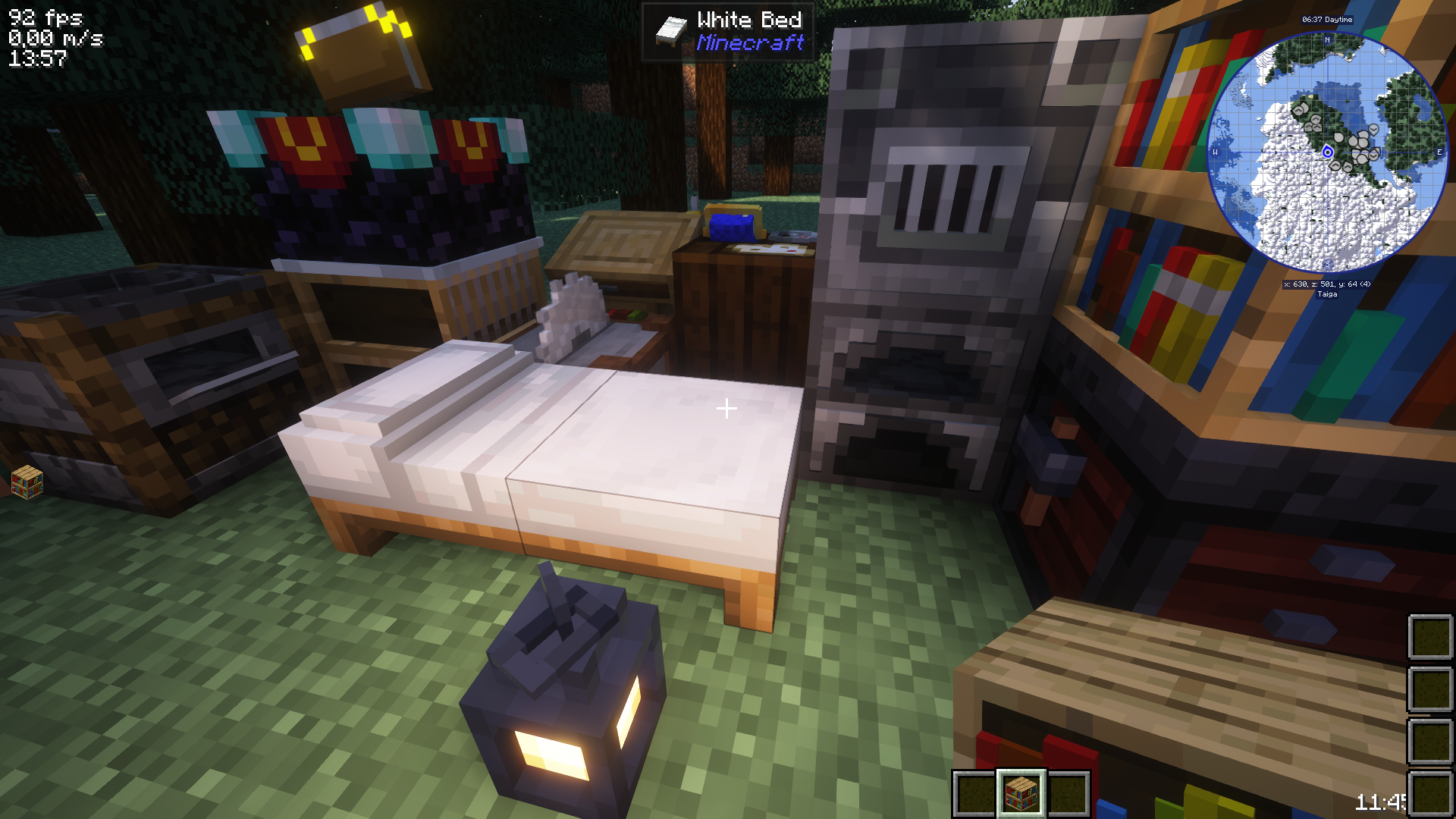 1.20.4: 3D Blocks Better looking functional blocks, plants, etc.
 -
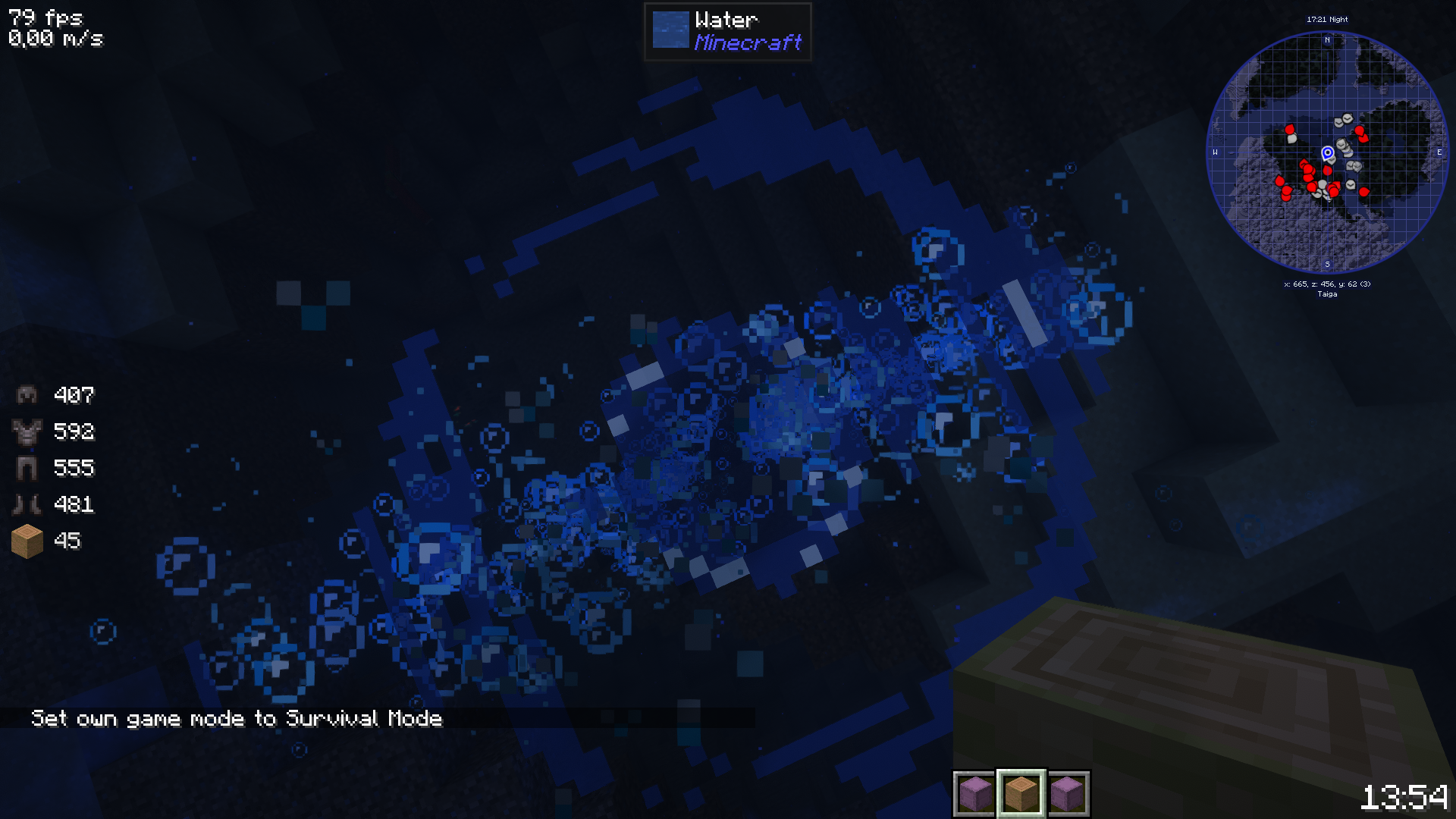 1.20.4: BubblesPoppingAndSplashes Bubbles pop and things falling into water make splashes
 -
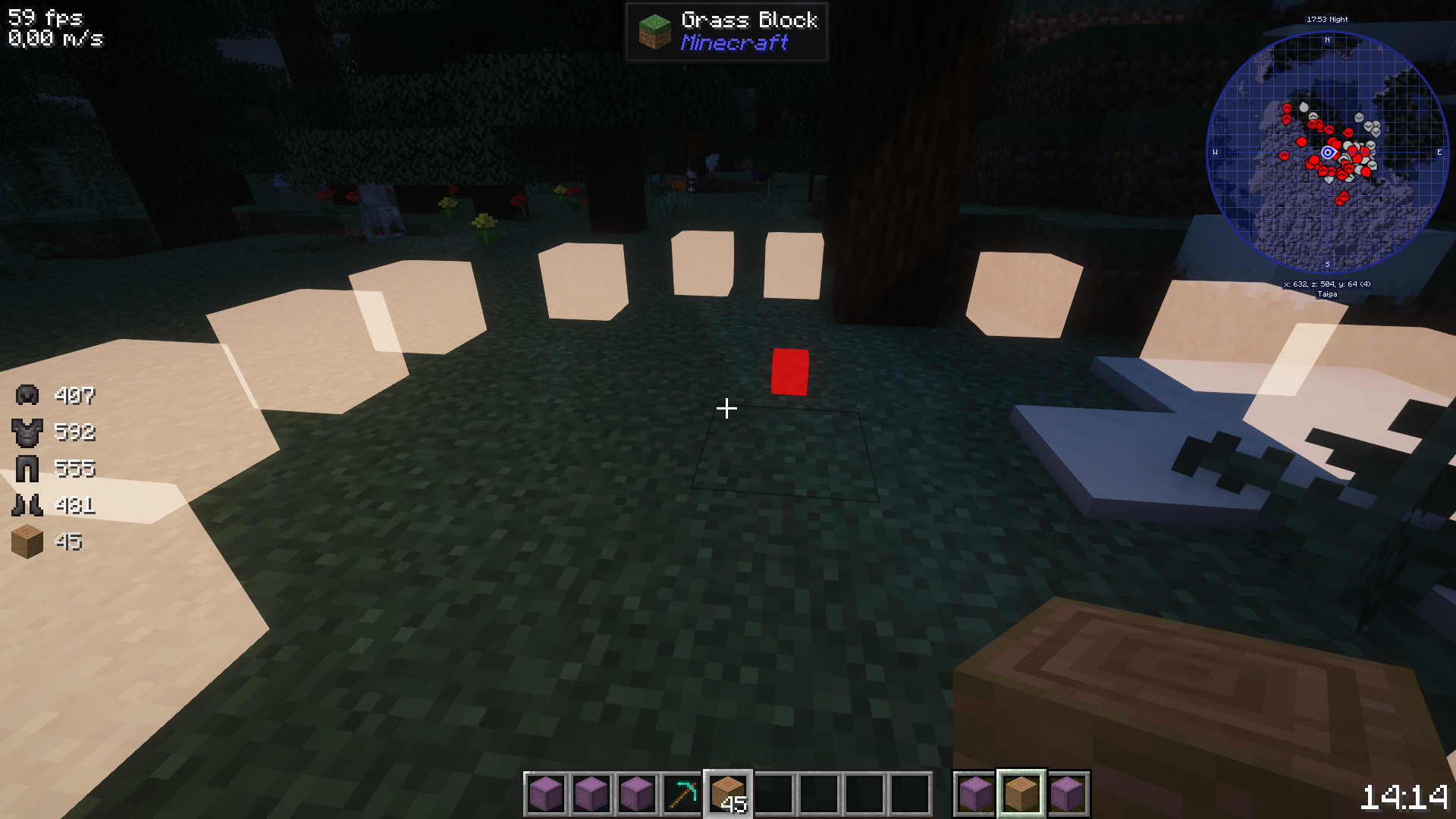 1.20.4: BuildGuide Highlight shapes you can fill in for a build. (Press B to access this.)
 -
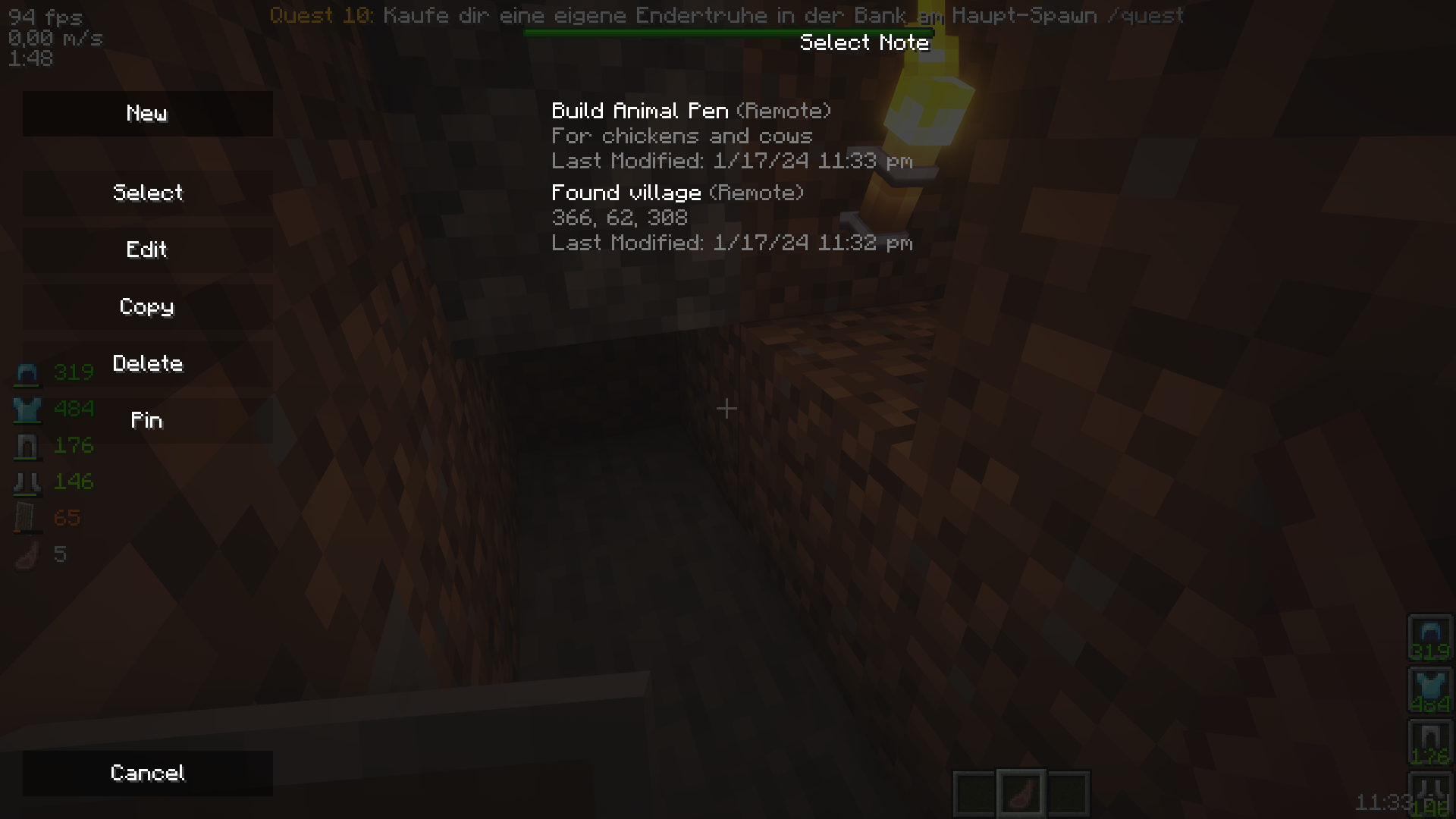 1.20.4: Notes Create notes
 -
 1.20.4: Search Containers Search any container in your area
 -
 1.20.4: Shulkerbox Tooltips & Preview
 -
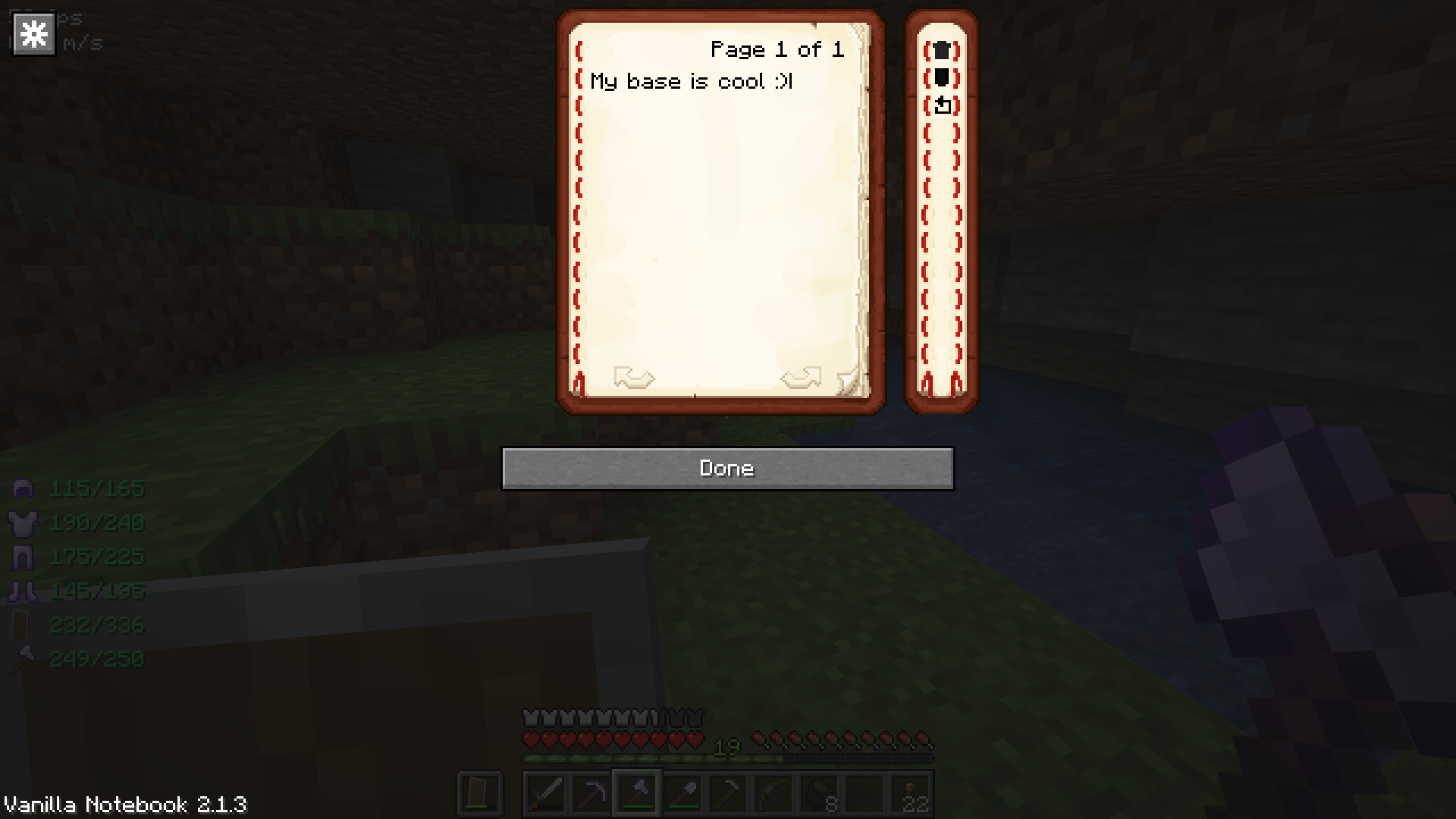 1.19.3: Notebook Write private notes from the menu, for co-ordinate logs, to-do planning, etc.
 -
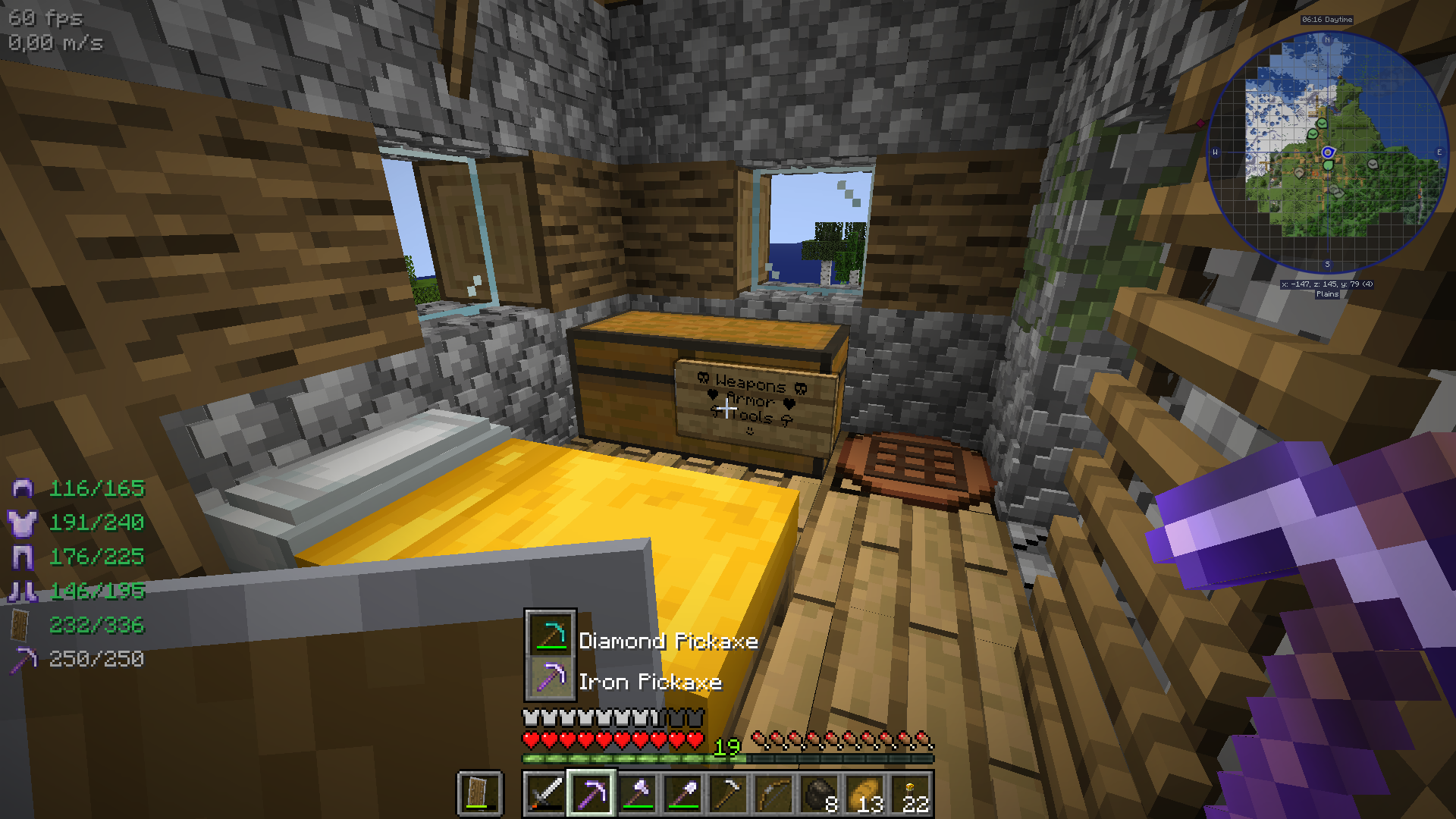 1.19.3: Itemswapper & Resource pack The Classic 3D resource pack serves for more eye candy and by pressing "r", you can activate item swapper.
 -
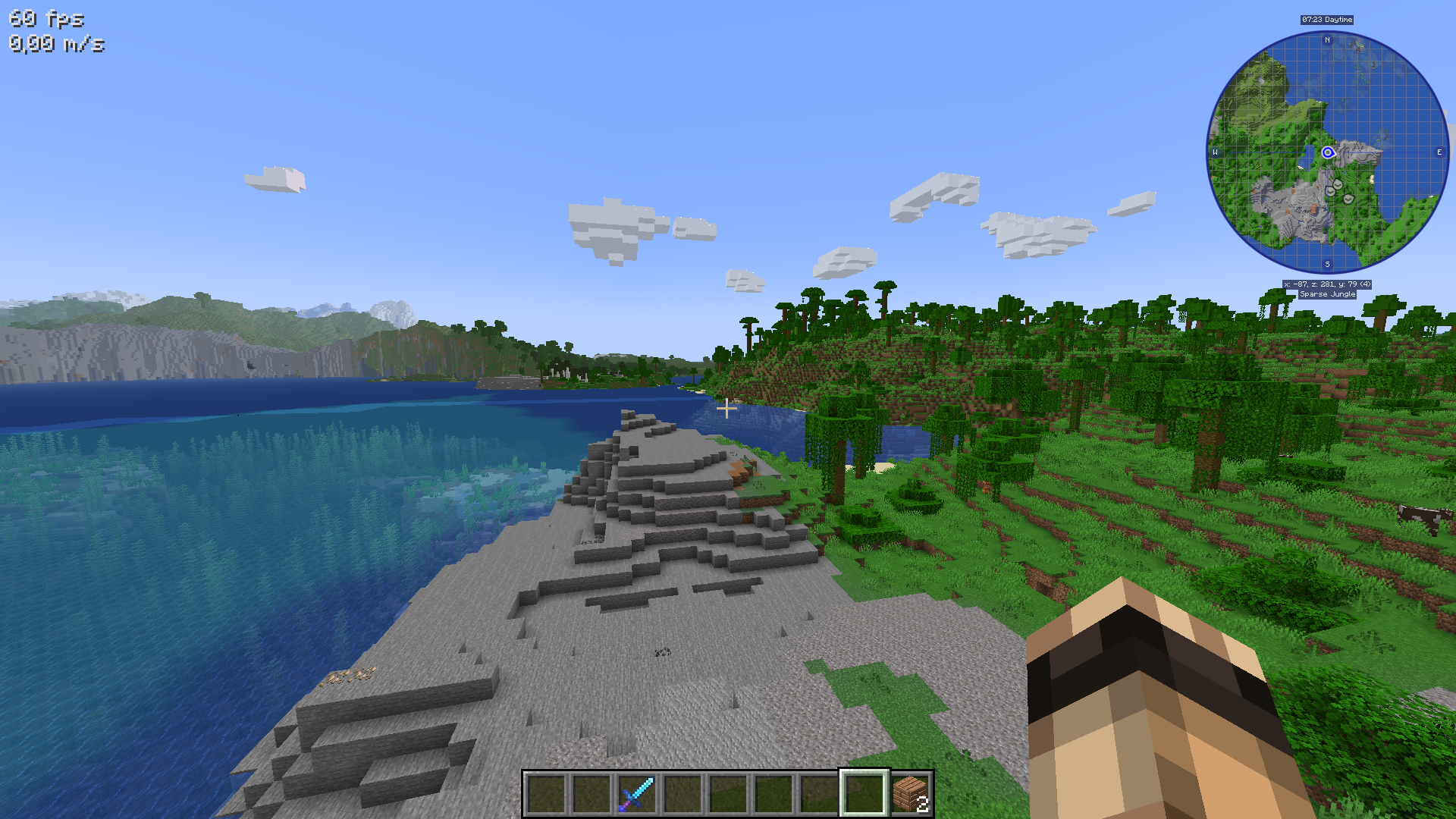 1.19.3: Distant Horizons & Fancy Clouds Without shaders, you can see very far, including fancy clouds. Also have a map & minimap with Journeymap.
 -
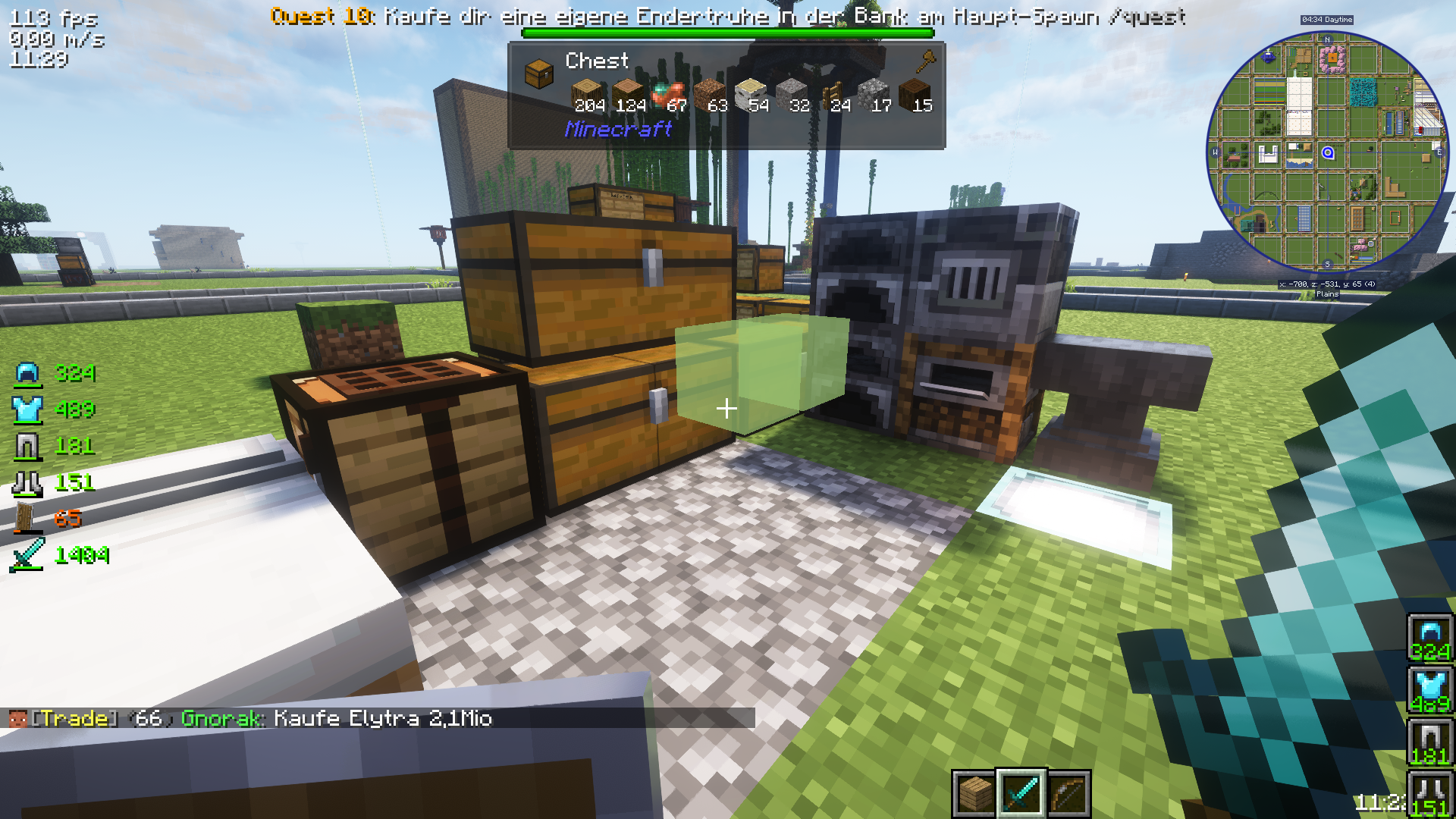 1.20.4: Found results Containers get highlighted that have your search result
 -
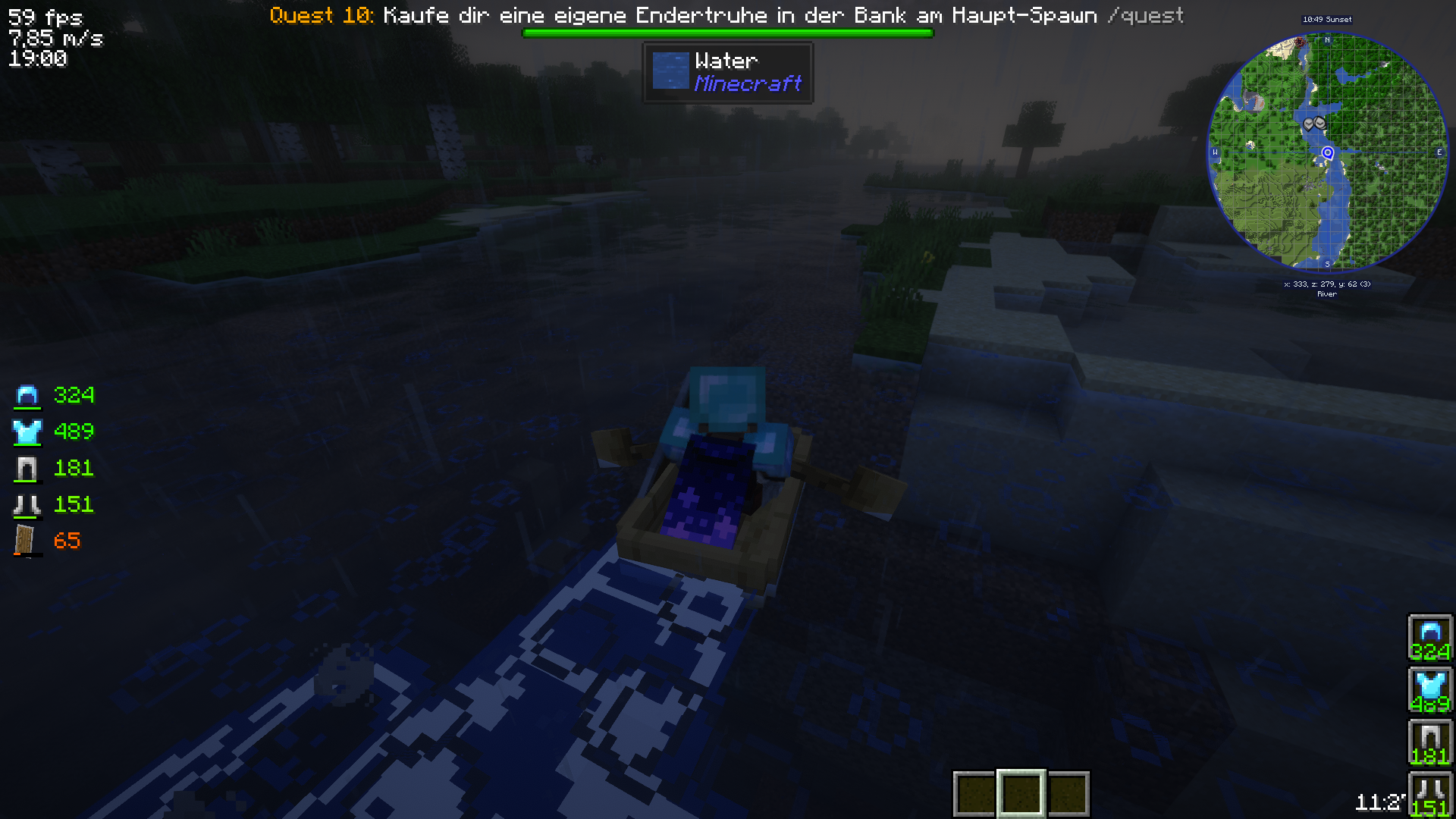 1.20.4: Wakes & Auto 3rd Person Boat Entering boats automatically switch to 3rd person and back and leave wakes in the water as you travel.
 -
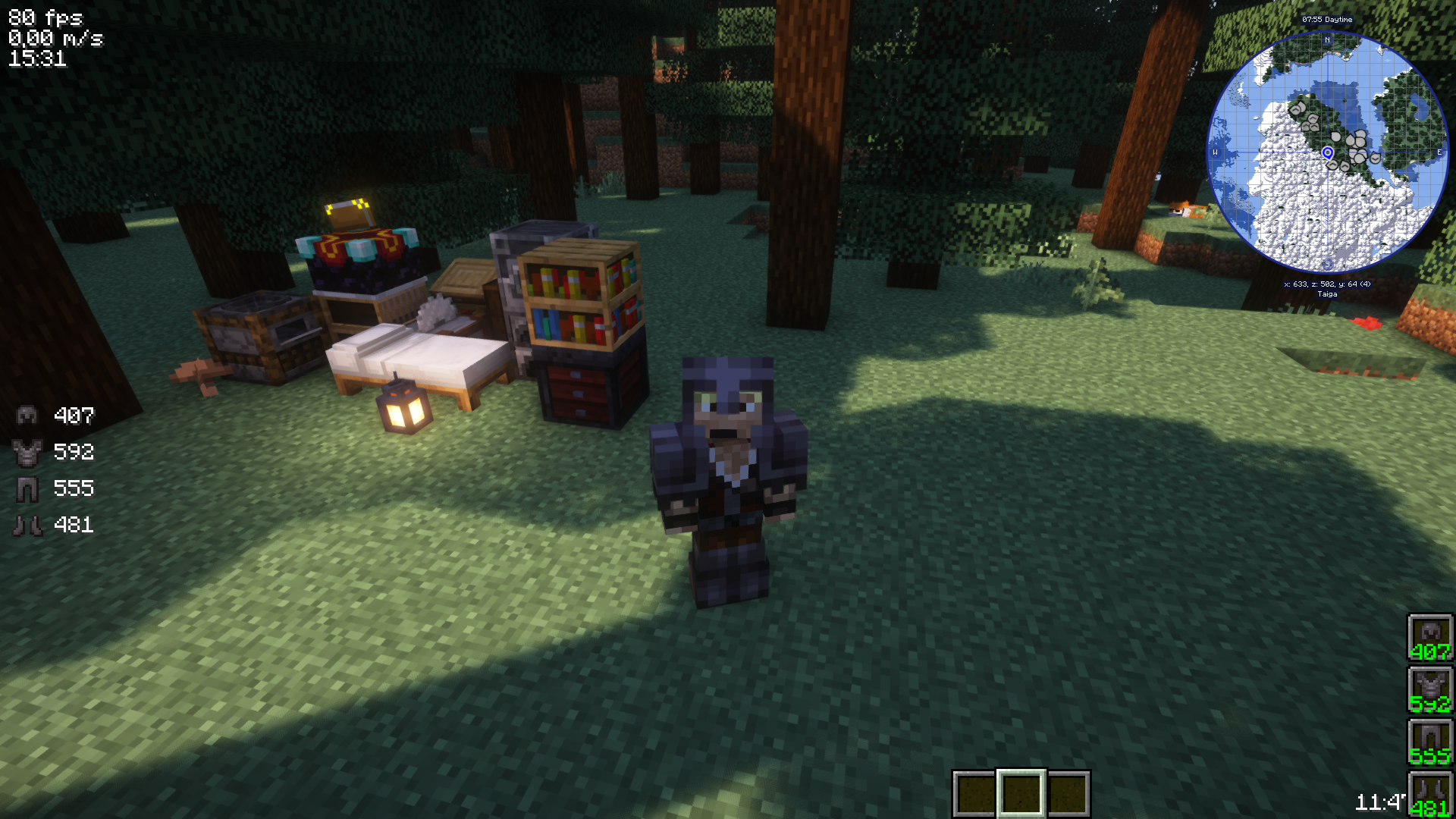 1.20.4: Trimmed Armor So you can see more of someone's skin while wearing armor
 -
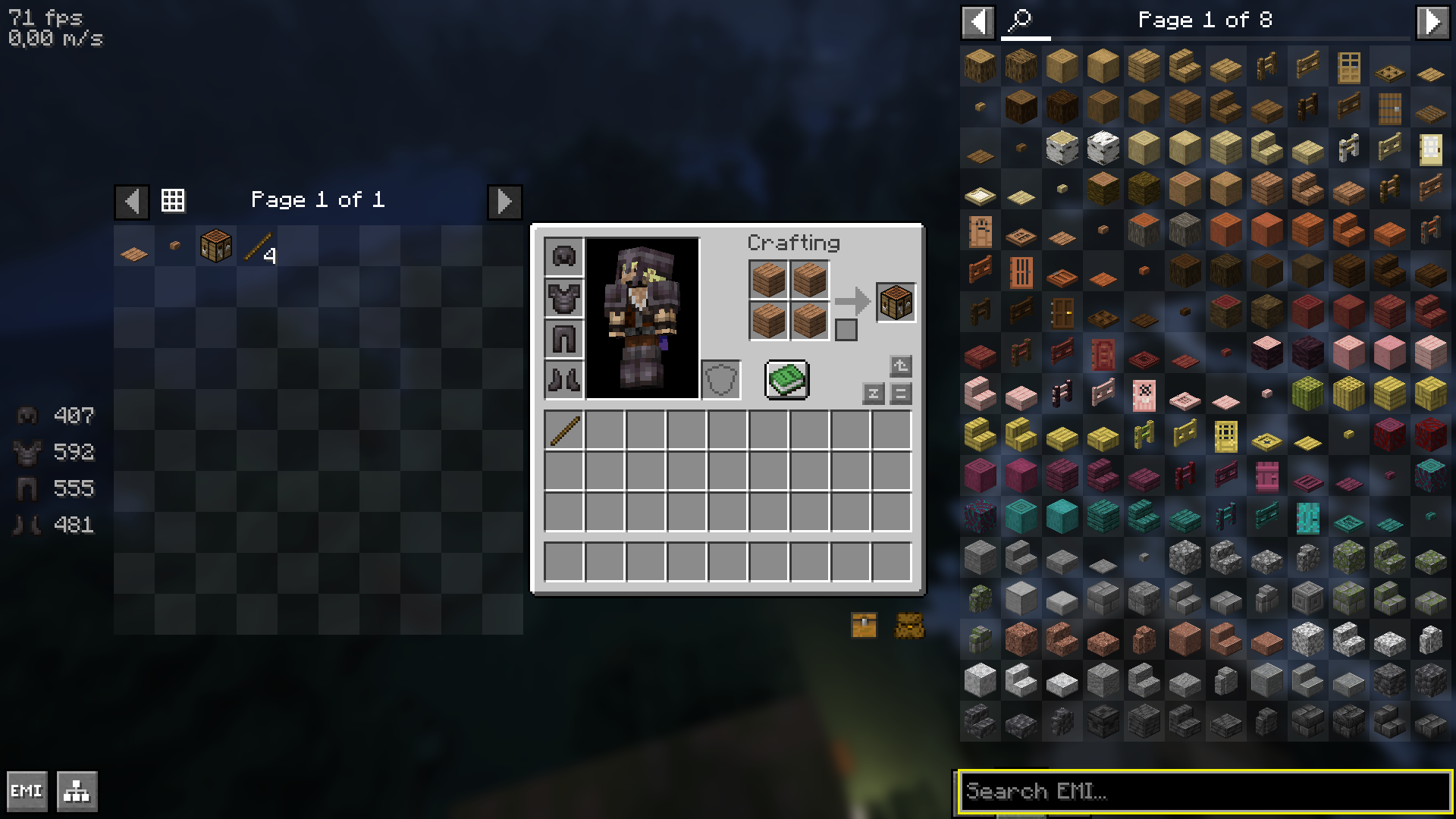 1.20.4: EMI with craftables EMI show craftables on the left where you can click them like with the crafting book.
 -
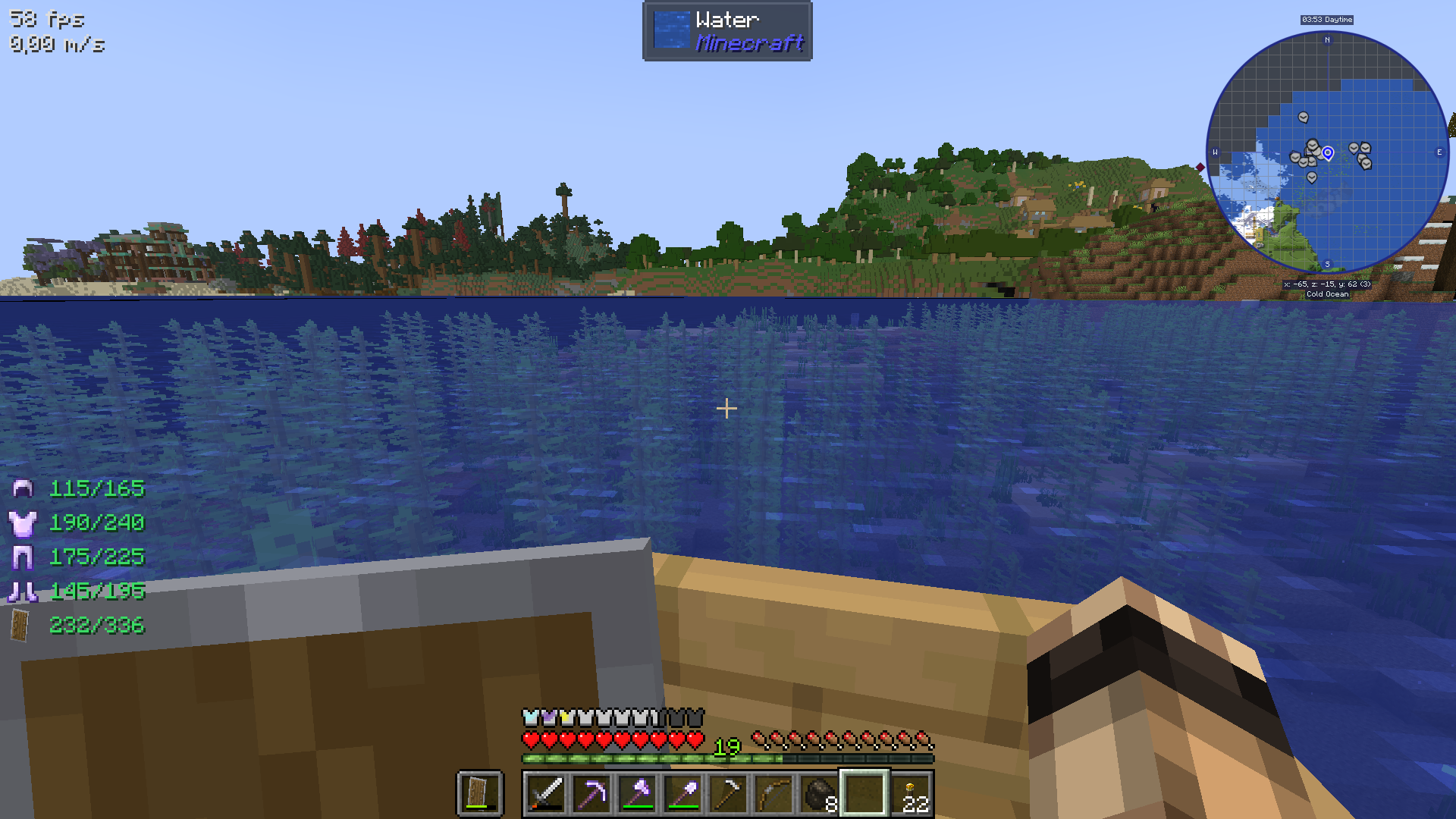 1.19.3: HUD Improvements Enchantments give a faint glow over your armor icons above your health bar. Also, you can see your durabilities on the left of your screen.
Versions
Files
Relations
Project Relations
More like this
Similar Modpacks
Suggestions use data such as tags, dependencies, dependents, descriptions, titles, and more to rank how much they overlap with this modpack.
On ModDex
Community snapshot
By the numbers
Statistics

Want to reach Minecraft players?
We're looking for a server hosting partner to feature here and other parts of the site. Interested? Send us a message!
Get in touchGet it on
Available Platforms
On ModDex
Community snapshot
By the numbers
Statistics
Resources