
Community listing page, reviews may not be monitored by the author.
OptimaCraft

No reviews yet
Highly Optimized Vanilla Modpack

Community voices
Reviews
No reviews yet. Be the first to review this project!
Get it on
Available Platforms
About
Project Details
For authors
Embed Badge
If you're the author of this project, you can embed a live badge anywhere that supports HTML or Markdown. It updates automatically whenever ratings change.
Use HTML for any page that supports it, or Markdown for README files and Markdown-based descriptions.
Identifiers
Platform IDs
Resources
External Links
About
Description
Quick Overview
If you wish to use this for your own personal modpack and want to publish said modpack, scroll to the bottom and read my requirements.
OptimaCraft is a highly optimized modpack for Forge 1.20.1, designed to serve as a base for personal modpacks if desired. My goal is to ensure that anyone can run Minecraft however they wish—ideally with shaders enabled. I have also optimized the shaders and adjusted the shadows to mimic Minecraft’s classic block-based style where applicable. This modpack is going to serve as a basis for an upcoming modpack called "Applecraft" that I am personally assisting with and it will have tech based progression with a story to follow so keep your eyes peeled if that's what you're into.
The server-side performance is heavily optimized, allowing it to handle an insane number of mobs without server tick lag—even if you add server-heavy mods.
I will update this modpack in my free time and provide support where possible. Below, I share some thoughts on Minecraft optimization—so even if you don't download the modpack, I hope you'll gain a better understanding of optimizing the game. Feedback and suggestions are always welcome, and I sincerely hope you enjoy this pack!
Optimization
The Rendering
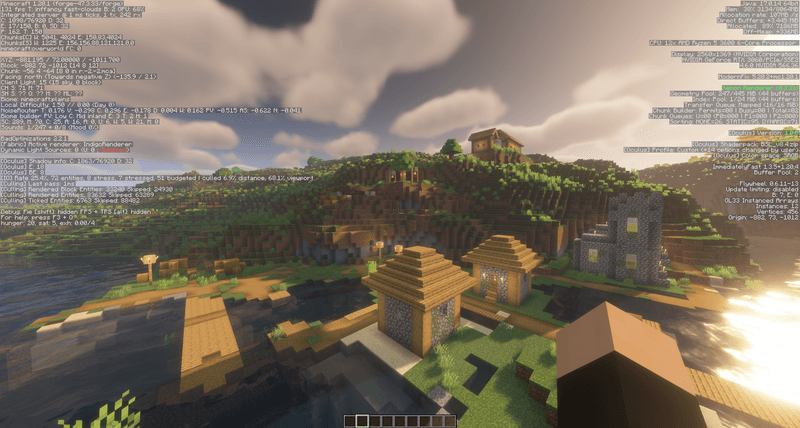
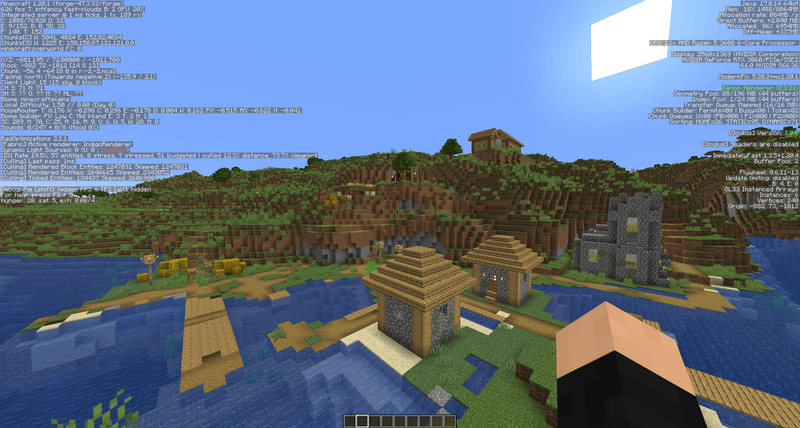
I optimized the modpack’s render speed both with and without shaders enabled. I also included three different shader packs to choose from, offering a balance between quality and performance. Complementary Shaders - Unbound provides the highest quality but has the slowest performance, while MakeUp - Ultra Fast offers the fastest performance with the lowest quality. BSL Shaders serves as a middle ground, delivering a good balance of quality and performance. Below are screenshots showcasing performance with each shader at a 32-chunk render distance, 12-chunk shadow distance and 32-chunk simulation distance. For context my rig contains a Ryzen 5 3600 and an RTX 3060.
Complementary Shaders - Unbound: 110 FPS @ 4ms Server Tick

MakeUp - Ultra Fast: 179 FPS @ 3ms Server Tick
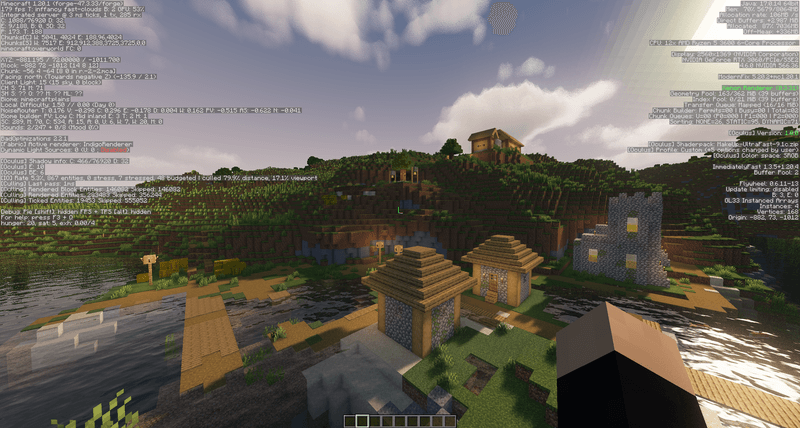
BSL Shaders: 131 FPS @ 1ms Server Tick
No Shaders: 626 FPS @ 1ms Server Tick
The Server
However, rendering and FPS are only part of the equation. What truly affects gameplay responsiveness—whether it’s breaking/placing blocks or fighting mobs—is the speed at which the server runs. The server’s performance tends to slow down as more mods are added, which can quickly lead to issues affecting the long-term enjoyment of the modpack. In response, I optimized the server tick speed to handle heavy mod loads more efficiently.
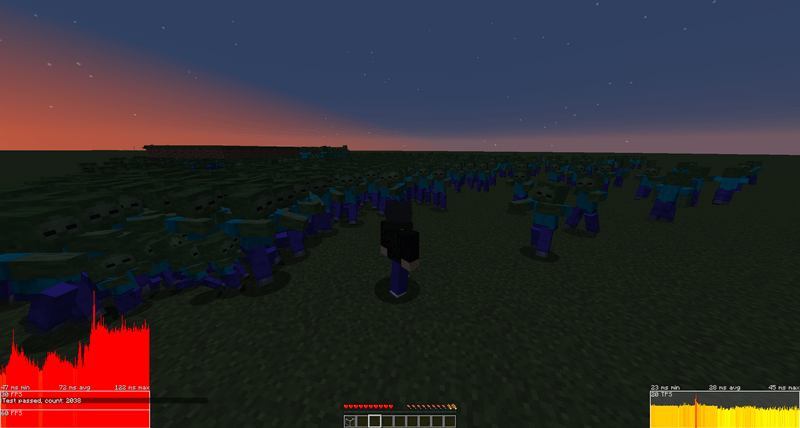
Below, I showcase the server tick speed under a heavy mob load, demonstrating how well it manages mob pathfinding. For context, the left bar graph displays the framerate timer, which is not directly related to server performance. The right bar graph shows the server tick speed; if its average tick time rise outside the designated box, it indicates that the server is running slower than 20 ticks per second (TPS), which is the optimal performance. One tick can take a maximum of 50ms without the server going under 20 TPS.
Server Stress test with 20,000 Zombies: 40ms avg Server Tick
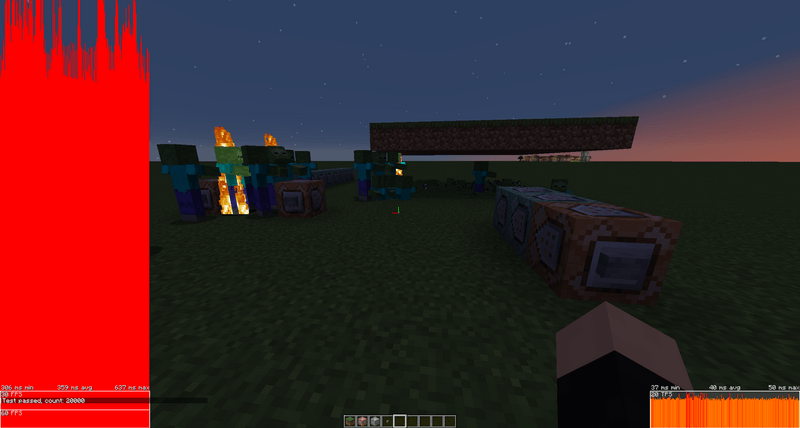
Server Stress test with 2038 Zombies path finding: 28ms avg Server Tick
The JVM, JDK/JRE, Arguments, and the rest
Now, Minecraft uses Java, and that's typically where most people's knowledge stops. This part of the optimization must be done manually, and you can choose to perform these tweaks to make your game—primarily the server—even faster if you wish. However, I must warn you that if you do this incorrectly, you may have a difficult time troubleshooting issues; I will do my best to check the comments and assist when possible.
Minecraft runs on what's called a Java Virtual Machine (JVM). For Minecraft, you can either use a Java Development Kit (JDK) or a Java Runtime Environment (JRE), and both work fine. A JDK is typically more useful if you also plan to modify or create your own mods.
JVM arguments can be preset within Forge. To do this, go to Settings, select Minecraft under the "Game Specific" section, and scroll to the bottom where it says "Additional Arguments." These arguments allow you to modify the JVM to optimize and further speed up the game.
One of the key aspects you can optimize is the Garbage Collector (GC), which manages the clearing of space in Random Access Memory (RAM) to keep Minecraft running smoothly, prevent crashes, and perform other essential tasks. Below, I will share a list of optional tweaks you can follow to further optimize your experience.
DO THIS AT YOUR OWN RISK THE INFORMATION PROVIDED IS COMPLETELY FOR INFORMATIONAL PURPOSES AND IS NOT AT ALL REQUIRED! THE FOLLOWING STEPS ARE NOT RECOMMENED FOR THE COMMON USER
- Download a Java JDK/JRE. I recommend Adoptium Temurin JDK/JRE 17 to begin with as this is what I used with my tests and argument optimizations. Yet again I must stress that none of this is required and you its completely optional unless you want even more performance, mainly for the server.
- Once you download it follow the installation steps and its important to remember what folder it was installed in. If you select to install it for everyone on the machine it will be under "C:\Program Files\Eclipse Adoptium" by default, otherwise it will be under your account and user with a similar name.
- Once installed go to forge and go to Settings, select Minecraft under the "Game Specific" section, and scroll to the bottom.
- You will then find three different Java version sections where by default it says "Curseforge Default"
- You will click the button by Java 17 labed "Choose"
- Navigate to your folder that I mentioned earlier and you should find a new folder labeled something similar to jdk-17.x.x.x-hotspot or jre-17.x.x.x-hotspot. You will need need to open said folder.
- You will then navigate to another folder named "bin"
- Upon opening it you will see a bunch of .exe with some form of java in them. You will need to select Javaw.exe. It is important to select the Javaw.exe or else your Minecraft may not launch or you will have a debug console.
- Now you can repeat steps 1-8 for Java versions 8 and 21. Minecraft utilizes versions 8, 17, 21 of Java depending on the version of Minecraft and you will follow the previous steps but with the respective versions selected.
- If you used Adoptium Temurin there are a few arguments you should take advantage of. To locate where to add them you will go back to where you selected the Java versions and scroll down to where it says "Additional Arguments
- A Basic list of Arguments that should work for most everyone is as follows:
-XX:+UnlockExperimentalVMOptions -XX:+UseShenandoahGC - That is it. If everything works out properly your Minecraft should run faster and smoother than before, regardless of the modpack.
The ShenandoahGC is a good Garbage Collector for modded scenarios and it is a low latency cleaner so it shouldn't cause the game to stutter notiably whenever it clears memory.
Use in other modpacks and compats and final thoughts
You are given permission to use this modpack as a basis for your own pack that you may publish, however, I do need you, the publisher/developer, to link this modpack and give credit in someway. The modpack doesn't have too many compatibility issues but there are some problematic mods that I will mention along with their common symptoms. Please enjoy and have fun.
- I included a plain version of Flywheel into this modpack that doesn't directly appear on forge, therefore, if you use Create you will need to go into the modfolder to remove it due to Create already having Flywheel built in.
- DO NOT update the flywheel and iris compat, as this will break compatibility between the two and cause the game to be unable to launch.
- DO NOT update Brute Force Rendering Culling or else it will sometimes have compat issues and cause crashes at boot.
- If the game crashes instantly and gives an error in the launcher about "sponge.mixin" the problem mod is most likely Brute Force Rendering Culling, which should be downgraded to its newest beta (0.5.9) as of time of writing. If the issue persists try disabling the mod.
- Random errors and crashes sometimes due to a mod called "Redirector".
- A helpful troubleshooting tool is in the ModernFix config there is a feature to turn on warnings for missing mods and issues. Sometimes this can be helpful in finding mods that can cause issues.
- Radium is another mod that can sometimes cause random issues and crashes when combined with other mods.
- Spark is a great profiler to check mods that could be slowing down your game.
- Xenon is a more aggressively optimized version of Embeddium but may have more compat issues related to graphical errors.
- If you notice weird graphical artifacts ingame with shaders check to make sure Flywheel is set to Instancing and not Batching. You can do this with the command
/flywheel backend instancing
That is it for now. I will add onto this list as I find more issues and compat problems. I do hope you enjoy the modpack if you choose to download it. I hope you have a good day/night and thank you for listening to my discussion/ramble.
Thanks to Your_Meme_Lord, VeroxUniverse, and Robdog_Danger for the ideas. Credit to the Vector Shader on Modrinth for the image for OptimaCraft.
Screenshots
Gallery
-
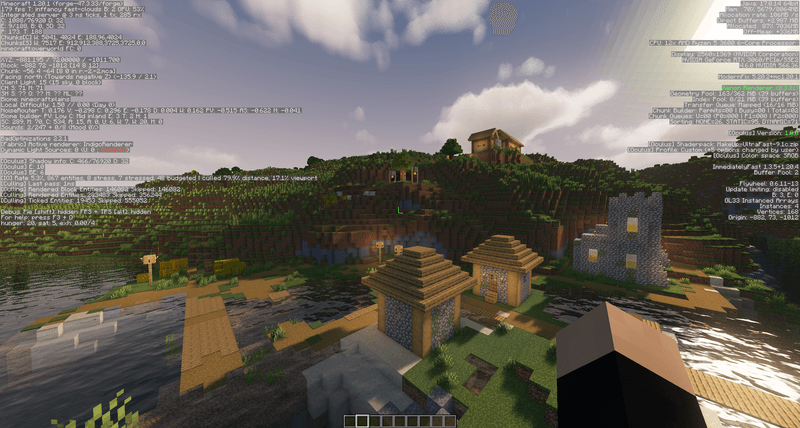 MakeUp - Ultra Fast | Shaders: Village Benchmark 179 FPS @ 3ms Server Tick Speed
 -
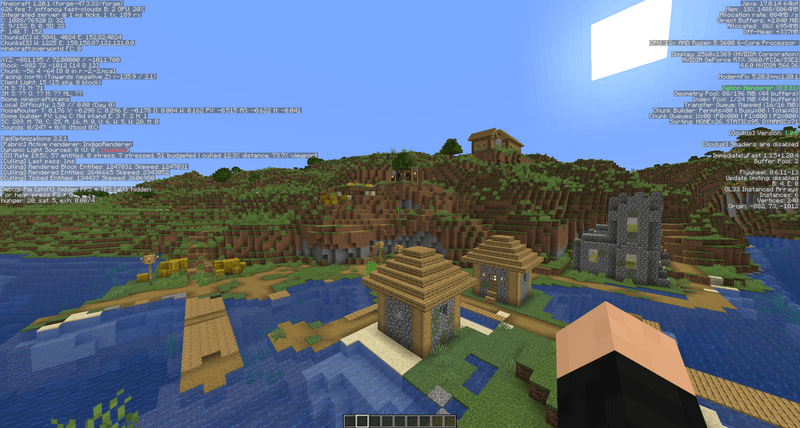 No Shaders: Village Benchmark 626 FPS @ 1ms Server Tick Speed
 -
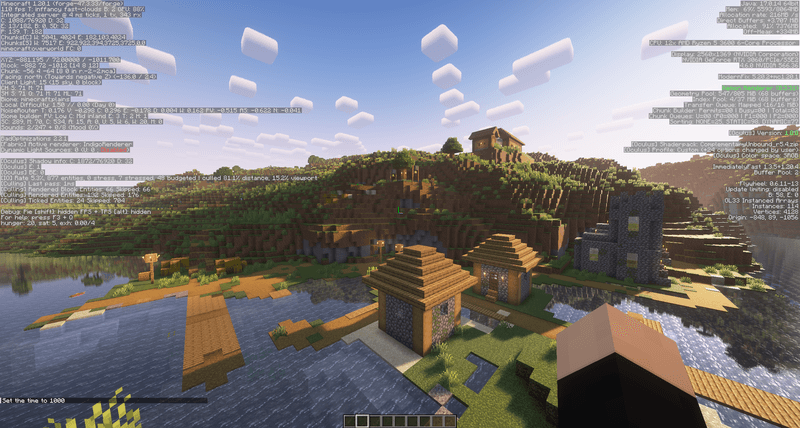 Complementary Shaders - Unbound: Village Benchmark 110 FPS @ 4ms Server Tick Speed
 -
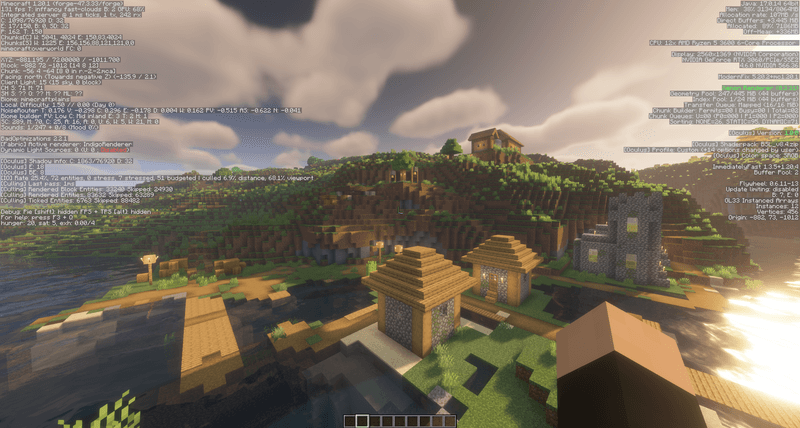 BSL Shaders: Village Benchmark 131 FPS @ 1ms Server Tick Speed
 -
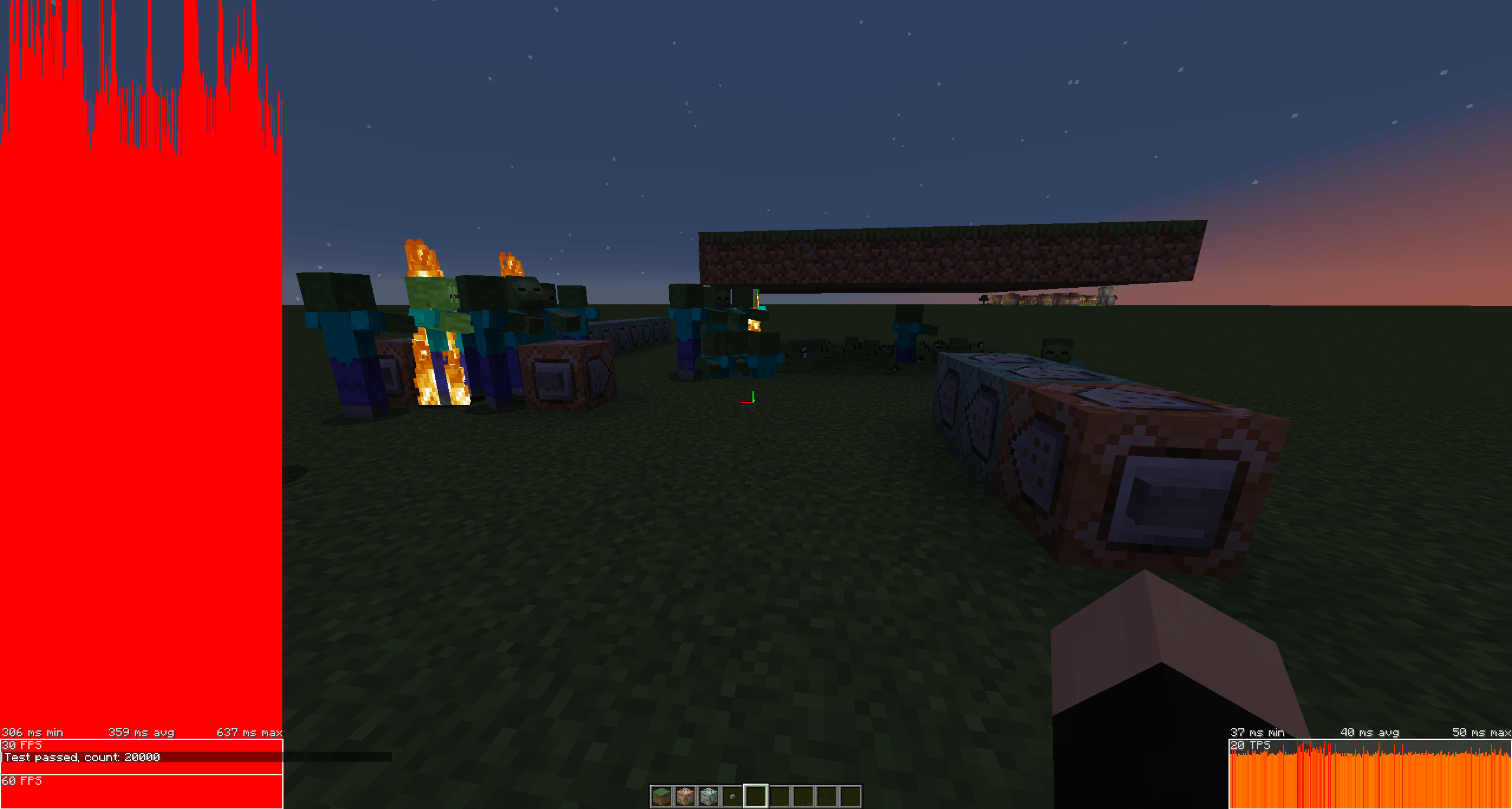 20K Zombies 20K Zombies being loaded without server dropping below 20 TPS
 -
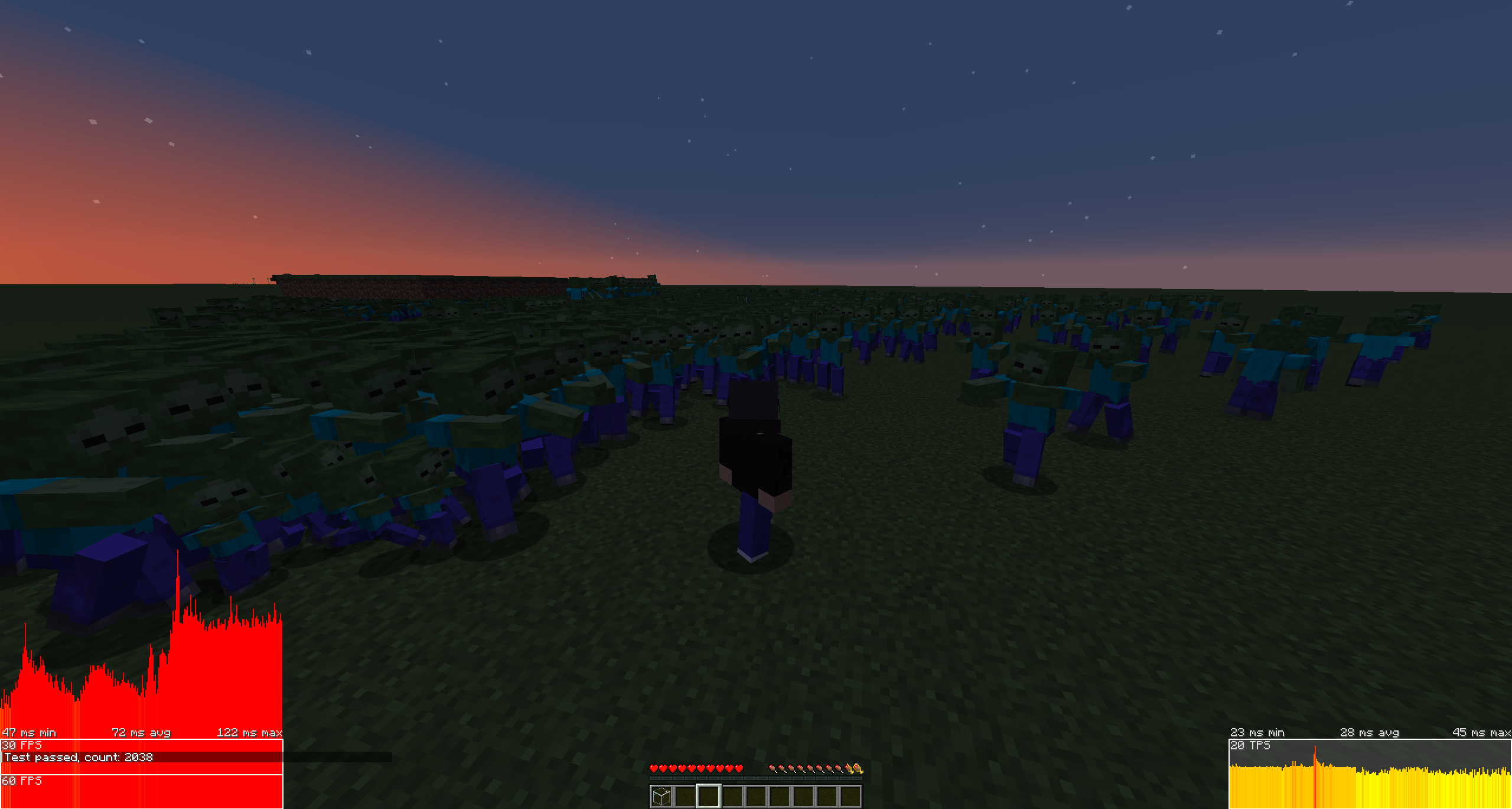 2038 Pathfinding Zombies 2038 Zombies Pathfinding to player with no server lag (Right graph)
Versions
Files
Relations
Project Relations
More like this
Similar Modpacks
Suggestions use data such as tags, dependencies, dependents, descriptions, titles, and more to rank how much they overlap with this modpack.
On ModDex
Community snapshot
By the numbers
Statistics

Get it on
Available Platforms
On ModDex
Community snapshot
By the numbers
Statistics
Resources