Community listing page, reviews may not be monitored by the author.
Proximity Chat With Extras

No reviews yet
Proximity Chat, Vanilla+ style mods, and more!

Community voices
Reviews
No reviews yet. Be the first to review this project!
Get it on
Available Platforms
About
Project Details
For authors
Embed Badge
If you're the author of this project, you can embed a live badge anywhere that supports HTML or Markdown. It updates automatically whenever ratings change.
Use HTML for any page that supports it, or Markdown for README files and Markdown-based descriptions.
Identifiers
Platform IDs
Resources
External Links
About
Description
This was originally a modpack intended for me and my friends. However, I started having fun and now it's this. :)
This is a Vanilla+ style modpack for fabric (if you don't know what that means, don't worry about it) that was meant to be played on a server, but you can play it on singleplayer too. I've configured everything to my personal liking, but feel free to modify any configs if you wish.
All Beta or Alpha versions of this modpack may include mods that may or may not be included in the full release versions, thus they are not mentioned on this page.
OPTIFINE IS REQUIRED, but it's really easy to install. Follow these steps:
Step one: Install this modpack.
Step two: Using the Curseforge desktop app, right-click on the profile for this modpack and click "Open Folder" then open the folder called "mods"
Step three: Go to optifine.net here and download (beware of ads).
Step four: Drag and drop "OptiFine_1.19_HD_U_H8.jar" to the mods folder you opened earlier.
Step five: Done!
This modpack includes:
Shader packs:
- Complementary Shaders v4
- Complementary Reimagined
Resource packs:
- Fresh Animations
- Orchestra Soundpack - Java
- Reimagined | Fresh Animations Patch
Mods:
- Xaero's World Map
- Xaero's Minimap
- Sound Physics Remastered
- Simple Voice Chat
- Fabric API
- Architectury API (Fabric/Forge)
- You're in Grave Danger
- Wildfire's Female Gender Mod (Fabric)
- Waystones (Fabric Edition)
- Towns and Towers - Structure Add-on
- Skin Layers 3D (Fabric/Forge)
- Roughly Enough Items Fabric/Forge (REI)
- Polaroid Camera
- Particle Rain
- PaperDoll
- OptiFabric
- Oh The Biomes You'll Go Refabricated
- Not Enough Animations
- NetherPortalFix (Fabric Edition)
- Nature's Compass
- Motschen's Puddles
- Mod Menu
- GeckoLib
- Cloth Config API (Fabric/Forge)
- Animal Feeding Trough [Fabric | Forge | Quilt]
- Adorn
Once Optifine is installed and the game is launched, you'll have to do the following (first time setup):
Make sure the resource packs are in this order:
You then can choose a shader, but you need to know...
This pack comes with two, highly configurable shaders: Complementary Shaders v4 and Complementary Reimagined. See the differences between the two here. Personally, I recommend Complimentary Reimagined but either way you will have to go into "Shader options..." and adjust them to fit both your liking and your PC/Laptop's capabilities.
Gameplay/Overview:
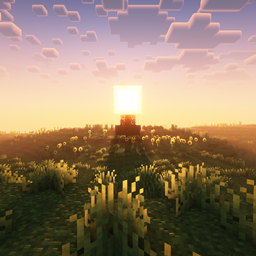
As for how this should affect your gameplay, you will be able to hear and talk with players near you. With the shader and resource packs, you will also see Minecraft through a whole new lens. The shader (either one) and resource packs really make Minecraft look absolutely spectacular. Thanks to the Sound Physics Remastered mod, you'll also get realistic sound attenuation, reverberation, and absorption through blocks (as a nice bonus, this mod is optimized for Simple Voice Chat). With other mods you'll get things like over 80 new biomes (Oh the Biomes You'll Go), horse-drawn carriages and other transport-related things (Grim's Transportables), graves that remember your and hold on to your inventory for you when you die (You're in Grave Danger), A fully functional world map which allows you to place waypoints anywhere using "B" and a minimap (Xaero's World Map and Xaero's Minimap), and so much more but if I get carried away in my excitement this will have to be a spoiler of its own due to its length.
Performance:
If you can run java Minecraft, you should be fine. If you are experiencing lag however, it is most likely due to the shader pack. Try going into "Shader Options" in-game and turning them down or turning off the shader completely if need be (a shame that would be).
Screenshots
Gallery
Versions
Files
Relations
Project Relations
More like this
Similar Modpacks
Suggestions use data such as tags, dependencies, dependents, descriptions, titles, and more to rank how much they overlap with this modpack.
On ModDex
Community snapshot
By the numbers
Statistics

Get it on
Available Platforms
On ModDex
Community snapshot
By the numbers
Statistics
Resources