
Community listing page, reviews here may not be monitored by the author.
Purker optimization

No reviews yet
A private-focused performance and utility modpack made for me and my friends' low-end PCs.
Community voices
Reviews
No reviews yet. Be the first to review this project!
Get it on
Available Platforms
Compatibility
Supported Environments
Runs entirely on the client. Works on vanilla servers.
About
Project Details
For authors
Embed Badge
If you're the author of this project, you can embed a live badge anywhere that supports HTML or Markdown. It updates automatically whenever ratings change.
Use HTML for any page that supports it, or Markdown for README files and Markdown-based descriptions.
Identifiers
Platform IDs
Resources
External Links
About
Description
Overview
This is a private-focused utility modpack specifically created for me and my friends to play together. Since many of us are using low-end PCs and laptops, the main goal of this project is to maximize performance, boost FPS, and add useful client-side tools for our multiplayer sessions.
Key Features
- Extreme Optimization: Powered by Sodium, Lithium, FerriteCore, and ImmediatelyFast to heavily reduce memory usage, fix lag spikes, and maximize your frame rates on older hardware.
- Smart Performance Tweaks: Features Entity Culling, More Culling, and Dynamic FPS which lower the rendering load on your graphics card by not drawing hidden objects or slowing down when the game is minimized.
- Enhanced Utilities: Includes essential client tools like Litematica for schematics, Item Scroller, WI Zoom, Notes, and Inventory HUD+ to keep your gameplay organized.
- Network & Connection Fixes: Optimized for servers with Packet Fixer, ViaFabricPlus, and fast pinging utilities to ensure a stable connection with fewer disconnects.
Mod List & Categories
🚀 Core Performance
- Sodium & Sodium Extra - Modern rendering engine replacements that drastically increase FPS.
- Lithium - General physics and chunk optimization.
- FerriteCore & Bad Optimizations - Drastically reduces RAM usage.
- Entity Culling & More Culling - Skips rendering blocks and entities you cannot see.
- C2ME & Lazy DFU - Speeds up world loading and chunk generation.
- ImmediatelyFast & Exordium - Optimizes hud, screen, and general rendering components.
- Clumps, SmoothBoot & Spark - Fixes loading lag, groups XP orbs, and diagnoses performance spikes.
🛠️ Client Utilities & HUD
- Litematica & Litematica Printer - Easy schematic placements, visual block guides, and builds.
- Inventory HUD & Item Scroller - Better inventory management and on-screen status effects.
- WI Zoom & Gamma Utils - Built-in cinematic zoom and fullbright controls.
- Notes - In-game notepad to write down coordinates and tasks.
- Mod Menu & Better Stats - Better interface for tweaking your mods and checking server/game statistics.
⚙️ System & Library Dependencies
- Fabric API, Cloth Config, Yet Another Config Lib, TCD Commons, Placeholder API, Fabric Language Kotlin - Necessary core libraries required to run and configure all included mods smoothly.
Performance Comparison (Vanilla vs. Modpack)
To show the actual impact of this modpack on low-end hardware, here is a side-by-side comparison on my personal PC:
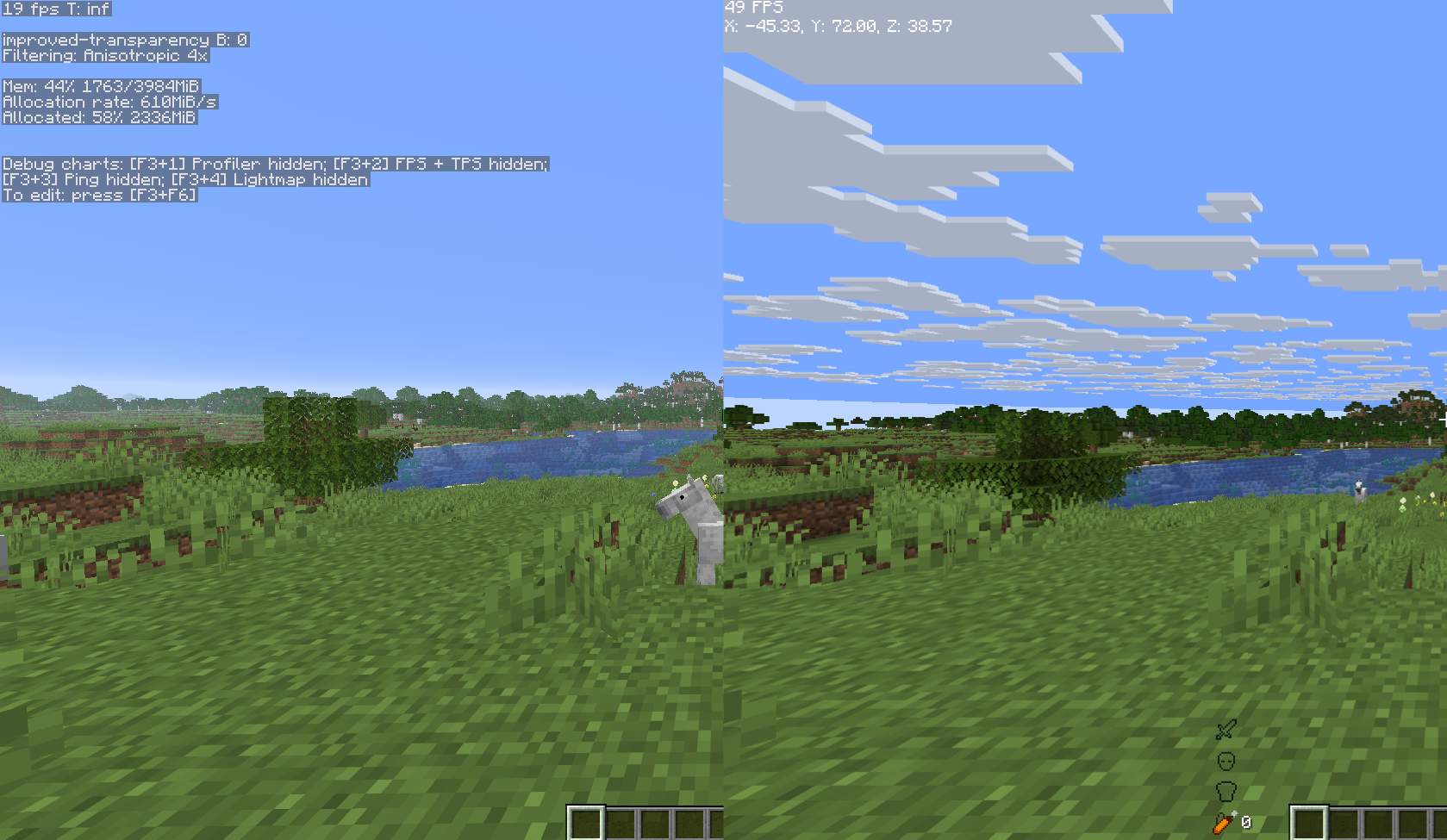
- Left Side (Vanilla Minecraft): Running on a local singleplayer world with all video settings turned OFF or set to minimum (Fast graphics, clouds disabled, minimal particles, 50% entity distance, etc). Despite the lowest possible quality, the game struggles heavily at around 19 FPS.
- Right Side (With Our Modpack): Running on the same world but with every single setting completely MAXED OUT (Fabulous graphics, clouds enabled, maximum particles, 500% entity distance, etc). Thanks to the optimization engine, the game runs at 49 FPS — more than doubling the performance while rendering the highest possible visual quality.
💡 Important Notes on Performance:
- Multiplayer Boost: This benchmark was taken in a demanding Singleplayer world (where the PC has to process world generation and logic at the same time). When playing on a Multiplayer server, the server handles those heavy tasks, meaning you and your friends will achieve significantly higher FPS than shown here.
- Tweak for More FPS: The 49 FPS on the right side was achieved using the most demanding, maximum settings possible. If you need even more performance on your laptop, you can easily turn down settings like render distance or graphics quality to perfectly match your hardware and unlock 60+ FPS.
Screenshots
Gallery
Versions
Files
Relations
Project Relations
More like this
Similar Modpacks
Suggestions use data such as tags, dependencies, dependents, descriptions, titles, and more to rank how much they overlap with this modpack.
On ModDex
Community snapshot
By the numbers
Statistics

Want to reach Minecraft players?
We're looking for a server hosting partner to feature here and other parts of the site. Interested? Send us a message!
Get in touchGet it on
Available Platforms
On ModDex
Community snapshot
By the numbers
Statistics
Resources