
Community listing page, reviews here may not be monitored by the author.
Quark Pack

No reviews yet
A Fabric-based modpack that includes various sound modes and additional modes(e.g. Iris Shaders) for optimization and enhanced immersion.

Community voices
Reviews
No reviews yet. Be the first to review this project!
Get it on
Available Platforms
Compatibility
Supported Environments
Runs entirely on the client. Works on vanilla servers.
About
Project Details
For authors
Embed Badge
If you're the author of this project, you can embed a live badge anywhere that supports HTML or Markdown. It updates automatically whenever ratings change.
Use HTML for any page that supports it, or Markdown for README files and Markdown-based descriptions.
Identifiers
Platform IDs
Resources
External Links
About
Description
Introduction
The Quark Pack modpack is designed for Minecraft players who prioritize optimization and immersion, all while using client-side mods only. This pack includes carefully selected utility and immersion-focused mods like Iris Shaders, enhancing the Minecraft experience without impacting performance. With each mod chosen meticulously, Quark Pack aims to maintain smooth gameplay, ensuring that only mods with minimal frame impact make it into the pack.
Quark Pack provides a robust foundation of client-side optimizations, focusing on maximizing both performance and enjoyment. While you can expect improved visuals and utility without sacrificing framerate, the modpack remains simple and streamlined, with little to no gameplay alterations outside of what boosts immersion. This makes it easy to add any additional mods for customization without concerns about compatibility or performance degradation.
Keeping the pack lightweight and performance-focused also means that updates can be quickly rolled out whenever new improvements or Minecraft versions become available. I’m committed to making sure Quark Pack stays relevant with the latest mod updates and performance enhancements.
Get Started
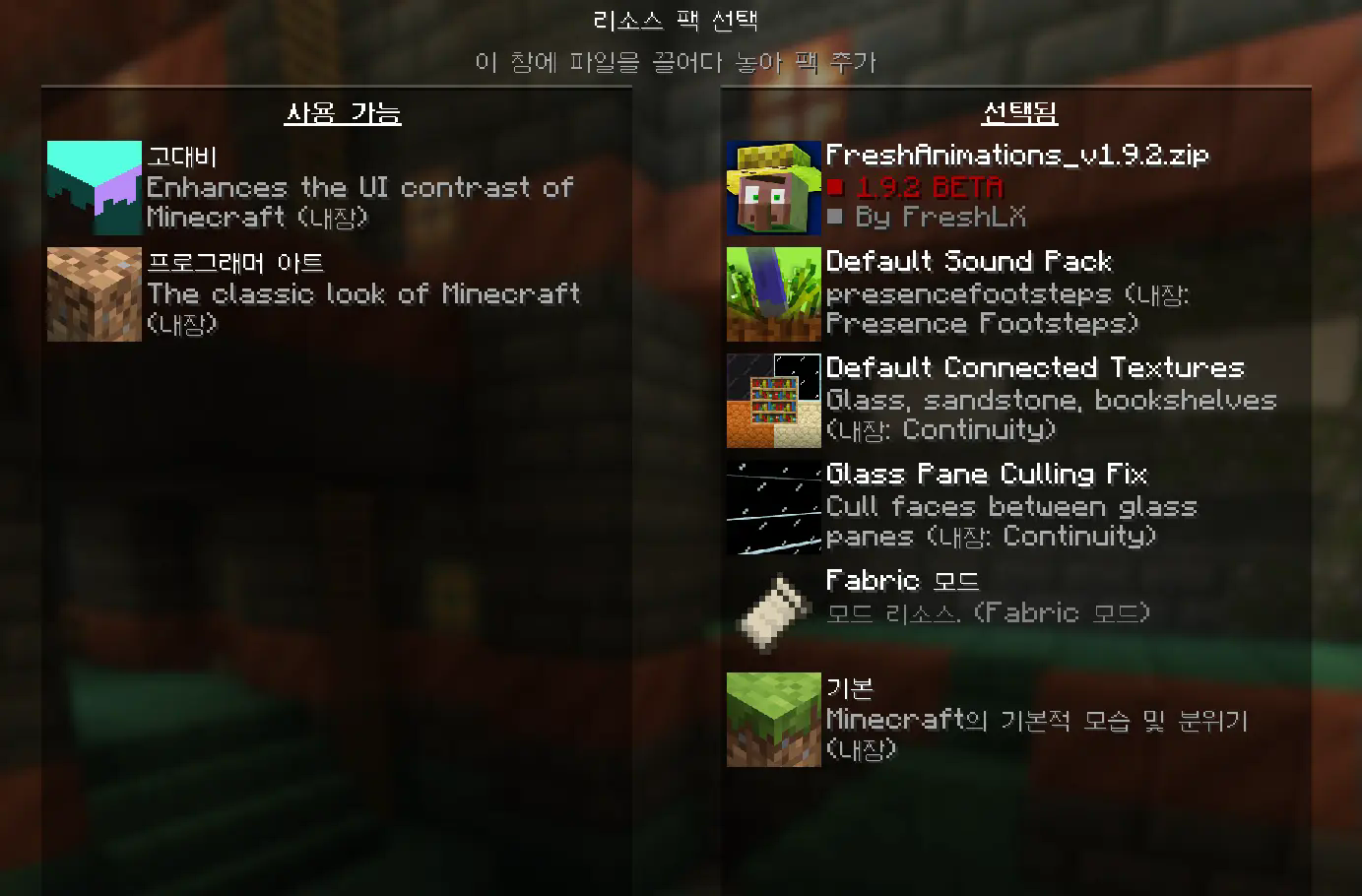
You need to apply all built-in resource packs by the mods. (e.g. Default Sound Pack, Default Connected Textures, Glass Pane Culling Fix)
The FreshAnimations resource pack is optional. Please note that applying this resource pack may cause significant frame drops, especially in scenarios where many mobs need to be displayed on screen.
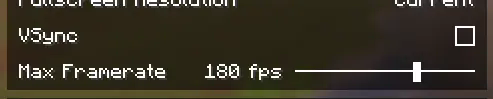
You need to turn off the VSync and on the Max Framerate in the Video Settings.
In your game settings, disable the V-sync option and set a frame rate limit that matches your monitor's refresh rate (e.g., 60fps, 144fps, 240fps). This will help reduce in-game latency to a minimal level. If you rely on V-sync by default, the GPU may become idle and underutilized, resulting in a significantly lower load rate. Consequently, this can cause stuttering and increased latency within the game.
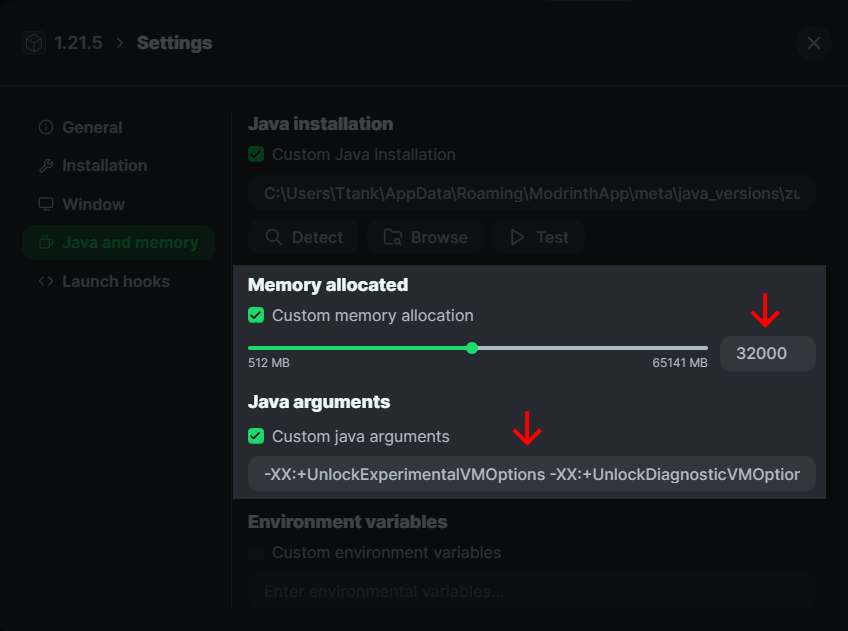
Settings about the memory size and Java arguments
After adjusting the memory size as needed, copy and paste the Java arguments below into the Java arguments field.
-XX:+UnlockExperimentalVMOptions -XX:+UnlockDiagnosticVMOptions -XX:+AlwaysActAsServerClassMachine -XX:+AlwaysPreTouch -XX:+DisableExplicitGC -XX:+UseNUMA -XX:NmethodSweepActivity=1 -XX:ReservedCodeCacheSize=400M -XX:NonNMethodCodeHeapSize=12M -XX:ProfiledCodeHeapSize=194M -XX:NonProfiledCodeHeapSize=194M -XX:-DontCompileHugeMethods -XX:MaxNodeLimit=240000 -XX:NodeLimitFudgeFactor=8000 -XX:+UseVectorCmov -XX:+PerfDisableSharedMem -XX:+UseFastUnorderedTimeStamps -XX:+UseCriticalJavaThreadPriority -XX:ThreadPriorityPolicy=1 -XX:+UseZGC -XX:AllocatePrefetchStyle=1 -XX:-ZProactive
It’s recommended to use the Super Duper Vanilla Shader when you want the shader.
My personal recommendation for a shader is the Super Duper Vanilla Shader, which is included in this mod pack (though optional and requires manual activation). This shader enhances the game’s graphics and atmosphere in an ideal way without compromising the original vanilla look. It also provides stable performance with minimal frame drops or stuttering. Notably, it outperforms BSL, offering both excellent visuals and high performance.

Who should use it?
The modpack includes dependencies like Sodium/Indium for optimization, utilizing a new rendering engine that can deliver performance improvements of up to two to three times over vanilla Minecraft, especially for users with Radeon GPUs.
Screenshots
Gallery
-
 Banner Banner image
Versions
Files
Relations
Project Relations
More like this
Similar Modpacks
Suggestions use data such as tags, dependencies, dependents, descriptions, titles, and more to rank how much they overlap with this modpack.
On ModDex
Community snapshot
By the numbers
Statistics

 (opens in a new tab)
Get it on
Available Platforms
On ModDex
Community snapshot
By the numbers
Statistics
Resources