
Ryzen SMP Official Modpack
No reviews yet
A bunch of Fabric mods to make your game run smoother and make the best experience of Ryzen SMP, or any other survival anarchy server!
Enhances game performance and optimizes resource usage.
Fabric is a mod loader for versions 1.14+ of Minecraft, particularly popular for client side and optimization mods.
Community voices
Reviews
Click once to include, again to exclude, again to clear
No reviews yet. Be the first to review this project!
Get it on
Available Platforms
 Modrinth
Compatibility
Supported Environments
About
Project Details
For authors
Embed Badge
If you're the author of this project, you can embed a live badge anywhere that supports HTML or Markdown. It updates automatically whenever ratings change.
Use HTML for any page that supports it, or Markdown for README files and Markdown-based descriptions.
Identifiers
Platform IDs
Resources
External Links
About
Description
A bundle of mods to make your game run smoother and make the best experience of Ryzen SMP, or any other Survival/anarchy server.
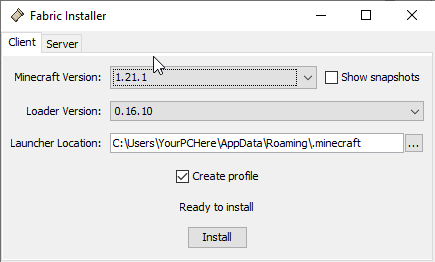
Installing instructions: Go to https://fabricmc.net and download the installer. Run the installer and under versions scroll down to 1.21.1. Make sure "create profile" is checked, then click Install. Then, unzip the modpack. Go into your .minecraft folder (also accessible through the resource pack folder -> go up 1 folder in the file directory) and find your mods folder. Make sure it is either empty or only has compatible mods. Go into the unzipped modpack folder and place all the .jar files into your mods folder. Launch Minecraft Launcher and your selected versions should say "fabric 1.21.1". click play and your game will start with all your mods!
<Mods List>
Quality of life: AppleSkin, Capes, Chat Heads, Concentration, Fullbright, Jade, LambDynamicLights, Recursive Resources, Shulker Box Tooltip, Simple Voice Chat, Slotted Armor HUD, Unlock All Recipes, Zoomify
Optimization: Clumps, Debugify, FerriteCore, ImmediatelyFast, Iris, Lithium, ModelFix, ModernFix, Mod Menu, More Culling, Noisium, Reese's Sodium Options, Sodium Extra, Sodium
Libraries (required to run some mods): Architectury, Cicada, Cloth Config, Fabric API, Fabric Language Kotlin, Placeholder API, Silk, Yet Another Config Lib
All credits to the original makers of these mods, which can all be found on Modrinth.
Note: Even if you don't use the modpack, you will have to use the exact same version of Simple Voice Chat (2.5.28) in order to be able to talk to other members with the modpack, as there is currently a glitch where you cannot talk between different Simple Voice Chat versions.
Screenshots
Gallery
Versions
Files
Relations
Project Relations
More like this
Similar Modpacks
Suggestions use data such as tags, dependencies, dependents, descriptions, titles, and more to rank how much they overlap with this modpack.
On ModDex
Community snapshot
By the numbers
Statistics

Want to reach Minecraft players?
We're looking for a server hosting partner to feature here and other parts of the site. Interested? Send us a message!
Get in touchGet it on
Available Platforms
On ModDex
Community snapshot
By the numbers
Statistics
Resources