
Community listing page, reviews may not be monitored by the author.
Shades 'n' Shine

No reviews yet
This modpack aims to create a semi-realistic, vanilla-style environment, visual and interactive adventure with minimal FPS drops and high customisability.

Community voices
Reviews
No reviews yet. Be the first to review this project!
Get it on
Available Platforms
Compatibility
Supported Environments
Must be installed on both the client and the server.
About
Project Details
For authors
Embed Badge
If you're the author of this project, you can embed a live badge anywhere that supports HTML or Markdown. It updates automatically whenever ratings change.
Use HTML for any page that supports it, or Markdown for README files and Markdown-based descriptions.
Identifiers
Platform IDs
Resources
External Links
About
Description
If you want to play the full version of the modpack, please download the latest 1.21.11 version!!!
 This Modpack is a collection of Mods and Resourcepacks that you can find on Modrinth that aims to create a semi-realistic, vanilla-style environment, visual and interactive adventure with minimal FPS drops and high customisability. I have gone through many, many Modrinth pages to find the best optimisations and debug mods to squeeze out every last drop of FPS.
NOTE: When playing in multiplayer, ensure that you disable the mod "Wet Sand" as the game becomes unplayable as block id's get messed up easily; you might find your deepslate becoming water!
Q: How often do updates come out?
Answer: I try my best to push out updates as quickly as possible, but with school and testing needs for the modpack, it may take a week or two to upload an update.
Q: How do I install it?
Answer: Download the file and double-click it. This should start creating the modpack for you in Modrinth if you have Modrinth installed.
Q: Can you make the modpack for older versions?
Answer: Unfortunately, outside of 1.21.11, the main mods that bring the life together are not compatible with 1.21.10 and earlier. 1.21.10 is the earliest version I will update for, as 1.21.9 has little to no features regarding this mopack; there aren't even replacement mods I could find.
Q: Can you update the modpack for a newer version?
Answer: Currently, no. Most of the mods still need to be upgraded.
Common Errors and Fixes:
Java Version Incompatibility Error:
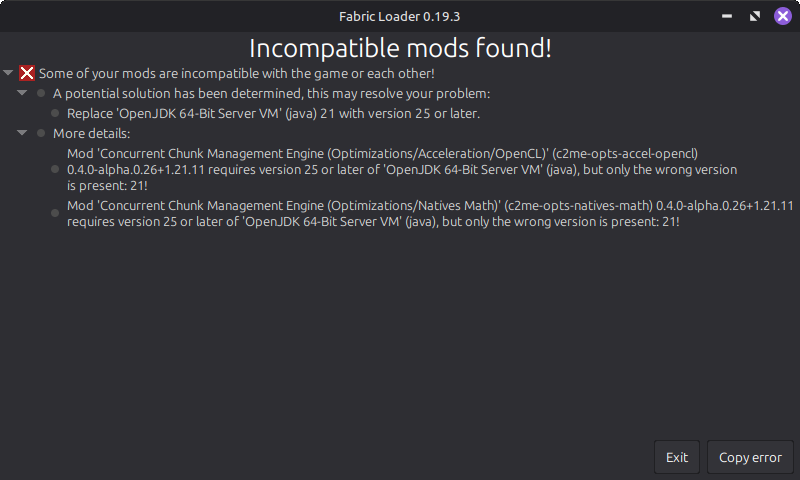
For this error, you must install said version of Java on your computer and then go to Shades 'n' Shine> Instance Settings> Java and memory> Java version. Here you need to tick the box that says: "Custom Java Installation" and then choose "Detect" and then choose the correct version of Java.
JDK Error:
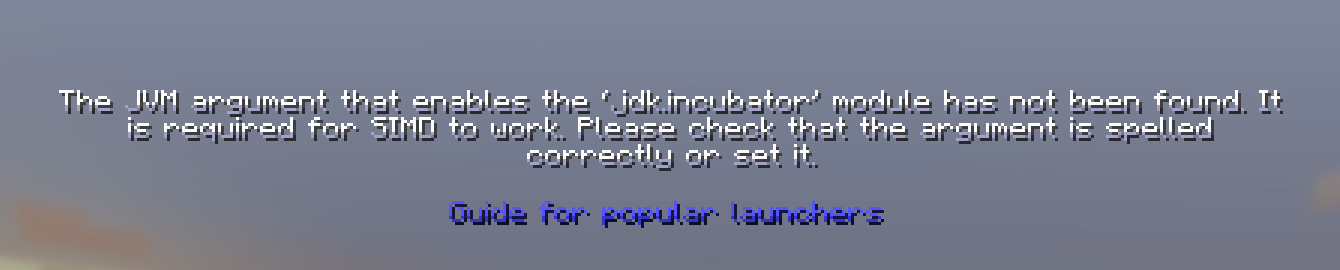
For this error, click on "Guide for popular launchers", and it should be smooth sailing from their - It'll have an easy step-by-step on their site.
Future Additions:
- My custom music
- Custom quests and advancements
- More simple QoL improvements
- Enhanced Structures (without adding much)
- Missing blocks (stairs, slabs, etc)
- Better balanced loot tables and chests
- Better Crafting Recipes
- Woodcutter
- Stonecutter Crafting Recipes
Minecraft Title created using the "Minecraft Title" plugin, which can be found on Blockbench: https://blockbench.net
My Music: https://musescore.com/s/user/62305303/sets/14941418 (to be added in the update 2.0)
Vanilla Tweaks: https://vanillatweaks.net/
Note: For an even better visual experience for skin customisation and emotes, I would recommend Essentials (mod), but remember to disable the Fresh Animations Player extension and HMI and HMI X Fresh Player Patch to avoid armour and player animations from being broken.
Screenshots
Gallery
-
 Shades 'n' Shine - Experience Adventure Banner Image
 -
 Raining In Swamp Clear visulisation of the fog, lighting, terrain generation, grass, rain and water puddle effects
 -
 Sunny Plains You can see the vibrant skybox and mob variations
 -
 Wild Forest You can see the new grass and terrain generateion as well as the grass colour
 -
 Ocean Monument Underwater
 -
 Snowy Village On Sunset You can eee the vibrant skybox
 -
 Snowy Village/Forest Beatuiful skybox and rocks.
Versions
Files
Relations
Project Relations
More like this
Similar Modpacks
Suggestions use data such as tags, dependencies, dependents, descriptions, titles, and more to rank how much they overlap with this modpack.
On ModDex
Community snapshot
By the numbers
Statistics


Get it on
Available Platforms
On ModDex
Community snapshot
By the numbers
Statistics
Resources