
Community listing page, reviews here may not be monitored by the author.
Yzord's PVP Modpack

No reviews yet
A combination of Optimization and PVP mods that I use like Appleskin, Bettershields, Particle core and more.
Community voices
Reviews
No reviews yet. Be the first to review this project!
Get it on
Available Platforms
Compatibility
Supported Environments
Runs entirely on the client. Works on vanilla servers.
About
Project Details
For authors
Embed Badge
If you're the author of this project, you can embed a live badge anywhere that supports HTML or Markdown. It updates automatically whenever ratings change.
Use HTML for any page that supports it, or Markdown for README files and Markdown-based descriptions.
Identifiers
Platform IDs
Resources
External Links
About
Description
This modpack is a combination of a ton of optimization, PVP, and QoL mods that are meant to improve your FPS, your PVP experience, and overall enhance your time playing minecraft with mods like Appleskin, Sodium, Gamma Utils and much more.
Total List of Mods:
Optimization:
- AsyncParticles
- Better Block Entities
- Concurrent Chunk Management Engine (Fabric)
- Consumable Optimizer
- Entity Culling
- Fast Noise
- FerriteCore
- Gnetum
- Ixeris
- Lithium
- ModernFix-mVUS
- More Culling
- Packet Fixer
- Particle Core
- Sodium
- XXL Packets
QoL/PVP:
- Gamma Utils (Fullbright)
- BetterShields
- GraphWaypoints
- Bundles Beyond
- Bundle Weight Counter
- Better F1 Reborn
- AppleSkin
- Continuity
- Custom Capes
- Light Overlay
- Marlow's Crystal Optimizer
- Mod Menu
- Player Kits
- Resourcify
- Shield Fixes
- Shulker Box Tooltip
- Sprint After Death
- Status Effect Timer
- uku's Armor HUD
- Zoomify (Zoom)
Libs & Other:
- Fzzy Config
- Herobot (1.21.11 only)
- Cloth Config API
- Fabric API
- Fabric Language Kotlin
- No Chat Reports
- OverlayLib
- Reese's Sodium Options
- Sodium Extra
- Text Placeholder API
- ukulib
- WalksyLib
- YetAnotherConfigLib (YACL)
Credit to Remarkably Optimized for a lot of the optimization mods.
Installation Process
Installation process:
If you do not have fabric installed, follow this guide to install it: Fabric Installer
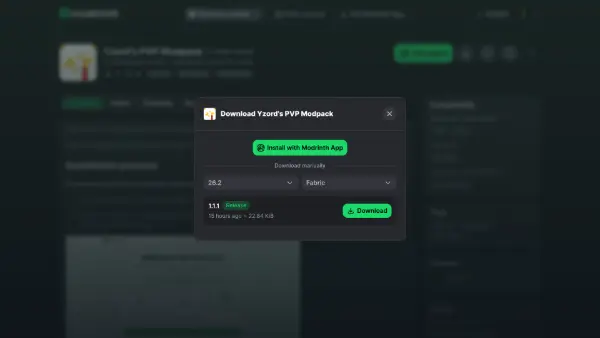
1.Dowload the pack for your specified version.
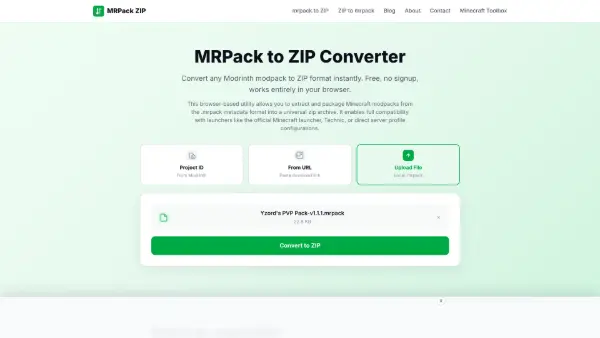
2.Go to: mrpack to ZIP and drag the mrpack onto the area where it says to. Then click convert to ZIP and once it's done, click dowload.
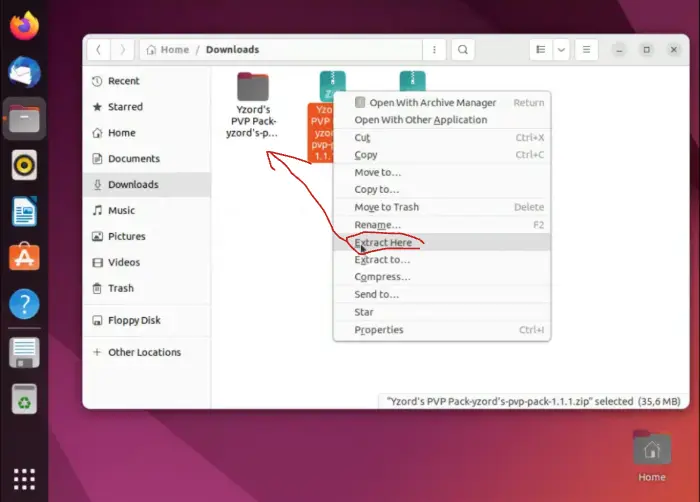
3.In your files, right click the new ZIP file and click extract. Then, inside of the folder, enter the "mods" folder and drag everything into the mods folder in minecraft (if there isn't one just create a folder in your .minecraft named "mods" all lowercase).
4.Now open minecraft and enjoy!
Screenshots
Gallery
-
 Banner
 -
 Cape 1
 -
 Cape 2
Versions
Files
Relations
Project Relations
More like this
Similar Modpacks
Suggestions use data such as tags, dependencies, dependents, descriptions, titles, and more to rank how much they overlap with this modpack.
On ModDex
Community snapshot
By the numbers
Statistics

Want to reach Minecraft players?
We're looking for a server hosting partner to feature here and other parts of the site. Interested? Send us a message!
Get in touchGet it on
Available Platforms
On ModDex
Community snapshot
By the numbers
Statistics
Resources