Community listing page, reviews here may not be monitored by the author.
A Dynamic Color Table

No reviews yet
A mod aimed toward making pixel art easier for all

Community voices
Reviews
No reviews yet. Be the first to review this project!
Get it on
Available Platforms
About
Project Details
For authors
Embed Badge
If you're the author of this project, you can embed a live badge anywhere that supports HTML or Markdown. It updates automatically whenever ratings change.
Use HTML for any page that supports it, or Markdown for README files and Markdown-based descriptions.
Identifiers
Platform IDs
Resources
External Links
About
Description

A Dynamic Color Table (ADCT) is a mod that enables the typical player to create various forms of pixel art, from players' skins to images found on the Internet. The mod adds the following commands to the player's arsenal to enhance building experience:
Block Count: (./blockcount <x1> <y1> <z1> <x2> <y2> <z2>)
This command doesn't really have anything to do with the rest of the mod, but it's in it anyway.
(Mainly because I thought it was kinda cool :P)
The command counts all the different kinds of blocks within the inputted coordinates, telling the player a variety of stats when complete. After executing the command, a message similar to this one will appear in the chat.

Create Cylinder: (./cylinder <x> <y> <z> <radius> <height> <block> [metadata] <filled>)
I think that this command is pretty self-explanatory. Upon execution, it generates a cylinder at the given position with the given radius, height, block and block data. The last parameter tells the command whether or not to fill the cylinder. It is a true or false argument.
Get Block From Color: (./blockfromcolor <valid hex color>)
Now this is where we start getting into the main purpose of the mod. Simply, this command gives the user a block whose side texture color best matches the given color in hex format (i.e. #FFFFFF = White). For example, executing the command like this (./blockfromcolor #FFFFFF) will display this GUI:
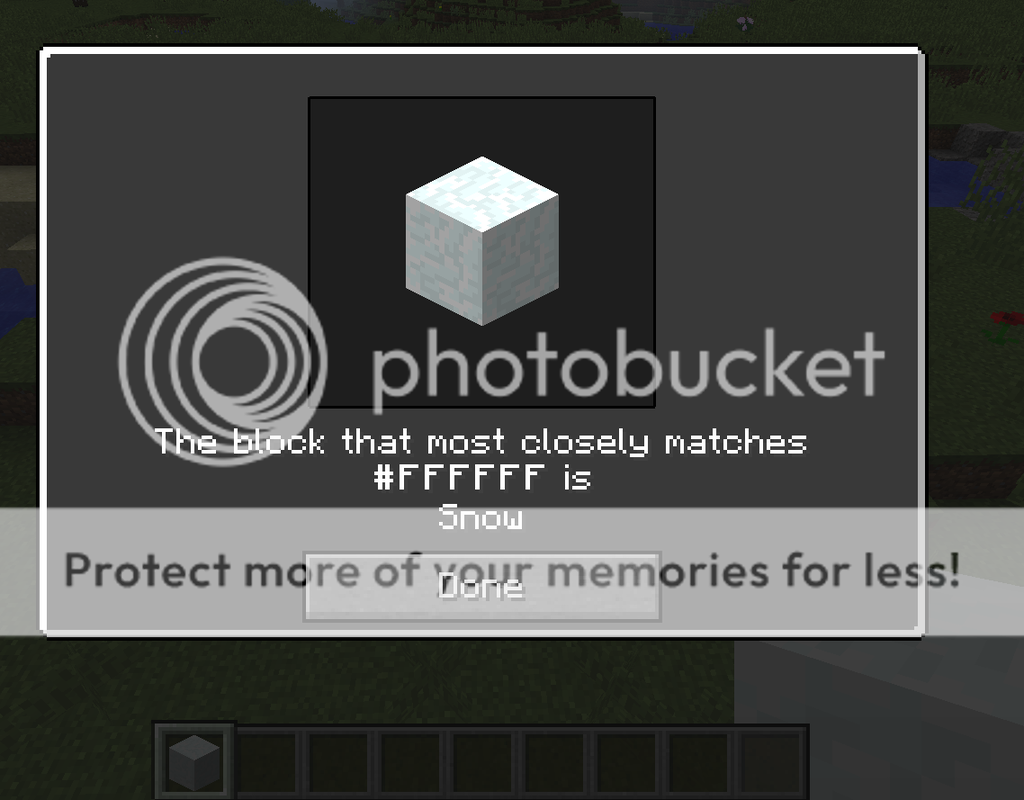
Furthermore, the command will give the player the matching block, as you can see in the screenshot.
Pixel Player: (./pixelplayer <player> <x> <y> <z> <facing>)
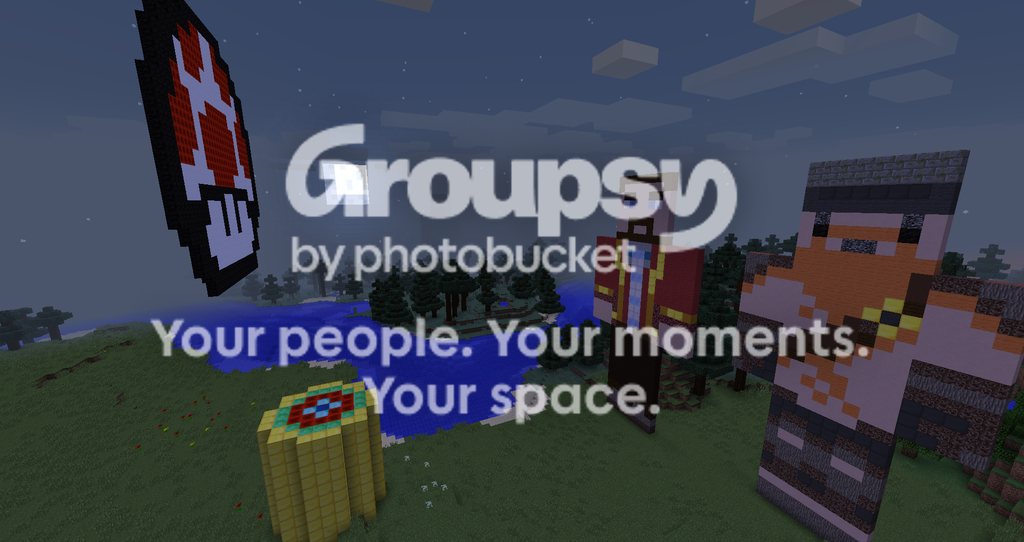
The Pixel Player command is one of the two art generating commands. When it is executed, a 2D player will be generated at the coordinates facing the given direction*. (*Currently, the only directions supported are "east/west" and "north/south"). However, the command will not simply create a 2D Steve! (as long as you have internet connection, as the command pulls for Minecraft's official skin database) Using the dynamic color table, the skin will be analyzed pixel by pixel to find RGB color values, and then through some very intense maths, find the block the best suites that color. (An example of this in action can be found in the features screenshot at the end of the post.)
Reset Color Table: (./resetcolortable)
Put simply, this command will reanalyze all the blocks in Minecraft and re-log their colors. This command is purely in case something goes wrong and the colors need to be remapped again.
Reset Chunk: (./resetchunk <x> <z>)
Again, this command is pretty self-explanatory. When it is executed, it will reset the chunk back to how it looked (approximately) upon world gen. There are a few glitches with it, such as Minecraft not recognizing the chunk update and failing to render the changes. To fix them, simply exit the world and join again. (Just like the old alpha/beta world holes for those old timers out there!)
Pixel Art: (./pixelart <x> <y> <z> <facing> <url>)
And now we arrive at the command we have all been waiting for. This command is for pixel artists who are super lazy. At the given x, y and z coordinates, the command will pull the image from the given URL and create it within Minecraft, facing the given direction. As for compatible file types, the following will work: JPEG, PNG, BMP, WBMP, and GIF. However, similarly to the pixel player command, the only available directions so far are "east/west" and "north/south". Obviously, an internet connection is required. A demonstration of this in action can be found in the screenshot at the bottom of the post.
Color From Block: (./colorfromblock <whitelisted block> [metadata])
This command is essentially the inverse of the Block From Color command. When given a block, it will find the average color and display it to the player. An example with Cyan Wool (./colorfromblock minecraft:wool 9) can be seen here:

Extra Features:
A user-friendly configuration file, allowing users to edit things such as:
Blocks that can be used in the dynamic color table, whether or not to use the standard block filters, maximum image size for the pixel art command, the block to use as a replacement for transparency in PNG images, and the color difference algorithm to use when determining the similarity between a block and a color. (See http://tinyurl.com/OhTheMathsHurt for more information on these algorithms)
ADCT Block Blacklist:
By default, the mod prevents some blocks from being used in the pixel art and pixel player commands. Some of these blocks include Pumpkins (both lit and unlit), Furnaces, End Portal Frames, Grass, Mycelium, Slime Blocks and much more. By simply changing a line of text or two, the player can remove/add blocks to this list.
Default Block Filters:
Also enabled by default are certain filters that enable some blocks to be used. Some of these filters include whether or not the block is a solid cube (cobblestone vs. carpet), opaque (obsidian vs. glass) and whether or not the block is affected by gravity (sandstone vs. sand). These filters can be disabled if the user wishes (although it is not recommended for art quality)!
But wait, I hate the grainy vanilla textures!
Well, too bad.....
No, I'm kidding of course! The Dynamic Color Table is DYNAMIC for a reason! The color table adapts to any resource pack the player chooses (although, some resource packs will work better than others, ie. Trippin' Craft vs. Disco's OCD pack)! Furthermore, it requires absolutely no effort at all. Simply change resource packs like you would normally and the color table will automatically update!
Oh, and here's that screenshot I promised :P
Side Notes:
Because the algorithms used in the arts and textile industries do not correctly match human perception 100% of the time, the dynamic color table might sometimes choose a block that you think looks nothing like the color you want. For example, Blue Wool is actually farther away from pure blue ([0, 0, 255] in RGB) than Purple Wool is. However, these effects can be easily fixed with either a resource pack, or manually editing the structure after generation.
*Shameless Plug Incoming*
If you're interested, check out my first mod here!

Screenshots
Gallery
Versions
Files
Relations
Project Relations
More like this
Similar Mods
Suggestions use data such as tags, dependencies, dependents, descriptions, titles, and more to rank how much they overlap with this mod.
On ModDex
Community snapshot
By the numbers
Statistics
 (opens in a new tab)
Get it on
Available Platforms
On ModDex
Community snapshot
By the numbers
Statistics
Resources