
Community listing page, reviews may not be monitored by the author.
Accessibility Alerts

No reviews yet
Visual alerts for deaf and hard-of-hearing players: directional sound markers around the crosshair, hostile mob markers, creeper and TNT warnings, damage direction. Client-side, no dependencies.

Community voices
Reviews
No reviews yet. Be the first to review this project!
Get it on
Available Platforms
About
Project Details
For authors
Embed Badge
If you're the author of this project, you can embed a live badge anywhere that supports HTML or Markdown. It updates automatically whenever ratings change.
Use HTML for any page that supports it, or Markdown for README files and Markdown-based descriptions.
Identifiers
Platform IDs
Resources
External Links
About
Description
Accessibility Alerts
See what you can't hear. Directional sound markers, hostile mob markers, creeper and TNT warnings, and a damage direction indicator, all drawn around your crosshair.
Minecraft tells you a lot through sound: a creeper hissing behind you, a skeleton drawing its bow around the corner, a zombie groaning in the dark. Vanilla subtitles show the text in a corner, but not clearly where it comes from. Accessibility Alerts turns those sounds and dangers into visual cues you can read at a glance, for players who are deaf or hard of hearing, play muted, or just want more awareness.
Features
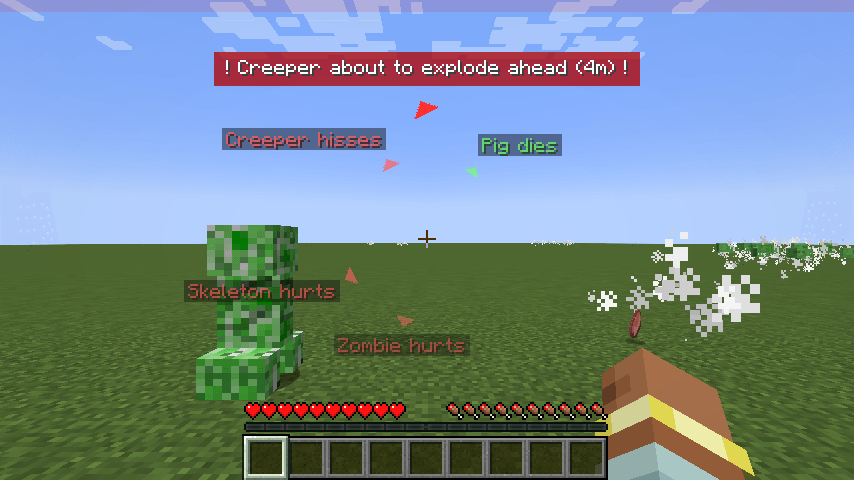
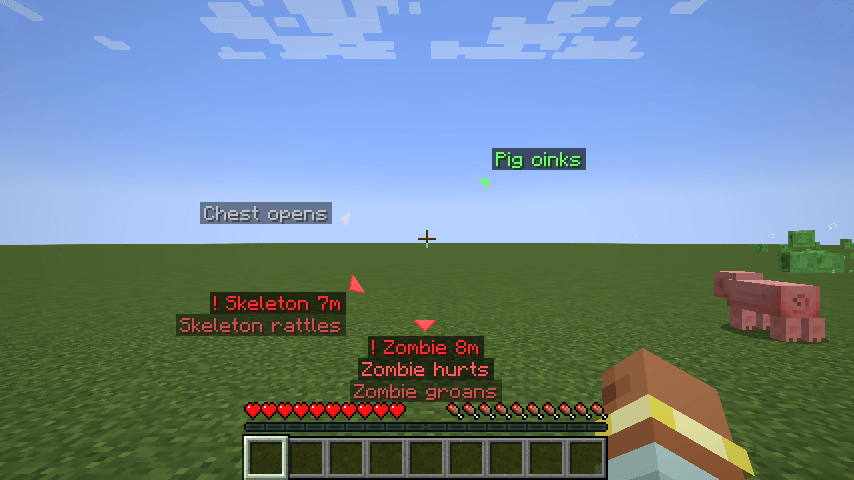
- Sound markers: every nearby sound gets a small colored arrow on a ring around the crosshair, pointing where it came from, with its subtitle next to it. Red for hostile mobs, green for animals, yellow for players, white for blocks, blue for weather. Arrows above or below show when the sound is much higher or lower than you.
- Hostile mob markers: red markers with name and distance for monsters near you that you cannot see (behind you, to the side, or behind a wall). Neutral mobs like endermen, piglins and wolves count only while they are angry.
- Creeper warning: a big flashing banner as soon as a creeper near you starts to hiss, saying where it is ("behind you", "on your left"...) and how far, with the matching screen edge pulsing red.
- TNT warning: the same alert for lit TNT nearby.
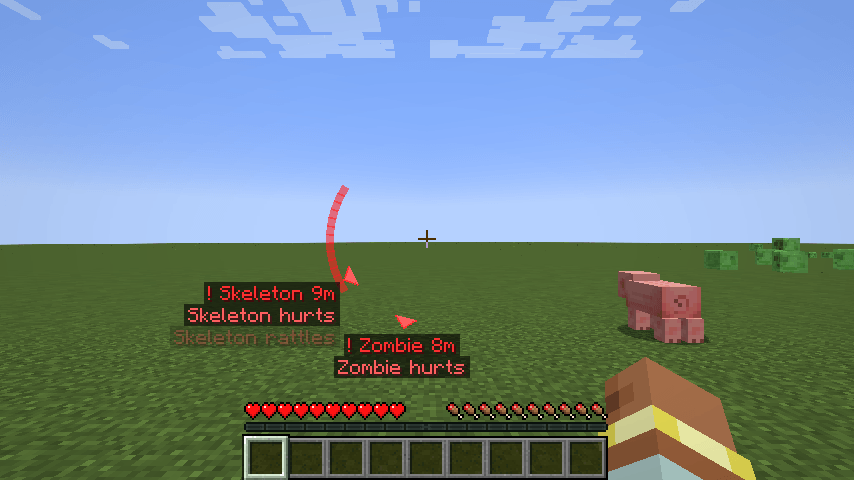
- Damage direction: a red arc around the crosshair points at whatever just hit you, even an arrow from far away.
- Works muted: sounds are read before the volume check, so the markers keep working with the game muted, a sound category turned off, or no audio device at all.
Settings
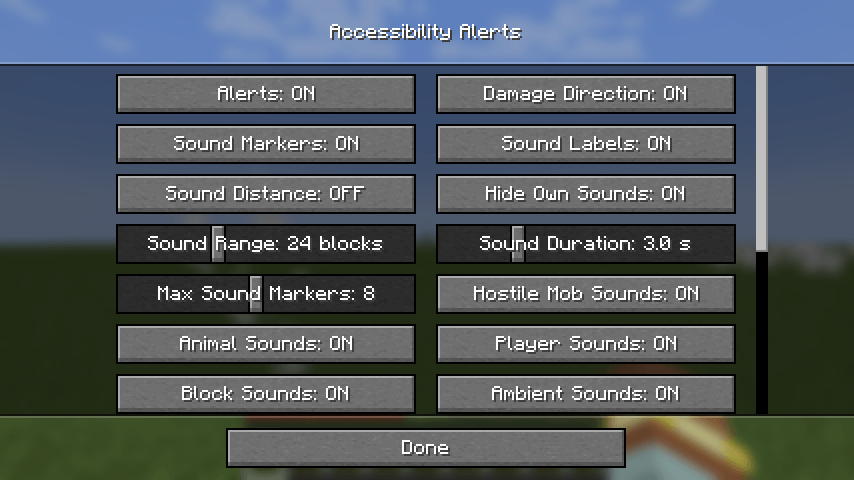
Open them from Options > Accessibility Settings > Accessibility Alerts..., from the mods list (NeoForge, or Mod Menu on Fabric), or with a key you can bind in Controls. Everything can be changed in game:
- every alert on or off, and a key to toggle all of them
- which sound categories to show, sound range and how long markers stay on screen
- mob marker range, number of markers, "only mobs you cannot see"
- ring size, alert scale and label background opacity
Settings are saved in config/accessibilityalerts.json. You can also edit that file while playing: changes apply within two seconds. ignoredSounds takes a list of sound ids (for example "minecraft:block.lava.pop") to hide.
Details
- Client-side only. Install it on your client; it works on any server, including vanilla ones. Servers do not need it.
- No dependencies. No Fabric API, no config library.
- Translated in English and Italian.
- Available for NeoForge and Fabric on Minecraft 1.21.1, 26.1, 26.2 and 26.3.
Modpacks
Free to include in any modpack. Licensed under MIT.
Feedback
Missing a sound or a danger you want to see? Leave a comment and say which one.
Screenshots
Gallery
-
 3-creeper-warning
 -
 5-settings
 -
 1-sound-and-mob-markers
 -
 2-damage-direction
 -
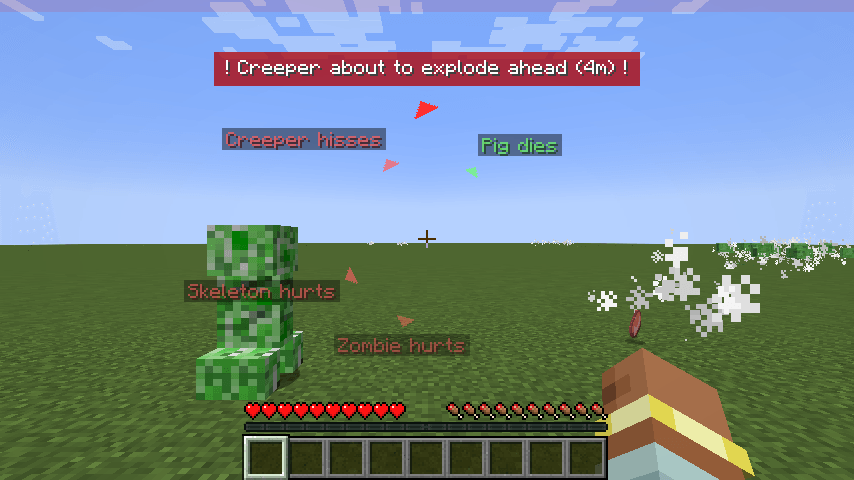 3-creeper-warning.png 3-creeper-warning.png
 -
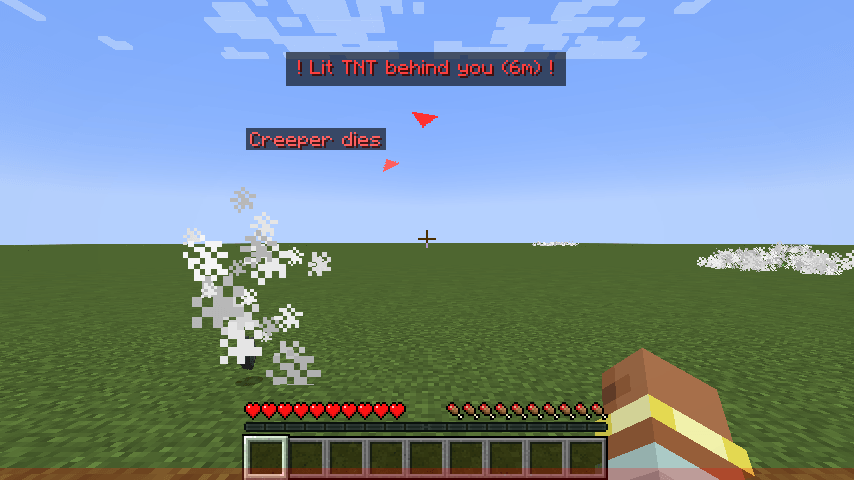 4-tnt-warning
Versions
Files
Relations
Project Relations
More like this
Similar Mods
Suggestions use data such as tags, dependencies, dependents, descriptions, titles, and more to rank how much they overlap with this mod.
On ModDex
Community snapshot
By the numbers
Statistics
 (opens in a new tab)
Get it on
Available Platforms
On ModDex
Community snapshot
By the numbers
Statistics
Resources