Community listing page, reviews here may not be monitored by the author.
Interaction Disable


No reviews yet
Stop accidental interactions! Automatically bypass chests, villagers, and mounts to prioritize using your items (food, potions, pearls) during intense PvP or gameplay. Fully customizable with a modern search-enabled UI.
Community voices
Reviews
No reviews yet. Be the first to review this project!
Get it on
Available Platforms
Compatibility
Supported Environments
Runs entirely on the client. Works on vanilla servers.
About
Project Details
For authors
Embed Badge
If you're the author of this project, you can embed a live badge anywhere that supports HTML or Markdown. It updates automatically whenever ratings change.
Use HTML for any page that supports it, or Markdown for README files and Markdown-based descriptions.
Identifiers
Platform IDs
Resources
External Links
About
Description
✨ Interaction Disable Features
Block targeted interactions – Choose exactly which blocks (chests, furnaces, hoppers) or entities (villagers, horses, boats) to ignore when you have a usable item in your hand.
Forced item use – When an interaction is canceled, the mod automatically forces your character to use the item in hand (gold apples, potions, pearls) instead of opening the block or entity interface.
Modern search GUI – Tabbed configuration menu with real-time filtering to find and toggle specific blocks or entities instantly. Customize your experience on the fly.
Persistent configuration – Settings are saved in a JSON file and reloaded every time you launch. Your blocklist is always ready when you need it.
📸 Screenshots
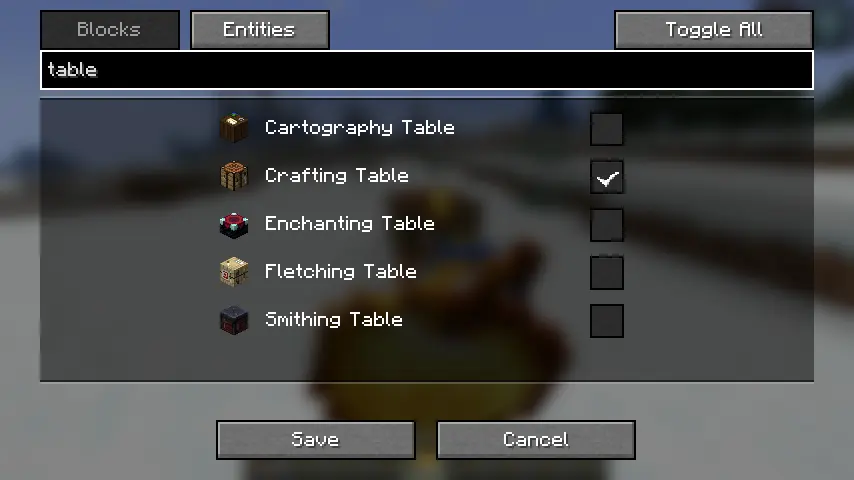
Config Screen – Searchable list with checkboxes for Blocks and Entities, with modern Minecraft UI styling.
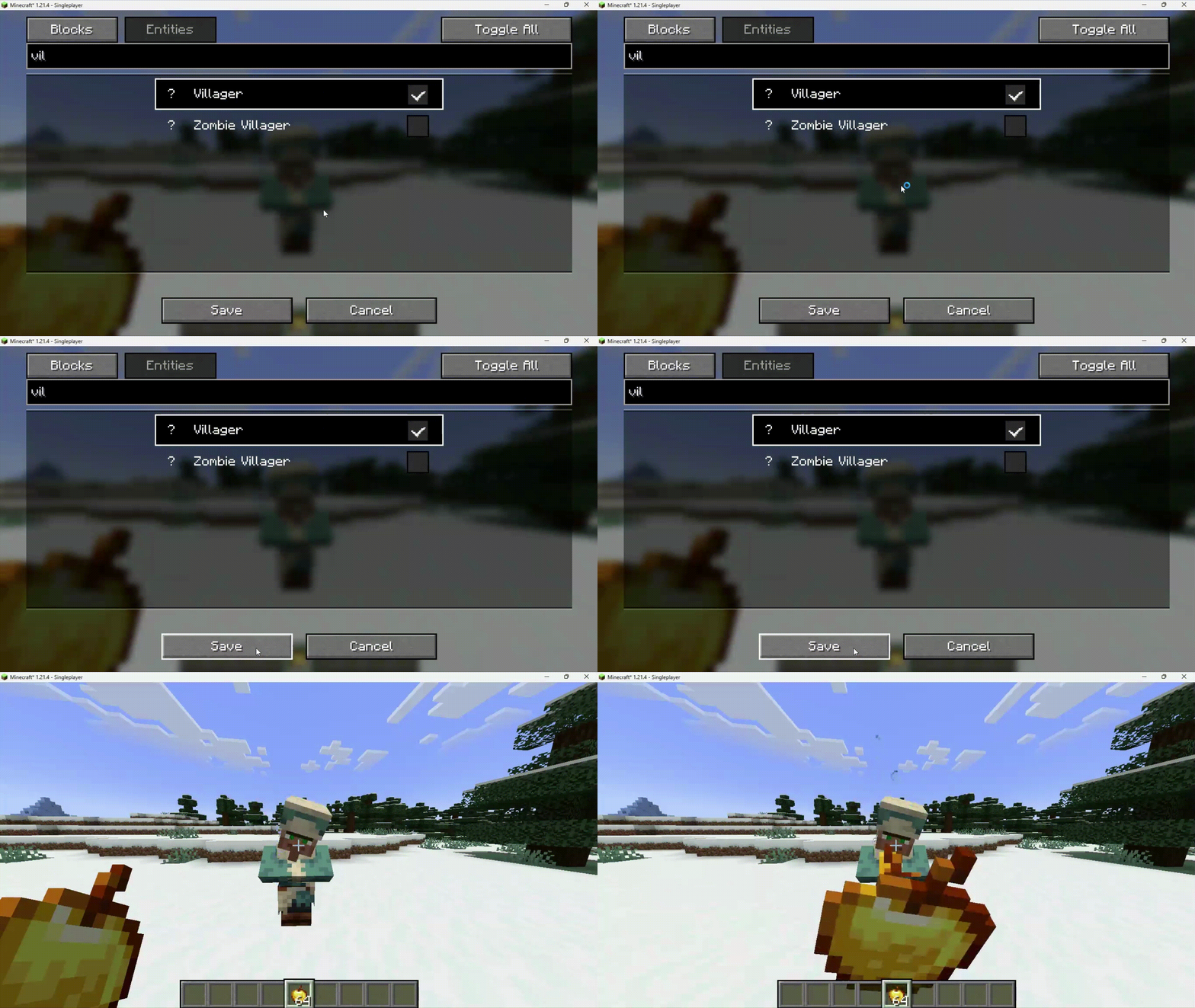
In-game – Successfully eating a Golden Apple while right-clicking a protected Ender Chest or Villager.
🔧 Requirements
Fabric Loader ≥ 0.15.0

Fabric API

Java 21
🎮 How to use
Install the mod and Fabric API.
Open the configuration screen with O (default key, changeable in Controls).
Use the tabs to switch between Blocks and Entities.
Search and select the blocks or entities you want to skip (click anywhere on the row to toggle).
Hold a usable item (food, potion, pearl, bow) and right-click a blocked target – you will skip the interface and use your item instead.
⚠️ Disclaimer
This mod is client-side only and does not modify game files or network packets in a way that should be detectable. However, some servers may have rules regarding interaction manipulation.
Use this mod at your own risk. I am not responsible for any bans or other sanctions applied by server administrators. Always check the rules of the servers you play on before using any client-side modifications.
🐛 Bug reports & suggestions
Send me dm discord:
marcellesa✨ Interaction Disable Features
Block targeted interactions – Choose exactly which blocks (chests, furnaces, hoppers) or entities (villagers, horses, boats) to ignore when you have a usable item in your hand.
Forced item use – When an interaction is canceled, the mod automatically forces your character to use the item in hand (gold apples, potions, pearls) instead of opening the block or entity interface.
Modern search GUI – Tabbed configuration menu with real-time filtering to find and toggle specific blocks or entities instantly. Customize your experience on the fly.
Persistent configuration – Settings are saved in a JSON file and reloaded every time you launch. Your blocklist is always ready when you need it.
📸 Screenshots
Config Screen – Searchable list with checkboxes for Blocks and Entities, with modern Minecraft UI styling.
In-game – Successfully eating a Golden Apple while right-clicking a protected Ender Chest or Villager.
🔧 Requirements
Fabric Loader ≥ 0.15.0

Fabric API

Java 21
🎮 How to use
Install the mod and Fabric API.
Open the configuration screen with O (default key, changeable in Controls).
Use the tabs to switch between Blocks and Entities.
Search and select the blocks or entities you want to skip (click anywhere on the row to toggle).
Hold a usable item (food, potion, pearl, bow) and right-click a blocked target – you will skip the interface and use your item instead.
⚠️ Disclaimer
This mod is client-side only and does not modify game files or network packets in a way that should be detectable. However, some servers may have rules regarding interaction manipulation.
Use this mod at your own risk. I am not responsible for any bans or other sanctions applied by server administrators. Always check the rules of the servers you play on before using any client-side modifications.
🐛 Bug reports & suggestions
Send me dm discord:
marcellesa
Screenshots
Gallery
Versions
Files
Relations
Project Relations
More like this
Similar Mods
Suggestions use data such as tags, dependencies, dependents, descriptions, titles, and more to rank how much they overlap with this mod.
On ModDex
Community snapshot
By the numbers
Statistics
Want to reach Minecraft players?
We're looking for a server hosting partner to feature here and other parts of the site. Interested? Send us a message!
Get in touchGet it on
Available Platforms
On ModDex
Community snapshot
By the numbers
Statistics
Resources