
Community listing page, reviews here may not be monitored by the author.
Advanced Fake Player


No reviews yet
Spawn real players and directly possess them to control their actions without running multiple game instances.
Community voices
Reviews
No reviews yet. Be the first to review this project!
Get it on
Available Platforms
Compatibility
Supported Environments
Must be installed on both the client and the server.
About
Project Details
For authors
Embed Badge
If you're the author of this project, you can embed a live badge anywhere that supports HTML or Markdown. It updates automatically whenever ratings change.
Use HTML for any page that supports it, or Markdown for README files and Markdown-based descriptions.
Identifiers
Platform IDs
Resources
External Links
About
Description
Advanced Fake Players
Ever wanted to test a multiplayer feature but had nobody available to join your world? Or maybe you're simply looking for new ways to have fun with your friends?
No more launching multiple Minecraft clients just to test multiplayer mechanics, mods, datapacks, command block creations, or server features.
Most fake player mods rely on chat commands, scripted actions, or limited NPC behavior. Advanced Fake Players takes a completely different approach by creating highly integrated synthetic players and introducing a Direct Possession System, allowing you to seamlessly take control of alternative players from a single Minecraft instance.
Create, possess, and interact with fully integrated fake players as if they were real accounts connected to the server.
To spawn the player, just type: /fakeplayer spawn <name>
Direct Possession System
This is not just another AI-controlled NPC.
You can instantly transfer your camera, movement, inventory, and interactions into any spawned fake player. It works through custom network packet routing, the fake player receives your inputs in real time, exactly as if you had logged into a second account.
Features
- Full Input Redirection: Place blocks, break blocks, attack entities, interact with GUIs, open chests, craft items, and manage inventories exactly as if you were using another account.
- Zero Client Overhead: Perform all your multiplayer testing while running only one Minecraft client. No second PC, no extra account, no extra RAM usage.
- Instant Switching: Jump between your real player and any controlled fake player at any time with a single command or keybind.
To control the player, just type: /fakeplayer control <name>
To unpossess the player, just type: /fakeplayer unpossess <name>
You can also use the keybind defined in the mod settings (default: O) to unpossess.
Deep Server Integration
Unlike traditional NPCs or bots, fake players are injected directly into Minecraft's internal player systems. From the server's perspective, they behave exactly like a real authenticated player connected to the server.
Authentic Behavior
- Affect local difficulty calculations based on their position and time spent online.
- Participate fully in mob spawning mechanics, mobs will spawn around them as expected.
- Activate pressure plates, tripwires, and other player-detection mechanisms.
- Interact naturally with entity collisions, players and mobs bump into them.
- Can be targeted and attacked by hostile mobs.
- Appear in player selectors such as
@a, making them compatible with command blocks and datapacks.
Custom Skins
Give your fake players a proper identity. You can assign a skin from any Minecraft username or provide a direct image URL, no external tools needed.
/fakeplayer skin set <name> <skin_name>Copies the skin from an existing Minecraft account./fakeplayer skin url <name> <url>Loads a skin directly from an image URL./fakeplayer skin clear <name>Reverts to the default Steve/Alex skin.
Multiplayer Support
Fully compatible with multiplayer and LAN worlds. Fake players are visible to all connected clients and behave consistently across the server, other players will see them, interact with them, and can even fight them.
It can also be used to create hilarious situations and troll your friends on multiplayer servers.
Multi-Control Mode (Beta)
One of the most unique features of the mod is the ability for multiple real players to control the same fake player simultaneously.
This feature is currently in beta and may contain bugs or unexpected behavior, but it already provides a surprisingly fun and chaotic experience for testing, challenges, and cooperative gameplay.
Enable it with: /fakeplayer config multi_control true
Commands
All commands require operator permission (level 2 or higher). Tab-completion is supported for fake player names.
| Command | Description |
|---|---|
/fakeplayer spawn [name] |
Spawns a new fake player at your current position and rotation. |
/fakeplayer control [name] |
Transfers your camera and inputs into the target fake player. |
/fakeplayer unpossess |
Returns control to your original player character. |
/fakeplayer remove |
Removes the specified fake player from the world. |
/fakeplayer skin set [name] [skin_name] |
Sets the skin using an existing Minecraft account name. |
/fakeplayer skin url [url_skin] |
Sets the skin from a direct image URL. |
/fakeplayer skin clear |
Removes the custom skin and reverts to default. |
/fakeplayer config multi_control [true/false] |
Enables or disables the multi-control mode for the current server. |
Installation Requirements
this mod must be installed on both the client and the server. It will not work if only one side has it installed.
Supported Versions
| Minecraft Version | Fabric | Forge | NeoForge |
|---|---|---|---|
| 1.19.2 | — | — | — |
| 1.20.1 | ✔️ | ✔️ | ❌ |
| 1.21.1 | ✔️ | ✔️ | ✔️ |
| 26.1 | — | — | — |
Support for newer Minecraft versions is actively planned. More loaders and versions will be added in future releases.
Perfect For
- Mod development and multiplayer testing without a second client
- Technical Minecraft projects, redstone, datapacks, and command blocks
- Server administration, test mob spawning, AFK mechanics, and player-triggered events
- Modpack development, validate features that require multiple players
- LAN worlds and dedicated servers
- Content creation, stage screenshots or cinematic scenes with extra "players"
- Trolling your friends in multiplayer
Advanced Fake Players
Ever wanted to test a multiplayer feature but had nobody available to join your world? Or maybe you're simply looking for new ways to have fun with your friends?
No more launching multiple Minecraft clients just to test multiplayer mechanics, mods, datapacks, command block creations, or server features.
Most fake player mods rely on chat commands, scripted actions, or limited NPC behavior. Advanced Fake Players takes a completely different approach by creating highly integrated synthetic players and introducing a Direct Possession System, allowing you to seamlessly take control of alternative players from a single Minecraft instance.
Create, possess, and interact with fully integrated fake players as if they were real accounts connected to the server.
To spawn the player, just type: /fakeplayer spawn <name>
Direct Possession System
This is not just another AI-controlled NPC.
You can instantly transfer your camera, movement, inventory, and interactions into any spawned fake player. It works through custom network packet routing, the fake player receives your inputs in real time, exactly as if you had logged into a second account.
Features
- Full Input Redirection: Place blocks, break blocks, attack entities, interact with GUIs, open chests, craft items, and manage inventories exactly as if you were using another account.
- Zero Client Overhead: Perform all your multiplayer testing while running only one Minecraft client. No second PC, no extra account, no extra RAM usage.
- Instant Switching: Jump between your real player and any controlled fake player at any time with a single command or keybind.
To control the player, just type: /fakeplayer control <name>
To unpossess the player, just type: /fakeplayer unpossess
You can also use the keybind defined in the mod settings (default: O) to unpossess.
Deep Server Integration
Unlike traditional NPCs or bots, fake players are injected directly into Minecraft's internal player systems. From the server's perspective, they behave exactly like a real authenticated player connected to the server.
Authentic Behavior
- Affect local difficulty calculations based on their position and time spent online.
- Participate fully in mob spawning mechanics, mobs will spawn around them as expected.
- Activate pressure plates, tripwires, and other player-detection mechanisms.
- Interact naturally with entity collisions, players and mobs bump into them.
- Can be targeted and attacked by hostile mobs.
- Appear in player selectors such as
@a, making them compatible with command blocks and datapacks.
Custom Skins
Give your fake players a proper identity. You can assign a skin from any Minecraft username or provide a direct image URL, no external tools needed.
/fakeplayer skin set <name> <skin_name>Copies the skin from an existing Minecraft account./fakeplayer skin url <name> <url>Loads a skin directly from an image URL./fakeplayer skin clear <name>Reverts to the default Steve/Alex skin.
Multiplayer Support
Fully compatible with multiplayer and LAN worlds. Fake players are visible to all connected clients and behave consistently across the server, other players will see them, interact with them, and can even fight them.
It can also be used to create hilarious situations and troll your friends on multiplayer servers.
Multi-Control Mode (Beta)
One of the most unique features of the mod is the ability for multiple real players to control the same fake player simultaneously.
This feature is currently in beta and may contain bugs or unexpected behavior, but it already provides a surprisingly fun and chaotic experience for testing, challenges, and cooperative gameplay.
Enable it with: /fakeplayer config multi_control true
Commands
All commands require operator permission (level 2 or higher). Tab-completion is supported for fake player names.
| Command | Description |
|---|---|
/fakeplayer spawn <name> |
Spawns a new fake player at your current position and rotation. |
/fakeplayer control <name> |
Transfers your camera and inputs into the target fake player. |
/fakeplayer unpossess |
Returns control to your original player character. |
/fakeplayer remove <name> |
Removes the specified fake player from the world. |
/fakeplayer skin set <name> <skin_name> |
Sets the skin using an existing Minecraft account name. |
/fakeplayer skin url <name> <url> |
Sets the skin from a direct image URL. |
/fakeplayer skin clear <name> |
Removes the custom skin and reverts to default. |
/fakeplayer config multi_control [true/false] |
Enables or disables the multi-control mode for the current server. |
Installation Requirements
this mod must be installed on both the client and the server. It will not work if only one side has it installed.
Supported Versions
| Minecraft Version | Fabric | Forge | NeoForge |
|---|---|---|---|
| 1.19.2 | — | — | — |
| 1.20.1 | ✔️ | ✔️ | ❌ |
| 1.21.x | — | — | — |
| 26.1+ | — | — | — |
Support for newer Minecraft versions is actively planned. More loaders and versions will be added in future releases.
Perfect For
- Mod development and multiplayer testing without a second client
- Technical Minecraft projects, redstone, datapacks, and command blocks
- Server administration, test mob spawning, AFK mechanics, and player-triggered events
- Modpack development, validate features that require multiple players
- LAN worlds and dedicated servers
- Content creation, stage screenshots or cinematic scenes with extra "players"
- Trolling your friends in multiplayer
Screenshots
Gallery
-
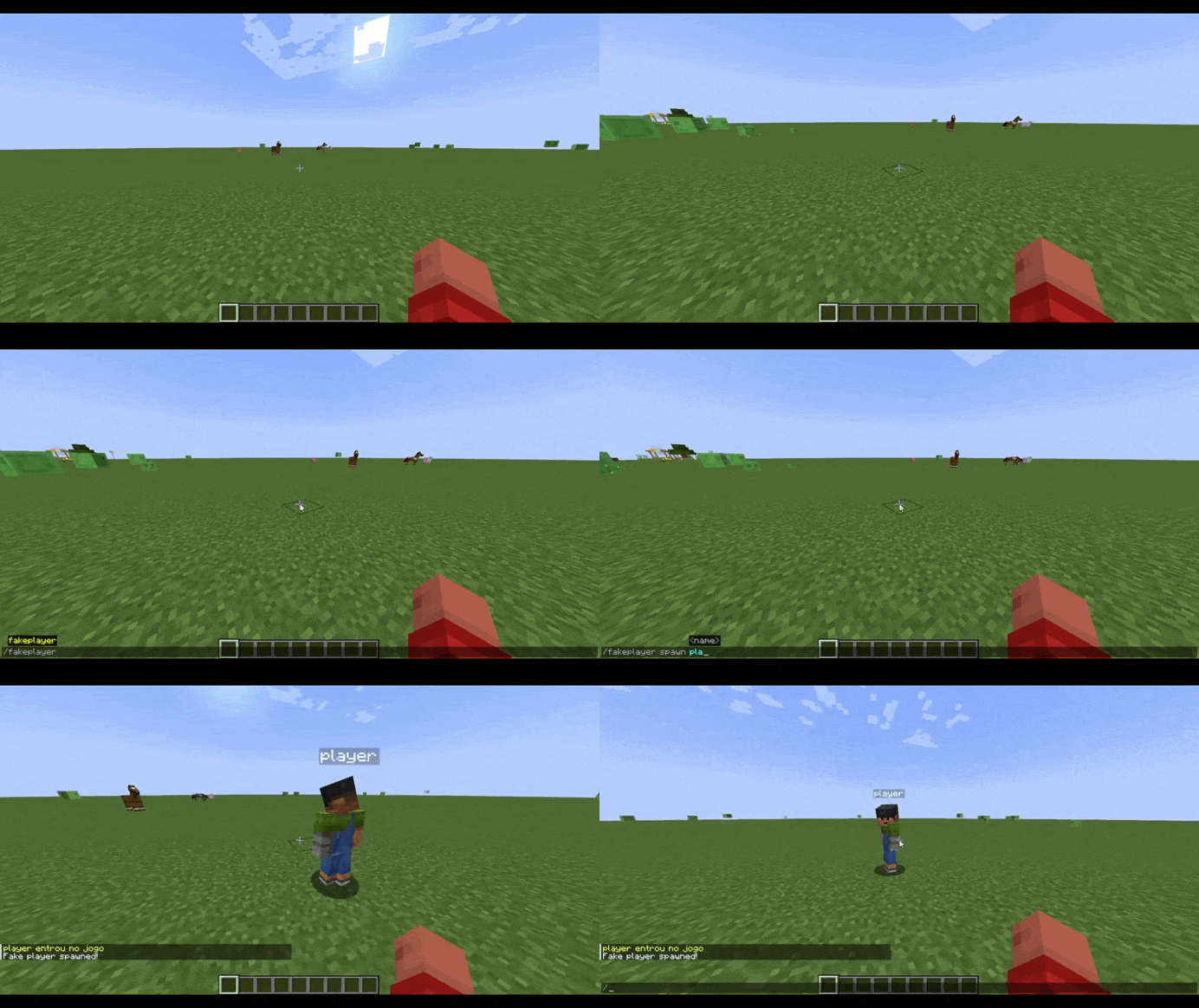 spawnfakeplayer.gif spawnfakeplayer.gif
 -
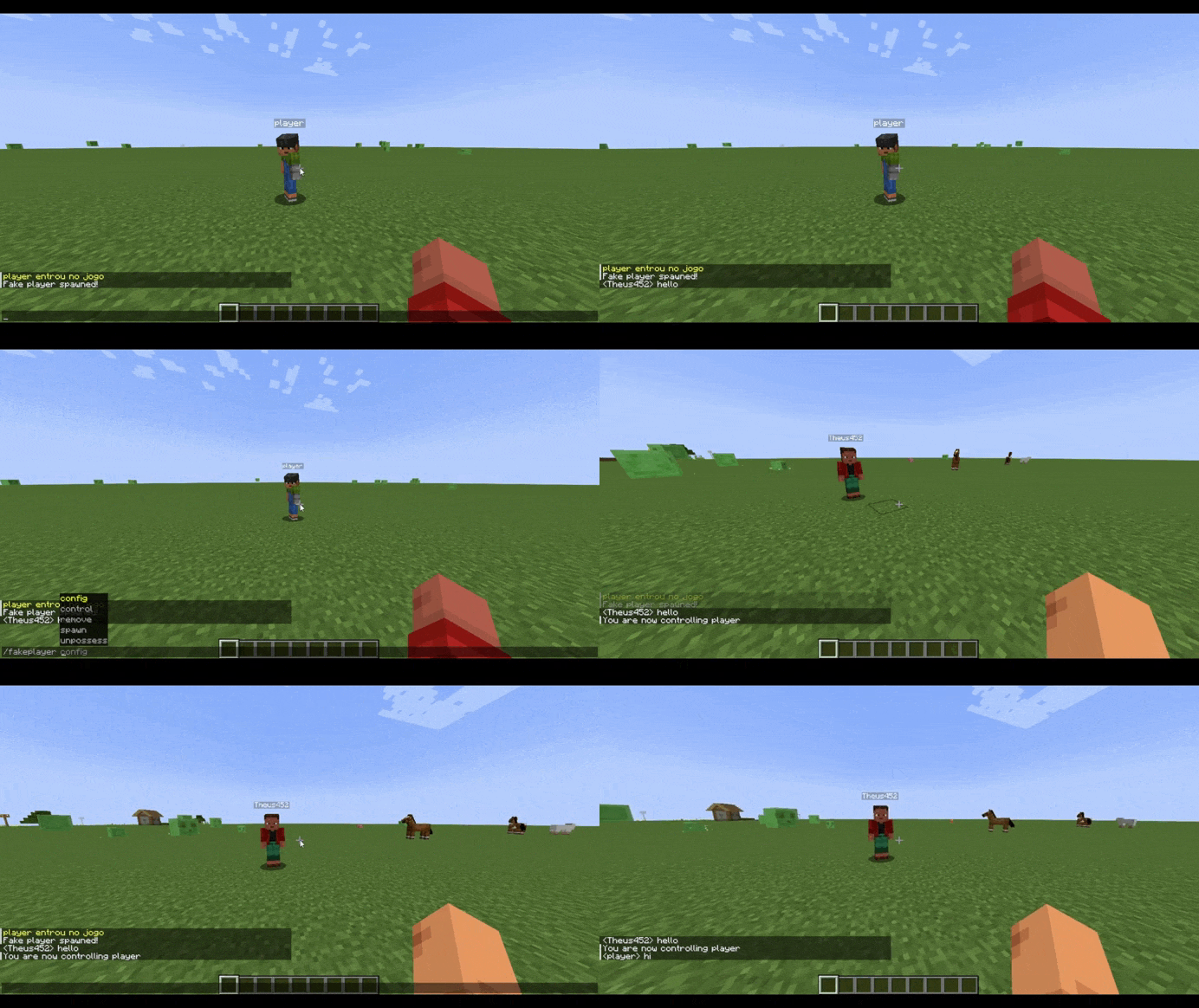 controlfakeplayer.gif controlfakeplayer.gif
 -
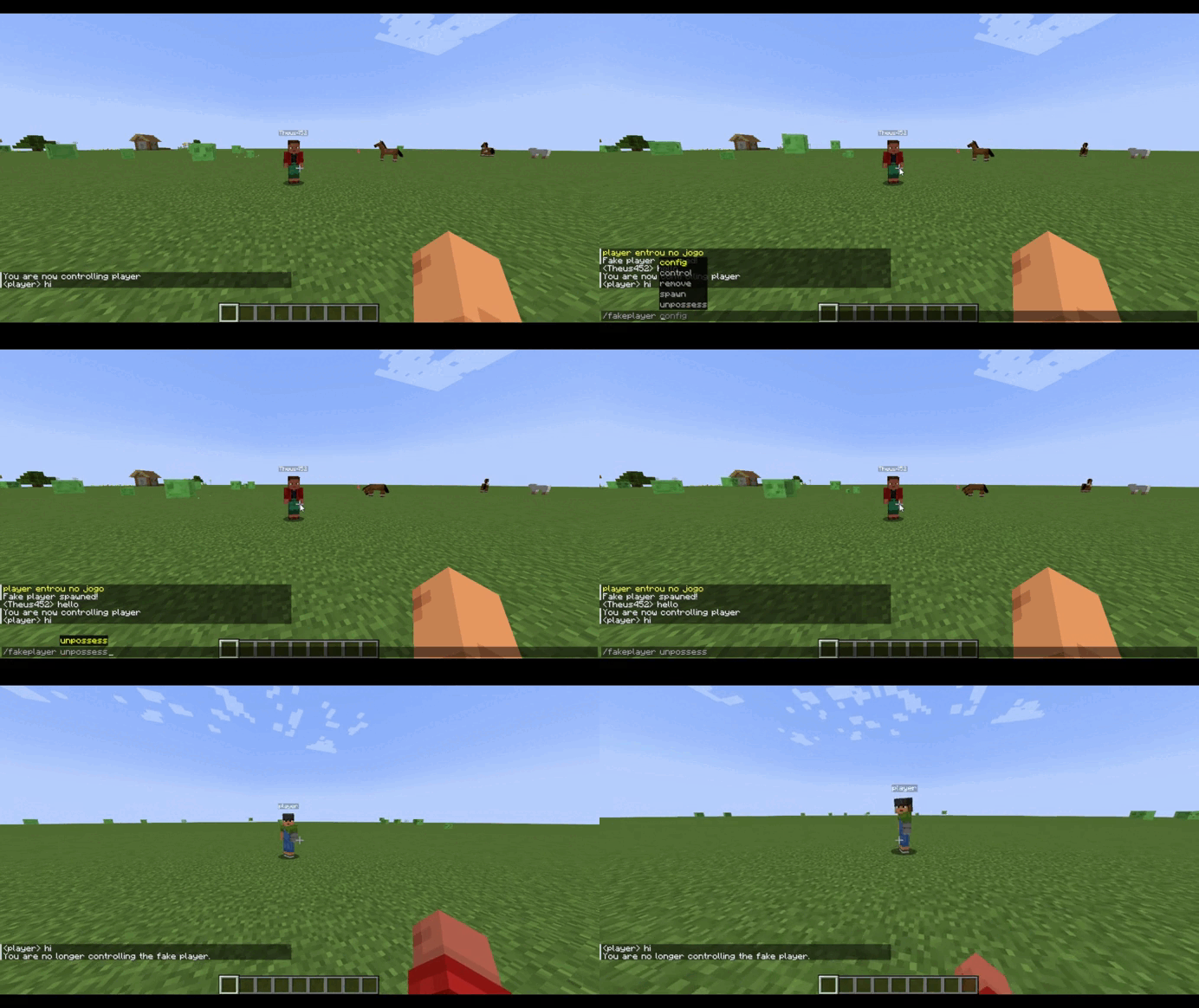 unposses.gif unposses.gif
 -
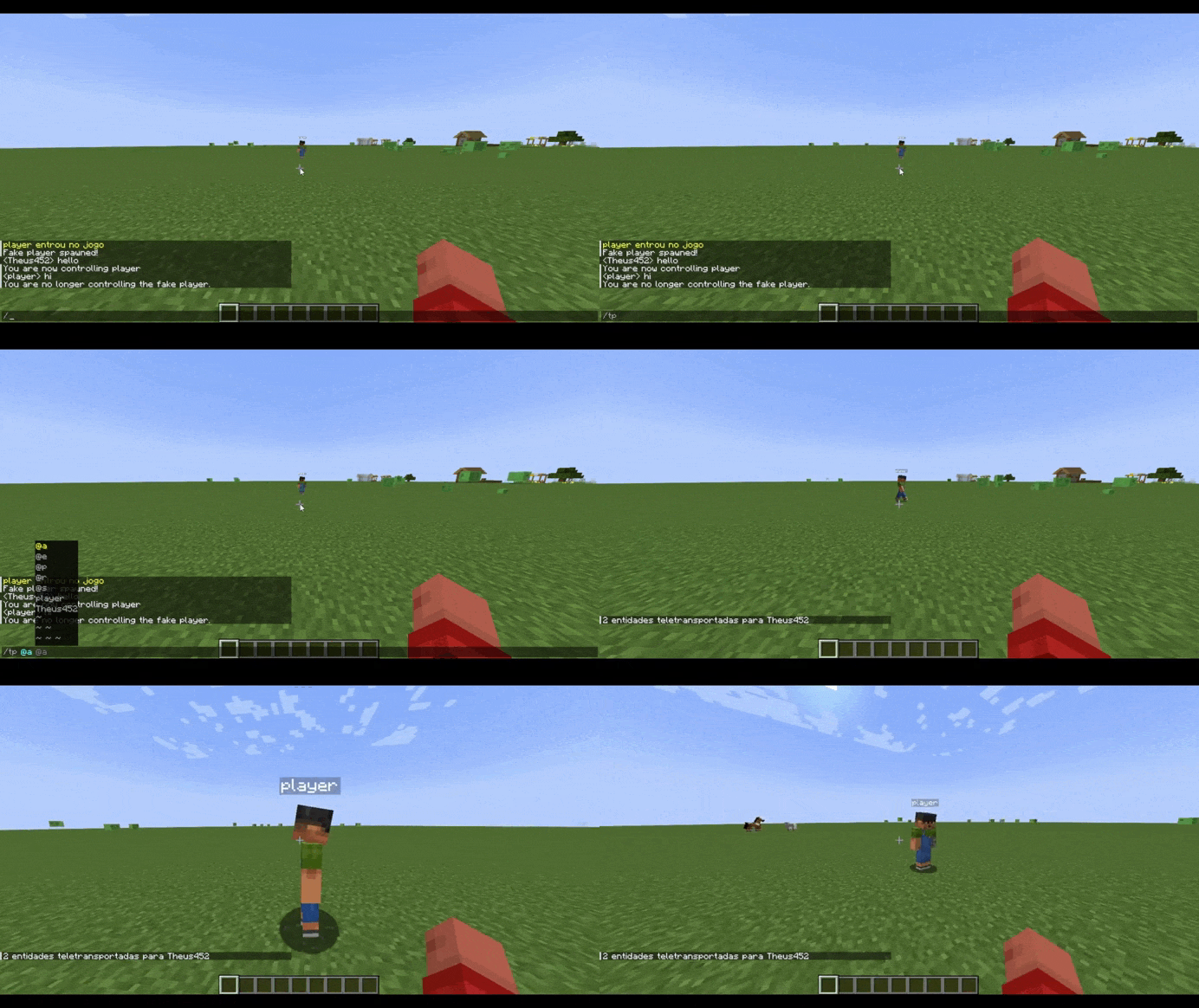 commandtest.gif commandtest.gif
 -
 playertablist.png tablist.png
-
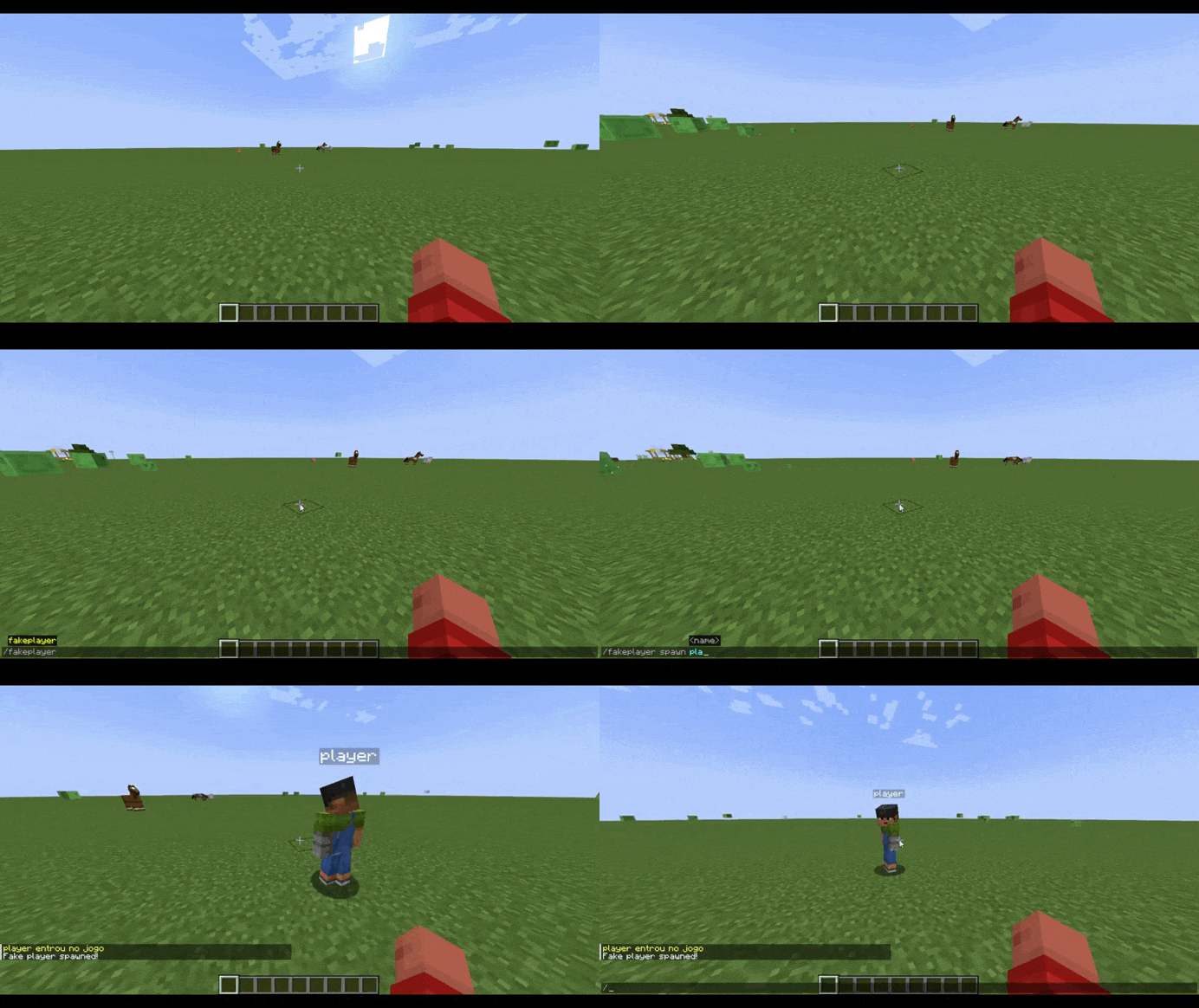 spawnfakeplayer
 -
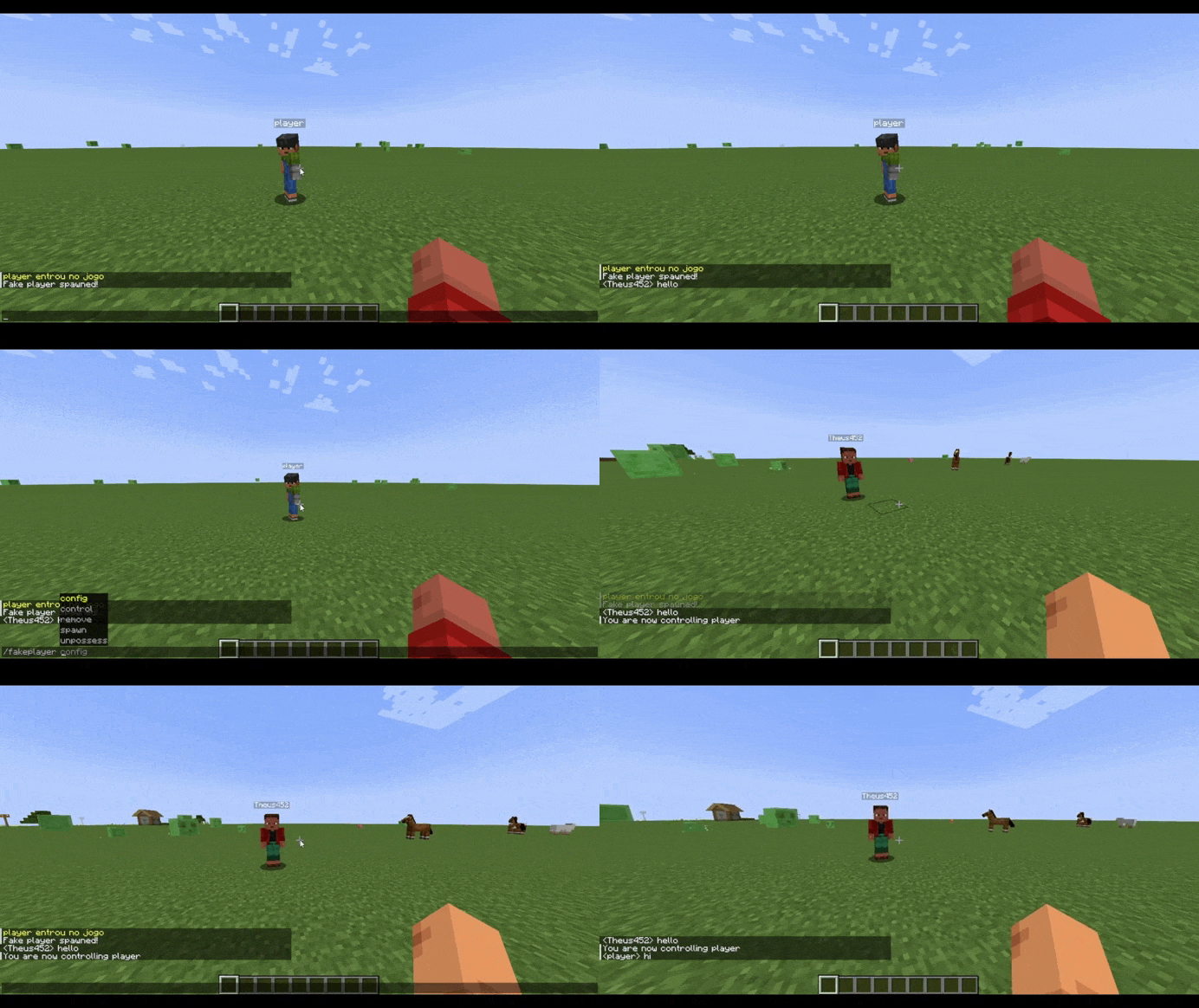 controlfakeplayer
 -
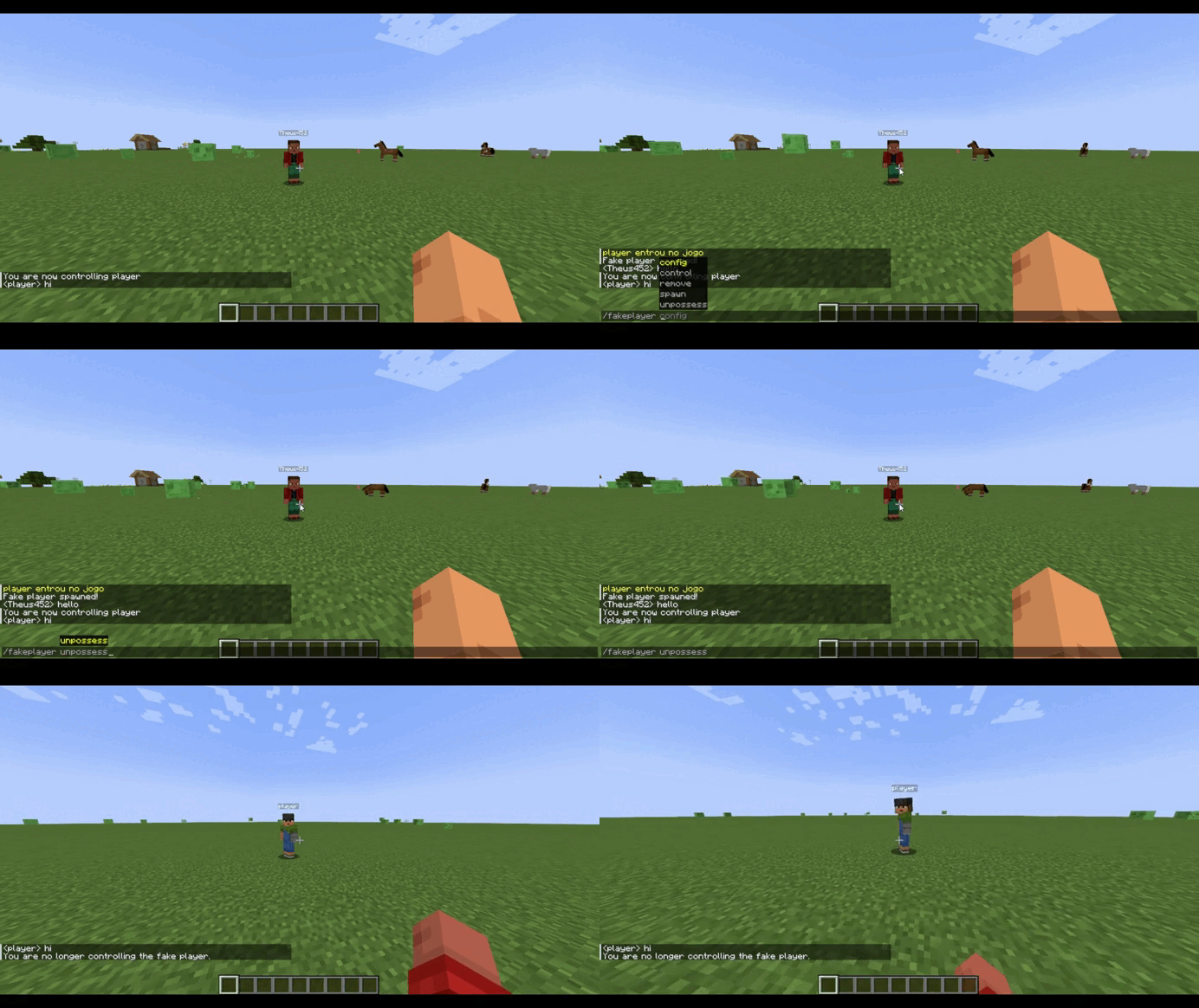 unpossess
 -
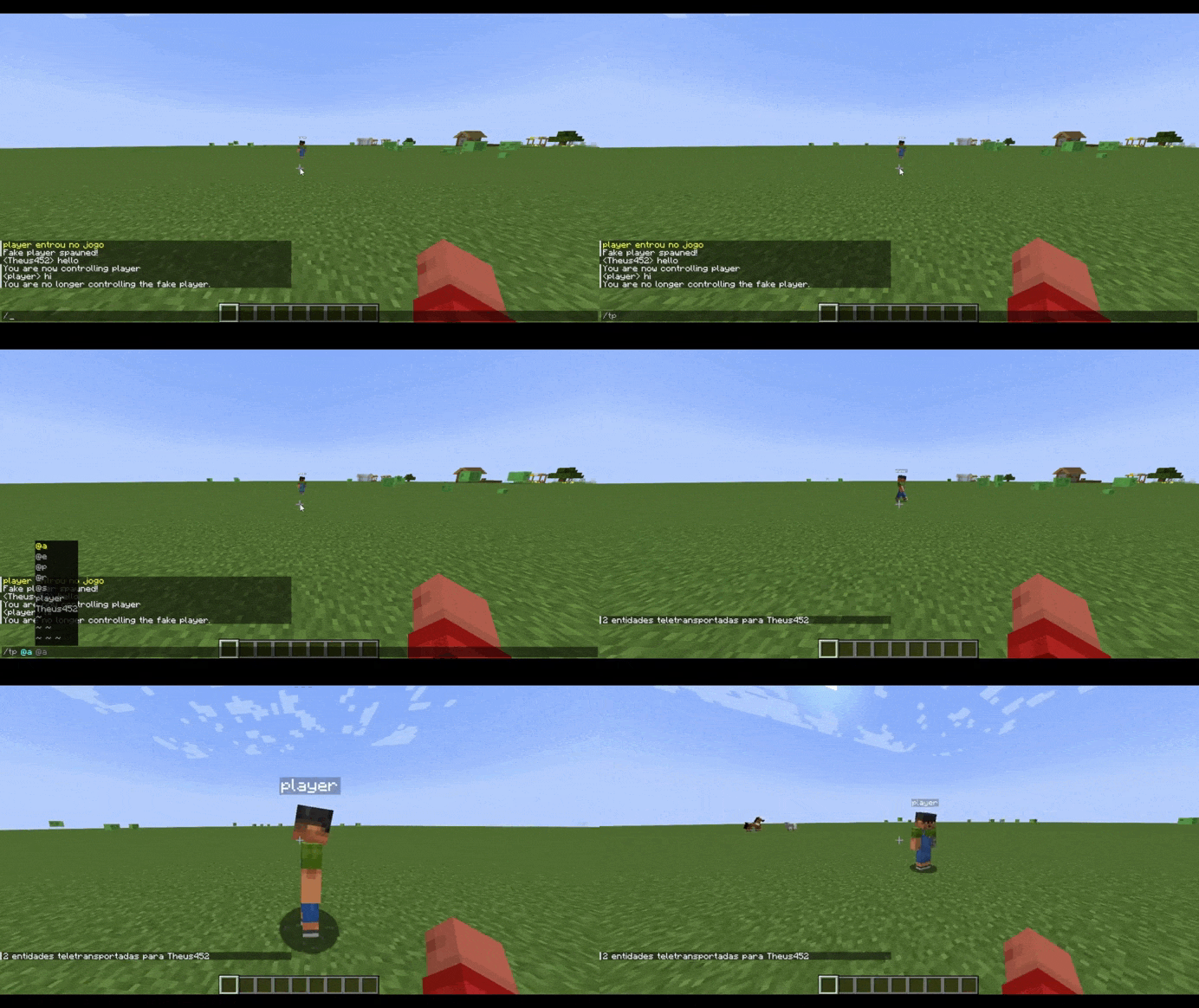 commandtest
Versions
Files
Relations
Project Relations
More like this
Similar Mods
Suggestions use data such as tags, dependencies, dependents, descriptions, titles, and more to rank how much they overlap with this mod.
On ModDex
Community snapshot
By the numbers
Statistics
Want to reach Minecraft players?
We're looking for a server hosting partner to feature here and other parts of the site. Interested? Send us a message!
Get in touchGet it on
Available Platforms
On ModDex
Community snapshot
By the numbers
Statistics
Resources