
Community listing page, reviews here may not be monitored by the author.
Advanced Sound Control


No reviews yet
Per-sound control, 3D spatial zones, real-time sound discovery — for Fabric, NeoForge and Quilt
Community voices
Reviews
No reviews yet. Be the first to review this project!
Get it on
Available Platforms
Compatibility
Supported Environments
Runs entirely on the client. Works on vanilla servers.
About
Project Details
For authors
Embed Badge
If you're the author of this project, you can embed a live badge anywhere that supports HTML or Markdown. It updates automatically whenever ratings change.
Use HTML for any page that supports it, or Markdown for README files and Markdown-based descriptions.
Identifiers
Platform IDs
About
Description







Complete per-sound control, 3D spatial zones, and real-time discovery tools — for Fabric, NeoForge, and Quilt.
Ever wondered which sound is coming from where? Tired of that one machine noise? Sound Control lets you manage every sound individually, pin overrides to zones in 3D space, and identify unknown sounds on the fly — including sounds from other mods.
Sound Anchors — Spatial Audio Zones
Currently available on Minecraft 26.1.x and 26.2 only · Support for older versions is planned.
Create sound override zones directly in your world:
| Feature | Details |
|---|---|
| Shape modes | Sphere (radius) or Box (W × H × D) |
| Sound overrides | Sounds auto-mute inside the zone |
| 3D boundaries | Toggle visible outlines of each zone |
| Management | Enable/disable and rename anchors freely |
| Persistence | Zones survive restarts and world reloads |
| Mod support | Works with any modded sound |
Real use cases:
- Mute the nether portal hum only inside your base
- Silence a noisy Create factory without affecting the area around it
- Build quiet zones for custom maps or roleplay servers
Complete Sound Management
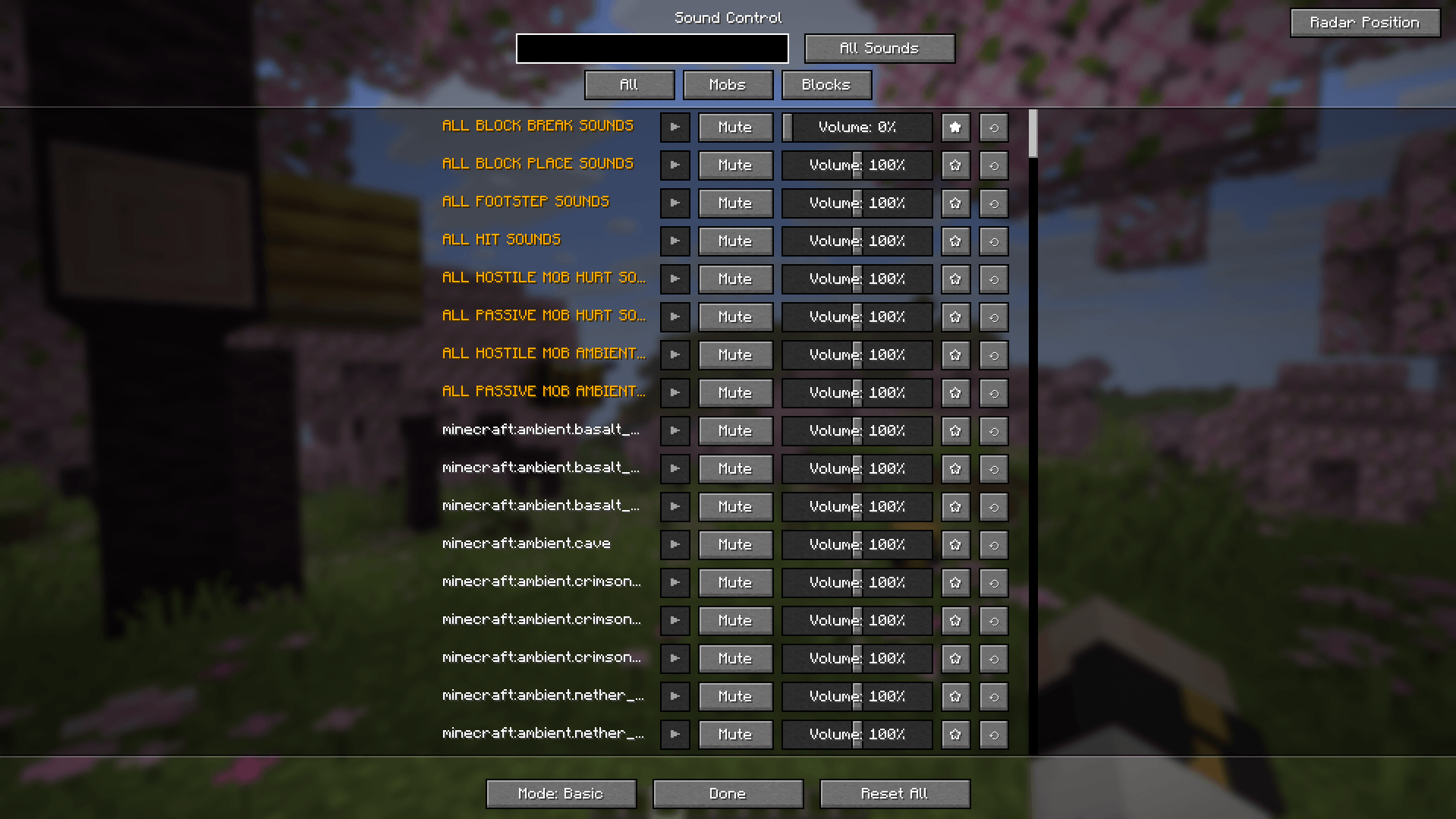
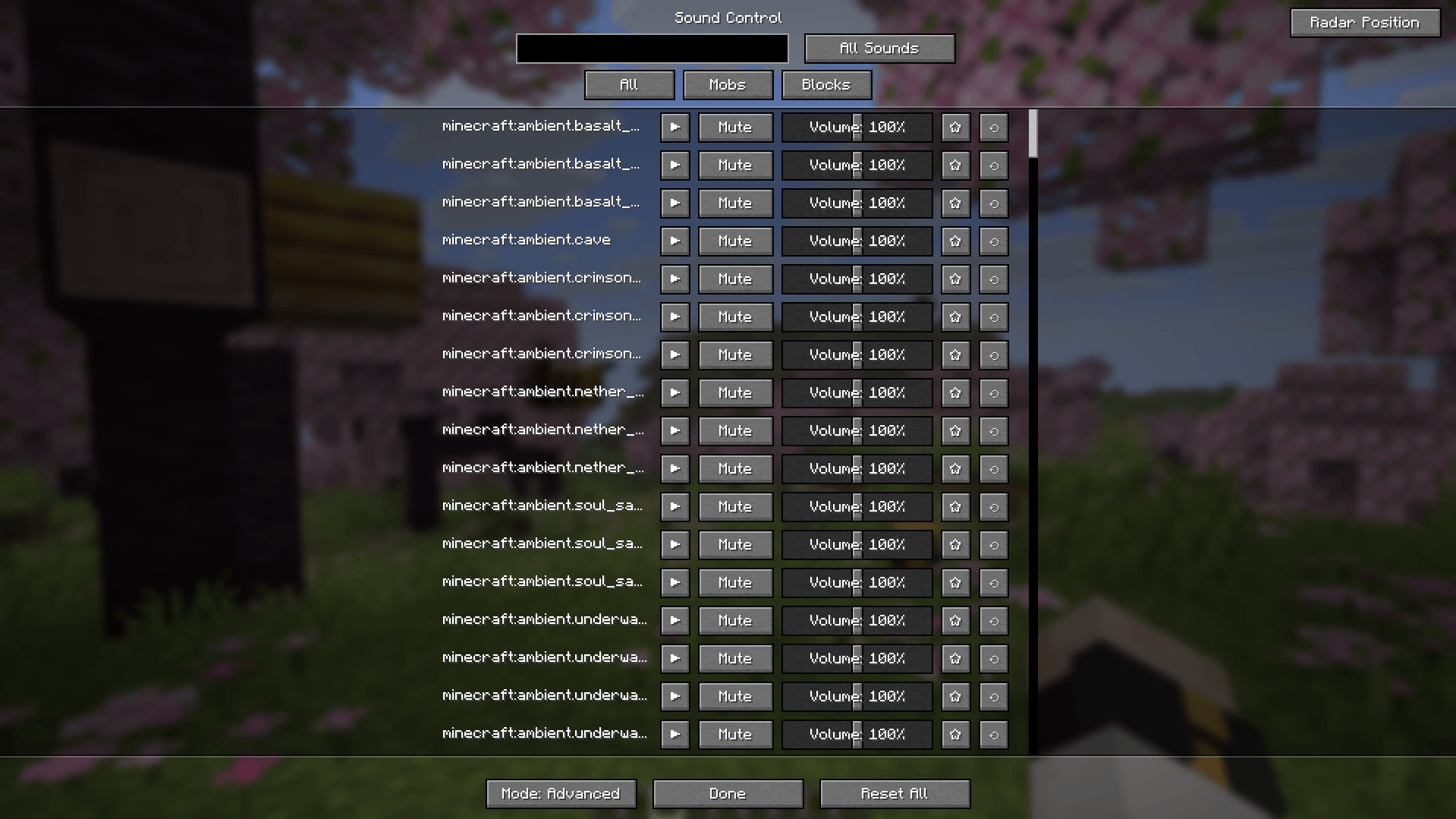
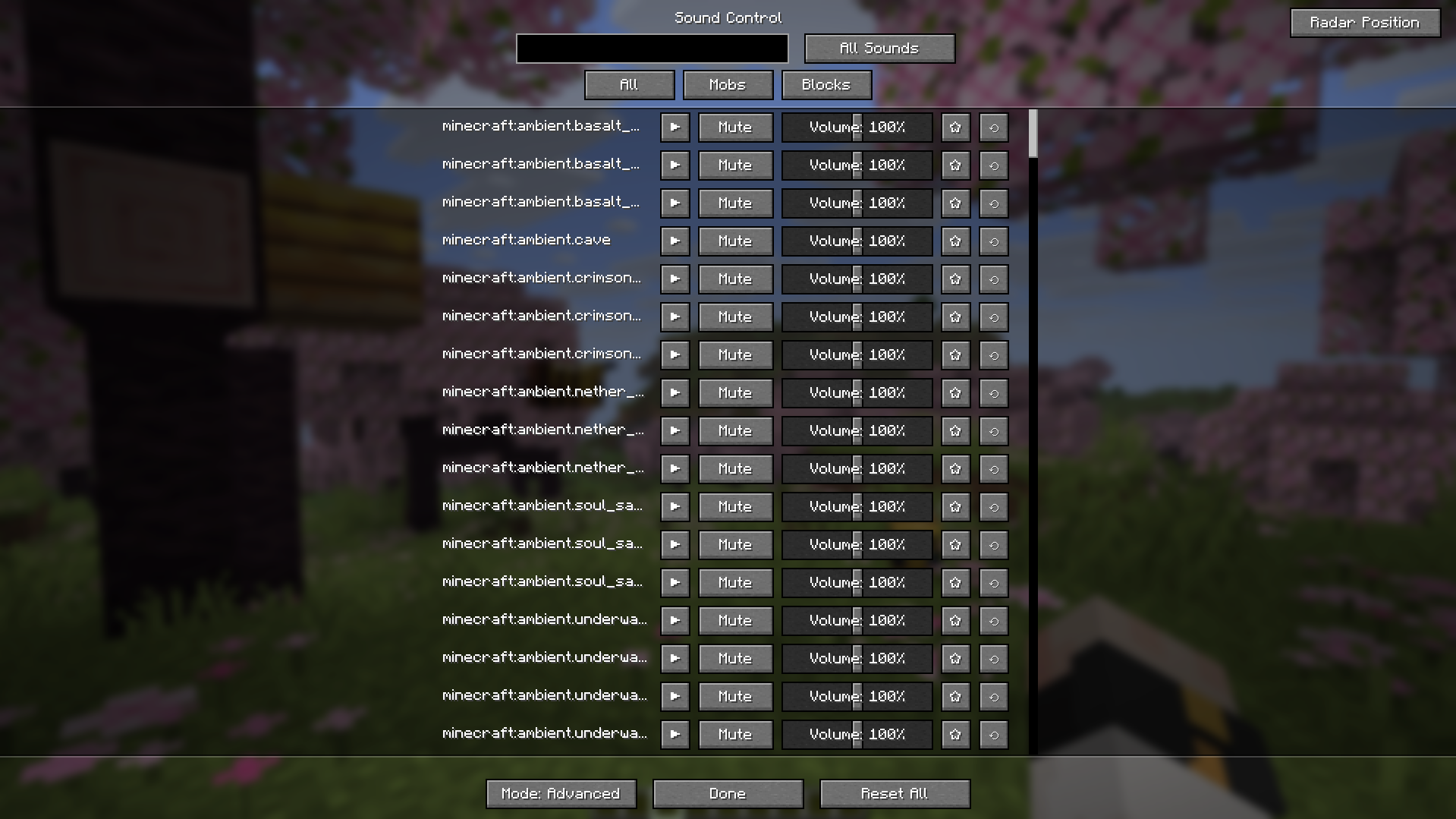
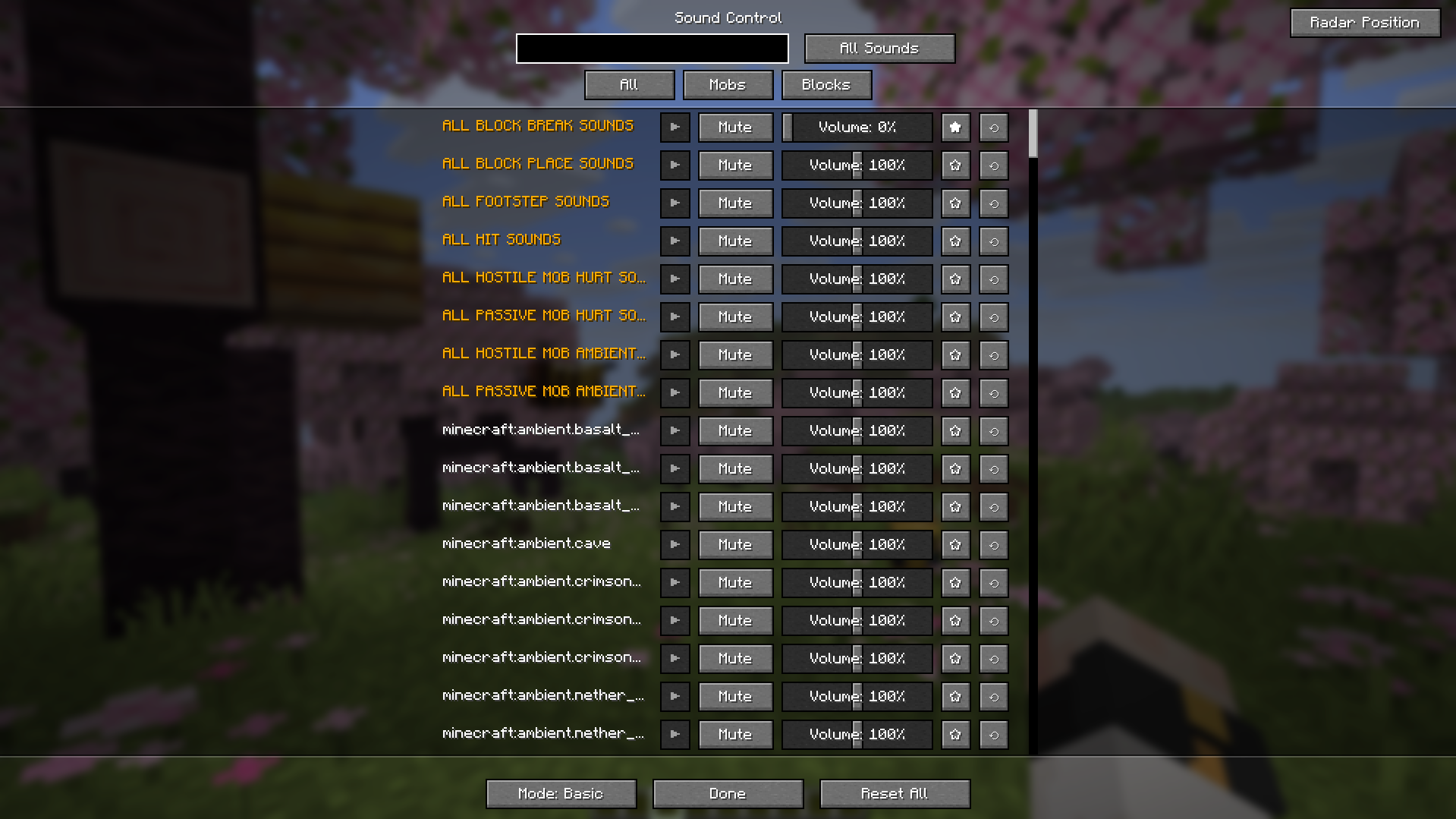
Press V to open the main menu and switch between three control modes:
| Mode | Best for |
|---|---|
| Basic | Adjusting sound groups (e.g. all zombie sounds at once) |
| Advanced | Individual control of every sound event in the game |
| Mods | Auto-groups sounds from installed mods (Create, Farmer's Delight, etc.) into a sidebar |
Inside the menu:
- Global Toggles — mute all footsteps / block breaks / mob hurt sounds in one click
- Favorites — star your most-used sounds, persisted across sessions
- Smart Filter — switch between All / Edited Only / Favorites Only
- In-menu Playback — preview any sound before changing its volume
- Copy Sound ID — click a sound name to copy its ID to clipboard (green ✔ confirms)
Recent Sounds
Automatically tracks every sound played during your session:
- Full per-entry controls: **Play/Stop · Mute · Volume · Favorite · Reset **
- Add sounds directly to Anchors — heard an annoying sound? One click to zone-mute it
- Clear history at any time
Discovery Tools
Never think "what IS that sound?" again.
Press Y to cycle through three overlay states:
| State | What you see |
|---|---|
| 1st press | 3D Sound Radar — spatial overlay of all sounds playing around you |
| 2nd press | SoundList Overlay — all sounds the block/entity at your crosshair can emit |
| 3rd press | All overlays off |
The SoundList Overlay pulls directly from the game registry — works for vanilla blocks, mobs, and any modded entity.
Version & Platform Support
Quilt uses the same file as Fabric — if Fabric is supported, Quilt is too.
| Minecraft | Fabric / Quilt | NeoForge |
|---|---|---|
| 26.2 | ✅ | ✅ |
| 26.1.x | ✅ | ✅ |
| 1.21.9–1.21.11 | ✅ | ✅ |
| 1.21.6–1.21.8 | ✅ | — |
| 1.21.4–1.21.5 | ✅ | — |
| 1.21.2–1.21.3 | ✅ | — |
| 1.21–1.21.1 | ✅ | ✅ |
| 1.20–1.20.1 | ✅ | ✅ |
Feature Support by Version
✅ Available · 🔄 In development · — Not available
| Feature | 1.20–1.20.1 | 1.21.x | 26.1.x / 26.2 |
|---|---|---|---|
| Sound Menu (V) — Basic / Advanced / Mods | ✅ | ✅ | ✅ |
| Global Toggles · Favorites · Smart Filter | ✅ | ✅ | ✅ |
| In-menu Sound Playback (▶) | ✅ | ✅ | ✅ |
| 3D Sound Radar (Y) | ✅ | ✅ | ✅ |
| Copy Sound ID to clipboard | — | ✅ | ✅ |
| SoundList Overlay — sounds at crosshair | — | ✅ | ✅ |
| Recent Sounds screen | — | ✅ | ✅ |
| Sound Anchors — spatial audio zones | — | 🔄 | ✅ |
Note for 1.20–1.20.1 users: the newest feature available is the 3D Sound Radar. Newer features are actively being ported — follow the project for updates.
Sound Wiki
Not sure what a sound ID looks like or where to find it? The Sound Wiki is a complete reference of all 1896 vanilla Minecraft sounds (up to 26.3-snapshot-3), organized by category — Blocks, Mobs, UI, Ambient, and more.
Use it to find the exact Sound ID you need, then manage it directly in the mod.
Fully translated into 12 languages:
🇺🇦 Ukrainian · 🇬🇧 English · 🇩🇪 German · 🇪🇸 Spanish · 🇫🇷 French · 🇵🇱 Polish · 🇨🇳 Chinese (Simplified) · 🇧🇷 Portuguese (BR) · 🇷🇺 Russian · 🇯🇵 Japanese · 🇰🇷 Korean · 🇮🇹 Italian
Default Controls
| Key | Action |
|---|---|
V |
Open Sound Control menu |
Y |
Cycle overlays: Radar → SoundList → Off |
Both keys are fully rebindable in Minecraft's standard Controls menu.
Found a bug or want a new feature? Open an issue on GitHub or join the Discord.
Complete per-sound control, 3D spatial zones, and real-time discovery tools — for Fabric, NeoForge, and Quilt.
Ever wondered which sound is coming from where? Tired of that one machine noise? Sound Control lets you manage every sound individually, pin overrides to zones in 3D space, and identify unknown sounds on the fly — including sounds from other mods.
Sound Anchors — Spatial Audio Zones
Currently available on Minecraft 26.1.x and 26.2 only · Support for older versions is planned.
Create sound override zones directly in your world:
| Feature | Details |
|---|---|
| Shape modes | Sphere (radius) or Box (W × H × D) |
| Sound overrides | Sounds auto-mute inside the zone |
| 3D boundaries | Toggle visible outlines of each zone |
| Management | Enable/disable and rename anchors freely |
| Persistence | Zones survive restarts and world reloads |
| Mod support | Works with any modded sound |
Real use cases:
- Mute the nether portal hum only inside your base
- Silence a noisy Create factory without affecting the area around it
- Build quiet zones for custom maps or roleplay servers
Complete Sound Management
Press V to open the main menu and switch between three control modes:
| Mode | Best for |
|---|---|
| Basic | Adjusting sound groups (e.g. all zombie sounds at once) |
| Advanced | Individual control of every sound event in the game |
| Mods | Auto-groups sounds from installed mods (Create, Farmer's Delight, etc.) into a sidebar |
Inside the menu:
- Global Toggles — mute all footsteps / block breaks / mob hurt sounds in one click
- Favorites — star your most-used sounds, persisted across sessions
- Smart Filter — switch between All / Edited Only / Favorites Only
- In-menu Playback — preview any sound before changing its volume
- Copy Sound ID — click a sound name to copy its ID to clipboard (green ✔ confirms)
Recent Sounds
Automatically tracks every sound played during your session:
- Full per-entry controls: Play/Stop · Mute · Volume · Favorite · Reset
- Add sounds directly to Anchors — heard an annoying sound? One click to zone-mute it
- Clear history at any time
Discovery Tools
Never think "what IS that sound?" again.
Press Y to cycle through three overlay states:
| State | What you see |
|---|---|
| 1st press | 3D Sound Radar — spatial overlay of all sounds playing around you |
| 2nd press | SoundList Overlay — all sounds the block/entity at your crosshair can emit |
| 3rd press | All overlays off |
The SoundList Overlay pulls directly from the game registry — works for vanilla blocks, mobs, and any modded entity.
Version & Platform Support
Quilt uses the same file as Fabric — if Fabric is supported, Quilt is too.
| Minecraft | Fabric / Quilt | NeoForge |
|---|---|---|
| 26.2 | ✅ | ✅ |
| 26.1.x | ✅ | ✅ |
| 1.21.9–1.21.11 | ✅ | ✅ |
| 1.21.6–1.21.8 | ✅ | — |
| 1.21.4–1.21.5 | ✅ | — |
| 1.21.2–1.21.3 | ✅ | — |
| 1.21–1.21.1 | ✅ | ✅ |
| 1.20–1.20.1 | ✅ | ✅ |
Feature Support by Version
✅ Available · 🔄 In development · — Not available
| Feature | 1.20–1.20.1 | 1.21.x | 26.1.x / 26.2 |
|---|---|---|---|
| Sound Menu (V) — Basic / Advanced / Mods | ✅ | ✅ | ✅ |
| Global Toggles · Favorites · Smart Filter | ✅ | ✅ | ✅ |
| In-menu Sound Playback (▶) | ✅ | ✅ | ✅ |
| 3D Sound Radar (Y) | ✅ | ✅ | ✅ |
| Copy Sound ID to clipboard | — | ✅ | ✅ |
| SoundList Overlay — sounds at crosshair | — | ✅ | ✅ |
| Recent Sounds screen | — | ✅ | ✅ |
| Sound Anchors — spatial audio zones | — | 🔄 | ✅ |
Note for 1.20–1.20.1 users: the newest feature available is the 3D Sound Radar. Newer features are actively being ported — follow the project for updates.
Sound Wiki
Not sure what a sound ID looks like or where to find it? The Sound Wiki is a complete reference of all 1896 vanilla Minecraft sounds (up to 26.3-snapshot-3), organized by category — Blocks, Mobs, UI, Ambient, and more.
Use it to find the exact Sound ID you need, then manage it directly in the mod.
Fully translated into 12 languages:
🇺🇦 Ukrainian · 🇬🇧 English · 🇩🇪 German · 🇪🇸 Spanish · 🇫🇷 French · 🇵🇱 Polish · 🇨🇳 Chinese (Simplified) · 🇧🇷 Portuguese (BR) · 🇷🇺 Russian · 🇯🇵 Japanese · 🇰🇷 Korean · 🇮🇹 Italian
Default Controls
| Key | Action |
|---|---|
V |
Open Sound Control menu |
Y |
Cycle overlays: Radar → SoundList → Off |
Both keys are fully rebindable in Minecraft's standard Controls menu.
Found a bug or want a new feature? Open an issue on GitHub or join the Discord.
Screenshots
Gallery
-
 ÐнÑмок екÑана 2026-04-26 144842.png ÐнÑмок екÑана 2026-04-26 144842.png
 -
 ÐнÑмок екÑана 2026-04-26 145140.png ÐнÑмок екÑана 2026-04-26 145140.png
-
 advanced menu
 -
 default menu
Versions
Files
Relations
Project Relations
More like this
Similar Mods
Suggestions use data such as tags, dependencies, dependents, descriptions, titles, and more to rank how much they overlap with this mod.
On ModDex
Community snapshot
By the numbers
Statistics
Want to reach Minecraft players?
We're looking for a server hosting partner to feature here and other parts of the site. Interested? Send us a message!
Get in touchGet it on
Available Platforms
On ModDex
Community snapshot
By the numbers