
Community listing page, reviews may not be monitored by the author.
Aether Clouds -- Clouds shader

No reviews yet
A client-side cloud overhaul with configurable volumetric and voxel styles that follow world lighting and weather.

Community voices
Reviews
No reviews yet. Be the first to review this project!
Get it on
Available Platforms
About
Project Details
For authors
Embed Badge
If you're the author of this project, you can embed a live badge anywhere that supports HTML or Markdown. It updates automatically whenever ratings change.
Use HTML for any page that supports it, or Markdown for README files and Markdown-based descriptions.
Identifiers
Platform IDs
Resources
External Links
About
Description
Give your world a sky of its own.
Volumetric clouds • Pixel art skies • Live customization

Choose the mood above your world. Aether Clouds replaces vanilla clouds with twelve distinct styles, from broad volumetric formations to playful pixel silhouettes. Switch between two collections and fine-tune each style without leaving the game.

Soft formations, tall cloud towers, layered skies, and delicate high clouds. The six volumetric styles offer different shapes and distributions.
Cumulus · Cumulus Towers · Stratocumulus
Cumulonimbus · Altocumulus · Cirrus
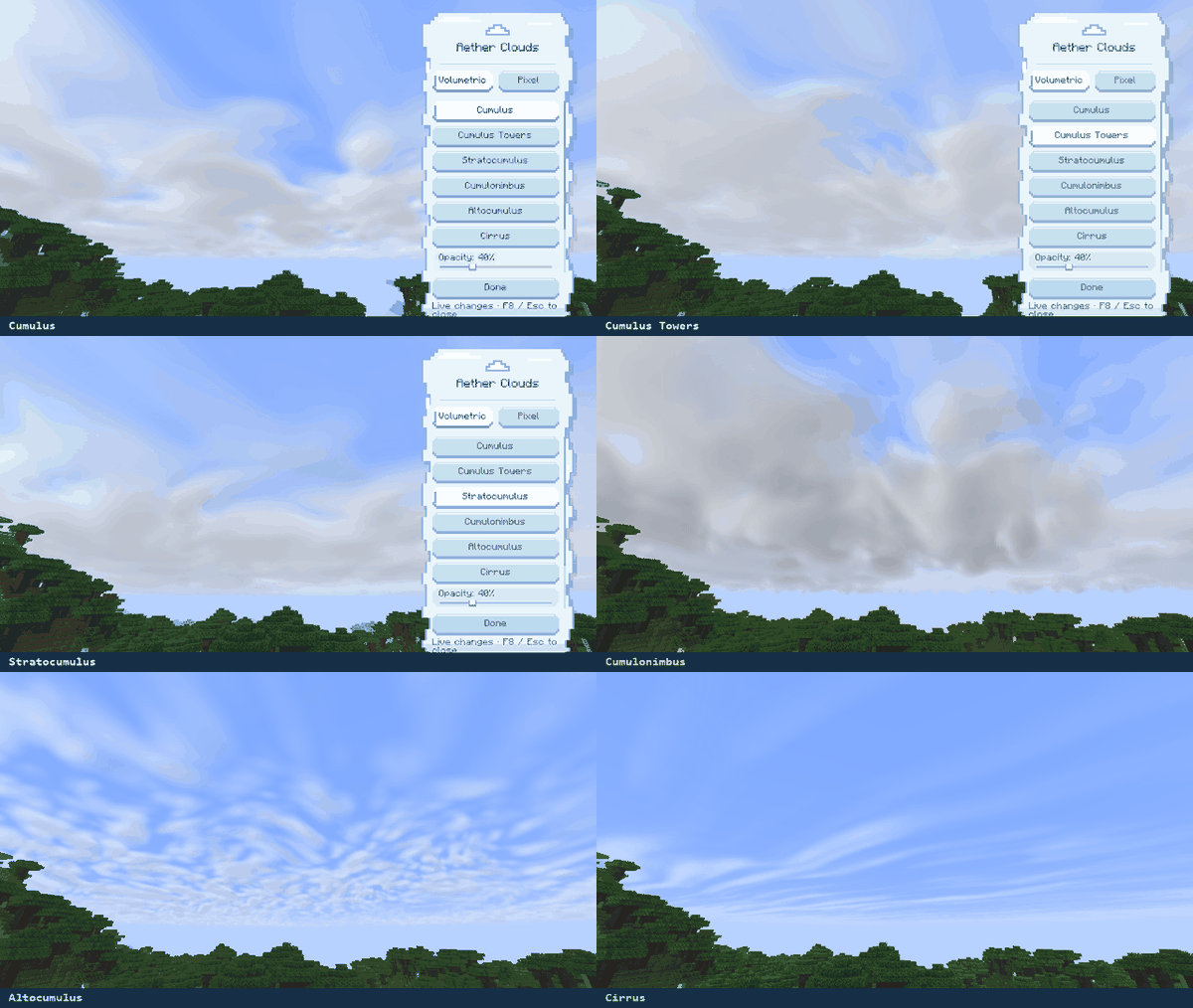
Actual in-game capture: choosing styles in the sidebar, then viewing the sky.

A collection for skies with a blocky or illustrated character. Explore bold shapes, soft blocks, terraces, painted forms, and ink-like clouds.
Karma Clouds · Sky Blocks · Sky Billows
Sky Terraces · Painted Cumulus · Ink Clouds
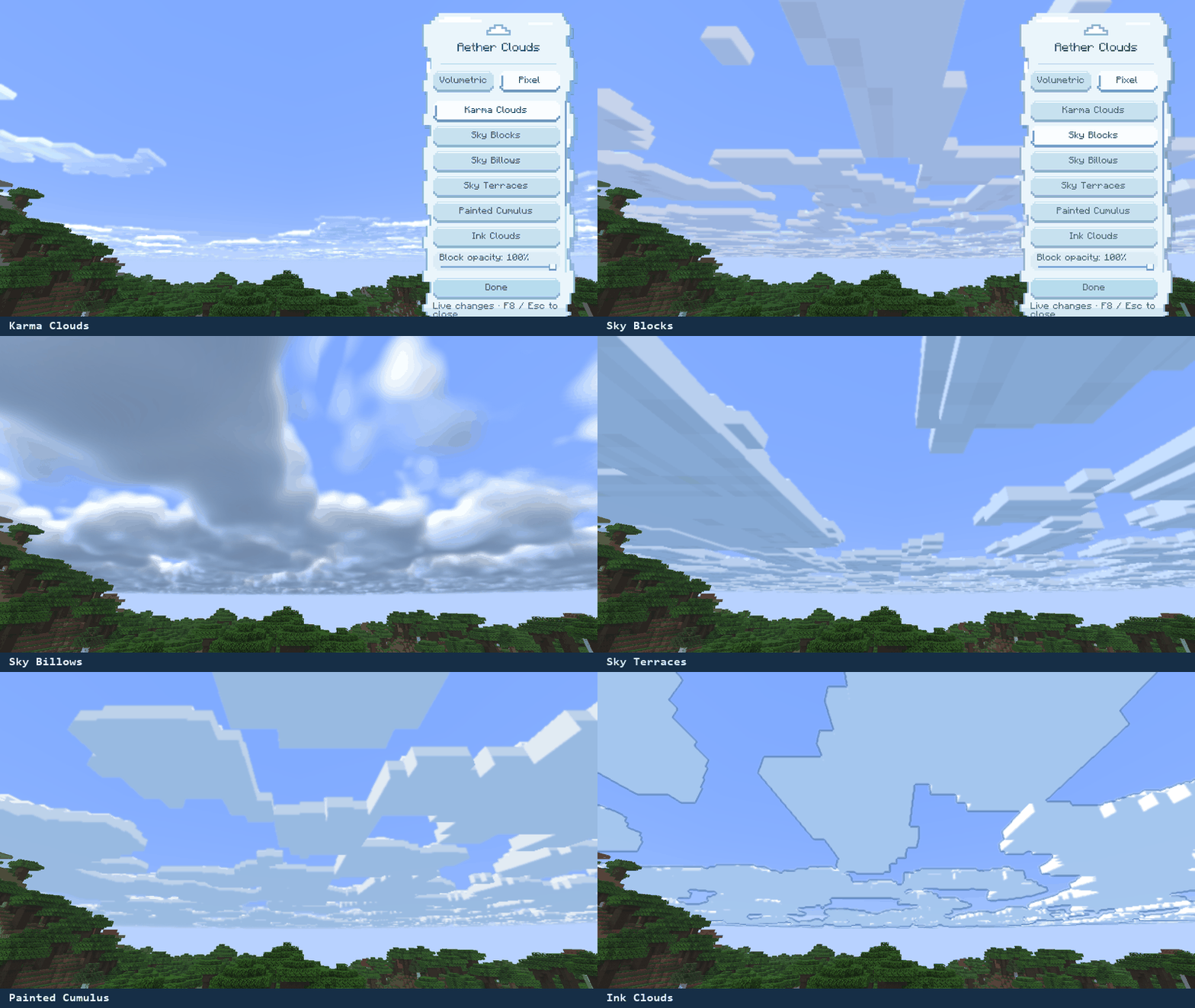

Press F8 inside a world to open the cloud-themed sidebar. Choose a collection, select a style, and adjust its controls while the world remains visible.
- Opacity and density: make clouds lighter or change the amount of sky they cover.
- Edge controls: adjust softness and enable edge filtering on supported pixel styles.
- Saved per style: every cloud style remembers its own settings, including after restarting Minecraft.
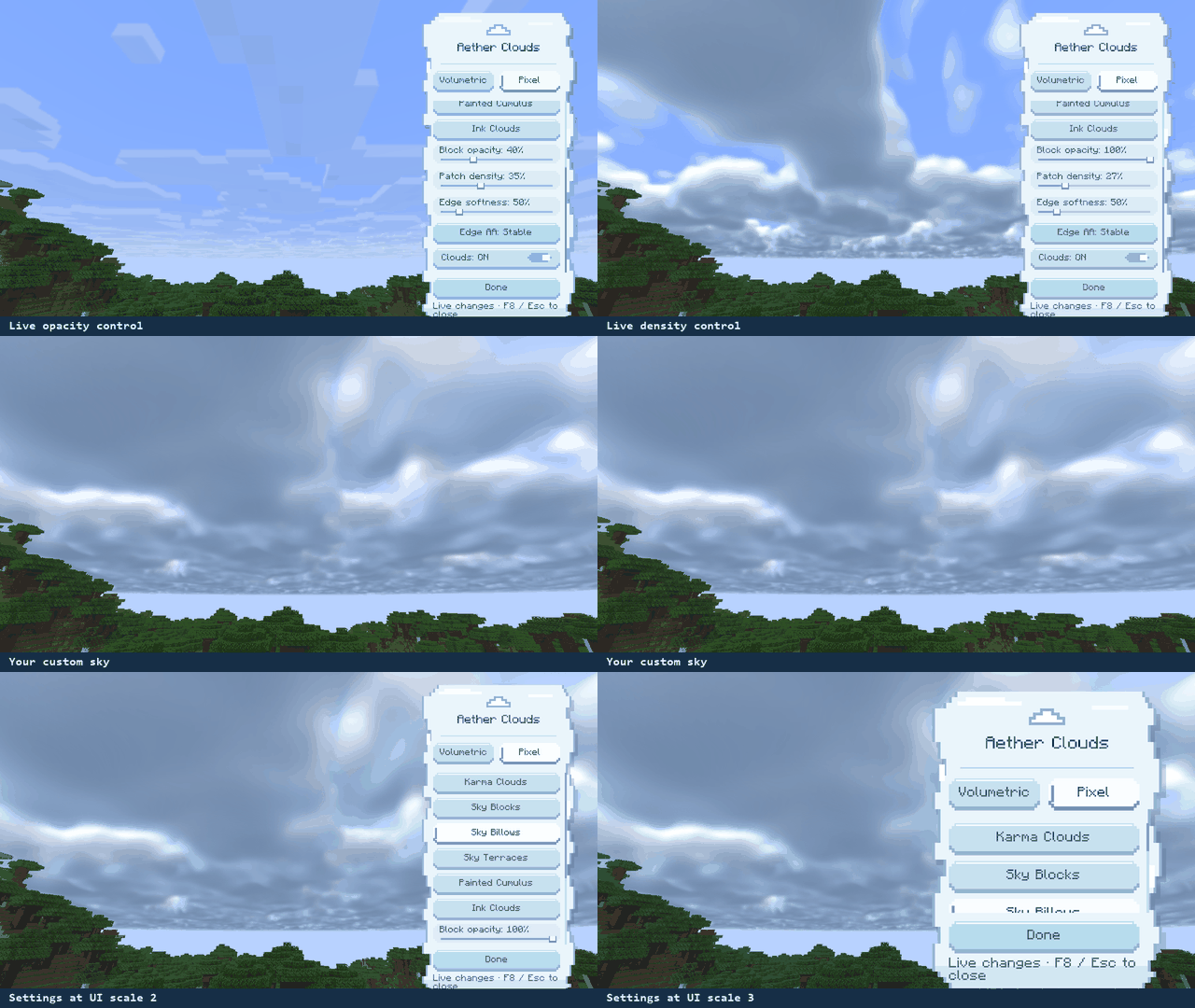
Actual in-game capture: opacity and density changes, plus the sidebar at UI scales 2 and 3.

Cloud color and lighting follow the world’s sky, day/night cycle, rain, and thunderstorms. Aether Clouds changes the clouds; terrain and water retain the game’s lighting.

1. Choose your build. Match both your Minecraft version and loader.
2. Install it. Place one matching JAR in your mods folder.
3. Look up. Enable Minecraft clouds, enter a world, and press F8.
Fabric · Forge · NeoForge
1.20.1 · 1.21.1 · 1.21.11 · 26.2 · 26.3
| Minecraft | Java |
|---|---|
| 1.20.1 | 17 |
| 1.21.1 / 1.21.11 | 21 |
| 26.2 / 26.3 | 25 |
Fabric builds bundle the required Fabric API Base and Resource Loader modules. A separate Fabric API installation is not required for Aether Clouds alone.

Shader packs: when Iris is installed, Aether Clouds disables its custom cloud renderer and leaves the normal rendering path active. External shader-pack compatibility is not claimed.
Performance: edge filtering can increase GPU work. Results depend on hardware and settings; Sodium, Fabulous graphics, MSAA, and distant-terrain combinations have not been verified across every supported version.

Aether Clouds · Version 0.0.1 · All Rights Reserved
Independent code and assets are owned by Haider x. Karma Clouds adapts Karma Shader by X-Haider, with its original attribution and ARR notice retained. Bundled Fabric API components retain their Apache-2.0 licenses. See each release’s included license files for the full terms.
Screenshots
Gallery
-
pixel-showcase.gif pixel-showcase.gif
-
volumetric-showcase-small.gif volumetric-showcase-small.gif
-
live-settings-web.gif live-settings-web.gif
-
about-both.png about-both.png
-
volume-both.png volume-both.png
-
pixel-both.png pixel-both.png
-
settings-both.png settings-both.png
-
weather-both.png weather-both.png
-
install-both.png install-both.png
-
compat-both.png compat-both.png
-
credits-both.png credits-both.png
Versions
Files
Relations
Project Relations
More like this
Similar Mods
Suggestions use data such as tags, dependencies, dependents, descriptions, titles, and more to rank how much they overlap with this mod.
- The Ethereal John
- Aether Cloud Storage Structures
- Simple Aether Cloud
- Aether Redoodled
- Aether: Lost Content Addon
- Aether Addon: Enhanced Extinguishing
- Aether Villages
- Aether Addon: Protect Your Moa
- Aether Continuation
- Aether Delight (A Farmer's Delight Add-on)
- Aether Addon: Emissivity
- Aether Addon: Treasure Reforging
On ModDex
Community snapshot
By the numbers
Statistics

Get it on
Available Platforms
On ModDex
Community snapshot
By the numbers
Statistics
Resources