
Community listing page, reviews may not be monitored by the author.
AFK Bots

No reviews yet
Spawn customizable player bots to farm, fish, mine, kill mobs, and keep chunks active! The ultimate server-friendly alternative to second accounts.

Community voices
Reviews
No reviews yet. Be the first to review this project!
Get it on
Available Platforms
About
Project Details
For authors
Embed Badge
If you're the author of this project, you can embed a live badge anywhere that supports HTML or Markdown. It updates automatically whenever ratings change.
Use HTML for any page that supports it, or Markdown for README files and Markdown-based descriptions.
Identifiers
Platform IDs
Resources
External Links
About
Description
🤖 AFK Bots
Automate your farms and load your chunks without needing alt accounts or leaving your client running 24/7!
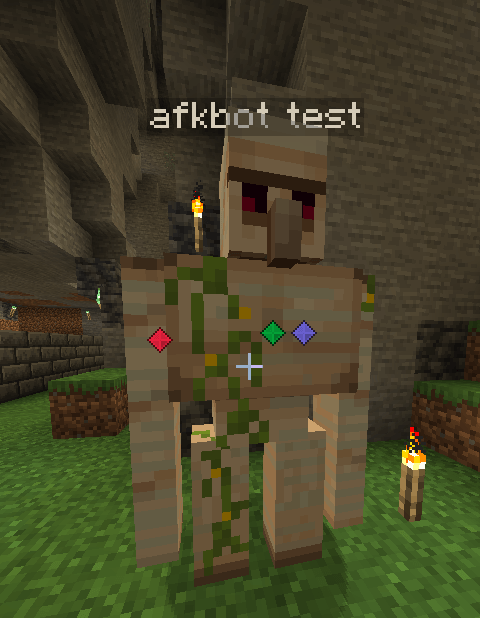
AFK Bots introduces stationary, fully persistent fake players to keep your mob spawners, fishing farms, cobblestone generators, and crop growth active in both Singleplayer and Dedicated Servers.
✨ Key Features
- 👥 Up to 32 Active Bots: Create and manage up to 32 individually named bots per world.
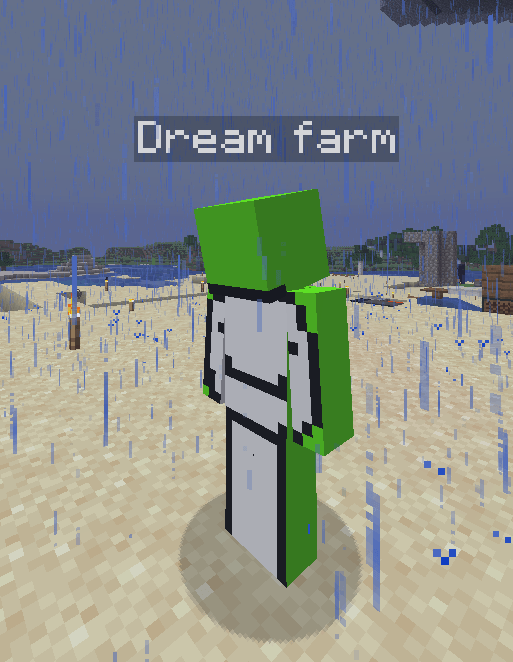
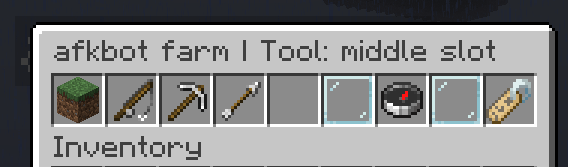
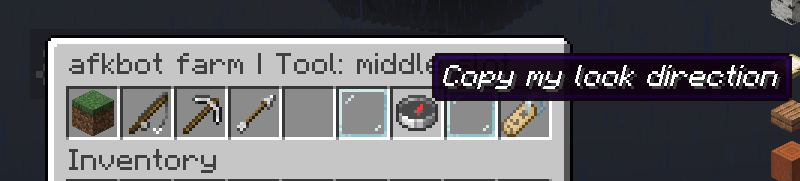
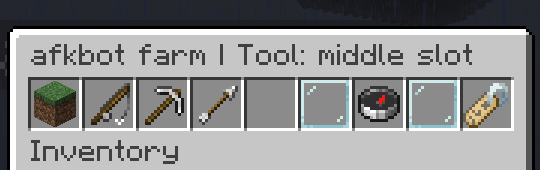
- 🖱️ Interactive GUI Menu: Simply Sneak + Right-Click any bot to configure its mode, inventory, and skin.
- 🛡️ Mending & XP Support: Bots absorb nearby XP orbs, allowing equipped gear enchanted with Mending to repair automatically!
- 🎨 Custom Player Skins: Give your bots any real Minecraft player's skin (e.g.,
stamsite) directly from the menu. - 💾 100% Persistent & Crash-Safe: Bots automatically save their exact location, dimension, inventory, durability, XP, and skin across world reopens and server restarts.
- 🖥️ Server-Side Friendly: Only required on the server! Joining players do NOT need to install the mod.
🛠️ Automated Farm Actions
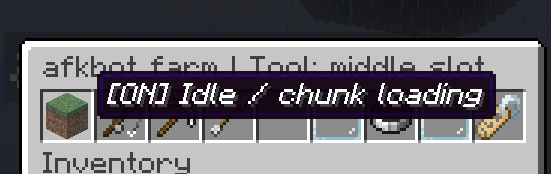
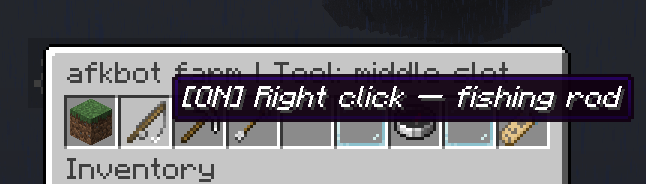
Equipping a tool automatically sets the bot's action mode:
- 🎣 Fishing Rod: Casts automatically, detects bites, reels in loot, and recast—perfect for 24/7 AFK fishing farms.
- ⛏️️ Pickaxe & Axe: Continuously mines/chops reachable blocks directly in front of the bot.
- ⚔️ Sword: Attacks nearby hostile or non-player targets in front, respecting vanilla attack cooldowns for maximum damage.
- ✋ Empty Hand / Idle Mode: Holds the bot in place without performing tool actions (ideal for pure chunk-loading or mob spawner activation).
💡 Note: Tools consume standard durability. Items dropped by mobs or blocks are not picked up by bots—be sure to use hoppers, water streams, or collection systems!
🧭 Quick Start Guide
- Position yourself: Stand exactly where you want your bot to be placed, facing your farm or target block.
- Spawn the bot: Run
/afkbot spawn <name>(e.g.,/afkbot spawn farm1). - Open the GUI: Sneak + Right-Click the bot to open its configuration screen.
- Equip & Aim: Shift-click or place a tool into the bot's hand. Look in the direction you want the bot to face and click the Compass button in the menu to sync its aim!
- Set Skin (Optional): Click the Name-tag button, enter a Minecraft username, and apply their skin instantly.
(Note: Creating and editing bots requires OP permissions on servers or Cheats enabled in Singleplayer).
💻 Commands Reference
| Command | Description |
|---|---|
/afkbot spawn <name> |
Spawns a new bot at your exact coordinates and view angle. |
/afkbot list |
Lists all active bots in your world. |
/afkbot remove <name> |
Permanently removes the specified bot. |
/afkbot removeall |
Permanently removes all bots in the world. |
/afkbot mode <name> idle |
Pauses tool actions while keeping the bot at its station. |
/afkbot mode <name> right_click |
Manually sets fishing / right-click mode. |
/afkbot mode <name> left_click |
Manually sets mining or combat / left-click mode. |
⚙️ Technical Requirements & Compatibility
- Minecraft Version:
26.3 - Mod Loader:
NeoForge 26.3.0.7-beta(or newer in the 26.3 release series) - Java Version:
Java 25
🌐 Multiplayer vs. Singleplayer
- Dedicated Server: Install on the server. Clients joining do not need the mod installed. Dedicated servers keep bots running even when all players log off.
- Singleplayer: Works out of the box. Bots save automatically when exiting and resume when re-entering the world (singleplayer worlds do not run while closed).
🌾 Farm Behavior & Tips
- Vanilla Rules Apply: Standard spawning distances, mob caps, difficulty settings, gamerules, and fishing mechanics still apply to AFK Bots just like a real player.
- Stationary Design: Bots do not walk around, replant crops, or move items into chests. Design your farms with automated collection systems (hoppers/allays/water streams).
- Skin Lookup: Changing skins requires a valid internet connection to fetch the requested Minecraft player skin.
Screenshots
Gallery
-
 Skärmbild 2026-09-22 155643.png Skärmbild 2026-09-22 155643.png
 -
 Skärmbild 2026-09-22 155524.png Skärmbild 2026-09-22 155524.png
 -
 Skärmbild 2026-09-22 155530.png Skärmbild 2026-09-22 155530.png
 -
 Skärmbild 2026-09-22 155537.png Skärmbild 2026-09-22 155537.png
 -
 Skärmbild 2026-09-22 155552.png Skärmbild 2026-09-22 155552.png
 -
 Skärmbild 2026-09-22 155600.png Skärmbild 2026-09-22 155600.png
 -
 Skärmbild 2026-09-22 155608.png Skärmbild 2026-09-22 155608.png
 -
 Skärmbild 2026-09-22 155543.png Skärmbild 2026-09-22 155543.png
 -
 Skärmbild 2026-09-27 200726.png Skärmbild 2026-09-27 200726.png
 -
 Skärmbild 2026-09-27 200737.png Skärmbild 2026-09-27 200737.png
 -
 Skärmbild 2026-09-27 200745.png Skärmbild 2026-09-27 200745.png
Versions
Files
Relations
Project Relations
More like this
Similar Mods
Suggestions use data such as tags, dependencies, dependents, descriptions, titles, and more to rank how much they overlap with this mod.
On ModDex
Community snapshot
By the numbers
Statistics
 (opens in a new tab)
Get it on
Available Platforms
On ModDex
Community snapshot
By the numbers
Statistics
Resources