
Community listing page, reviews may not be monitored by the author.
AFK Player Anchor

No reviews yet
A server-side mod that uses stationary dummy players to keep chunks loaded and running, allowing mob farms, furnaces, and automated systems to operate while you're away, including Nether portal farms with multiple players online.

Community voices
Reviews
No reviews yet. Be the first to review this project!
Get it on
Available Platforms
About
Project Details
For authors
Embed Badge
If you're the author of this project, you can embed a live badge anywhere that supports HTML or Markdown. It updates automatically whenever ratings change.
Use HTML for any page that supports it, or Markdown for README files and Markdown-based descriptions.
Identifiers
Platform IDs
Resources
External Links
About
Description
AFK Player Anchor
English
AFK Player Anchor is a server-side Minecraft mod that lets you place dummy players to keep mob farms operating even when real players are away.
Nether portal-based mob farms can also operate on multiplayer servers, even when multiple players are online in different dimensions. Placing a dummy player near the portal's arrival point in the Overworld can help prevent transferred mobs from despawning when no real players are nearby.
It also works as a chunk loader, keeping chunks loaded and ticking so furnaces and automated systems can continue operating while players are away.
No client-side installation is required.
Features
- Dummy Player Management: Create, view, rename, and remove dummy players using commands.
- Chunk Loading: Keep chunks loaded and ticking around each dummy player.
- Mob Despawning Prevention: Help prevent distance-based despawning of mobs near dummy players, including mobs transferred through Nether portals.
- Machine Operation: Placing a dummy player near furnaces and other machines keeps their chunks loaded and ticking, allowing processes such as smelting to continue even when real players are away. All chunks required for the machines to operate must remain loaded.
- Player List Display: Dummy players appear in the player list shown when pressing the TAB key. However, they are not counted toward the online player count displayed in the multiplayer server list (e.g.,
0/20). - Custom Names: Supports names using Unicode characters from various languages, including English, Japanese, Simplified Chinese, Traditional Chinese, and Korean. Some naming restrictions apply.
- Persistent Data: Save dummy players and restore them after server restarts.
- Configurable Settings: Adjust the chunk-loading radius and command permission level.
- Command Permissions: By default, all players can use the mod's commands. The configuration file allows server administrators to restrict command access to operators (OPs) only.
- Server-Side Only: No client-side installation required.
Supported Versions
| Minecraft | Mod Loader | Supported Version Range |
|---|---|---|
| 1.20.1 | Forge | 47.4.0 – 47.x |
| 1.21.1 | Forge | 52.1.0 – 52.x |
| 1.21.1 | NeoForge | 21.1.239 – 21.1.x |
Each mod loader is supported from the listed minimum version onward, within the same version series.
Java 17 is required for Minecraft 1.20.1, and Java 21 for Minecraft 1.21.1.
Tested Environments
All three versions have been tested in-game and confirmed to work.
The Minecraft 1.20.1 Forge version has also been tested successfully on a server with 144 installed mods, including major content mods.
These results do not guarantee compatibility with every mod or mod combination.
Commands
Commands
Basic Usage
- Go to the location where you want to place a dummy player.
- Run
/afkpa spawnto create a dummy player.
The dummy player will keep nearby chunks loaded and ticking.
Command List
| Command | Description |
|---|---|
/afkpa |
Command root (use Tab to view available subcommands) |
/afkpa spawn [name] |
Create a dummy player at your current position (optional custom name) |
/afkpa status [name] |
Display information about dummy players |
/afkpa rename <name> <newName> |
Rename a dummy player |
/afkpa remove <name> |
Remove a specified dummy player |
/afkpa remove all |
Remove all managed dummy players |
Naming
If no name is specified, dummy players are automatically assigned names such as AFKPlayer1 and AFKPlayer2. You can also specify a custom name when creating a dummy player, rename it later, or remove it individually.
Command Usage Notes
The /afkpa spawn command must be executed in-game. It cannot be executed from the server console.
Moving Dummy Players
In v1.0.0, dummy players cannot be moved after placement. To change a dummy player's location, remove it and create a new one at the desired location.
Configuration
Configuration file: config/afkplayeranchor-server.toml
Default settings:
chunkRadius = 8
commandPermissionLevel = 0- chunkRadius: Chunk-loading radius around each dummy player (0–8). The default radius of 8 covers 17 × 17 chunks (289 chunks).
- commandPermissionLevel: Required permission level for commands (0–4). The default value of
0allows all players to use the commands. Setting it to2restricts access to operators with permission level 2 or higher.
Chunk-Loading Radius Notes:
Increasing the chunk-loading radius may increase server load, especially when multiple dummy players are active. Adjust the radius according to your needs.
The chunk radius is saved when a dummy player is created. Changes to this setting do not affect existing dummy players; they must be removed and recreated to apply the new radius.
Command Permissions and Server Performance:
By default, commandPermissionLevel = 0 allows all players to create and manage dummy players. This setting is generally suitable for private servers with trusted friends.
However, dummy players continuously keep nearby chunks loaded and ticking. Creating too many dummy players may significantly increase server load, so avoid placing more than necessary.
For public servers where anyone can join, setting commandPermissionLevel = 2 is recommended to restrict dummy player management to server operators (OPs).
Important Notes
- The mod does not completely disable Minecraft's normal mob despawning rules.
- Dummy players must be positioned appropriately for distance-based despawning prevention.
- Chunk loading alone does not guarantee that every mob farm or mechanism will function.
- Server Performance: Dummy players keep nearby chunks loaded and ticking, similar to some of the effects of having real players online. Placing too many dummy players may significantly increase server load. Please be mindful of how many you create.
- The mod is designed for dedicated server use and does not require installation on clients.
Current Behavior
Dummy players have an internal name (e.g., AFKPlayer1) and a configurable display name (e.g., Coatlicue).
Some entity information display mods, such as Jade, may display the internal name (e.g., AFKPlayer1) instead of the configured display name (e.g., Coatlicue).
This is a display-only behavior and does not affect the functionality of AFK Player Anchor. Support for displaying custom names in these mods may be considered in future updates.
Credits and Acknowledgments
AFK Player Anchor was inspired by the fake player functionality of Stay and was developed with independently written code.
My sincere thanks to slugwall11, the developer of Stay, whose work inspired the creation of this mod.
Author and License
Author: Coatlicue
License: All Rights Reserved
The source code is not publicly available.
This is an unofficial Minecraft mod and is not affiliated with or endorsed by Mojang or Microsoft.
日本語
AFK Player Anchorは、ダミープレイヤーを設置することで、実際のプレイヤーがその場を離れていてもMobトラップなどの動作を維持できるサーバー専用MODです。
特に、複数人が異なるディメンションにログインしているマルチサーバーでも、ネザーゲート式Mobトラップが動作します。ネザーゲートの転送先となるオーバーワールドにダミープレイヤーを設置することで、周囲に実際のプレイヤーがいない場合でも、転送されたMobのデスポーンを防ぐことができます。
また、チャンクローダーとしても利用でき、プレイヤーが離れている間もチャンクの読み込みと処理を維持し、かまどや自動化設備などを動作させ続けることができます。
クライアント側へのMOD導入は不要です。
主な機能
- ダミープレイヤーの管理: コマンドでダミープレイヤーの設置・確認・改名・削除ができます。
- チャンクの読み込み: ダミープレイヤー周辺のチャンクを読み込み、処理を維持します。
- Mobのデスポーン防止: ネザーゲートを通過したMobを含め、ダミープレイヤー付近での距離によるデスポーンの防止を支援します。
- 装置の稼働維持: ダミープレイヤーをかまどなどの装置の近くに設置することで、プレイヤーが離れていてもチャンクの読み込みと処理を維持し、精錬などの動作を継続できます。ただし、装置の動作に必要なチャンクが読み込まれている必要があります。
- プレイヤー一覧への表示: ダミープレイヤーはTABキーで表示されるプレイヤー一覧に追加されます。ただし、サーバー一覧などに表示される接続人数(例:
0/20)にはカウントされません。 - 名前の変更: 英語、日本語、簡体字中国語、繁体字中国語、韓国語などのUnicode文字を使用した名前に対応しています。ただし、名前には一部制限があります。
- データの永続保存: ダミープレイヤーの情報を保存し、サーバー再起動後に復元します。
- 設定の変更: チャンクの読み込み半径やコマンドの実行権限を変更できます。
- コマンドの実行権限: デフォルトではすべてのプレイヤーがコマンドを使用できます。設定ファイルを変更することで、管理者(OP)のみに使用を制限することもできます。
- サーバー側のみで動作: クライアント側へのMOD導入は不要です。
対応バージョン
| Minecraft | MODローダー | 対応バージョン範囲 |
|---|---|---|
| 1.20.1 | Forge | 47.4.0 ~ 47.x |
| 1.21.1 | Forge | 52.1.0 ~ 52.x |
| 1.21.1 | NeoForge | 21.1.239 ~ 21.1.x |
各MODローダーは、記載された最低バージョン以降、同じバージョン系列で利用できます。
Minecraft 1.20.1ではJava 17、Minecraft 1.21.1ではJava 21が必要です。
動作確認環境
3種類すべてのバージョンでゲーム内動作を確認済みです。
Minecraft 1.20.1 Forge版については、大型MODを含む144個のMODを導入したサーバー環境でも正常動作を確認しています。
ただし、すべてのMODやMODの組み合わせとの互換性を保証するものではありません。
コマンド
基本的な使い方
- ダミープレイヤーを設置したい場所に移動します。
/afkpa spawnを実行してダミープレイヤーを生成します。
生成されたダミープレイヤーは、周囲のチャンクの読み込みと処理を維持します。
コマンド一覧
| コマンド | 説明 |
|---|---|
/afkpa |
コマンドの起点(Tabキーで利用可能なサブコマンドを確認) |
/afkpa spawn [name] |
現在の位置にダミープレイヤーを生成(名前の指定も可能) |
/afkpa status [name] |
ダミープレイヤーの情報を表示 |
/afkpa rename <name> <newName> |
ダミープレイヤーの名前を変更 |
/afkpa remove <name> |
指定したダミープレイヤーを削除 |
/afkpa remove all |
管理対象のダミープレイヤーをすべて削除 |
名前について
名前を指定せずに生成した場合、AFKPlayer1、AFKPlayer2 のような名前が自動的に割り当てられます。名前を指定して生成することもでき、後から名前の変更や個別の削除が可能です。
実行時の注意事項
/afkpa spawn はMinecraftのゲーム内から実行してください。サーバーコンソールからは実行できません。
ダミープレイヤーの移動について
v1.0.0では、設置したダミープレイヤーを後から移動させることはできません。設置場所を変更したい場合は、対象のダミープレイヤーを削除し、新しい場所に設置し直してください。
設定
設定ファイル:config/afkplayeranchor-server.toml
初期設定:
chunkRadius = 8
commandPermissionLevel = 0- chunkRadius: ダミープレイヤーを中心としたチャンク読み込み半径(0~8)。初期値8では、17×17チャンク(289チャンク)が対象です。
- commandPermissionLevel: コマンドの実行に必要な権限レベル(0~4)。初期値の
0ではすべてのプレイヤーが使用できます。2に設定すると、通常のOP権限レベル2以上の管理者のみが使用できます。
チャンク読み込み半径について:
チャンク読み込み半径を大きくすると、サーバー負荷が増加する可能性があります。特に複数のダミープレイヤーを設置する場合は、必要な範囲に応じて半径を調整してください。
チャンク半径はダミープレイヤーを作成した時点で保存されます。設定を変更しても既存のダミープレイヤーには反映されないため、新しい半径を適用するには削除して再設置する必要があります。
コマンド権限とサーバー負荷について:
デフォルトの commandPermissionLevel = 0 では、すべてのプレイヤーがダミープレイヤーを設置・管理できます。友人同士など、信頼できるメンバーで遊ぶサーバーでは、そのまま使用しても問題ありません。
ただし、ダミープレイヤーは周囲のチャンクを継続的に読み込むため、大量に設置するとサーバーに大きな負荷がかかる可能性があります。必要以上に設置しないよう注意してください。
不特定多数のプレイヤーが参加する公開サーバーでは、commandPermissionLevel = 2 に設定し、ダミープレイヤーの管理をサーバー管理者(OP)のみに制限することを推奨します。
注意事項
- Minecraft標準のMobデスポーン条件を完全に無効化するMODではありません。
- 距離によるデスポーンを防止するには、ダミープレイヤーを適切な位置に設置する必要があります。
- チャンクの読み込みだけで、すべてのMobトラップや装置の動作が保証されるわけではありません。
- サーバー負荷について: ダミープレイヤーを設置すると、実際のプレイヤーがログインしている場合と同様に、周囲のチャンクの読み込みや処理が継続されます。そのため、ダミープレイヤーを大量に設置すると、サーバーに大きな負荷がかかる可能性があります。設置数には十分注意してください。
- 専用サーバーでの使用を想定しており、クライアント側への導入は不要です。
現在の仕様
ダミープレイヤーには、内部名(例:AFKPlayer1)と、自由に設定できる表示名(例:Coatlicue)があります。
Jadeなどの一部のエンティティ情報表示MODでは、設定した表示名(例:Coatlicue)ではなく、内部名(例:AFKPlayer1)が表示されます。
これは表示上の仕様であり、AFK Player Anchorの機能には影響しません。今後のアップデートで表示名への対応を検討する可能性があります。
クレジット・謝辞
AFK Player Anchorは、Stayのフェイクプレイヤー機能を参考に、独自のコードで開発されたMODです。
このMODを開発するきっかけとなったStayの開発者であるslugwall11氏に、心より感謝申し上げます。
作者・ライセンス
作者: Coatlicue
ライセンス: All Rights Reserved
ソースコードは公開していません。
このMODは非公式のMinecraft MODであり、MojangおよびMicrosoftとは提携・公認関係にありません。
Screenshots
Gallery
-
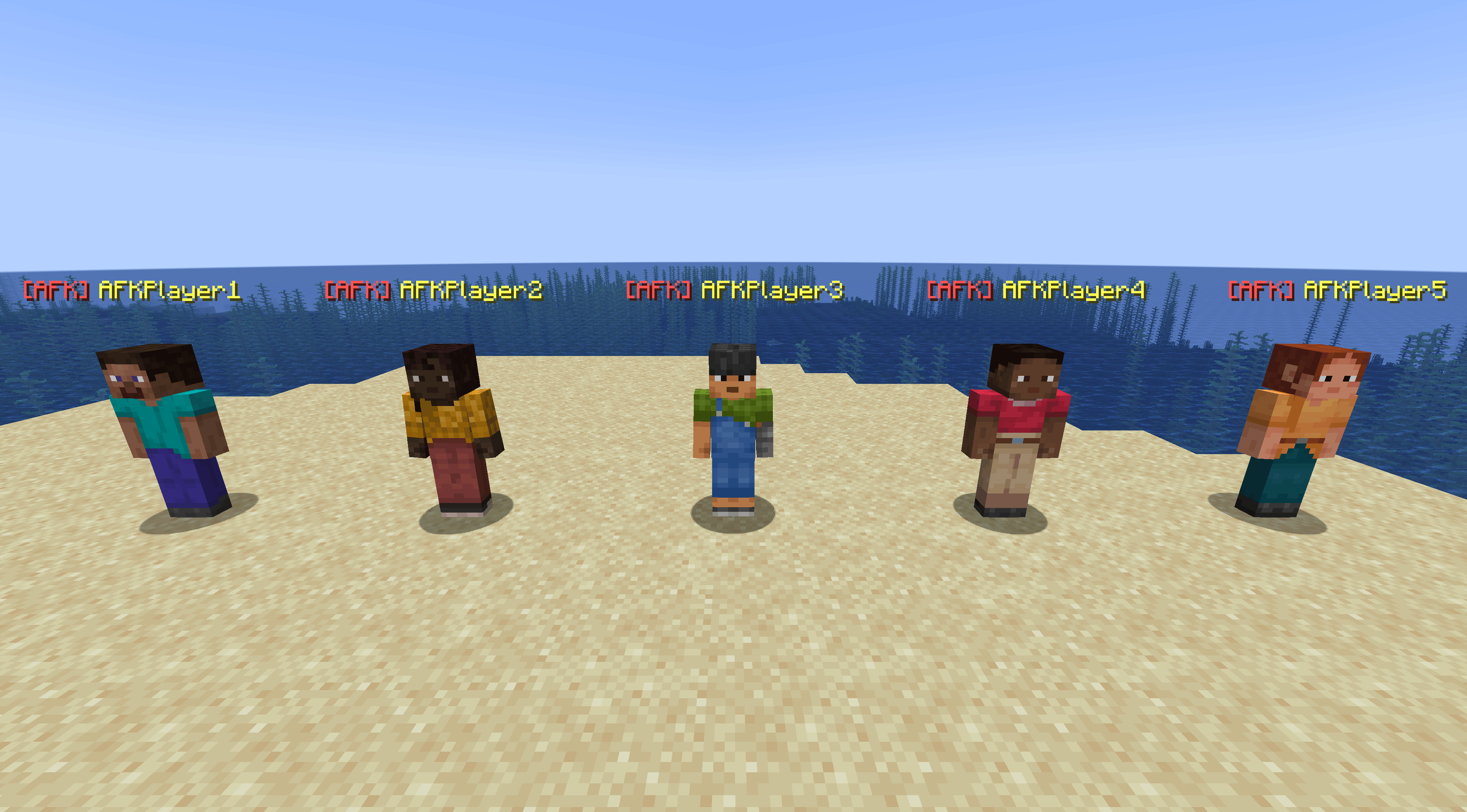 Dummy Players Showcase Five stationary dummy players created using AFK Player Anchor, each with a unique identifier and a visible [AFK] name tag.
 -
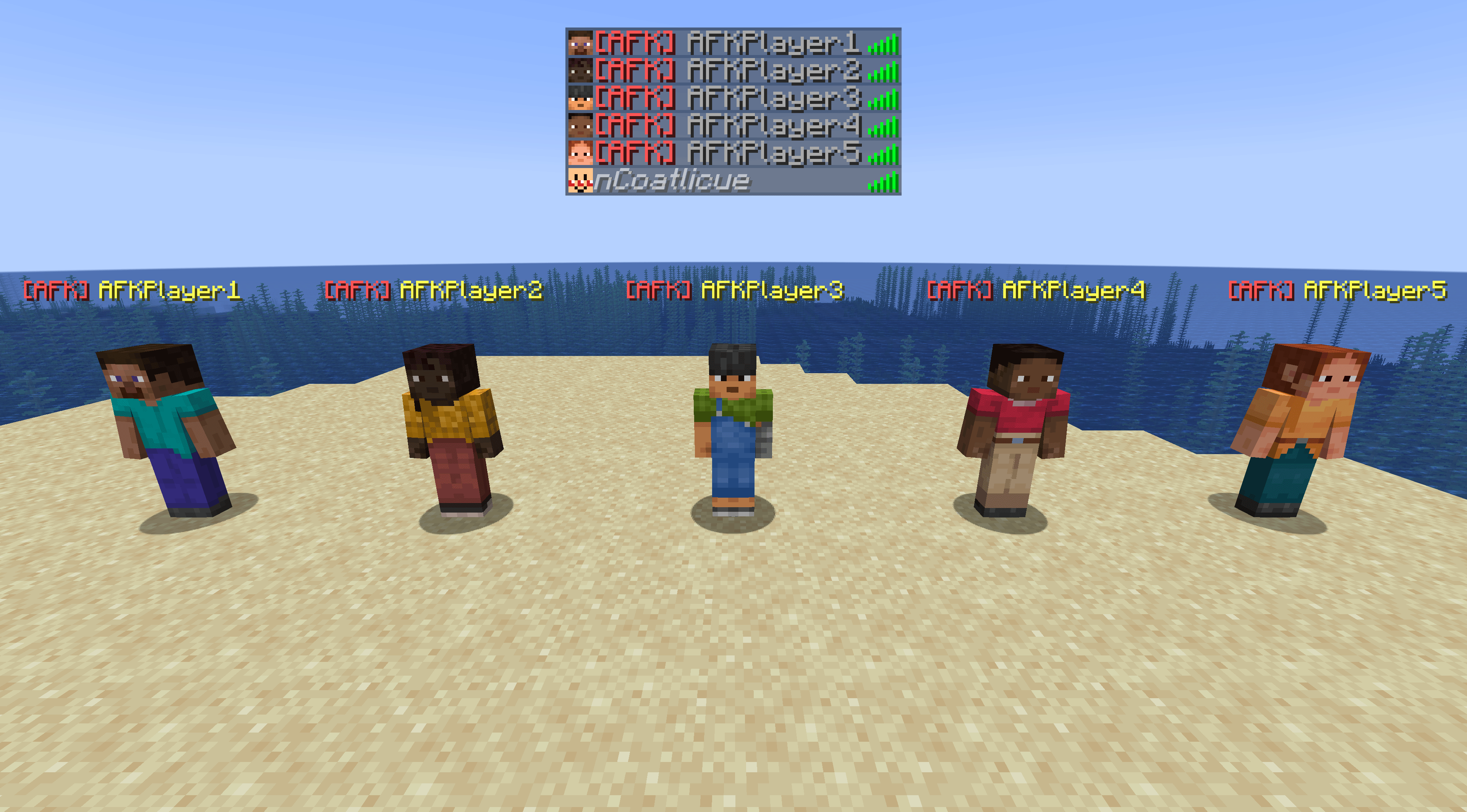 Dummy Players in the TAB List Dummy players appear in the TAB player list with an [AFK] prefix, alongside real players.
 -
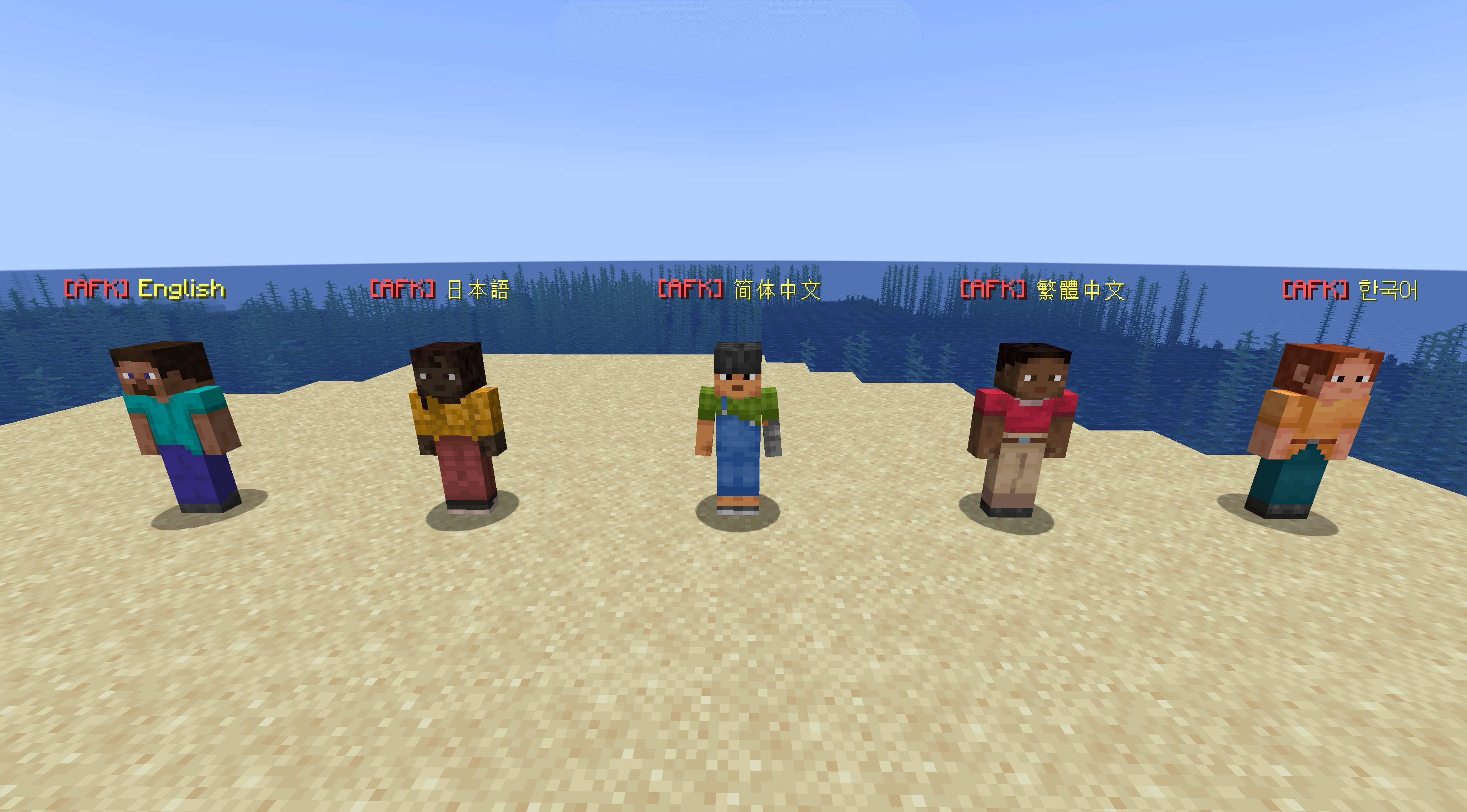 Multilingual Dummy Player Names Dummy player names support Unicode characters from multiple languages, including English, Japanese, Simplified Chinese, Traditional Chinese, and Korean.
 -
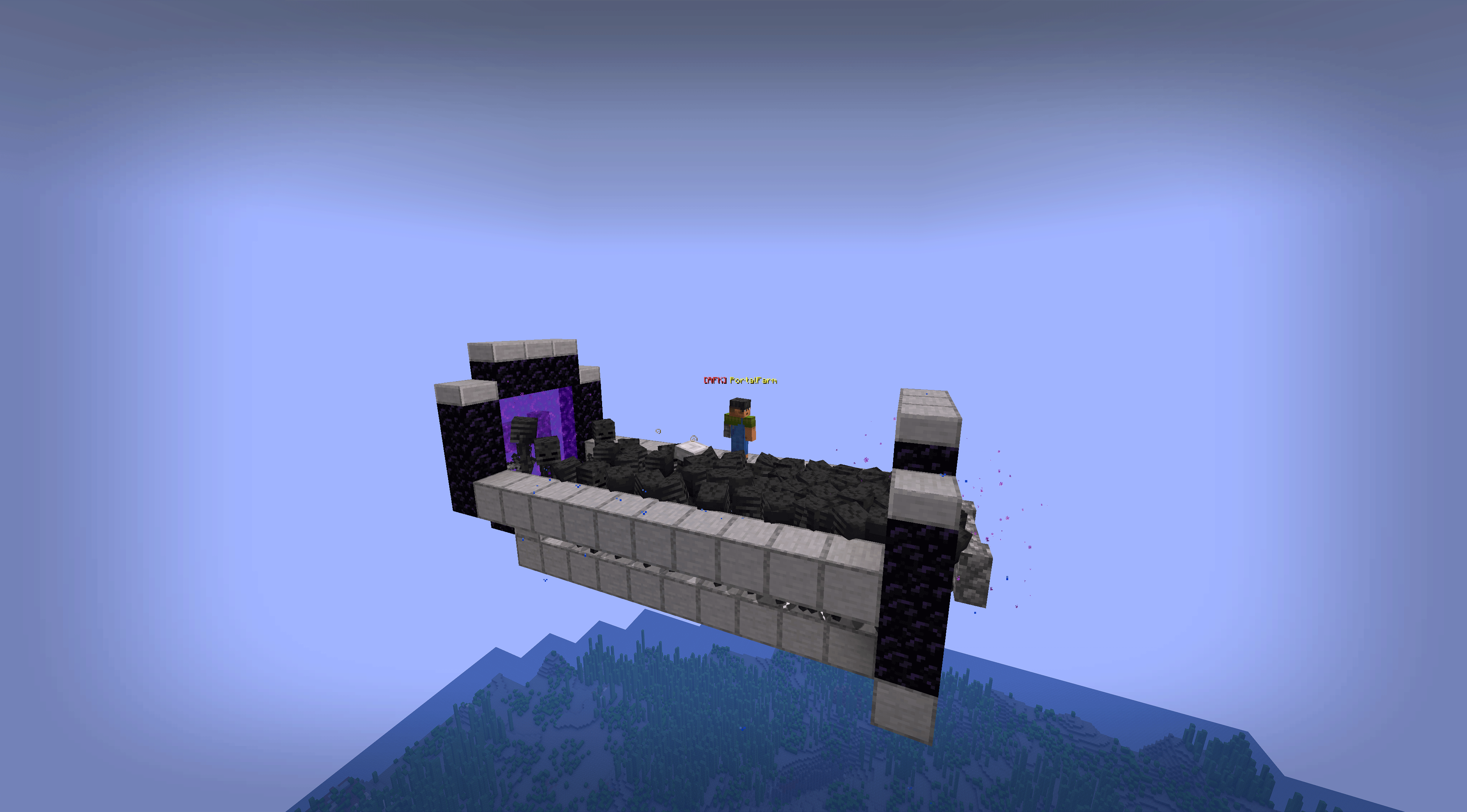 Nether Portal Mob Farm A dummy player positioned near the Overworld destination of a Nether portal mob farm, helping prevent distance-based despawning of transferred mobs.
 -
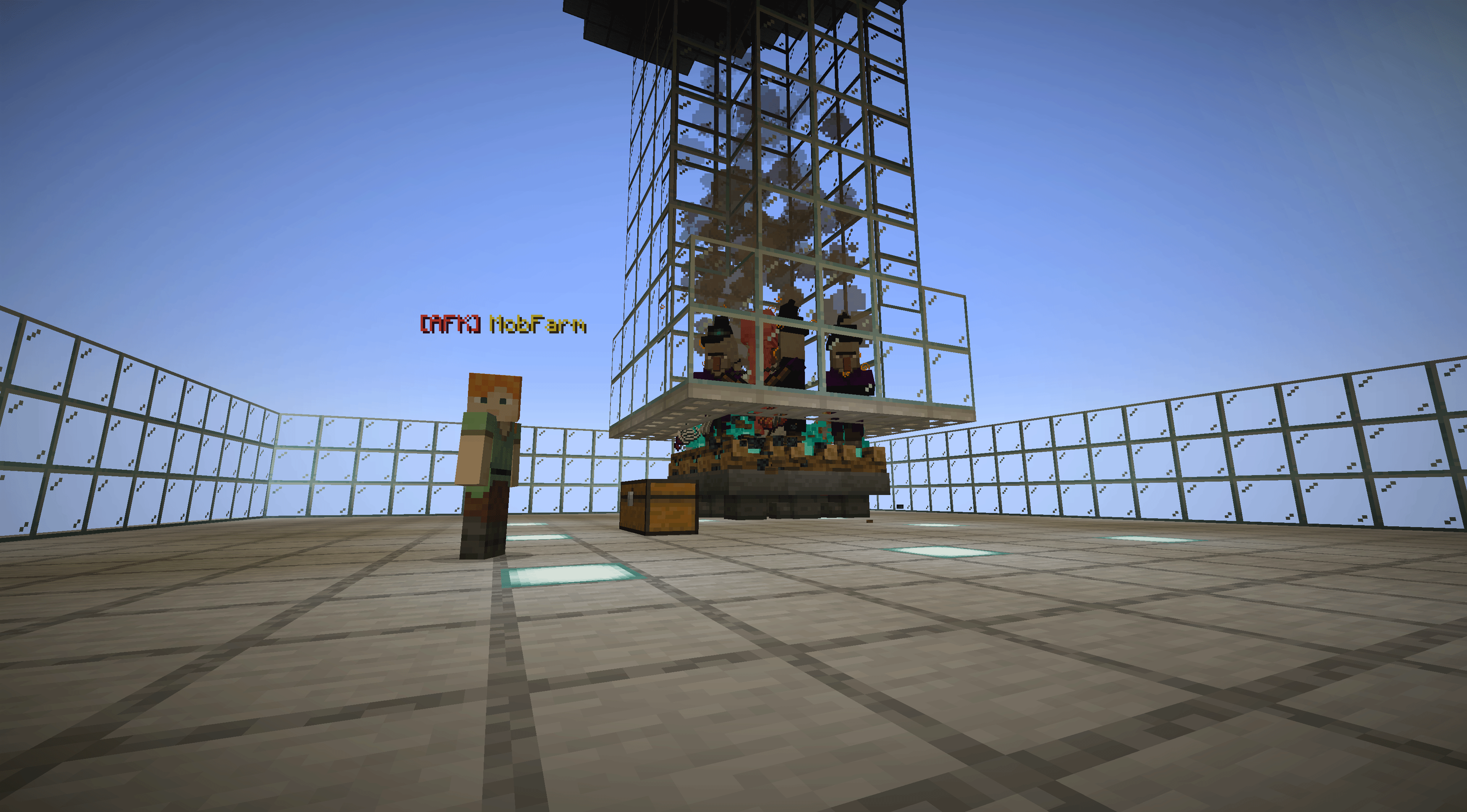 Mob Farm with Dummy Player A stationary dummy player placed near a mob farm to keep surrounding chunks loaded and ticking, helping the farm continue operating while real players are away.
 -
 Dummy Player Management Commands AFK Player Anchor provides commands to create, view, rename, and remove dummy players. Command suggestions are available in Minecraft's chat interface.
Versions
Files
Relations
Project Relations
More like this
Similar Mods
Suggestions use data such as tags, dependencies, dependents, descriptions, titles, and more to rank how much they overlap with this mod.
On ModDex
Community snapshot
By the numbers
Statistics

Get it on
Available Platforms
On ModDex
Community snapshot
By the numbers
Statistics
Resources