Community listing page, reviews here may not be monitored by the author.
Aggression Detection+: Mob Aggro Indicators

No reviews yet
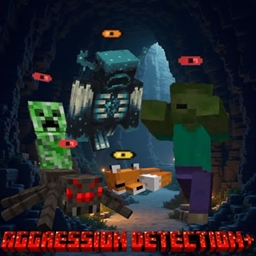
Gives a Detection Indicator above Hostile and Skittish mobs. Yellow means close to detection, Red means detected by hostile mobs.
Community voices
Reviews
No reviews yet. Be the first to review this project!
Get it on
Available Platforms
About
Project Details
For authors
Embed Badge
If you're the author of this project, you can embed a live badge anywhere that supports HTML or Markdown. It updates automatically whenever ratings change.
Use HTML for any page that supports it, or Markdown for README files and Markdown-based descriptions.
Identifiers
Platform IDs
Resources
External Links
About
Description
Aggression Indicator
Aggression Indicator is a lightweight Fabric mod that displays clear, color-coded eye icons above mobs, helping you understand when a creature is close to detecting you, becoming alert, or actively targeting you.
Indicators are player-specific and server-aware, so each player only sees the aggression state that applies directly to them. A mob targeting another player will not incorrectly appear aggressive toward you.
Indicator States
- Yellow Eye: You are close to the mob’s detection range, and it may notice or react to you soon.
- Orange Eye: The mob is alert, angry, searching for you, or attempting to acquire you as a target.
- Red Eye: The mob has actively selected you as its current target.
Features
- Clear indicators displayed above mobs
- Player-specific aggression detection
- Server-authoritative detection with client-side rendering
- Works with vanilla hostile and neutral mobs
- Supports many modded mobs that use standard Minecraft targeting behavior
- Warning indicators for skittish creatures such as foxes, rabbits, and ocelots
- Configurable display distance
- Adjustable indicator size
- Adjustable height offset
- Configurable visibility behavior
- Lightweight and designed to remain readable without obstructing gameplay
- No changes to mob AI, targeting, damage, or behavior
Supported Versions
Aggression Indicator is currently available only for:
- Minecraft 1.20.1 — Fabric
- Minecraft 26.2 — Fabric
Forge, NeoForge, Quilt, and other Minecraft versions are not currently supported.
Dependencies
Required
- Fabric Loader
- Fabric API
Optional
- Mod Menu
Installing Mod Menu adds an in-game configuration screen for adjusting client-side visual settings such as indicator size, display distance, vertical offset, and visibility options.
Aggression Indicator is designed to provide useful information at a glance while remaining simple, unobtrusive, and compatible with both singleplayer and multiplayer environments.
Screenshots
Gallery
Versions
Files
Relations
Project Relations
More like this
Similar Mods
Suggestions use data such as tags, dependencies, dependents, descriptions, titles, and more to rank how much they overlap with this mod.
On ModDex
Community snapshot
By the numbers
Statistics
Want to reach Minecraft players?
We're looking for a server hosting partner to feature here and other parts of the site. Interested? Send us a message!
Get in touchGet it on
Available Platforms
On ModDex
Community snapshot
By the numbers
Statistics
Resources