
Community listing page, reviews here may not be monitored by the author.
Air Strike Warfare

No reviews yet
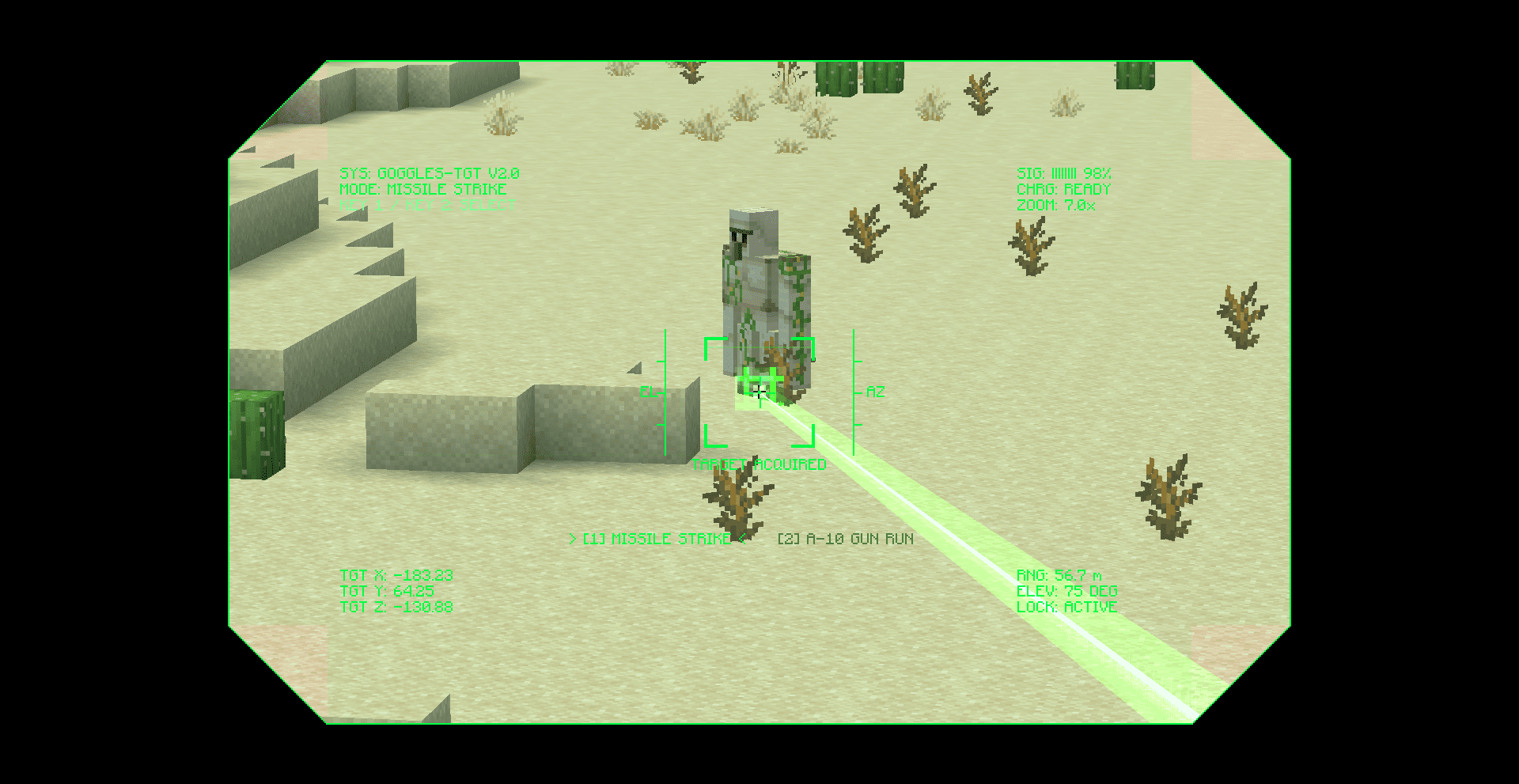
Air Strike Warfare adds a laser designator for calling in air strikes. Aim through a tactical HUD with zoom to mark a target, choose a missile strike or an A-10 gun run, then the strike hits it with explosions, shockwaves, and camera shake.
Community voices
Reviews
No reviews yet. Be the first to review this project!
Get it on
Available Platforms
 CurseForge
Modrinth
CurseForge
Modrinth
About
Project Details
For authors
Embed Badge
If you're the author of this project, you can embed a live badge anywhere that supports HTML or Markdown. It updates automatically whenever ratings change.
Use HTML for any page that supports it, or Markdown for README files and Markdown-based descriptions.
Identifiers
Platform IDs
Resources
External Links
About
Description


Air Strike Warfare
Air Strike Warfare brings laser-guided air support to Minecraft. Equip the Laser Designator, mark a target through a tactical targeting overlay, and call in a strike on the spot you painted — complete with a visible laser beam, inbound ordnance, and cinematic impact effects.
Features
- Laser Designator — a dedicated targeting tool. Hold use to raise the optic and paint a target in the world.
- Tactical HUD — a scope-style overlay with live telemetry: target coordinates, range, lock status, selected mode, and an animated reticle.
- Adjustable zoom — scroll to change magnification (1x–16x) with a matching field-of-view zoom while aiming.
- Two strike modes — switch between a Missile Strike and an A-10 Gun Run on the fly with the number keys.
- Visible laser beam — a real beam is drawn from the designator to the target, turning green on a valid lock and red when there is no target.
- Cinematic impacts — custom explosion bursts with an expanding ground shockwave, plus camera shake to sell the hit.
- Custom entities & audio — strike aircraft, the A-10, and missiles, backed by positional engine and impact sound.
- Localization — English and Arabic language support.
How to Use
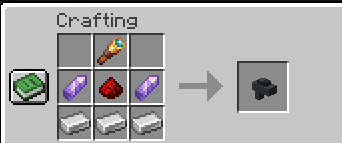
- Obtain the Laser Designator from the creative tab (or your usual means).
- Hold use to bring up the targeting HUD and aim at a location.
- Press 1 or 2 to choose Missile Strike or A-10 Gun Run.
- Scroll to adjust zoom, line up your lock, and the strike is delivered to the marked spot.


Air Strike Warfare
Air Strike Warfare brings laser-guided air support to Minecraft. Equip the Laser Designator, mark a target through a tactical targeting overlay, and call in a strike on the spot you painted — complete with a visible laser beam, inbound ordnance, and cinematic impact effects.
Features
- Laser Designator — a dedicated targeting tool. Hold use to raise the optic and paint a target in the world.
- Tactical HUD — a scope-style overlay with live telemetry: target coordinates, range, lock status, selected mode, and an animated reticle.
- Adjustable zoom — scroll to change magnification (1x–16x) with a matching field-of-view zoom while aiming.
- Two strike modes — switch between a Missile Strike and an A-10 Gun Run on the fly with the number keys.
- Visible laser beam — a real beam is drawn from the designator to the target, turning green on a valid lock and red when there is no target.
- Cinematic impacts — custom explosion bursts with an expanding ground shockwave, plus camera shake to sell the hit.
- Custom entities & audio — strike aircraft, the A-10, and missiles, backed by positional engine and impact sound.
- Localization — English and Arabic language support.
How to Use
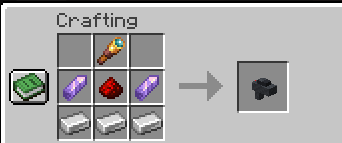
- Obtain the Laser Designator from the creative tab (or your usual means).
- Hold use to bring up the targeting HUD and aim at a location.
- Press 1 or 2 to choose Missile Strike or A-10 Gun Run.
- Scroll to adjust zoom, line up your lock, and the strike is delivered to the marked spot.
Screenshots
Gallery
Versions
Files
Relations
Project Relations
More like this
Similar Mods
Suggestions use data such as tags, dependencies, dependents, descriptions, titles, and more to rank how much they overlap with this mod.
On ModDex
Community snapshot
By the numbers
Statistics
Want to reach Minecraft players?
We're looking for a server hosting partner to feature here and other parts of the site. Interested? Send us a message!
Get in touchGet it on
Available Platforms
CurseForge
Modrinth
On ModDex
Community snapshot
By the numbers
Statistics
Resources