Community listing page, reviews here may not be monitored by the author.
Ala Screen

No reviews yet
Press F2 and your screenshot becomes a link you can paste anywhere - you see the shot before it is sent.
Community voices
Reviews
No reviews yet. Be the first to review this project!
Get it on
Available Platforms
About
Project Details
For authors
Embed Badge
If you're the author of this project, you can embed a live badge anywhere that supports HTML or Markdown. It updates automatically whenever ratings change.
Use HTML for any page that supports it, or Markdown for README files and Markdown-based descriptions.
Identifiers
Platform IDs
About
Description
Ala Screen
Sharing a Minecraft screenshot usually means leaving the game, finding the file and attaching it somewhere. Ala Screen makes it one click.
Press F2 exactly as you always have. The screenshot is saved to your
screenshots/ folder exactly as it always was, and the message in chat gains one
extra word:
Saved screenshot as 2026-08-29_18.24.32.png [share]
Click it, look at the shot one last time, and you get a link:
Screenshot uploaded: alacraft.day/en/screenshots/aB3xY9kM [open] [copy] [delete]
The link is already on your clipboard. Pasted into Discord, it unfolds as the picture itself.
You see it before it leaves
There is no way to scan pixels for things you did not mean to share. A screenshot can carry your coordinates from the F3 overlay, a conversation in chat, a private server address, somebody's name over their head — and no rule could reliably find any of it.
So the mod shows you the frame and asks. It is the one feature here that cannot be automated, and it is on by default. You can turn it off if you take fifty shots an evening; that is your decision to make, not ours.
Built for the monitor you actually own
An ultrawide or a 4K panel produces a very large image every single time. Rather than refusing those, the mod scales the upload down to fit — and the file saved on your disk keeps its full resolution. Only the copy that travels is smaller.
When something goes wrong, it says what
Offline, rate limited, too large, and "a moderator removed it" are four different messages, because they call for four different responses — and most of them are not your fault.
Your uploads stay yours
Every upload comes with a delete token kept on your machine, so the link you shared this morning is still yours to remove tonight — after a restart, after a week. Deleting asks first. Screenshots are kept for 90 days from the last time anybody opened them.
Seven languages
Every line the mod prints follows your client's language: English, Russian, Ukrainian, German, French, Spanish, Japanese. So does the link — it points at the page in your language, not a translated-later version of it.
Also
- F7 shares a fresh capture directly, without going through F2. Rebindable.
/alascreen listshows what you have uploaded;/alascreen delete <id>removes one.- Point
apiBaseUrlat your own instance if you run one. - Optional account token from your profile: uploads join your history and get a higher rate limit. Everything works without it.
Requirements
Minecraft 26.2, Fabric, Fabric API. Client side only — the server never needs it, and never knows.
Screenshots
Gallery
-
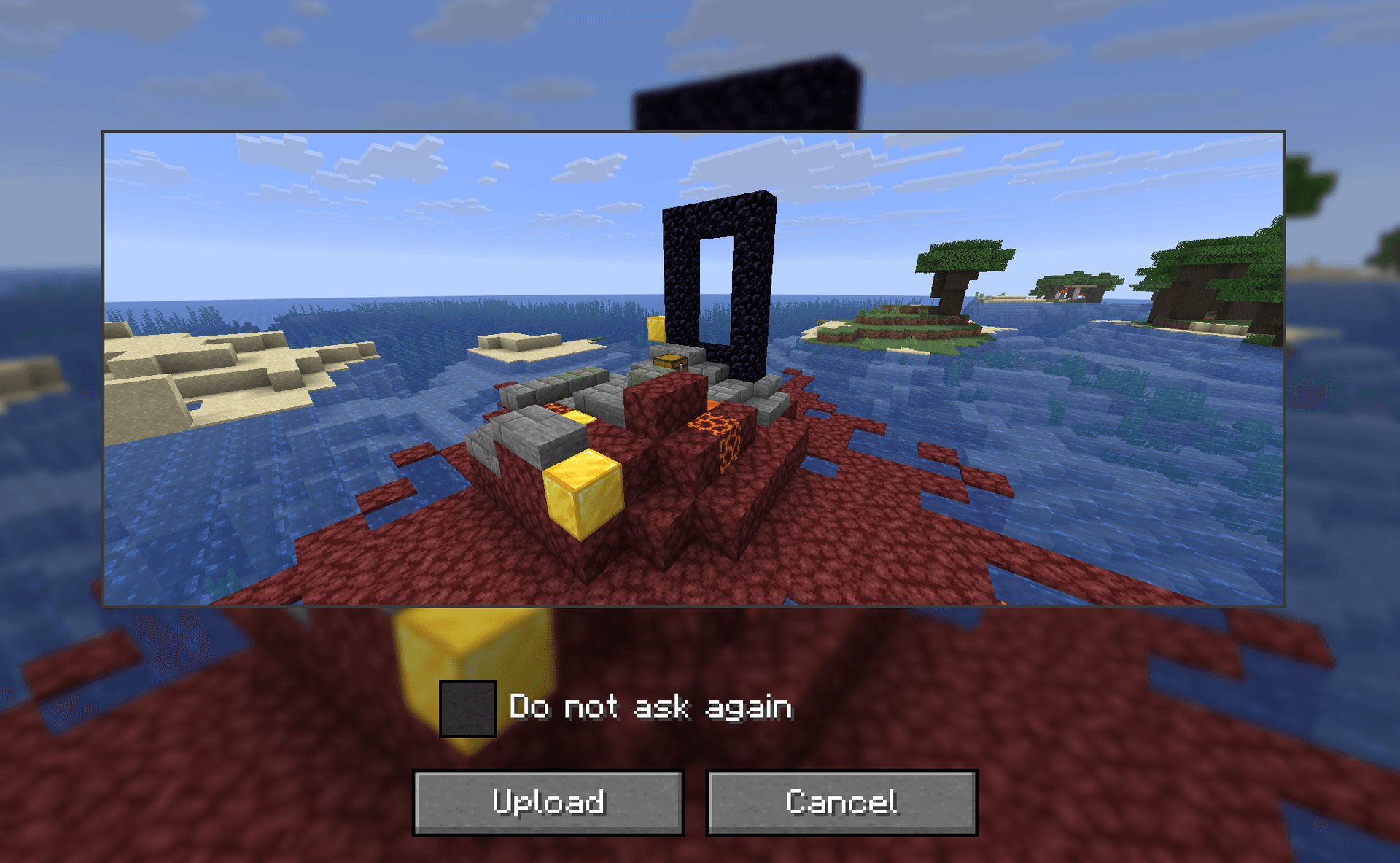 Confirmation screen before upload Every screenshot goes through this screen first. Turn it off when you no longer need it.
Versions
Files
Relations
Project Relations
More like this
Similar Mods
Suggestions use data such as tags, dependencies, dependents, descriptions, titles, and more to rank how much they overlap with this mod.
On ModDex
Community snapshot
By the numbers
Statistics
Want to reach Minecraft players?
We're looking for a server hosting partner to feature here and other parts of the site. Interested? Send us a message!
Get in touchGet it on
Available Platforms
On ModDex
Community snapshot
By the numbers