Community listing page, reviews here may not be monitored by the author.
All About Mobs - Show & Edit Mob Health, Names & Damage


No reviews yet
Show mob health and names, and customize mob health and damage in Minecraft.
Community voices
Reviews
No reviews yet. Be the first to review this project!
Get it on
Available Platforms
Compatibility
Supported Environments
Works on the client or the server alone, but does more when on both.
About
Project Details
For authors
Embed Badge
If you're the author of this project, you can embed a live badge anywhere that supports HTML or Markdown. It updates automatically whenever ratings change.
Use HTML for any page that supports it, or Markdown for README files and Markdown-based descriptions.
Identifiers
Platform IDs
Resources
External Links
About
Description


Versions:
 M1- [MOBNAME] [Command-Base] (nick) -Works on Client & Server

 File Name: Download files named "M1"
 If you are a server owner, just upload it to the server; no need to install it on the client.
/hidemobopen "enemy" /hidemobopen "friend" Enables enemy or friendly mob name visibility.
/hidemobclose "enemy" /hidemobclose "friend" Disables enemy or friendly mob name visibility.
/hideemobedistance "enemy" or "friend" Visibility distance in blocks: 5-10-15-20-25-30-35-40-45-50

M1.5- [MOBNAME][Keyboard Shortcut-Based] (nick) -Just install it on the client works everywhere.
File Name: Download files named "M1.5"
If you are a server owner, just upload it to the server; no need to install it on the client.
Press "insert" key to show enemy mob names Press "insert" key again to hide them
Press "PgUp" to increase the enemy mob name visibility distance.
Press "delete" key to show friend mob names Press "delete" key again to hide them
Press "PgDn" to increase the friendly mob name visibility distance.
M2- [MOB HEALTH][Keyboard Shortcut-Based] -Just install it on the client — works everywhere.
File Name: Download files named "M2"
If you are a server owner, just upload it to the server; no need to install it on the client.
Press "F6" key to show mob health Press "F6" key again to hide them
Press "F7" to increase the mob health bar visibility distance.
Visibility distance in blocks: 5-10-15-20-25-30-35-40-45-50
M3- [MOB HEALTH SETTING][Command-Base] -Works on Client & Server
File Name: Download files named "M3"
A mod to adjust mob health via commands.If you are a server owner, just upload it to the server; no need to install it on the client.
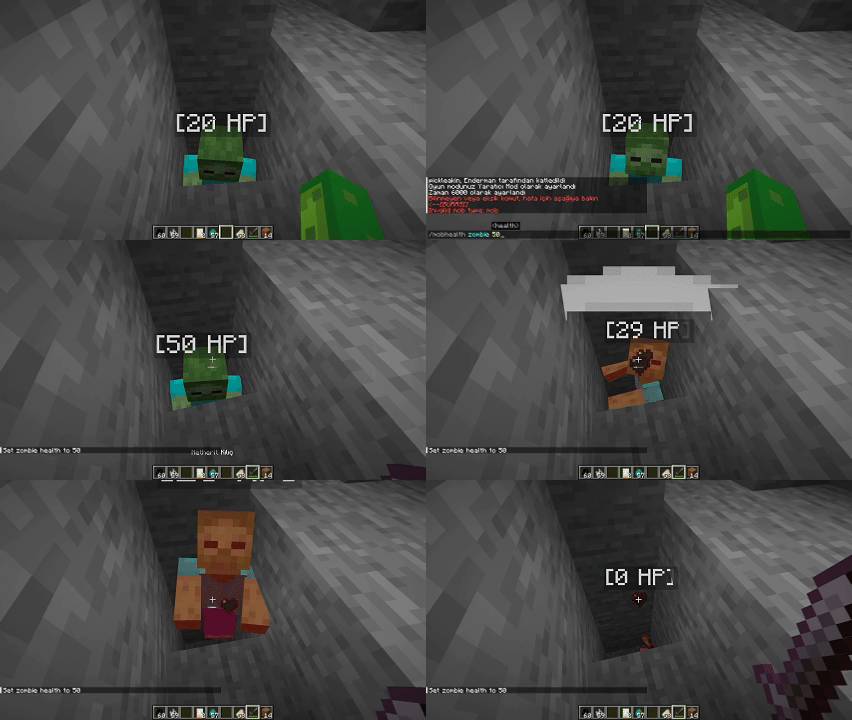
/mobhealth "mob" "health" Example:/mobhealth "zombie" "1"
/mobhealth default "mob" Restores the selected mob to normal health
M4- [MOB DAMAGE Commands][Command-Base] -Works on Client & Server
File Name: Download files named "M4"
If you are a server owner, just upload it to the server; no need to install it on the client.
/mobdamage set "mob" "damage" Sets the custom damage value for a mob.
/mobdamage default "mob" Resets the given mob's damage to its default game value.
/mobdamage default all Resets all modified mobs' damage values to their original default settings.

Redistribution and Permission:
To redistribute my mod, you need to come to my Discord address and obtain special permission. Please also credit me in the source code. This is required for versions I have granted permission for. Additionally, it is required that you clearly mention me on the promotional page.
Personal Use Only:
You may remix or edit textures for personal use, but modified versions cannot be distributed without my consent.
No Re-Uploads:
Do not re-upload this pack elsewhere. Link to the official source to maintain integrity and consolidate feedback.
Content Creation Allowed:
Screenshots and video recordings using this pack may be shared, with or without commercial intent. Attribution is not required but appreciated if you choose to give credit.
Server Use:
Server owners (or representatives) may distribute this pack as a server-side resource via the server's resource pack prompt. This excludes hosting it on forums or websites.
Prohibited Uses:
-
You may not include any part of this pack in paid products, such as other resource packs, mods, or commercial projects, without explicit written permission.
-
This pack may not be included in mash-ups, compilations, or third-party downloads without my explicit consent.
Commercial Use:
You may monetize content (e.g., videos, streams) created using this resource pack. However, direct monetization of the pack (e.g., selling it or modified versions) is strictly prohibited.
Intellectual Property Statement:
"This resource pack and all its contents are the intellectual property of [pickleakin]. Unauthorized distribution or use violates copyright law."
Disclaimer of Liability:
This resource pack is provided "as is" without warranty of any kind. I am not responsible for any damage, loss, or issues arising from the use of this pack.
Revocation of Rights:
Failure to comply with these terms may result in the revocation of your right to use or distribute this resource pack.
Updates:
These terms apply to this and all future versions of the resource pack, unless otherwise specified.
License Modification:
"The permissions granted by me and this license are subject to future modifications. I reserve the right to change the terms of the license, add new conditions, and remove existing ones. Any changes made will be published in the official source and will be effective once updated."
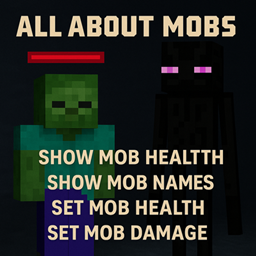
All About Mobs is a lightweight Minecraft mod that gives you more control and information about mobs.
Features:
-
Show mob health
-
Show mob names
-
Set mob health
-
Set mob damage
-
Customize mob information
-
Useful for gameplay, testing and servers
Search terms:
Minecraft mob health, show mob health, mob health display, mob health bar, show mob names, mob name display, set mob health, change mob health, set mob damage, change mob damage, mob utility mod.
M1- [MOBNAME] [Command-Base] (nick) -Works on Client & Server File Name: Download files named "M1"
Spoiler
-
Printable for DownloadIf you are a server owner, just upload it to the server; no need to install it on the client.
-
- Printable for Download/hidemobopen "enemy" /hidemobopen "friend" Enables enemy or friendly mob name visibility.
-
Printable for Download/hidemobclose "enemy" /hidemobclose "friend" Disables enemy or friendly mob name visibility.
-
Printable for Download/hideemobedistance "enemy" or "friend" Visibility distance in blocks: 5-10-15-20-25-30-35-40-45-50
Spoiler
-
Printable for DownloadIf you are a server owner, just upload it to the server; no need to install it on the client.
-
Printable for DownloadPress "insert" key to show enemy mob names Press "insert" key again to hide them
-
Printable for DownloadPress "PgUp" to increase the enemy mob name visibility distance.
-
Printable for DownloadPress "delete" key to show friend mob names Press "delete" key again to hide them
-
Printable for DownloadPress "PgDn" to increase the friendly mob name visibility distance.
M2- [MOB HEALTH][Keyboard Shortcut-Based] -Just install it on the client — works everywhere. File Name: Download files named "M2"
Spoiler
- If you are a server owner, just upload it to the server; no need to install it on the client.
- Press "F6" key to show mob health Press "F6" key again to hide them
- Press "F7" to increase the mob health bar visibility distance.
- Visibility distance in blocks: 5-10-15-20-25-30-35-40-45-50
Spoiler
A mod to adjust mob health via commands.If you are a server owner, just upload it to the server; no need to install it on the client.
- /mobhealth "mob" "health" Example:/mobhealth "zombie" "1"
- /mobhealth default "mob" Restores the selected mob to normal health
M4- [MOB DAMAGE Commands][Command-Base] -Works on Client & Server File Name: Download files named "M4"
Spoiler
- If you are a server owner, just upload it to the server; no need to install it on the client.
- /mobdamage set "mob" "damage" Sets the custom damage value for a mob.
- /mobdamage default "mob" Resets the given mob's damage to its default game value.
- /mobdamage default all Resets all modified mobs' damage values to their original default settings.
Personal Use Only: You may remix or edit textures for personal use, but modified versions cannot be distributed without my consent.
No Re-Uploads: Do not re-upload this pack elsewhere. Link to the official source to maintain integrity and consolidate feedback.
Content Creation Allowed: Screenshots and video recordings using this pack may be shared, with or without commercial intent. Attribution is not required but appreciated if you choose to give credit.
Server Use: Server owners (or representatives) may distribute this pack as a server-side resource via the server's resource pack prompt. This excludes hosting it on forums or websites.
Prohibited Uses:
You may not include any part of this pack in paid products, such as other resource packs, mods, or commercial projects, without explicit written permission.
This pack may not be included in mash-ups, compilations, or third-party downloads without my explicit consent.
Commercial Use: You may monetize content (e.g., videos, streams) created using this resource pack. However, direct monetization of the pack (e.g., selling it or modified versions) is strictly prohibited.
Intellectual Property Statement: "This resource pack and all its contents are the intellectual property of [pickleakin]. Unauthorized distribution or use violates copyright law."
Disclaimer of Liability: This resource pack is provided "as is" without warranty of any kind. I am not responsible for any damage, loss, or issues arising from the use of this pack.
Revocation of Rights: Failure to comply with these terms may result in the revocation of your right to use or distribute this resource pack.
Updates: These terms apply to this and all future versions of the resource pack, unless otherwise specified.
License Modification: "The permissions granted by me and this license are subject to future modifications. I reserve the right to change the terms of the license, add new conditions, and remove existing ones. Any changes made will be published in the official source and will be effective once updated."
Screenshots
Gallery
-
 MOBCANAYARLMAYENÄ°.gif MOBCANAYARLMAYENÄ°.gif
-
![M1- [MOBNAME] M1.5- [MOBNAME]](https://cdn.modrinth.com/data/5CnN4uxi/images/175b69935c305aebc96ccfff108354fccd46e7b9.gif) M1- [MOBNAME] M1.5- [MOBNAME] M1- [MOBNAME] M1.5- [MOBNAME]
M1- [MOBNAME] M1.5- [MOBNAME] M1- [MOBNAME] M1.5- [MOBNAME] -
![M3- [MOB HEALTH SETTING]](https://cdn.modrinth.com/data/5CnN4uxi/images/7422976b583ad06e2a3c84aacafe4a61492022ff.gif) M3- [MOB HEALTH SETTING] M3- [MOB HEALTH SETTING]
M3- [MOB HEALTH SETTING] M3- [MOB HEALTH SETTING] -
![M4- [MOB DAMAGE Commands]](https://cdn.modrinth.com/data/5CnN4uxi/images/ec7412e3d33cbb37bf8b8cc7182ef657fba1077c.gif) M4- [MOB DAMAGE Commands] M4- [MOB DAMAGE Commands]
M4- [MOB DAMAGE Commands] M4- [MOB DAMAGE Commands]
Versions
Files
Relations
Project Relations
More like this
Similar Mods
Suggestions use data such as tags, dependencies, dependents, descriptions, titles, and more to rank how much they overlap with this mod.
On ModDex
Community snapshot
By the numbers
Statistics
Want to reach Minecraft players?
We're looking for a server hosting partner to feature here and other parts of the site. Interested? Send us a message!
Get in touchGet it on
Available Platforms
On ModDex
Community snapshot
By the numbers
Statistics
Resources