
Community listing page, reviews may not be monitored by the author.
AmbiClick


No reviews yet
Swaps left and right click for swords and maces. Perfect for players who want to attack and build using the same mouse button. All other items work normal

Community voices
Reviews
No reviews yet. Be the first to review this project!
Get it on
Available Platforms
Compatibility
Supported Environments
Runs entirely on the client. Works on vanilla servers.
About
Project Details
For authors
Embed Badge
If you're the author of this project, you can embed a live badge anywhere that supports HTML or Markdown. It updates automatically whenever ratings change.
Use HTML for any page that supports it, or Markdown for README files and Markdown-based descriptions.
Identifiers
Platform IDs
Resources
External Links
About
Description
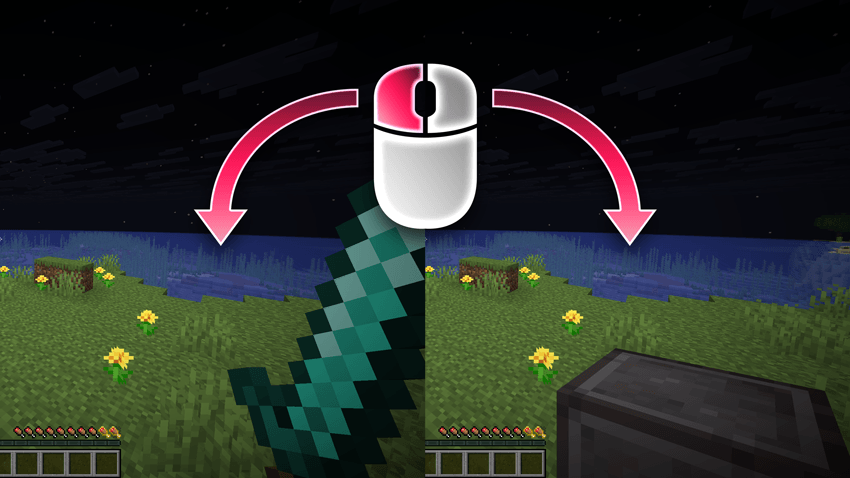
AmbiClick allows swords and maces to work with inverted mouse buttons.
If you have Attack on right-click and Use on left-click set in your controls, this mod lets you attack with left-click while holding a sword or mace.
This means: You can essentially use the same key (left-click) to both attack (with a sword/mace) and build or use items/blocks!
All other items work normally (left-click attack/mine, right-click use/place). Interacting with chests, villagers, or workbenches always uses your original control scheme.

AmbiClick is a client-side utility mod that lets you play Minecraft with inverted mouse controls for specific items, making it perfect for left-handed players or anyone who prefers custom keybinds.
Features
If you have Attack on right-click and Use on left-click set in your controls, AmbiClick lets you:
- ⚔️ Attack with left-click while holding swords, axes, or maces
- ⛏️ Mine with left-click while holding tools (pickaxes, shovels, hoes)
- 🧱 Build with left-click while holding blocks
- 🍖 Use consumables with left-click (food, potions, bows, buckets, etc.)
This means you can essentially use the same key (left-click) for combat, mining, building, AND using items!
Smart Interaction Override
The mod automatically disables click inversion when you're looking at:
- 📦 Containers (chests, barrels, shulker boxes, hoppers, etc.)
- 🛠️ Workstations (crafting tables, furnaces, anvils, enchanting tables, etc.)
- 🚪 Interactive blocks (doors, buttons, levers, etc.)
- 👤 Entities (villagers, minecarts, boats, horses, item frames, etc.)
This ensures you can always interact with these objects using your original controls!
Fully Configurable
Configure everything through Mod Menu:
- Toggle inversion individually for swords, tools, blocks, and usables
- Enable/disable the interaction override
- Changes take effect immediately without restart
- Available in English and German
Perfect For
- Left-handed players who want consistent left-click actions
- Players with custom control schemes
- Anyone who wants a more intuitive control experience
All items not configured to be inverted work normally with your original keybinds.
Screenshots
Gallery
Versions
Files
Relations
Project Relations
More like this
Similar Mods
Suggestions use data such as tags, dependencies, dependents, descriptions, titles, and more to rank how much they overlap with this mod.
On ModDex
Community snapshot
By the numbers
Statistics

Get it on
Available Platforms
On ModDex
Community snapshot
By the numbers
Statistics
Resources