
Community listing page, reviews may not be monitored by the author.
Another Random Spawn

No reviews yet
Configurable random spawn for servers with GUI for players

Community voices
Reviews
No reviews yet. Be the first to review this project!
Get it on
Available Platforms
About
Project Details
For authors
Embed Badge
If you're the author of this project, you can embed a live badge anywhere that supports HTML or Markdown. It updates automatically whenever ratings change.
Use HTML for any page that supports it, or Markdown for README files and Markdown-based descriptions.
Identifiers
Platform IDs
Resources
External Links
About
Description
About
- Minecraft: 1.20.1
- Mod Launcher: Forge
My fork of Just Another Random Spawn by hakujoucho.
A simple mod that allows you to configure random spawns for new players entering a Minecraft server.
The killer feature of this random spawn mod is that, instead of limiting you to the world’s center coordinates, you can configure multiple differently sized areas where players can spawn randomly. Even better, you can let players choose in which area they would like to spawn.
Configuration
After the first server launch, a RandomSpawn.toml file is created in the config folder.
[Config]
    RandomSpawnOnEachLogin = false
    MaxTries = 50
    "biome Blacklist" = ["mod1:biome2", "mod3:biome4"]
    "block Blacklist" = ["minecraft:magma_block", "minecraft:cactus", "minecraft:lava"]
    RandomSpawnArea = false

[[areas]]
    shape = "square"
    name = "default"
    x = 0
    z = 0
    radius = 100
RandomSpawnOnEachLogin– enables random spawn every time a player logs in. Useful for debugging.MaxTries– how many random block positions will be tested before giving up.biome Blacklist– list of biomes to avoid when searching for a spawn point.block Blacklist– list of blocks to avoid when searching for a spawn point.RandomSpawnArea– if true, players cannot choose an area; the server picks randomly (all areas have an equal chance).shape– shape of the spawn area (circleorsquare).name– name of the area, shown in the GUI.xandz– coordinates of the area’s center.radius– radius of the spawn area.
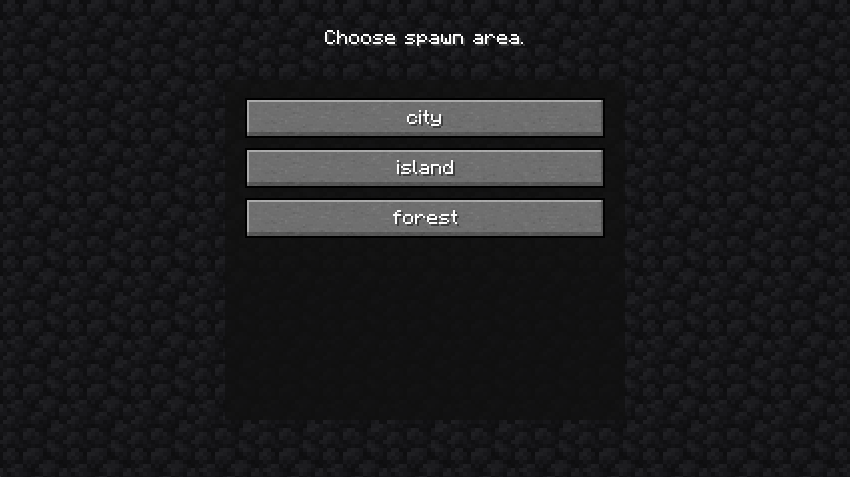
You can define as many areas as you wish. For example:
[Config]
    RandomSpawnOnEachLogin = false
    MaxTries = 50
    "biome Blacklist" = ["mod1:biome2", "mod3:biome4"]
    "block Blacklist" = ["minecraft:magma_block", "minecraft:cactus", "minecraft:lava"]
    RandomSpawnArea = false

[[areas]]
    shape = "square"
    name = "city"
    x = 250
    z = 900
    radius = 250

[[areas]]
    shape = "circle"
    name = "island"
    x = -900
    z = -76
    radius = 1000

[[areas]]
    shape = "circle"
    name = "forest"
    x = 1450
    z = 250
    radius = 670
For the player, it will look like this:
Screenshots
Gallery
Versions
Files
Relations
Project Relations
More like this
Similar Mods
Suggestions use data such as tags, dependencies, dependents, descriptions, titles, and more to rank how much they overlap with this mod.
On ModDex
Community snapshot
By the numbers
Statistics
 (opens in a new tab)
Get it on
Available Platforms
On ModDex
Community snapshot
By the numbers
Statistics
Resources