Community listing page, reviews may not be monitored by the author.
Apocalypse Structures: Radio Towers and Airdrops

No reviews yet
adds radio towers and airdrops

Community voices
Reviews
No reviews yet. Be the first to review this project!
Get it on
Available Platforms
About
Project Details
For authors
Embed Badge
If you're the author of this project, you can embed a live badge anywhere that supports HTML or Markdown. It updates automatically whenever ratings change.
Use HTML for any page that supports it, or Markdown for README files and Markdown-based descriptions.
Identifiers
Platform IDs
Resources
External Links
About
Description
Apocalypse Structures: Radio Towers and Airdrops
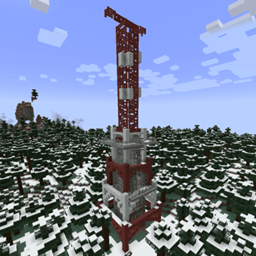
Adds three climbable radio tower structures and an airdrop system to your world. Climb Metal Bars to the top, use the Radio Panel, and call in supply drops—or coordinate with Dead Air for full broadcast and radio-tuning gameplay when that mod is installed.
Tower types:
- Standard — basic tower; panel works immediately.
- Fenced — includes loot; panel may need activation (saved per world).
- Overrun — includes loot and pillagers; same activation rules as fenced towers.
Blocks (uncraftable, found in structures):
- Metal Bars — climbable; used on tower exteriors.
- Radio Panel — right-click to open panel UI: nearest airdrop coordinates, standard airdrop lever, and (with optional mods) station assignment and catalog ordering.
- Airdrop Container / crate — delivered loot from plane flyover.
- Trash block — soft landing (cancels fall damage); sticky underfoot but you can still jump out.
How it works:
Structures generate in the world (configurable via structure sets / pack datapacks).
Radio Panel behaviour depends on what else is installed:
- RadioTowers only — panel UI for coordinates and a standard airdrop (loot table, cooldown).
- + Dead Air (optional) — panel also assigns broadcast stations (Turn off, default cycle, Dynamic, Internet). Tune and listen on a radio through Dead Air’s GUI.
- + Extra Special LIB (required on the ESS stack) — Call Airdrop catalog with a point budget, search, difficulty, optional multiplayer lobby (needs ESN), and defense waves before the plane delivers your order.
Airdrop cooldown: 3 minutes for standard panel calls; longer after wave-delivered catalog runs (both configurable).
How to change configs:
After the first launch, edit `config/radiotowers-common.toml` in your instance (or server) folder. Save, then restart the game or server.
Longer defense waves
Default round length is 3 minutes. Example — 5 minutes per wave:
[waves]
waveDurationMinutes = 5
Also useful nearby: `maxWaves`, `baseZombiesPerWave`, `zombiesPerTierStep`. Set `useZombieWavesForAirdrop = false` if you want the plane immediately with no defense rounds.
Call Airdrop shop (add / remove / reprice)
[airdrop]
includeTaczGuns = true
includeTaczAmmo = true
blacklistItems = ["tacz:gun/m1911", "tacz:ammo/9mm", "minecraft:nether_star"]
# globs work: "tacz:gun/*"
customCatalogEntries = ["minecraft:diamond=20", "tacz:gun/ak47=80"]
- blacklistItems — hide items from the catalog (TaCZ ids and globs supported).
- customCatalogEntries — set point costs (`item=points`); matching auto-detected TaCZ rows get repriced.
- includeTaczGuns / includeTaczAmmo — turn whole TaCZ categories on or off.
Optional sidecars under `config/radiotowers/` if you prefer files over a long toml list:
- `blacklist.txt` — one item id (or glob) per line
- `custom_catalog.txt` — one `item=points` per line
What is *not* in this toml
Tower rarity / spacing is controlled by structure sets / datapacks, not `radiotowers-common.toml`.
You do not need to edit the mod jar or create a “new version” in an IDE to change wave length or shop prices.
How to use it:
- Find a radio tower in the world (or spawn one if your pack adds commands/datapacks).
- Climb Metal Bars to the Radio Panel at the top.
- Right-click the panel — coordinates to the nearest airdrop site, lever/buttons for drops and (if installed) station and catalog options.
- With Dead Air + a radio, turn the radio on and open Dead Air’s tuning screen to hear assigned stations.
Dependencies:
- Required: ExtraSpecialCore (ESC) — shared panel and airdrop GUIs.
- Required: ExtraSpecialLIB (ESL) — lobby/session and wave runtime APIs (ESC already depends on ESL).
- Required: ExtraSpecialNetwork (ESN) — multiplayer lobby packet fabric. Packs must include ESN with Radio Towers.
- Optional: Dead Air — tower broadcasts, station assignment on panels, radio integration. Radio Towers does not require Dead Air to load; structures and basic airdrops work without it.
https://www.curseforge.com/minecraft/mc-mods/dead-air
- Optional: Timeless and Classics Zero (TaCZ) — guns/ammo appear in the Call Airdrop catalog when installed (togglable in config).
Radio Towers is the structure and airdrop foundation. Dead Air adds the radio network on top; neither replaces the other.
Permissions & credits:
You can use this in your modpacks and you can edit this mod as you wish! Just, don't claim it as your own mod :(
Suggestions are greatly appreciated :D
Author: that1lilguy
Update / maintenance: Extra_Special_K (Extra Special Studio)
Discord: https://discord.gg/fkbVsYQXYu
Screenshots
Gallery
-
 2025-02-03_21.25.04.png 2025-02-03_21.25.04.png
-
 2025-02-03_21.24.51.png 2025-02-03_21.24.51.png
-
 2025-02-03_21.25.04.png 2025-02-03_21.25.04.png
-
 2025-02-03_21.25.19.png 2025-02-03_21.25.19.png
-
 2025-02-03_21.25.26.png 2025-02-03_21.25.26.png
-
 2025-02-03_21.27.02.png 2025-02-03_21.27.02.png
-
 2025-02-03_21.29.54.png 2025-02-03_21.29.54.png
-
 2025-05-26_16.36.26.png 2025-05-26_16.36.26.png
-
 2025-05-26_16.36.44.png 2025-05-26_16.36.44.png
-
 2025-05-26_16.37.33.png 2025-05-26_16.37.33.png
-
 2025-05-26_16.38.31.png 2025-05-26_16.38.31.png
-
 2025-05-26_16.38.40.png 2025-05-26_16.38.40.png
Versions
Files
Relations
Project Relations
More like this
Similar Mods
Suggestions use data such as tags, dependencies, dependents, descriptions, titles, and more to rank how much they overlap with this mod.
- Berezka API for Radio Towers and Airdrops
- Dead Air
- Radio Towers and Guns [TaCZ]
- Horror Radio Towers (Radio towers addon
- Radio Towers & Airdrops: NeoForge Port
- Apocalypse Structures
- Apocalypse structures: Abandoned city buildings
- Apocalypse structures decoration Core
- Apocalypse structures decoration Core translation
- Zombie Apocalypse Structures
- Pillager Apocalypse Structures
- New Apocalypse Structures
On ModDex
Community snapshot
By the numbers
Statistics

Get it on
Available Platforms
On ModDex
Community snapshot
By the numbers
Statistics
Resources