
Community listing page, reviews here may not be monitored by the author.
armor insight hud


No reviews yet
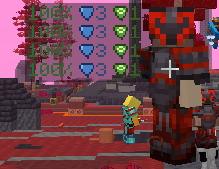
See your target's armor durability and PvP enchantments at a glance — a compact HUD panel that appears above their nametag while you're aiming at them.
Community voices
Reviews
No reviews yet. Be the first to review this project!
Get it on
Available Platforms
Compatibility
Supported Environments
Runs entirely on the client. Works on vanilla servers.
About
Project Details
For authors
Embed Badge
If you're the author of this project, you can embed a live badge anywhere that supports HTML or Markdown. It updates automatically whenever ratings change.
Use HTML for any page that supports it, or Markdown for README files and Markdown-based descriptions.
Identifiers
Platform IDs
Resources
External Links
About
Description
Armor Insight HUD is a lightweight, client-side-only Fabric mod that gives you instant, at-a-glance intel on any player or armored mob you're looking at — no menus, no tooltips, no guessing.
Aim your crosshair at an opponent (or an armored zombie, skeleton, piglin, wither skeleton, drowned, etc.) and a compact panel fades in just above their nametag, showing:
- Durability for each of their four armor pieces (helmet, chestplate, leggings, boots), color-coded green/yellow/red so you can tell at a glance who's about to lose their gear.
- PvP-relevant enchantments — Protection, Fire Protection, Blast Protection, Projectile Protection, Thorns, Feather Falling, plus Mending and Unbreaking — shown as small icons with their level, so you know exactly what you're up against before you commit to a fight.
The panel disappears the instant you lose line of sight or look away, and fades in smoothly (no jarring pop-in) when you switch targets.
Features
- Real raycast, not the vanilla crosshair. Detection range matches your own render distance setting, not the short vanilla interaction range — spot armor from much further away.
- Works on mobs too. Any armored
LivingEntity— not just players — gets a panel. Unarmored mobs are left alone so you're not drowning in HUD clutter. - Distance-aware scaling. The panel shrinks slightly the further away your target is, and collapses into simple color-coded dots at extreme range instead of disappearing entirely.
- Fully repositionable. Don't like where the panel sits? Hold the arrow keys to nudge it up/down/left/right in real time, relative to your camera. Your position is saved automatically and persists between sessions.
- Three quick toggles, all rebindable in Options > Controls > Armor Insight HUD:
- C — turn the whole HUD on/off
- V — switch durability between percentage (
72%) and absolute (276/384) - B — hide durability entirely and show only enchantment icons
- Zero gameplay impact. This is a pure information overlay — everything it shows is already synced to your client for rendering armor models; the mod just visualizes it more usefully.
Controls
| Key | Action |
|---|---|
C |
Toggle the HUD on/off |
V |
Cycle durability format (% ↔ absolute) |
B |
Toggle enchantments-only mode |
↑ ↓ ← → (hold) |
Reposition the panel |
All keys are freely rebindable.
Requirements
- Minecraft 1.21.11
- Fabric Loader 0.19.3+
- Fabric API
- Client-side only — no server-side installation needed, safe for singleplayer and any multiplayer server.
Notes
- This is purely a visual/informational overlay — it does not grant any gameplay advantage beyond making already-available client-side data easier to read.
- No config screen yet; all settings persist automatically via the in-game keybinds.
Armor Insight HUD is a lightweight, client-side-only Fabric mod that gives you instant, at-a-glance intel on any player or armored mob you're looking at — no menus, no tooltips, no guessing.
Aim your crosshair at an opponent (or an armored zombie, skeleton, piglin, wither skeleton, drowned, etc.) and a compact panel fades in just above their nametag, showing:
Durability for each of their four armor pieces (helmet, chestplate, leggings, boots), color-coded green/yellow/red so you can tell at a glance who's about to lose their gear. PvP-relevant enchantments — Protection, Fire Protection, Blast Protection, Projectile Protection, Thorns, Feather Falling, plus Mending and Unbreaking — shown as small icons with their level, so you know exactly what you're up against before you commit to a fight. The panel disappears the instant you lose line of sight or look away, and fades in smoothly (no jarring pop-in) when you switch targets.
Features Real raycast, not the vanilla crosshair. Detection range matches your own render distance setting, not the short vanilla interaction range — spot armor from much further away. Works on mobs too. Any armored LivingEntity — not just players — gets a panel. Unarmored mobs are left alone so you're not drowning in HUD clutter. Distance-aware scaling. The panel shrinks slightly the further away your target is, and collapses into simple color-coded dots at extreme range instead of disappearing entirely. Fully repositionable. Don't like where the panel sits? Hold the arrow keys to nudge it up/down/left/right in real time, relative to your camera. Your position is saved automatically and persists between sessions. Three quick toggles, all rebindable in Options > Controls > Armor Insight HUD: C — turn the whole HUD on/off V — switch durability between percentage (72%) and absolute (276/384) B — hide durability entirely and show only enchantment icons Zero gameplay impact. This is a pure information overlay — everything it shows is already synced to your client for rendering armor models; the mod just visualizes it more usefully. Controls Key Action C Toggle the HUD on/off V Cycle durability format (% ↔ absolute) B Toggle enchantments-only mode ↑ ↓ ← → (hold) Reposition the panel All keys are freely rebindable.
Requirements Minecraft 1.21.11 Fabric Loader 0.19.3+ Fabric API Client-side only — no server-side installation needed, safe for singleplayer and any multiplayer server. Notes This is purely a visual/informational overlay — it does not grant any gameplay advantage beyond making already-available client-side data easier to read. No config screen yet; all settings persist automatically via the in-game keybinds.
Screenshots
Gallery
Versions
Files
Relations
Project Relations
More like this
Similar Mods
Suggestions use data such as tags, dependencies, dependents, descriptions, titles, and more to rank how much they overlap with this mod.
On ModDex
Community snapshot
By the numbers
Statistics
Want to reach Minecraft players?
We're looking for a server hosting partner to feature here and other parts of the site. Interested? Send us a message!
Get in touchGet it on
Available Platforms
On ModDex
Community snapshot
By the numbers
Statistics
Resources