Community listing page, reviews here may not be monitored by the author.
Asset Bridge


No reviews yet
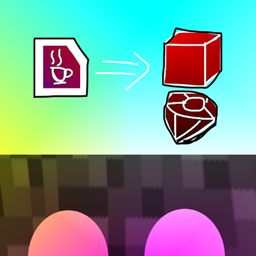
A Minecraft mod that loads assets such as blocks from other mods, allowing them to be used visually without their original functionality.

Community voices
Reviews
No reviews yet. Be the first to review this project!
Get it on
Available Platforms
Compatibility
Supported Environments
Must be installed on both the client and the server.
About
Project Details
For authors
Embed Badge
If you're the author of this project, you can embed a live badge anywhere that supports HTML or Markdown. It updates automatically whenever ratings change.
Use HTML for any page that supports it, or Markdown for README files and Markdown-based descriptions.
Identifiers
Platform IDs
About
Description
A mod that loads assets such as blocks from imported Minecraft mods and makes them available visually without their original functionality. It can be used when you want to add the appearance of blocks or other assets even when the original mod targets a different Minecraft version or platform.
The code of imported mods is never executed; only their assets are used. Therefore, specific features and functionality provided by the original mods will not work.
Usage
Create an assetbridge/ directory inside the game's mods/ directory, then place the JAR or ZIP files of the mods you want to load inside it.
Asset Bridge automatically creates the assetbridge/ directory on the first launch.
mods/
└─ assetbridge/
   ├─ aaa.jar
   ├─ bbb.jar
   └─ ccc.zip
Blocks with matching assets/<namespace>/blockstates/*.json files and items with matching assets/<namespace>/models/item/*.json files are registered using their original namespaces.
They can be obtained from the following Creative Tabs:
Asset Bridge: BlocksAsset Bridge: Items
A mod that loads assets only such as blocks from other mods and makes them available visually without their original functionality.
It can be used when you want to add the appearance of blocks or other assets even when the original mod targets a different game version or platform.
Usage
Create an assetbridge/ directory inside the game's mods/ directory, then place the .jar or .zip files of the mods you want to load inside it.
Asset Bridge automatically creates the assetbridge/ directory on the first launch.
mods/
└─ assetbridge/
   ├─ aaa.jar
   ├─ bbb.jar
   └─ ccc.zip
Register blocks and items from /blockstates/*.json and /models/item/*.json.
Registered items can be accessed from creative tabs for each mod (namespace) or from "Asset Bridge: Blocks" and "Asset Bridge: Items" tabs. (Set either option with feature.split_tab_by_namespace)

Screenshots
Gallery
Versions
Files
Relations
Project Relations
More like this
Similar Mods
Suggestions use data such as tags, dependencies, dependents, descriptions, titles, and more to rank how much they overlap with this mod.
On ModDex
Community snapshot
By the numbers
Statistics
 (opens in a new tab)
Get it on
Available Platforms
On ModDex
Community snapshot
By the numbers