
Community listing page, reviews may not be monitored by the author.
CoordVeil

No reviews yet
Protect coordinates in streams and screenshots with custom, offset, random, or frozen client-side HUD values.

Community voices
Reviews
No reviews yet. Be the first to review this project!
Get it on
Available Platforms
About
Project Details
For authors
Embed Badge
If you're the author of this project, you can embed a live badge anywhere that supports HTML or Markdown. It updates automatically whenever ratings change.
Use HTML for any page that supports it, or Markdown for README files and Markdown-based descriptions.
Identifiers
Platform IDs
Resources
External Links
About
Description
CoordVeil
Share the adventure, not the base.
CoordVeil helps reduce accidental coordinate leaks while recording, streaming, or sharing screenshots. It can display a separate privacy HUD and mask selected coordinate lines without changing the player's real position.
✨ Highlights
- Custom, offset, random, and frozen display modes
- Separate coordinate HUD with anchor, scale, and background controls
- Targeted masking for XYZ, block, and chunk debug lines
- Per-dimension offsets and a clearly visible FAKE state indicator
- Privacy Lock for recording and streaming sessions
- Local configuration only; no network or telemetry service
🎮 Quick start
- Download the file for your exact Minecraft version and loader.
- Install Fabric API as well when using a Fabric build.
- Put the JAR in your profile's
modsfolder. - Start Minecraft and check Controls/settings for the available options.
Press F8 to switch between protected and real display modes. Privacy Lock can prevent an accidental return to real coordinates during a session.
🧩 Compatibility
- Client-side only; a vanilla server does not need to install it.
- Fabric builds require Fabric API. Forge and NeoForge builds use their matching loader.
- Use the file made for your exact Minecraft version and loader.
- Available from Minecraft 1.16.5 through 26.1.2 where that loader exists.
🔒 Privacy and safety
- No telemetry, analytics, ads, account system, or background network service.
- Configuration stays on your device.
- The mod is designed around conservative defaults and clean fallback behavior.
- Always check the rules of the server you play on; some servers restrict client utilities.
🚫 What it does not do
- Does not move the player or send fake coordinates to a server
- Does not modify command output or unrelated debug information
- Privacy features reduce accidental exposure but cannot protect text produced by every other mod
📦 Support
When reporting a problem, include the Minecraft version, loader, mod version, and the relevant client log. Do not upload a random loader/version combination: each published file is built for the exact version shown on its page.
Screenshots
Gallery
-
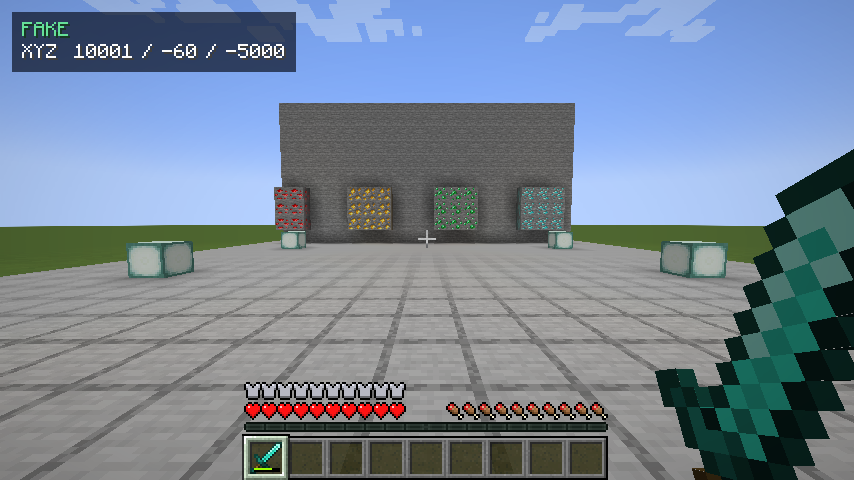 CoordVeil coordinate privacy HUD Isolated in-game view of CoordVeil protecting displayed coordinates with a clean privacy HUD.
-
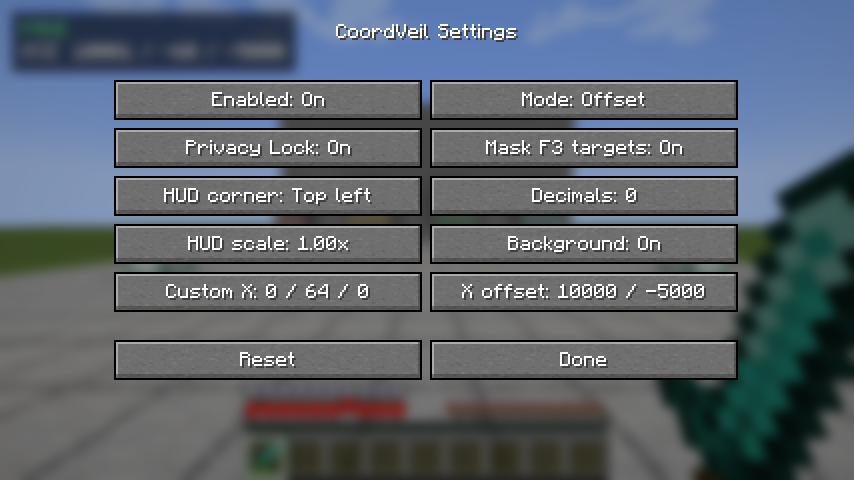 CoordVeil settings CoordVeil settings for coordinate offsets, formatting and HUD placement.
Versions
Files
Relations
Project Relations
More like this
Similar Mods
Suggestions use data such as tags, dependencies, dependents, descriptions, titles, and more to rank how much they overlap with this mod.
On ModDex
Community snapshot
By the numbers
Statistics

Get it on
Available Platforms
On ModDex
Community snapshot
By the numbers
Statistics
Resources