Community listing page, reviews here may not be monitored by the author.
ShulkerLens

No reviews yet
Preview the contents already stored in a shulker ItemStack through a safe, compact 27-slot tooltip.
Community voices
Reviews
No reviews yet. Be the first to review this project!
Get it on
Available Platforms
About
Project Details
For authors
Embed Badge
If you're the author of this project, you can embed a live badge anywhere that supports HTML or Markdown. It updates automatically whenever ratings change.
Use HTML for any page that supports it, or Markdown for README files and Markdown-based descriptions.
Identifiers
Platform IDs
Resources
External Links
About
Description
ShulkerLens
See what is already in the box.
ShulkerLens turns existing shulker item data into a readable tooltip. It supports both legacy NBT and modern data components while keeping nested previews intentionally disabled.
✨ Highlights
- Compact hover preview and detailed 27-slot grid
- Item icons, stack counts, shulker color, and custom name
- Screen-edge and GUI-scale clamping
- Legacy NBT and modern data-component adapters
- Safe fallback to the vanilla tooltip when data is malformed
- Works in inventory, chest, and ender-chest screens
🎮 Quick start
- Download the file for your exact Minecraft version and loader.
- Install Fabric API as well when using a Fabric build.
- Put the JAR in your profile's
modsfolder. - Start Minecraft and check Controls/settings for the available options.
Hover a shulker for the compact preview and hold Left Shift for the detailed grid. Press V to toggle previews.
🧩 Compatibility
- Client-side only; a vanilla server does not need to install it.
- Fabric builds require Fabric API. Forge and NeoForge builds use their matching loader.
- Use the file made for your exact Minecraft version and loader.
- Available from Minecraft 1.16.5 through 26.1.2 where that loader exists.
🔒 Privacy and safety
- No telemetry, analytics, ads, account system, or background network service.
- Configuration stays on your device.
- The mod is designed around conservative defaults and clean fallback behavior.
- Always check the rules of the server you play on; some servers restrict client utilities.
🚫 What it does not do
- Does not request hidden contents from a server
- Does not open nested shulkers or perform inventory actions
- Does not modify ItemStack data
📦 Support
When reporting a problem, include the Minecraft version, loader, mod version, and the relevant client log. Do not upload a random loader/version combination: each published file is built for the exact version shown on its page.
Screenshots
Gallery
-
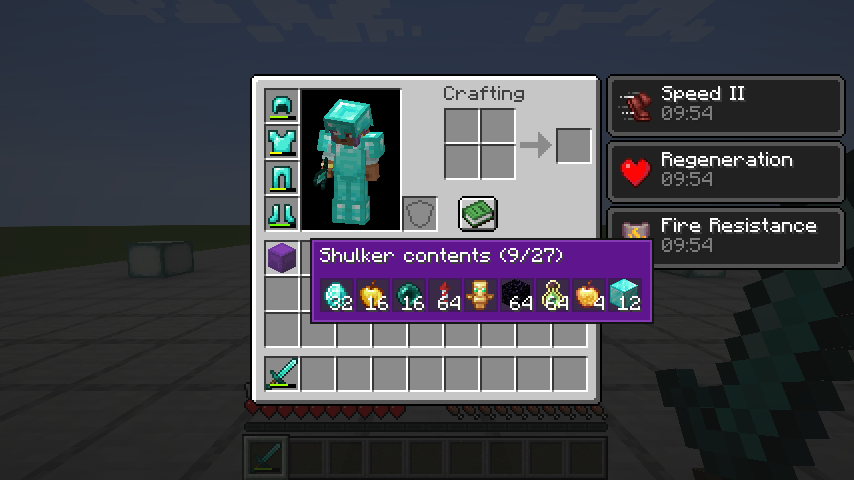 ShulkerLens contents preview Isolated inventory demonstration of ShulkerLens showing shulker contents without unrelated category text.
 -
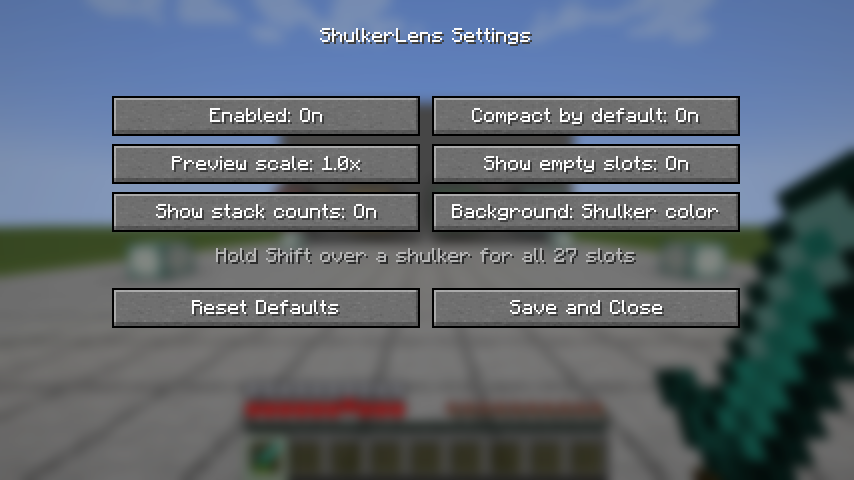 ShulkerLens settings ShulkerLens preview layout, interaction and appearance settings.
Versions
Files
Relations
Project Relations
More like this
Similar Mods
Suggestions use data such as tags, dependencies, dependents, descriptions, titles, and more to rank how much they overlap with this mod.
On ModDex
Community snapshot
By the numbers
Statistics
Want to reach Minecraft players?
We're looking for a server hosting partner to feature here and other parts of the site. Interested? Send us a message!
Get in touchGet it on
Available Platforms
On ModDex
Community snapshot
By the numbers
Statistics
Resources